By: Jeremy Kadlec | Comments (1) | Related: 1 | 2 | 3 | 4 | 5 | > Fragmentation and Index Maintenance
Problem
Database fragmentation is a hindrance to SQL Server performance because with excessive fragmentation more data pages need to be traversed to fulfill a query request. Luckily, fragmentation is a manageable problem that is resolved by re-building the indexes to reduce the fragmentation at the index or table level. Determining the tables that have high levels of fragmentation was a potentially time consuming process in the SQL Server 2000 environment because DBCC SHOWCONTIG had to be issued against the table or index. Then this data needed to be analyzed to determine which indexes required rebuilding based on your personal tolerance for fragmentation. Unfortunately, there was and still remains little agreement on the threshold when indexes should be rebuilt. Some DBAs use a threshold in the 90% range while other DBAs were closer to the 70% range, but it seems that DBAs agree beyond the 70% fragmentation range that the indexes should be rebuilt.
Solution
SQL Server 2000 - DBCC SHOWCONTIG
In SQL Server 2005 DBCC SHOWCONTIG remains a viable short term option to determine the database fragmentation, but will be removed in a future version of SQL Server. Below outlines the DBCC SHOWCONTIG code to determine table level fragmentation for a sample table and database:
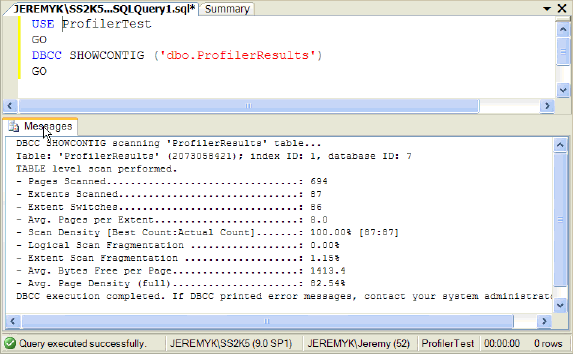
This output indicates that the table is free of fragmentation based on the logical scan fragmentation (0.00%), extent scan fragmentation (0.00%) and scan density statistics (100%). This table should be considered healthy as it pertains to fragmentation because the indexes have been recently rebuilt.
|
DBCC SHOWCONTIG Output Columns | |
| Pages Scanned | The number of 8KB pages scanned to support the storage for the table. |
| Extents Scanned | The number of extents (~8 pages per extent) to support the table. |
| Extent Switches | The number of extents that were traversed. |
| Avg. Pages per Extent | The average number of 8KB pages to support the extents. |
| Scan Density [Best Count:Actual Count] | The percentage of compactness for the extents with an ultimate goal of 100 or the closer the better. |
| Logical Scan Fragmentation | The percentage of fragmentation of with an ultimate goal of 0 or the closer the better. |
| Extent Scan Fragmentation | The percentage of extent fragmentation of with an ultimate goal of 0 or the closer the better. |
| Avg. Bytes Free per Page | The average bytes free per page. |
| Avg. Page Density | The average compactness of the B-Tree to support the table with an ultimate goal of 100 or the closer the better. |
SQL Server 2005 - sys.dm_db_index_physical_stats
Dynamic Management Views (DMVs) and Functions (DMF) are a new feature in SQL Server 2005 to help gather statistical information on particular portions of SQL Server from the core database engine to new features such as the CLR or Service Broker. The sys.dm_db_index_physical_stats DMF addresses database fragmentation and can be queried directly for specific index fragmentation. The key column from the query to determine the fragmentation is avg_fragementation_in_percent. This column indicates the percentage of fragmentation for the table or index. To fine tune the output, the query accepts 5 parameters which are database_id, object_id, index_id, partition_number and the mode as well as WHERE clause parameters as an example.
|
sys.dm_db_index_physical_stats Input Parameters | |
| database_id | This is the integer value corresponding to the value from sys.databases.
*** NOTE *** - If this value is NULL then no database filter will be used to restrict the result set. |
| object_id | This is the integer value corresponding to the value from sys.objects.
*** NOTE *** - If this value is NULL then no object filter will be used to restrict the result set. |
| index_id | This is the integer value corresponding to the value from sys.indexes.
*** NOTE *** - If this value is NULL then no index filter will be used to restrict the result set. |
| partition_number | This is the partition number corresponding to the object.
*** NOTE *** - If this value is NULL then no partition filter will be used to restrict the result set. |
| Mode | The mode is the parameter (DEFAULT, NULL, LIMITED, SAMPLED, or DETAILED) to determine the level of detail when scanning the table or index for fragmentation statistics. The three key modes are LIMITED, SAMPLED, or DETAILED which are ordered from lowest to highest scanning to capture the fragmentation statistics. |
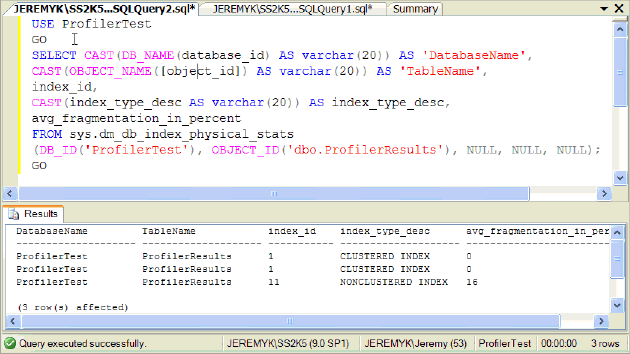
Below outlines a sample query to determine the fragmentation for the dbo.ProfilerResults tables in the ProfilerTest database. The output shows three entries for the table with the overall table being free of corruption, but 1 of the non clustered indexes having 16% fragmentation based on the value from the avg_fragementation_in_percent column. The ideal goal would be to have the avg_fragementation_in_percent value of 0 or reasonably between 0 and 10 percent.
Download the sample code here from the image above.
Next Steps
- Determine the last time database fragmentation was reviewed and indexes were rebuilt to resolve the fragmentation levels.
- If database maintenance is not performed regularly, work with your organization to determine a viable maintenance window to rebuild indexes and perform must have database maintenance.
- Based on your application determine the correct fragmentation threshold for rebuilding indexes.
- With the fragmentation threshold resolved, determine if the fill factor used to build or rebuild the indexes needs to be adjusted.
- Since DBCC SHOWCONTIG will removed in a future SQL Server version begin to migrate code to use sys.dm_db_index_physical_stats.






About the author
 Jeremy Kadlec is a Co-Founder, Editor and Author at MSSQLTips.com with more than 300 contributions. He is also the CTO @ Edgewood Solutions and a six-time SQL Server MVP. Jeremy brings 20+ years of SQL Server DBA and Developer experience to the community after earning a bachelor's degree from SSU and master's from UMBC.
This author pledges the content of this article is based on professional experience and not AI generated.
View all my tips
