By: Carla Abanes | Comments (12) | Related: > Disaster Recovery
Problem
For this tip, I will provide a guide on how to create a console application that will generate create scripts for server level objects for multiple SQL Server instances. This is handy in the event of a disaster and you need to create a clone of the SQL Server that is no longer available. I hope that time will never come, but if it does, it never hurts to be proactive. Being proactive and resourceful are great characteristics of a successful SQL Server DBA.
Solution
From MSDN, SQL Server Management Objects (SMO) is a collection of objects designed for programming all aspects of managing Microsoft SQL Server. It is a good idea to learn a bit of programming when using SMO. It can be used via PowerShell programming or using .NET Framework programming. For this tip, I will be featuring the latter.
The scripts and language used here are all in C# as I'm a previous developer in C#. If you are VB scripting guy, you will need to do a bit of conversion, but the logic is the same.
From your MS Visual Studio, create a new console application in your preferred language. In my case, I mainly use C# so I have the figure below:
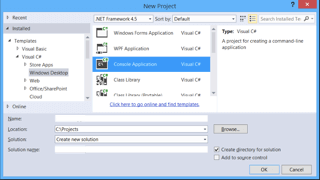
It should open up a new Project Solution and in your main program class you can copy the following code:
namespace SkeletonSetup
{
class Program
{
    private static string serverName = string.Empty;
    static void Main(string[] args)
    {
            //Get Server List
            ArrayList serverList = dl.GetServerList();

            //For each server hostname in the list, generate the object scripts
            foreach (int i in serverList)
            {
                string serverName = i.ToString();
                int result = dl.GenerateObjectScript(serverName);
            }

    }
}
}
To start coding you need to add reference for some SMO dlls. A good reference of how to do this is in this tip. You need to use the following for the SMO namespace:
using Microsoft.SqlServer.Management.Common;
using Microsoft.SqlServer.Management.Smo;
using Microsoft.SqlServer.Management.Smo.Agent;
using Microsoft.SqlServer.Management.Smo.Mail;
using Microsoft.SqlServer.Server;
using System.Data.SqlClient;
In your host SQL Server, create a table that will contain all the server host names you are managing. Insert all your server hostnames into this table. If you are not using the default port 1433 then also include the port you are using in the format HostName, Port (i.e. Server1, 29140 or Server22).
Create Table ServerList
(
    ServerName nvarchar(50)
)
GO
For the class I created below, the code will loop thru the ServerList table and put all the ServerName values in an ArrayList object. So from our main program above, we need to create a new class just below it. We'll call it GetServerList() and it should return an ArrayList object containing our server names:
     public ArrayList GetServerList()
    {
        ArrayList serverList = new ArrayList();

        ServerConnection conn = new ServerConnection();
        conn.LoginSecure = true;
        conn.ServerInstance = hostServer;;
        Server srv = new Server(conn);

        string sqlcmd = "SELECT ServerName FROM dbo.ServerList";
        SqlDataReader reader = srv.ConnectionContext.ExecuteReader(sqlcmd);

        while (reader.Read())
        {
            serverList.Add(reader["ServerName"]);
        }

        reader.Close();
        srv.ConnectionContext.Disconnect();
        return serverList;
    }
Using this ArrayList object, the code will create a connection to the SQL Server, script out the server objects via the ScriptingOptions object and create a .sql file per object. You need to prepare the output folder for your script to store the *.sql files that will be created. For this we need to create a new class, you can go ahead and create this after the GetServerList() class and call it GenerateObjectScript() class.
If you look through the code below, you can see the different items that will be generated. Each section generates different *.sql files, so this will give you an idea of the objects that will get scripted.
   public void GenerateObjectScript(string serverName)
    {
        //Generate the scripting for the server
        ServerConnection conn = new ServerConnection();
        conn.LoginSecure = true;
        conn.ServerInstance = serverName;
        Server srv = new Server(conn);

        //Scripting options
        ScriptingOptions scriptingOptions = new ScriptingOptions();
        scriptingOptions.IncludeIfNotExists = true;
        //Script out for version SQL 2012
        scriptingOptions.TargetServerVersion = SqlServerVersion.Version110;
        scriptingOptions.AppendToFile = false;
        //Assign an output folder path;
        string scriptPath = @"\\DBA\Scripts\ServerSkeleton\" + serverName + @"\";

        GenerateConfigurationScript(srv, scriptPath);

        if (srv.Information.Version.Major == 11 && srv.IsHadrEnabled)
        {
            foreach (AvailabilityGroup ag in srv.AvailabilityGroups)
            {
                foreach (AvailabilityGroupListener agl in ag.AvailabilityGroupListeners)
                {
                    scriptingOptions.FileName = scriptPath + "CreateAGListenerScript.sql";
                    agl.Script(scriptingOptions);
                    scriptingOptions.AppendToFile = true;
                }

                scriptingOptions.AppendToFile = false;
                foreach (AvailabilityDatabase adb in ag.AvailabilityDatabases)
                {
                    scriptingOptions.FileName = scriptPath + "CreateAGDatabaseScript.sql";
                    adb.Script(scriptingOptions);
                    scriptingOptions.AppendToFile = true;
                }

                scriptingOptions.AppendToFile = false;
                foreach (AvailabilityReplica agr in ag.AvailabilityReplicas)
                {
                    scriptingOptions.FileName = scriptPath + "CreateAGReplicaScript.sql";
                    agr.Script(scriptingOptions);
                    scriptingOptions.AppendToFile = true;
                }

                scriptingOptions.AppendToFile = false;
                scriptingOptions.FileName = scriptPath + "CreateAGScript.sql";
                ag.Script(scriptingOptions);
            }
        }

        if (srv.IsClustered)
        {
            scriptingOptions.FileName = scriptPath + "ClusterInformation.sql";
            srv.Script();
        }

        //database
        scriptingOptions.AppendToFile = false;
        foreach (Database db in srv.Databases)
        {
            scriptingOptions.FileName = scriptPath + "CreateDatabaseScript.sql";
            db.Script(scriptingOptions);
            scriptingOptions.AppendToFile = true;
        }

        //backupdevices
        scriptingOptions.AppendToFile = false;
        foreach (BackupDevice bd in srv.BackupDevices)
        {
            scriptingOptions.FileName = scriptPath + "CreateBackupDeviceScript.sql";
            bd.Script(scriptingOptions);
            scriptingOptions.AppendToFile = true;
        }

        //triggers
        scriptingOptions.AppendToFile = false;
        foreach (Trigger trigger in srv.Triggers)
        {
            scriptingOptions.FileName = scriptPath + "CreateTriggerScript.sql";
            trigger.Script(scriptingOptions);
            scriptingOptions.AppendToFile = true;
        }


        //endpoints
        if (srv.Endpoints.Count > 1)
        {
            scriptingOptions.AppendToFile = false;
            foreach (Endpoint endpoint in srv.Endpoints)
            {
                if (!endpoint.IsSystemObject)
                {
                    scriptingOptions.FileName = scriptPath + "CreateEndpointScript.sql";
                    endpoint.Script(scriptingOptions);
                    scriptingOptions.AppendToFile = true;
                }
            }
        }

        //jobscripts
        scriptingOptions.AppendToFile = false;
        foreach (Job job in srv.JobServer.Jobs)
        {
            scriptingOptions.FileName = scriptPath + "CreateAgentJobsScript.sql";
            job.Script(scriptingOptions);
            scriptingOptions.AppendToFile = true;
        }

        //linkserverscripts
        scriptingOptions.AppendToFile = false;
        foreach (LinkedServer linkedServer in srv.LinkedServers)
        {
            scriptingOptions.FileName = scriptPath + "CreateLinkedServerScript.sql";
            linkedServer.Script(scriptingOptions);
            scriptingOptions.AppendToFile = true;
        }

        //userlogins
        scriptingOptions.AppendToFile = false;
        foreach (Login login in srv.Logins)
        {
            scriptingOptions.FileName = scriptPath + "CreateLoginsScript.sql";
            login.Script(scriptingOptions);
            scriptingOptions.AppendToFile = true;
        }

        //server audit
        scriptingOptions.AppendToFile = false;
        foreach(Audit audit in srv.Audits)
        {
            scriptingOptions.FileName = scriptPath + "CreateServerAuditScript.sql";
            audit.Script(scriptingOptions);
            scriptingOptions.AppendToFile = true;
        }

        //server audit specifications
        scriptingOptions.AppendToFile = false;
        foreach (ServerAuditSpecification sas in srv.ServerAuditSpecifications)
        {
            scriptingOptions.FileName = scriptPath + "CreateServerAuditSpecificationsScript.sql";
            sas.Script(scriptingOptions);
            scriptingOptions.AppendToFile = true;
        }

        //alerts
        scriptingOptions.AppendToFile = false;
        foreach (Alert alert in srv.JobServer.Alerts)
        {
            scriptingOptions.FileName = scriptPath + "CreateAlertsScript.sql";
            alert.Script(scriptingOptions);
            scriptingOptions.AppendToFile = true;
        }

        //operators
        scriptingOptions.AppendToFile = false;
        foreach (Operator operators in srv.JobServer.Operators)
        {
            scriptingOptions.FileName = scriptPath + "CreateOperatorsScript.sql";
            operators.Script(scriptingOptions);
            scriptingOptions.AppendToFile = true;
        }

        //mailprofiles
        scriptingOptions.AppendToFile = false;
        foreach (MailProfile mailProfile in srv.Mail.Profiles)
        {
            scriptingOptions.FileName = scriptPath + "CreateMailProfileScript.sql";
            mailProfile.Script(scriptingOptions);
            scriptingOptions.AppendToFile = true;
        }

        //mailaccounts
        scriptingOptions.AppendToFile = false;
        foreach (MailAccount mailAccount in srv.Mail.Accounts)
        {
            scriptingOptions.FileName = scriptPath + "CreateMailAccountScript.sql";
            mailAccount.Script(scriptingOptions);
            scriptingOptions.AppendToFile = true;
        }

        //proxy settings
        scriptingOptions.AppendToFile = false;
        foreach (ProxyAccount proxyAccount in srv.JobServer.ProxyAccounts)
        {
            scriptingOptions.FileName = scriptPath + "CreateProxyAccountsScript.sql";
            proxyAccount.Script(scriptingOptions);
            scriptingOptions.AppendToFile = true;
        }
}
To also create a script of your sp_configure settings, you can compile them into one executable script. For this we create another class GenerateConfigurationScript() and we pass the Server object and string scriptPath from our GenerateObjectScrip() class earlier:
public void GenerateConfigurationScript(Server srv, string scriptPath)
    {
        string fileName = scriptPath + "CreateConfigurationScript.sql";

        //write the configuration settings
        TextWriter textWriter = new StreamWriter(fileName);
        textWriter.WriteLine("EXEC sp_configure '" + srv.Configuration.AdHocDistributedQueriesEnabled.DisplayName + "', " + srv.Configuration.AdHocDistributedQueriesEnabled.ConfigValue.ToString());
        textWriter.WriteLine("EXEC sp_configure '" + srv.Configuration.Affinity64IOMask.DisplayName + "', " + srv.Configuration.Affinity64IOMask.ConfigValue.ToString());
        textWriter.WriteLine("EXEC sp_configure '" + srv.Configuration.Affinity64Mask.DisplayName + "', " + srv.Configuration.Affinity64Mask.ConfigValue.ToString());
        textWriter.WriteLine("EXEC sp_configure '" + srv.Configuration.AffinityIOMask.DisplayName + "', " + srv.Configuration.AffinityIOMask.ConfigValue.ToString());
        textWriter.WriteLine("EXEC sp_configure '" + srv.Configuration.AffinityMask.DisplayName + "', " + srv.Configuration.AffinityMask.ConfigValue.ToString());
        textWriter.WriteLine("EXEC sp_configure '" + srv.Configuration.AgentXPsEnabled.DisplayName + "', " + srv.Configuration.AgentXPsEnabled.ConfigValue.ToString());
        textWriter.WriteLine("EXEC sp_configure '" + srv.Configuration.AllowUpdates.DisplayName + "', " + srv.Configuration.AllowUpdates.ConfigValue.ToString());
        textWriter.WriteLine("EXEC sp_configure '" + srv.Configuration.BlockedProcessThreshold.DisplayName + "', " + srv.Configuration.BlockedProcessThreshold.ConfigValue.ToString());
        textWriter.WriteLine("EXEC sp_configure '" + srv.Configuration.C2AuditMode.DisplayName + "', " + srv.Configuration.C2AuditMode.ConfigValue.ToString());
        textWriter.WriteLine("EXEC sp_configure '" + srv.Configuration.CommonCriteriaComplianceEnabled.DisplayName + "', " + srv.Configuration.CommonCriteriaComplianceEnabled.ConfigValue.ToString());
        textWriter.WriteLine("EXEC sp_configure '" + srv.Configuration.CostThresholdForParallelism.DisplayName + "', " + srv.Configuration.CostThresholdForParallelism.ConfigValue.ToString());
        textWriter.WriteLine("EXEC sp_configure '" + srv.Configuration.CrossDBOwnershipChaining.DisplayName + "', " + srv.Configuration.CrossDBOwnershipChaining.ConfigValue.ToString());
        textWriter.WriteLine("EXEC sp_configure '" + srv.Configuration.CursorThreshold.DisplayName + "', " + srv.Configuration.CursorThreshold.ConfigValue.ToString());
        textWriter.WriteLine("EXEC sp_configure '" + srv.Configuration.DatabaseMailEnabled.DisplayName + "', " + srv.Configuration.DatabaseMailEnabled.ConfigValue.ToString());
        textWriter.WriteLine("EXEC sp_configure '" + srv.Configuration.DefaultBackupCompression.DisplayName + "', " + srv.Configuration.DefaultBackupCompression.ConfigValue.ToString());
        textWriter.WriteLine("EXEC sp_configure '" + srv.Configuration.DefaultFullTextLanguage.DisplayName + "', " + srv.Configuration.DefaultFullTextLanguage.ConfigValue.ToString());
        textWriter.WriteLine("EXEC sp_configure '" + srv.Configuration.DefaultLanguage.DisplayName + "', " + srv.Configuration.DefaultLanguage.ConfigValue.ToString());
        textWriter.WriteLine("EXEC sp_configure '" + srv.Configuration.DefaultTraceEnabled.DisplayName + "', " + srv.Configuration.DefaultTraceEnabled.ConfigValue.ToString());
        textWriter.WriteLine("EXEC sp_configure '" + srv.Configuration.DisallowResultsFromTriggers.DisplayName + "', " + srv.Configuration.DisallowResultsFromTriggers.ConfigValue.ToString());
        textWriter.WriteLine("EXEC sp_configure '" + srv.Configuration.IsSqlClrEnabled.DisplayName + "', " + srv.Configuration.IsSqlClrEnabled.ConfigValue.ToString());
        textWriter.WriteLine("EXEC sp_configure '" + srv.Configuration.MaxDegreeOfParallelism.DisplayName + "', " + srv.Configuration.MaxDegreeOfParallelism.ConfigValue.ToString());
        textWriter.WriteLine("EXEC sp_configure '" + srv.Configuration.MaxServerMemory.DisplayName + "', " + srv.Configuration.MaxServerMemory.ConfigValue.ToString());
        textWriter.WriteLine("EXEC sp_configure '" + srv.Configuration.MaxWorkerThreads.DisplayName + "', " + srv.Configuration.MaxWorkerThreads.ConfigValue.ToString());
        textWriter.WriteLine("EXEC sp_configure '" + srv.Configuration.MinMemoryPerQuery.DisplayName + "', " + srv.Configuration.MinMemoryPerQuery.ConfigValue.ToString());
        textWriter.WriteLine("EXEC sp_configure '" + srv.Configuration.MinServerMemory.DisplayName + "', " + srv.Configuration.MinServerMemory.ConfigValue.ToString());
        textWriter.WriteLine("EXEC sp_configure '" + srv.Configuration.NestedTriggers.DisplayName + "', " + srv.Configuration.NestedTriggers.ConfigValue.ToString());
        textWriter.WriteLine("EXEC sp_configure '" + srv.Configuration.NetworkPacketSize.DisplayName + "', " + srv.Configuration.NetworkPacketSize.ConfigValue.ToString());
        textWriter.WriteLine("EXEC sp_configure '" + srv.Configuration.OleAutomationProceduresEnabled.DisplayName + "', " + srv.Configuration.OleAutomationProceduresEnabled.ConfigValue.ToString());
        textWriter.WriteLine("EXEC sp_configure '" + srv.Configuration.OpenObjects.DisplayName + "', " + srv.Configuration.OpenObjects.ConfigValue.ToString());
        textWriter.WriteLine("EXEC sp_configure '" + srv.Configuration.OptimizeAdhocWorkloads.DisplayName + "', " + srv.Configuration.OptimizeAdhocWorkloads.ConfigValue.ToString());
        textWriter.WriteLine("EXEC sp_configure '" + srv.Configuration.RemoteAccess.DisplayName + "', " + srv.Configuration.RemoteAccess.ConfigValue.ToString());
        textWriter.WriteLine("EXEC sp_configure '" + srv.Configuration.RemoteDacConnectionsEnabled.DisplayName + "', " + srv.Configuration.RemoteDacConnectionsEnabled.ConfigValue.ToString());
        textWriter.WriteLine("EXEC sp_configure '" + srv.Configuration.RemoteLoginTimeout.DisplayName + "', " + srv.Configuration.RemoteLoginTimeout.ConfigValue.ToString());
        textWriter.WriteLine("EXEC sp_configure '" + srv.Configuration.RemoteProcTrans.DisplayName + "', " + srv.Configuration.RemoteProcTrans.ConfigValue.ToString());
        textWriter.WriteLine("EXEC sp_configure '" + srv.Configuration.RemoteQueryTimeout.DisplayName + "', " + srv.Configuration.RemoteQueryTimeout.ConfigValue.ToString());
        textWriter.WriteLine("EXEC sp_configure '" + srv.Configuration.ReplicationMaxTextSize.DisplayName + "', " + srv.Configuration.ReplicationMaxTextSize.ConfigValue.ToString());
        textWriter.WriteLine("EXEC sp_configure '" + srv.Configuration.ReplicationXPsEnabled.DisplayName + "', " + srv.Configuration.ReplicationXPsEnabled.ConfigValue.ToString());
        textWriter.WriteLine("EXEC sp_configure '" + srv.Configuration.ScanForStartupProcedures.DisplayName + "', " + srv.Configuration.ScanForStartupProcedures.ConfigValue.ToString());
        textWriter.WriteLine("EXEC sp_configure '" + srv.Configuration.ServerTriggerRecursionEnabled.DisplayName + "', " + srv.Configuration.ServerTriggerRecursionEnabled.ConfigValue.ToString());
        textWriter.WriteLine("EXEC sp_configure '" + srv.Configuration.SetWorkingSetSize.DisplayName + "', " + srv.Configuration.SetWorkingSetSize.ConfigValue.ToString());
        textWriter.WriteLine("EXEC sp_configure '" + srv.Configuration.ShowAdvancedOptions.DisplayName + "', " + srv.Configuration.ShowAdvancedOptions.ConfigValue.ToString());
        textWriter.WriteLine("EXEC sp_configure '" + srv.Configuration.SmoAndDmoXPsEnabled.DisplayName + "', " + srv.Configuration.SmoAndDmoXPsEnabled.ConfigValue.ToString());
        textWriter.WriteLine("EXEC sp_configure '" + srv.Configuration.TwoDigitYearCutoff.DisplayName + "', " + srv.Configuration.TwoDigitYearCutoff.ConfigValue.ToString());
        textWriter.WriteLine("EXEC sp_configure '" + srv.Configuration.UserConnections.DisplayName + "', " + srv.Configuration.UserConnections.ConfigValue.ToString());
        textWriter.WriteLine("EXEC sp_configure '" + srv.Configuration.UserOptions.DisplayName + "', " + srv.Configuration.UserOptions.ConfigValue.ToString());
        textWriter.WriteLine("EXEC sp_configure '" + srv.Configuration.XPCmdShellEnabled.DisplayName + "', " + srv.Configuration.XPCmdShellEnabled.ConfigValue.ToString());
        textWriter.WriteLine("RECONFIGURE");
        textWriter.Close();
    }
After you have created everything, save the project. Go to Project > Build to build the project file and create an executable file. From the project bin folder, there should now be an executable for your project. Open a cmd window, locate your created executable file and execute. Make sure that the account you are using to run this has access to view server state and definitions in SQL Server, so that scripting of the objects will be successful.
And viola! You now have scripted out your server level objects for all the SQL Servers you manage. You can now add these generated scripts to your armory and feel more prepared and confident in the event of a disaster (knock on wood)!
Next Steps
- You can create a scheduled task and run this monthly or quarterly depending on your deployments and configuration changes.
- Download the .Net solution code.
- For more articles on SQL Server Management Objects, visit this link.
- For more tips on preparedness for disaster recovery and rebuilding your SQL Server, visit this link.






About the author
 Carla Abanes is a certified Microsoft SQL Server Database Administrator with extensive experience in data architecture and supporting mission critical databases in production environments.
This author pledges the content of this article is based on professional experience and not AI generated.
View all my tips
