By: Jeremy Kadlec | Comments | Related: > Security
Problem
Have you had an issue trying to find out how to assign rights for some of the new applications (SQL Server Integration Services, Full Text, OLAP, Express, Reporting Services, etc.) in SQL Server 2005? If so, you are not alone. With SQL Server 2005, some of the new security is assigned via Windows Groups that can be managed directly via Computer Manager. Unfortunately, these are no where to be found or configured in SQL Server 2005 Management Studio (SSMS) in the same light as database engine permissions.
Solution
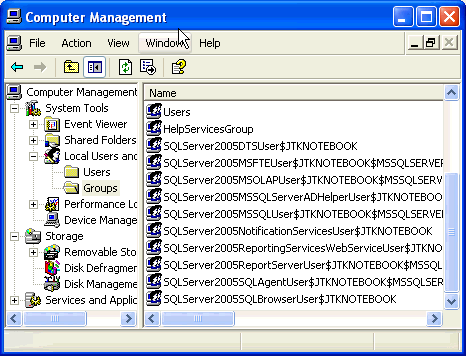
With security migrating away from direct management in SQL Server 2005 Management Studio, create a short cut on your desk to Computer Management in order to manage the new groups. The new groups to support some of the new SQL Server 2005 applications are created as the application is installed on the SQL Server. Below is a screen shot of Computer Management with some of the new Windows groups to support SQL Server 2005:
How can I add or remove windows accounts for these new groups?
To manage the groups, follow these steps:
- Open Computer Management by clicking on Start | Control Panel | Administrative Tools | Computer Management
- Once Computer Management loads, navigate to System Tools | Local Users and Groups | Groups
- Select the group you would like to add or remove a login by double clicking on the group
- Click the 'Add ' button and enter the login on the subsequent screen
- To delete a login or group, click the 'Remove' button and review the subsequent screens
How can I assign SQL Server logins?
The SQL Server 2005 Windows groups use just domain or local accounts, so SQL Server logins are not an option.
Next Steps
- As you begin to deploy these new applications be sure to verify the Windows Group rights for these users and do not feel obligated to assign Windows Administrator rights by default.
- Since assigning rights at the Windows Group level may not be a portion of the typical developer or DBA daily tasks, be sure to coordinate with your Network or System Administrators as needed.
- Stay tuned for additional security options with these SQL Server 2005 applications.






About the author
 Jeremy Kadlec is a Co-Founder, Editor and Author at MSSQLTips.com with more than 300 contributions. He is also the CTO @ Edgewood Solutions and a six-time SQL Server MVP. Jeremy brings 20+ years of SQL Server DBA and Developer experience to the community after earning a bachelor's degree from SSU and master's from UMBC.
This author pledges the content of this article is based on professional experience and not AI generated.
View all my tips
