By: MSSQLTips | Updated: 2023-11-13 | Comments (62) | Related: 1 | 2 | 3 | 4 | 5 | 6 | > Dates
Problem
There are many instances when dates and times don't show up at your doorstep in the format you'd like it to be, nor does the output of a query fit the needs of the people viewing it. One option is to format the data in the application itself. Another option is to use the built-in functions SQL Server provides to format the date string for you.
Solution
SQL Server provides a number of options you can use for formatting a date/time string in SQL queries and stored procedures either from an input file (Excel, CSV, etc.) or a date column (datetime, datetime2, smalldatetime, etc.) from a table. One of the first considerations is the actual date/time value needed if you are in the USA, need a French value or the ISO standard. The most common is the current date/time using getdate(). This provides the current date and time according to the server providing the date and time. If a universal date/time (UTC) is needed, then getutcdate() should be used. To change the format of the date, you convert the requested date to a string and specify the format number corresponding to the format needed.
How to get SQL Date Format in SQL Server
- Use the SELECT statement with CONVERT function and date format option for the date values needed
- To get YYYY-MM-DD use this T-SQL syntax SELECT CONVERT(varchar, getdate(), 23)
- To get MM/DD/YY use this T-SQL syntax SELECT CONVERT(varchar, getdate(), 1)
- Check out the chart to get a list of all format options
The following table is a list of SQL date formats and an example of the output. The date parameter used for all of these examples is "2022-12-30 00:38:54.840".
| DATE ONLY FORMATS | |||
| Format # | Query | Format | Sample |
|---|---|---|---|
| 1 | select convert(varchar, getdate(), 1) | mm/dd/yy | 12/30/22 |
| 2 | select convert(varchar, getdate(), 2) | yy.mm.dd | 22.12.30 |
| 3 | select convert(varchar, getdate(), 3) | dd/mm/yy | 30/12/22 |
| 4 | select convert(varchar, getdate(), 4) | dd.mm.yy | 30.12.22 |
| 5 | select convert(varchar, getdate(), 5) | dd-mm-yy | 30-12-22 |
| 6 | select convert(varchar, getdate(), 6) | dd-Mon-yy | 30 Dec 22 |
| 7 | select convert(varchar, getdate(), 7) | Mon dd, yy | Dec 30, 22 |
| 10 | select convert(varchar, getdate(), 10) | mm-dd-yy | 12-30-22 |
| 11 | select convert(varchar, getdate(), 11) | yy/mm/dd | 22/12/30 |
| 12 | select convert(varchar, getdate(), 12) | yymmdd | 221230 |
| 23 | select convert(varchar, getdate(), 23) | yyyy-mm-dd | 2022-12-30 |
| 31 | select convert(varchar, getdate(), 31) | yyyy-dd-mm | 2022-30-12 |
| 32 | select convert(varchar, getdate(), 32) | mm-dd-yyyy | 12-30-2022 |
| 33 | select convert(varchar, getdate(), 33) | mm-yyyy-dd | 12-2022-30 |
| 34 | select convert(varchar, getdate(), 34) | dd-mm-yyyy | 30-12-2022 |
| 35 | select convert(varchar, getdate(), 35) | dd-yyyy-mm | 30-2022-12 |
| 101 | select convert(varchar, getdate(), 101) | mm/dd/yyyy | 12/30/2022 |
| 102 | select convert(varchar, getdate(), 102) | yyyy.mm.dd | 2022.12.30 |
| 103 | select convert(varchar, getdate(), 103) | dd/mm/yyyy | 30/12/2022 |
| 104 | select convert(varchar, getdate(), 104) | dd.mm.yyyy | 30.12.2022 |
| 105 | select convert(varchar, getdate(), 105) | dd-mm-yyyy | 30-12-2022 |
| 106 | select convert(varchar, getdate(), 106) | dd Mon yyyy | 30 Dec 2022 |
| 107 | select convert(varchar, getdate(), 107) | Mon dd, yyyy | Dec 30, 2022 |
| 110 | select convert(varchar, getdate(), 110) | mm-dd-yyyy | 12-30-2022 |
| 111 | select convert(varchar, getdate(), 111) | yyyy/mm/dd | 2022/12/30 |
| 112 | select convert(varchar, getdate(), 112) | yyyymmdd | 20221230 |
| TIME ONLY FORMATS | |||
| 8 | select convert(varchar, getdate(), 8) | hh:mm:ss | 00:38:54 |
| 14 | select convert(varchar, getdate(), 14) | hh:mm:ss:nnn | 00:38:54:840 |
| 24 | select convert(varchar, getdate(), 24) | hh:mm:ss | 00:38:54 |
| 108 | select convert(varchar, getdate(), 108) | hh:mm:ss | 00:38:54 |
| 114 | select convert(varchar, getdate(), 114) | hh:mm:ss:nnn | 00:38:54:840 |
| DATE & TIME FORMATS | |||
| 0 | select convert(varchar, getdate(), 0) | Mon dd yyyy hh:mm AM/PM | Dec 30 2022 12:38AM |
| 9 | select convert(varchar, getdate(), 9) | Mon dd yyyy hh:mm:ss:nnn AM/PM | Dec 30 2022 12:38:54:840AM |
| 13 | select convert(varchar, getdate(), 13) | dd Mon yyyy hh:mm:ss:nnn AM/PM | 30 Dec 2022 00:38:54:840AM |
| 20 | select convert(varchar, getdate(), 20) | yyyy-mm-dd hh:mm:ss | 2022-12-30 00:38:54 |
| 21 | select convert(varchar, getdate(), 21) | yyyy-mm-dd hh:mm:ss:nnn | 2022-12-30 00:38:54.840 |
| 22 | select convert(varchar, getdate(), 22) | mm/dd/yy hh:mm:ss AM/PM | 12/30/22 12:38:54 AM |
| 25 | select convert(varchar, getdate(), 25) | yyyy-mm-dd hh:mm:ss:nnn | 2022-12-30 00:38:54.840 |
| 26 | select convert(varchar, getdate(), 26) | yyyy-dd-mm hh:mm:ss:nnn | 2022-30-12 00:38:54.840 |
| 27 | select convert(varchar, getdate(), 27) | mm-dd-yyyy hh:mm:ss:nnn | 12-30-2022 00:38:54.840 |
| 28 | select convert(varchar, getdate(), 28) | mm-yyyy-dd hh:mm:ss:nnn | 12-2022-30 00:38:54.840 |
| 29 | select convert(varchar, getdate(), 29) | dd-mm-yyyy hh:mm:ss:nnn | 30-12-2022 00:38:54.840 |
| 30 | select convert(varchar, getdate(), 30) | dd-yyyy-mm hh:mm:ss:nnn | 30-2022-12 00:38:54.840 |
| 100 | select convert(varchar, getdate(), 100) | Mon dd yyyy hh:mm AM/PM | Dec 30 2022 12:38AM |
| 109 | select convert(varchar, getdate(), 109) | Mon dd yyyy hh:mm:ss:nnn AM/PM | Dec 30 2022 12:38:54:840AM |
| 113 | select convert(varchar, getdate(), 113) | dd Mon yyyy hh:mm:ss:nnn | 30 Dec 2022 00:38:54:840 |
| 120 | select convert(varchar, getdate(), 120) | yyyy-mm-dd hh:mm:ss | 2022-12-30 00:38:54 |
| 121 | select convert(varchar, getdate(), 121) | yyyy-mm-dd hh:mm:ss:nnn | 2022-12-30 00:38:54.840 |
| 126 | select convert(varchar, getdate(), 126) | yyyy-mm-dd T hh:mm:ss:nnn | 2022-12-30T00:38:54.840 |
| 127 | select convert(varchar, getdate(), 127) | yyyy-mm-dd T hh:mm:ss:nnn | 2022-12-30T00:38:54.840 |
| ISLAMIC CALENDAR DATES | |||
| 130 | select convert(nvarchar, getdate(), 130) | dd mmm yyyy hh:mi:ss:nnn AM/PM |
 |
| 131 | select convert(nvarchar, getdate(), 131) | dd mmm yyyy hh:mi:ss:nnn AM/PM | 10/12/1444 12:38:54:840AM |
You can also format the date or time without dividing characters, as well as concatenate the date and time string:
| Sample statement | Format | Output |
|---|---|---|
| select replace(convert(varchar, getdate(),101),'/','') | mmddyyyy | 12302022 |
| select replace(convert(varchar, getdate(),101),'/','') + replace(convert(varchar, getdate(),108),':','') | mmddyyyyhhmmss | 12302022004426 |
If you want to get a list of all valid date and time formats, you could use the code below and change the @date to GETDATE() or any other date you want to use. This will output just the valid formats.
DECLARE @counter INT = 0
DECLARE @date DATETIME = '2006-12-30 00:38:54.840'

CREATE TABLE #dateFormats (dateFormatOption int, dateOutput nvarchar(40))

WHILE (@counter <= 150 )
BEGIN
   BEGIN TRY
      INSERT INTO #dateFormats
      SELECT CONVERT(nvarchar, @counter), CONVERT(nvarchar,@date, @counter)
      SET @counter = @counter + 1
   END TRY
   BEGIN CATCH;
      SET @counter = @counter + 1
      IF @counter >= 150
      BEGIN
         BREAK
      END
   END CATCH
END

SELECT * FROM #dateFormats
Table of Date Data Types in SQL Server
| Data Type | Description | Range | Storage | Example |
|---|---|---|---|---|
| date | A date without a time |
0001-Jan-01 - 9999-Dec-31 |
3 bytes | 2023-Dec-17 |
| Time (factional seconds) | A time on a 24-hour clock without a date. There can be between 0 and 7 decimal places to support fractional seconds. The default is 7. |
00:00:00.0000000 - 23:59:59.9999999 |
Differs based on the scale of the fractional
seconds.
3 bytes for 0-2 4 bytes for 3-4 5 bytes for 5-7 |
time(0)
16:23:45
time(4) 16:23:45.5468 time(7) 16:23:45.5468375 |
| datetime | A date and time together in one column. The precision of the time is 1/300th of a second. |
1753-Jan-01 00:00:00.000 - 9999-Dec-21 23:59:59.997 |
8 bytes | 2023-Dec-17 17:23:45.547 |
| smalldatetime | A date and time together in one column. The precision of the time 1 minute. There are no seconds and no fractions of a second. |
1900-Jan-01 00:00 - 2079-Jun-06 23:59 |
4 bytes | 2023-Dec-17 16:23 |
| datetime2 (factional seconds) | A date and time together in one column. There can be between 0 and 7 decimal places to support fractional seconds of the time. The default is 7. |
0001-Jan-01 00:00:00.0000000 - 9999-Dec-31 23:59:59.9999999 |
Differs based on the scale of the fractional
seconds.
6 bytes for 0-2 7 bytes for 3-4 8 bytes for 5-7 |
datetime2(0)
2023-Dec-17 16:23:45 datetime2(4) 2023-Dec-17 16:23:45.5468 datetime2(7) 2023-Dec-17 16:23:45.5468375 |
| Datetimeoffset(factional seconds) | This is exactly the same as a datetime2 except that it also includes a time zone offset value. This data type requires at least SQL Server 2016 |
0001-Jan-01 00:00:00.0000000 - 9999-Dec-31 23:59:59.9999999 With a time zone between UTC-14:00 and UTC+14:00 |
Differs based on the scale of the fractional
seconds.
8 bytes for 0-2 9 bytes for 3-4 10 bytes for 5-7 |
datetimeoffset(0)
2023-Dec-17 16:23:45+08:00
datetimeoffset(4) 2023-Dec-17 16:23:45.5468+08:00 datetimeoffset(7) 2023-Dec-17 16:23:45.5468375+08:00 |
Here are links to date data type articles:
- Working with Date and Time Data Types in SQL Server
- Understanding Time Zones in SQL Server
- Convert SQL Server DateTime Data Type to DateTimeOffset Data Type
- SQL Server Date Time Calculation Examples
- SQL Server Date and Time Functions with Examples
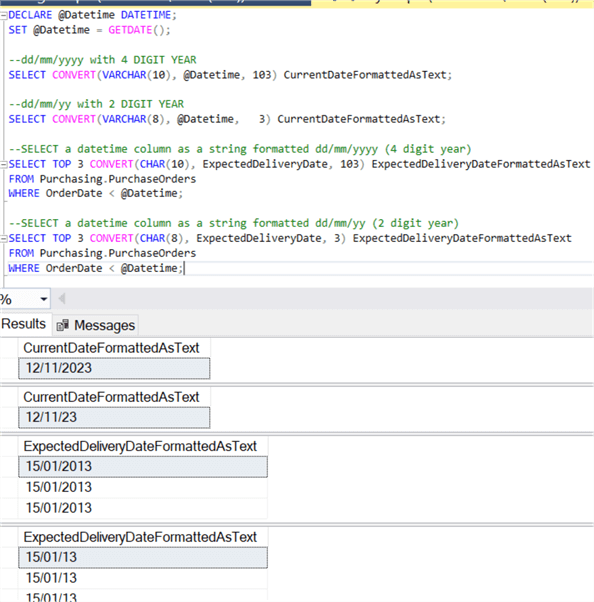
SQL Date Format dd/mm/yyyy with SQL CONVERT
Here is an example to get this date format.
-- The date used for this example was November 12, 2023.
DECLARE @Datetime DATETIME;
SET @Datetime = GETDATE();

--dd/mm/yyyy with 4 DIGIT YEAR
SELECT CONVERT(VARCHAR(10), @Datetime, 103) CurrentDateFormattedAsText;

--dd/mm/yy with 2 DIGIT YEAR
SELECT CONVERT(VARCHAR(8), @Datetime,   3) CurrentDateFormattedAsText;


-- pull data from a database table
-- The date used for this example was January 25, 2013.
--SELECT a datetime column as a string formatted dd/mm/yyyy (4 digit year)
SELECT TOP 3 CONVERT(CHAR(10), ExpectedDeliveryDate, 103) ExpectedDeliveryDateFormattedAsText
FROM Purchasing.PurchaseOrders
WHERE OrderDate < @Datetime;

--SELECT a datetime column as a string formatted dd/mm/yy (2 digit year)
SELECT TOP 3 CONVERT(CHAR(8), ExpectedDeliveryDate, 3) ExpectedDeliveryDateFormattedAsText
FROM Purchasing.PurchaseOrders
WHERE OrderDate < @Datetime;
Here is the output.
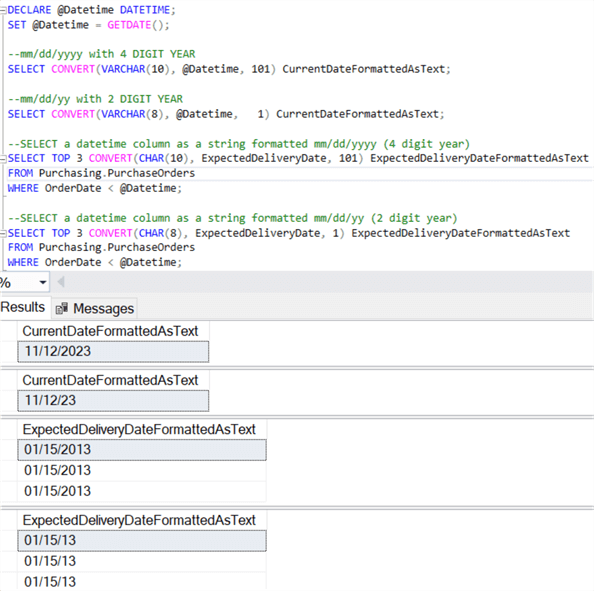
SQL Date Format mm/dd/yyyy with SQL CONVERT
Here is an example to get this date format.
-- The date used for this example was November 12, 2023.

DECLARE @Datetime DATETIME;
SET @Datetime = GETDATE();

--mm/dd/yyyy with 4 DIGIT YEAR
SELECT CONVERT(VARCHAR(10), @Datetime, 101) CurrentDateFormattedAsText;

--mm/dd/yy with 2 DIGIT YEAR
SELECT CONVERT(VARCHAR(8), @Datetime,   1) CurrentDateFormattedAsText;


-- pull data from a database table
-- The date used for this example was January 15, 2013.
--SELECT a datetime column as a string formatted mm/dd/yyyy (4 digit year)
SELECT TOP 3 CONVERT(CHAR(10), ExpectedDeliveryDate, 101) ExpectedDeliveryDateFormattedAsText
FROM Purchasing.PurchaseOrders
WHERE OrderDate < @Datetime;

--SELECT a datetime column as a string formatted mm/dd/yy (2 digit year)
SELECT TOP 3 CONVERT(CHAR(8), ExpectedDeliveryDate, 1) ExpectedDeliveryDateFormattedAsText
FROM Purchasing.PurchaseOrders
WHERE OrderDate < @Datetime;
Here is the output.
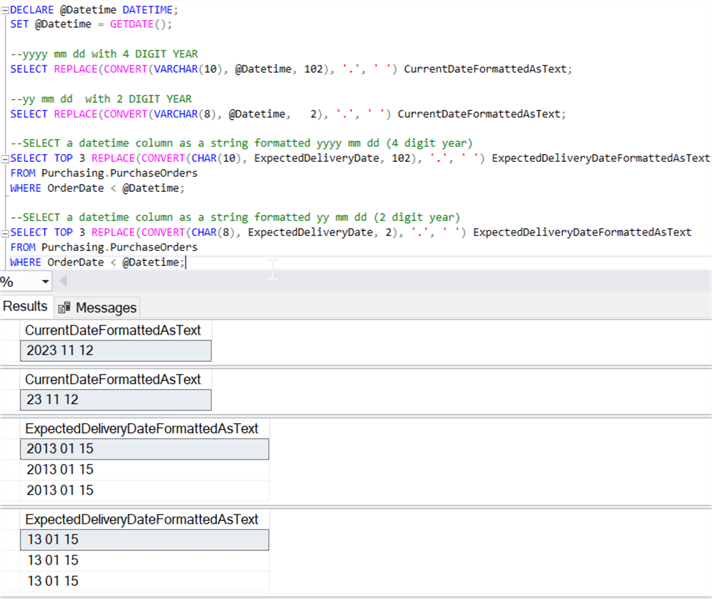
SQL Date Format yyyy mm dd with SQL CONVERT
Here is an example to get this date format.
-- The date used for this example was November 12, 2023.
DECLARE @Datetime DATETIME;
SET @Datetime = GETDATE();

--yyyy mm dd with 4 DIGIT YEAR
SELECT REPLACE(CONVERT(VARCHAR(10), @Datetime, 102), '.', ' ') CurrentDateFormattedAsText;

--yy mm dd  with 2 DIGIT YEAR
SELECT REPLACE(CONVERT(VARCHAR(8), @Datetime,   2), '.', ' ') CurrentDateFormattedAsText;


-- pull data from a database table
-- The date used for this example was January 15, 2013.
--SELECT a datetime column as a string formatted yyyy mm dd (4 digit year)
SELECT TOP 3 REPLACE(CONVERT(CHAR(10), ExpectedDeliveryDate, 102), '.', ' ') ExpectedDeliveryDateFormattedAsText
FROM Purchasing.PurchaseOrders
WHERE OrderDate < @Datetime;

--SELECT a datetime column as a string formatted yy mm dd (2 digit year)
SELECT TOP 3 REPLACE(CONVERT(CHAR(8), ExpectedDeliveryDate, 2), '.', ' ') ExpectedDeliveryDateFormattedAsText
FROM Purchasing.PurchaseOrders
WHERE OrderDate < @Datetime;
Here is the output.
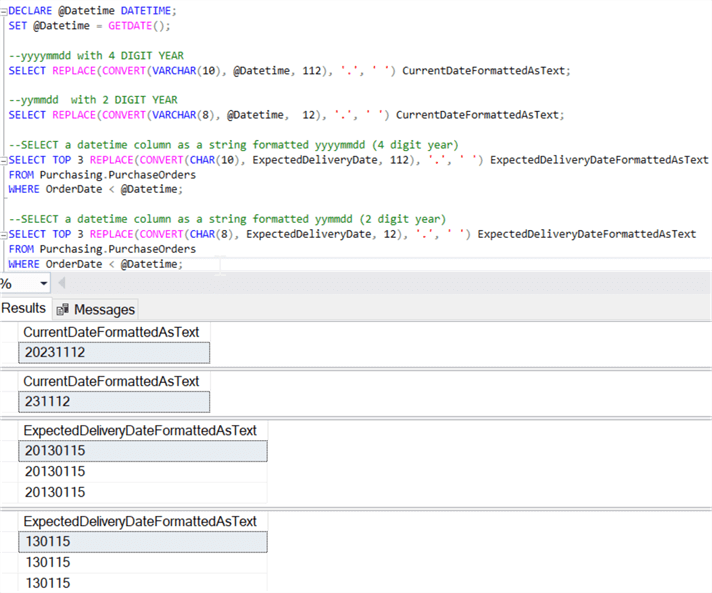
SQL Date Format yyyymmdd with SQL CONVERT
Here is an example to get this date format.
-- The date used for this example was November 12, 2023.
DECLARE @Datetime DATETIME;
SET @Datetime = GETDATE();

--yyyymmdd with 4 DIGIT YEAR
SELECT REPLACE(CONVERT(VARCHAR(10), @Datetime, 112), '.', ' ') CurrentDateFormattedAsText;

--yymmdd  with 2 DIGIT YEAR
SELECT REPLACE(CONVERT(VARCHAR(8), @Datetime,  12), '.', ' ') CurrentDateFormattedAsText;


-- pull data from a database table
-- The date used for this example was January 15, 2013.
--SELECT a datetime column as a string formatted yyyymmdd (4 digit year)
SELECT TOP 3 REPLACE(CONVERT(CHAR(10), ExpectedDeliveryDate, 112), '.', ' ') ExpectedDeliveryDateFormattedAsText
FROM Purchasing.PurchaseOrders
WHERE OrderDate < @Datetime;

--SELECT a datetime column as a string formatted yymmdd (2 digit year)
SELECT TOP 3 REPLACE(CONVERT(CHAR(8), ExpectedDeliveryDate, 12), '.', ' ') ExpectedDeliveryDateFormattedAsText
FROM Purchasing.PurchaseOrders
WHERE OrderDate < @Datetime;
Here is the output.
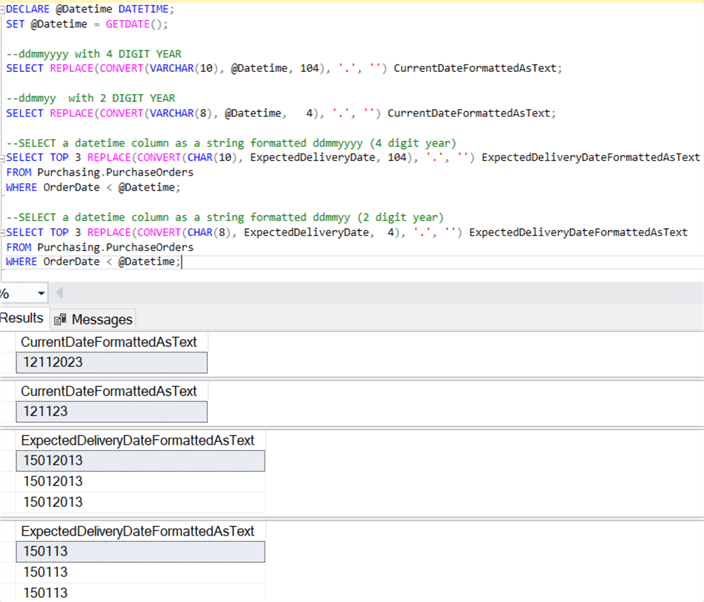
SQL Date format ddmmyyyy with SQL CONVERT
Here is an example to get this date format.
-- The date used for this example was November 12, 2023.
DECLARE @Datetime DATETIME;
SET @Datetime = GETDATE();

--ddmmyyyy with 4 DIGIT YEAR
SELECT REPLACE(CONVERT(VARCHAR(10), @Datetime, 104), '.', '') CurrentDateFormattedAsText;

--ddmmyy  with 2 DIGIT YEAR
SELECT REPLACE(CONVERT(VARCHAR(8), @Datetime,   4), '.', '') CurrentDateFormattedAsText;


-- pull data from a database table
-- The date used for this example was January 15, 2013.
--SELECT a datetime column as a string formatted ddmmyyyy (4 digit year)
SELECT TOP 3 REPLACE(CONVERT(CHAR(10), ExpectedDeliveryDate, 104), '.', '') ExpectedDeliveryDateFormattedAsText
FROM Purchasing.PurchaseOrders
WHERE OrderDate < @Datetime;

--SELECT a datetime column as a string formatted ddmmyy (2 digit year)
SELECT TOP 3 REPLACE(CONVERT(CHAR(8), ExpectedDeliveryDate,  4), '.', '') ExpectedDeliveryDateFormattedAsText
FROM Purchasing.PurchaseOrders
WHERE OrderDate < @Datetime;
Here is the output.
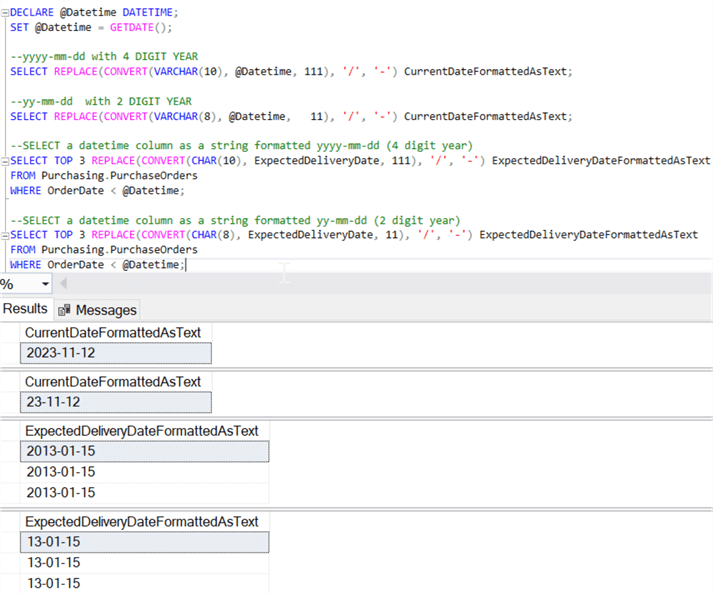
SQL Date Format yyyy-mm-dd with SQL CONVERT
Here is an example to get this date format.
-- The date used for this example was November 12, 2023.
DECLARE @Datetime DATETIME;
SET @Datetime = GETDATE();

--yyyy-mm-dd with 4 DIGIT YEAR
SELECT REPLACE(CONVERT(VARCHAR(10), @Datetime, 111), '/', '-') CurrentDateFormattedAsText;

--yy-mm-dd  with 2 DIGIT YEAR
SELECT REPLACE(CONVERT(VARCHAR(8), @Datetime,   11), '/', '-') CurrentDateFormattedAsText;


-- pull data from a database table
-- The date used for this example was January 15, 2013.
--SELECT a datetime column as a string formatted yyyy-mm-dd (4 digit year)
SELECT TOP 3 REPLACE(CONVERT(CHAR(10), ExpectedDeliveryDate, 111), '/', '-') ExpectedDeliveryDateFormattedAsText
FROM Purchasing.PurchaseOrders
WHERE OrderDate < @Datetime;

--SELECT a datetime column as a string formatted yy-mm-dd (2 digit year)
SELECT TOP 3 REPLACE(CONVERT(CHAR(8), ExpectedDeliveryDate, 11), '/', '-') ExpectedDeliveryDateFormattedAsText
FROM Purchasing.PurchaseOrders
WHERE OrderDate < @Datetime;
Here is the output.
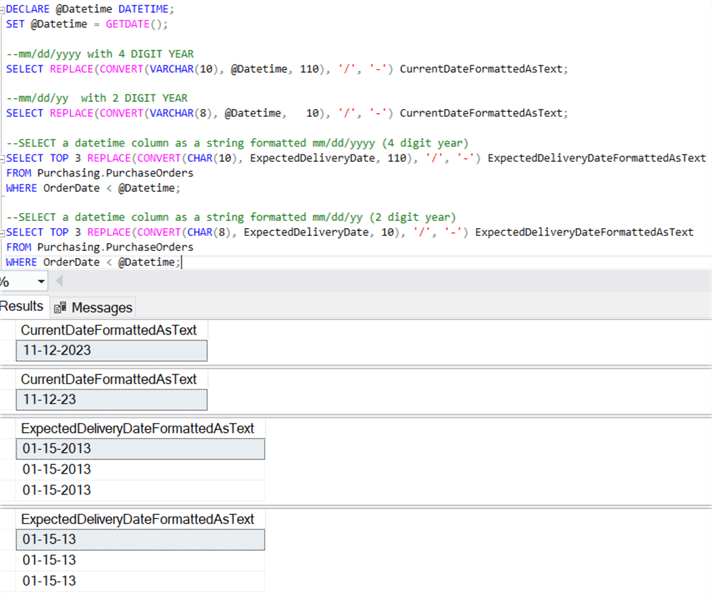
SQL Date Format mm/dd/yyyy with SQL CONVERT
Here is an example to get this date format.
-- The date used for this example was November 12, 2023.
DECLARE @Datetime DATETIME;
SET @Datetime = GETDATE();

--mm/dd/yyyy with 4 DIGIT YEAR
SELECT REPLACE(CONVERT(VARCHAR(10), @Datetime, 110), '/', '-') CurrentDateFormattedAsText;

--mm/dd/yy  with 2 DIGIT YEAR
SELECT REPLACE(CONVERT(VARCHAR(8), @Datetime,   10), '/', '-') CurrentDateFormattedAsText;


-- pull data from a database table
-- The date used for this example was January 15, 2013.
--SELECT a datetime column as a string formatted mm/dd/yyyy (4 digit year)
SELECT TOP 3 REPLACE(CONVERT(CHAR(10), ExpectedDeliveryDate, 110), '/', '-') ExpectedDeliveryDateFormattedAsText
FROM Purchasing.PurchaseOrders
WHERE OrderDate < @Datetime;

--SELECT a datetime column as a string formatted mm/dd/yy (2 digit year)
SELECT TOP 3 REPLACE(CONVERT(CHAR(8), ExpectedDeliveryDate, 10), '/', '-') ExpectedDeliveryDateFormattedAsText
FROM Purchasing.PurchaseOrders
WHERE OrderDate < @Datetime;
Here is the output.
Recommended Reading
Continue your learning on Microsoft SQL Server dates with these tips and tutorials which could be valuable to beginners and experienced Developers alike:
- Determine SQL Server Date and Time Parts with DATEPART and DATENAME Functions
- SQL Server Date and Time Data Types
- SQL Server function to convert integer date to datetime format
- SQL Database DateTime Best Practices
- Format SQL Server Dates with FORMAT Function
- SQL Server Date Functions
- Add and Subtract Dates using DATEADD in SQL Server
- DATEDIFF SQL Server Function
- SQL Date Function Tutorial - DATEADD, DATEDIFF, DATENAME, DATEPART and more
- Getting Started with SQL DATEDIFF and DATEDIFF_BIG Functions with Use Cases
- How SQL Server handles the date format YYYY-MM-DD
- SQL Convert Date to YYYYMMDD
Next Steps
- The formats listed above are not inclusive of all formats provided. Experiment with various dates and the different format numbers to see what others are available.
- These formats can be used for all date/time functions, as well as data being served to clients, so experiment with these data format conversions to see if they can provide data more efficiently.
- Also, check out the SQL Server FORMAT Function to Format Dates.
Last updated by Eric Blinn on 2023-11-13






About the author
 MSSQLTips.com was started in 2006 to provide SQL Server content about various aspects of SQL Server and other database platforms.
This author pledges the content of this article is based on professional experience and not AI generated.
View all my tips
Article Last Updated: 2023-11-13
