By: Greg Robidoux | Updated: 2021-08-11 | Comments (25) | Related: 1 | 2 | 3 | > Monitoring
Problem
One thing that is often handy is to know how much space each table is using within your database. It is helpful to know the number of rows, the data space used as well as the index space used. There are several ways that you can get this information, by reading the system tables, using SSMS and using the built-in reports in SSMS. In this tip we look at some queries that can be used to do this.
Solution
This tip was originally written in 2007 and it used the queries that SSMS used to get the details. To make this a little easier to use, the tip was updated with the following approach. The latest test was done using SQL Server 2019 and this should work with all previous versions, since sp_spaceused has been around for quite some time.
There are several ways to pull the data to find out the space used for a table. One simple way to do this is to use sp_spaceused to get the space used for a table. We will use the AdventureWorks database for this test.
Here is the simple command to get the data for one table.
sp_spaceused '[HumanResources].[Department]'
This returns the following information:

This is great if you want to do one table at a time, but what if you want to do all of the tables. You can use this code as suggested in the comments section:
DECLARE @str VARCHAR(500)
SET @str = 'exec sp_spaceused ''?'''
EXEC sp_msforeachtable @command1=@str
This is helpful, but the output is not very easy to read.
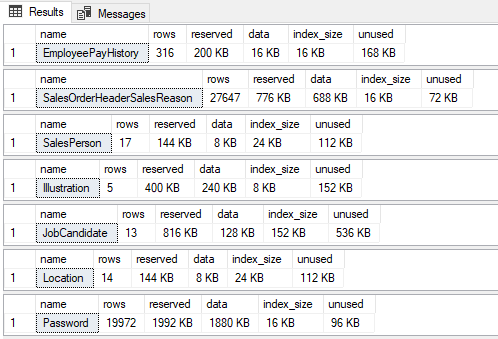
So what if we put the results to a temp table as shown in the comments section and then we could sort the data as needed like this:
CREATE TABLE #SpaceUsed (
	 TableName sysname
	,NumRows BIGINT
	,ReservedSpace VARCHAR(50)
	,DataSpace VARCHAR(50)
	,IndexSize VARCHAR(50)
	,UnusedSpace VARCHAR(50)
	)

DECLARE @str VARCHAR(500)
SET @str =  'exec sp_spaceused ''?'''
INSERT INTO #SpaceUsed
EXEC sp_msforeachtable @command1=@str

SELECT * FROM #SpaceUsed ORDER BY TableName
When we run this we get the following output sorted by table name:
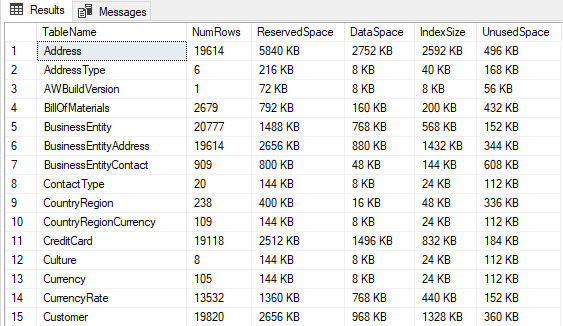
This is great, but if we try to sort by ReservedSpace as follows.
SELECT * FROM #SpaceUsed ORDER BY ReservedSpace desc
The sorting doesn't work correctly. It thinks ResevedSpace is a text column, so it sorts in text order, not numerical order.
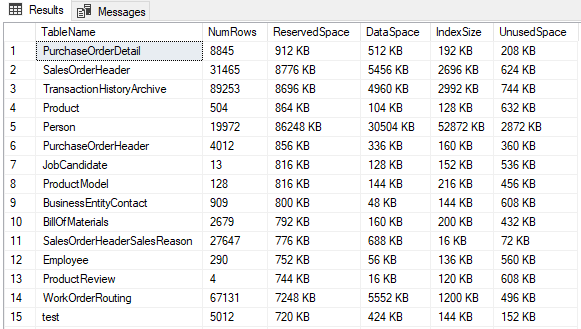
So what we can do is convert all of the space columns to numbers, by removing the KB and also converting the values to MB instead of KB as follows.
SELECT TableName, NumRows,
CONVERT(numeric(18,0),REPLACE(ReservedSpace,' KB','')) / 1024 as ReservedSpace_MB,
CONVERT(numeric(18,0),REPLACE(DataSpace,' KB','')) / 1024 as DataSpace_MB,
CONVERT(numeric(18,0),REPLACE(IndexSize,' KB','')) / 1024 as IndexSpace_MB,
CONVERT(numeric(18,0),REPLACE(UnusedSpace,' KB','')) / 1024 as UnusedSpace_MB
FROM #SpaceUsed
ORDER BY ReservedSpace_MB desc
Now the sorting will work correctly as follows:
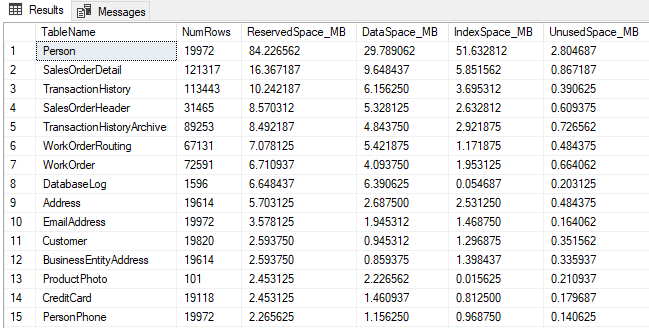
Script to get sortable space used info for all SQL Server tables in a database
Here is the complete script. You can change the ORDER BY as needed.
IF OBJECT_ID('tempdb..#SpaceUsed') IS NOT NULL
	DROP TABLE #SpaceUsed

CREATE TABLE #SpaceUsed (
	 TableName sysname
	,NumRows BIGINT
	,ReservedSpace VARCHAR(50)
	,DataSpace VARCHAR(50)
	,IndexSize VARCHAR(50)
	,UnusedSpace VARCHAR(50)
	)

DECLARE @str VARCHAR(500)
SET @str =  'exec sp_spaceused ''?'''
INSERT INTO #SpaceUsed
EXEC sp_msforeachtable @command1=@str

SELECT TableName, NumRows,
CONVERT(numeric(18,0),REPLACE(ReservedSpace,' KB','')) / 1024 as ReservedSpace_MB,
CONVERT(numeric(18,0),REPLACE(DataSpace,' KB','')) / 1024 as DataSpace_MB,
CONVERT(numeric(18,0),REPLACE(IndexSize,' KB','')) / 1024 as IndexSpace_MB,
CONVERT(numeric(18,0),REPLACE(UnusedSpace,' KB','')) / 1024 as UnusedSpace_MB
FROM #SpaceUsed
ORDER BY ReservedSpace_MB desc
Downside to using sp_spaceused
One of the major downsides to using sp_spaceused is that it only returns the table name and does not include the schema name. So, if you have several tables with the same name, but with different schemas it is kind of hard to tell which table it is.
Next Steps
- Here is another simple process to help you get a handle on your database and table usage
- Add these scripts to your toolbox
- Run these scripts on a set schedule like once a week or once a month to get a handle on how your database and tables are changing. This can then be used for trending and space requirements as you do future planning for your database.






About the author
 Greg Robidoux is the President and founder of Edgewood Solutions, a technology services company delivering services and solutions for Microsoft SQL Server. He is also one of the co-founders of MSSQLTips.com. Greg has been working with SQL Server since 1999, has authored numerous database-related articles, and delivered several presentations related to SQL Server. Before SQL Server, he worked on many data platforms such as DB2, Oracle, Sybase, and Informix.
This author pledges the content of this article is based on professional experience and not AI generated.
View all my tips
Article Last Updated: 2021-08-11
