By: Greg Robidoux | Comments (5) | Related: > Performance Tuning
Problem
SQL Server doesn't always select the best execution plan for your queries and thankfully there are several different hints that can be used to force SQL Server into using one execution plan over another. One issue that you may be faced with is when using parameters in your WHERE clause, sometimes the query runs great and other times it runs really slow.
I recently had a situation where the hard coded values in the WHERE clause worked great, but when I changed the values to parameters and used the exact same values for the parameters the execution plan drastically changed and the overall time it took to run the query increased by about 5 times. This situation is referred to as parameter sniffing where SQL Server stores the values used as part of the execution plan and therefore other queries with different values may act totally different. So what options are there to get around this?
Solution
As mentioned above, SQL Server offers many hints that can be used to force how an execution plan is put together. The option that we are interested in is the OPTIMIZE FOR option. This will allow us to specify what parameter value we want SQL Server to use when creating the execution plan. This hint was introduced in SQL Server 2005.
Let's take a look at a few examples. These were all done using the AdventureWorks database.
Example 1 - query with no hints
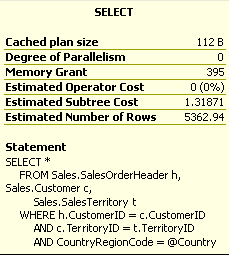
This first example is a straight query using a parameter without the OPTIMIZE FOR hint.
DECLARE @Country VARCHAR(20)
SET @Country = 'US'

SELECT *
FROM Sales.SalesOrderHeader h, Sales.Customer c,
Sales.SalesTerritory t
WHERE h.CustomerID = c.CustomerID
AND c.TerritoryID = t.TerritoryID
AND CountryRegionCode = @Country
The following is the actual execution plan that is generated to execute this query.
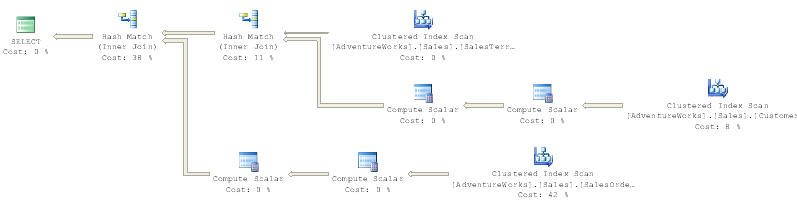
The overall cost for this query is 1.31871.
Example 2 - query using OPTIMIZE FOR hint
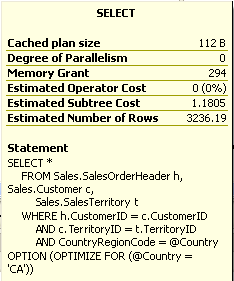
In this example we are specifying the OPTIMIZE FOR hint which is shown in the last line of this query. The first part is identical to the query in Example 1. In this example we are telling SQL Server to optimize this execution plan for this query using "CA" as the parameter value even though we are passing in US as the parameter value.
DECLARE @Country VARCHAR(20)
SET @Country = 'US'

SELECT *
FROM Sales.SalesOrderHeader h, Sales.Customer c,
Sales.SalesTerritory t
WHERE h.CustomerID = c.CustomerID
AND c.TerritoryID = t.TerritoryID
AND CountryRegionCode = @Country
OPTION (OPTIMIZE FOR (@Country = 'CA'))
The following is the actual execution plan that is generated to execute this query. For the most part this query plan looks the same as the query plan above, except that the percentages in some tasks are a bit different.
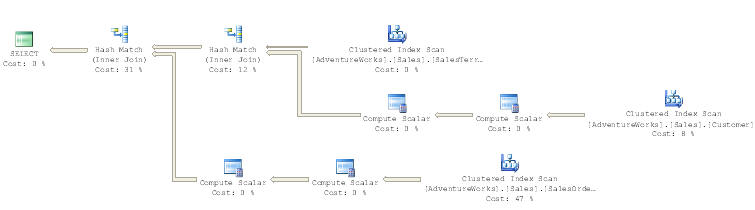
The overall cost for this query is 1.1805 which is better then example 1.
Example 3 - query using OPTIMIZE FOR
In this example we have changed the OPTIMIZE FOR value to be "US" instead of "CA", everything else is the same.
DECLARE @Country VARCHAR(20)
SET @Country = 'US'

SELECT *
FROM Sales.SalesOrderHeader h, Sales.Customer c,
Sales.SalesTerritory t
WHERE h.CustomerID = c.CustomerID
AND c.TerritoryID = t.TerritoryID
AND CountryRegionCode = @Country
OPTION (OPTIMIZE FOR (@Country = 'US'))
The following is the actual execution plan that is generated to execute this query. As you can see, SQL Server has changed this quite a bit from examples 1 and 2.
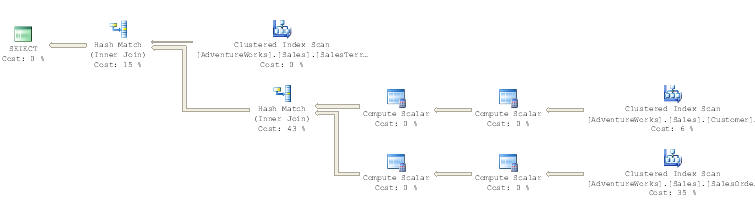
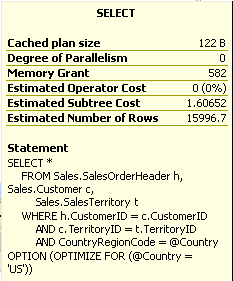
The overall cost for this query is 1.60652 which is not as good as the first two examples.
Client Stats
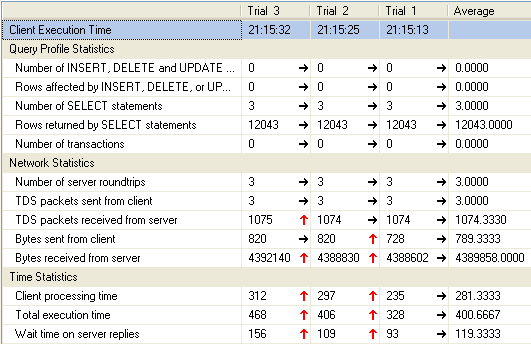
In addition to the above, we also captured the client statistics with each execution. The trial # corresponds with the example #. In the below grid we can see the Total Execution time increased with each run. For example1 the total time was 328ms, for example2 was 406ms and for example3 it was 468ms. This shows that for this query SQL Server seems to be picking the best query plan and the OPTIMIZE FOR did not make it run any faster.
Note: the procedure cache was not cleared between each run.
Summary
As you can see from this simple test when using parameters, using the OPTIMIZE FOR hint can change the query plan. This may have a positive impact or a negative impact, but this gives you another option to adjust how your queries execute especially if things start performing poorly when using parameters in your queries. Without the OPTIMIZE hint some executions were fast and others took a long time. So depending on your dataset and the task at hand this option may or may not help.
Next Steps
- Take the time to run some tests with the OPTIMIZE FOR hint to see if it boosts query performance
- Also, use the Client Statistics to give you some comparisons from one query run to the next
- If you want to clear the procedure cache between runs you can use the DBCC FREEPROCCACHE command






About the author
 Greg Robidoux is the President and founder of Edgewood Solutions, a technology services company delivering services and solutions for Microsoft SQL Server. He is also one of the co-founders of MSSQLTips.com. Greg has been working with SQL Server since 1999, has authored numerous database-related articles, and delivered several presentations related to SQL Server. Before SQL Server, he worked on many data platforms such as DB2, Oracle, Sybase, and Informix.
This author pledges the content of this article is based on professional experience and not AI generated.
View all my tips
