By: Armando Prato | Comments (7) | Related: > Views
Problem
I recently added a column to one of my core system tables referenced by a reporting view. When I run the view, the added column is not appearing in my result set! What can I do?
Solution
When a view is created in SQL Server, metadata for the referenced table columns (column name and ordinal position) is persisted in the database. Any change to the referenced base table(s) (column re-ordering, new column addition, etc) will not be reflected in the view until the view is either:
- Altered with an ALTER VIEW statement
- Recreated with DROP VIEW/CREATE VIEW statements
- Refreshed using system stored procedure sp_refreshview
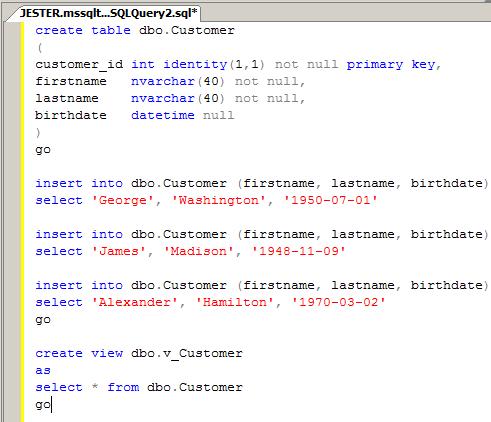
The following example creates a table and an associated view
create table dbo.Customer
(
customer_id int identity(1,1) not null primary key,
firstname nvarchar(40) not null,
lastname nvarchar(40) not null,
birthdate datetime null
)
go

insert into dbo.Customer (firstname, lastname, birthdate)
select 'George', 'Washington', '1950-07-01'

insert into dbo.Customer (firstname, lastname, birthdate)
select 'James', 'Madison', '1948-11-09'

insert into dbo.Customer (firstname, lastname, birthdate)
select 'Alexander', 'Hamilton', '1970-03-02'
go

create view dbo.v_Customer
as
select * from dbo.Customer
go
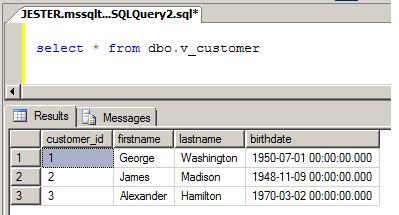
Running the view using select * from dbo.v_Customer, we see the following
output:
A new business requirement has now been identified; we need to add a last order date to keep track of the last time this customer ordered stock from our warehouse:
alter table dbo.Customer
add last_order_date datetime null
go
exec sp_help [dbo.Customer]
go
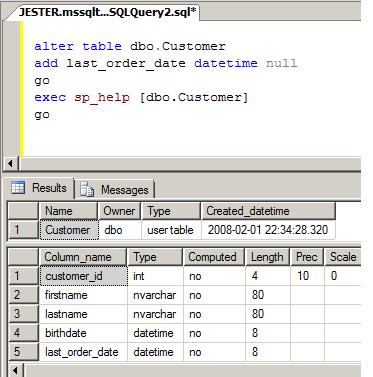
As we can see, the last_order_date has been added to the table. However, running our view again we get the same output as before the column change!
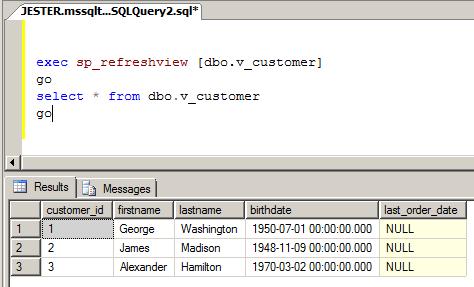
This occurs because the view's metadata information about the table needs to be updated; it's not maintained automatically. This can be corrected using one of the methods mentioned at the beginning of this tip. My preference is to use sp_refreshview since I don't have to hunt down the view and issue a DROP VIEW/CREATE VIEW and re-grant permissions or issue an ALTER VIEW statement:
exec sp_refreshview [dbo.v_customer]
go
select * from dbo.v_customer
go
As you can see, the view now returns all columns including the newly added one.
I find that this can always be avoided by not issuing SELECT * in your
view definitions. By explicitly defining a column list, you're forced to change
any views that reference tables that may require a change. Another approach is to
issue your CREATE VIEW statements with a SCHEMABINDING option. Views defined with
this option do not allow SELECT * syntax (you'll receive an error if
you try) and forces you to enter an explicit column list. This way, you can prevent
a less experienced developer from changing a view to use this syntax
If you're curious about how your view metadata is being stored, you can take a peek at the INFORMATION_SCHEMA.COLUMNS view (view column information is kept there as well as table column information).
Next Steps
- Examine your views and consider changing SELECT * syntax to explicit column lists, if possible
- Read more about sp_refreshview in greater detail in the SQL Server 2000 and 2005 Books Online
- Read more about SCHEMABINDING option in greater detail in the SQL Server 2000 and 2005 Books Online
- Read more about INFORMATION_SCHEMA.COLUMNS view in greater detail in the SQL Server 2000 and 2005 Books Online






About the author
 Armando Prato has close to 30 years of industry experience and has been working with SQL Server since version 6.5.
This author pledges the content of this article is based on professional experience and not AI generated.
View all my tips
