By: Ray Barley | Comments (4) | Related: More > Integration Services Analysis Services Tasks
Problem
We typically use the Lookup Data Flow Transform to retrieve the surrogate key for a dimension row based on the natural key in a fact table. While this works well, we occasionally have a situation where a fact table row has a natural key that isn't in our dimension table and we're looking for a way to handle this. What do you think?
Solution
The situation you describe is often referred to as early arriving facts. For a variety of reasons you tend to encounter this situation on occasion in a data warehousing environment. It may be a timing issue, a failed load from a particular source system, etc. A practical solution is to implement inferred member handling in your ETL processing for your dimension tables. An inferred member is a dimension row that has been created as a result of an early arriving fact. The inferred member will have the natural key from the fact table and default values for the rest of the columns. You probably want to add an indicator column in the dimension to identify the row as an inferred member; e.g. a bit column called InferredMember. The rationale behind inferred member processing is that it is only a temporary situation. In the very near future when the actual row is extracted from the source system and processed, you will simply perform a type 1 update, overwriting all columns in the inferred row with the values from the source system. You will also set the InferredMember indicator to 0 since the row is no longer inferred. For details on processing type 1 and type 2 changes please refer to our earlier tip on Handling Slowly Changing Dimensions.
Now that we have defined our solution at a high level, let's walk through the implementation. As an example we will process an Order fact table that references a Customer dimension. The schema for the Order staging and fact tables is as follows:
CREATE TABLE [dbo].[stg_fact_Order](
 [nk_CustomerID] [nvarchar](255),
 [OrderID] [int],
 [OrderAmount] [money]
)
CREATE TABLE [dbo].[fact_Order](
        [wk_Order] [int] identity NOT NULL,
 [fk_Customer] [int] NOT NULL,
 [OrderID] [int] NOT NULL,
 [OrderAmount] [money] NOT NULL
) |
Note that in the above tables we have the nk_CustomerID column which is the source system natural key for the Customer dimension. The fk_Customer column will be populated with the Customer dimension surrogate key.
In order to facilitate efficient lookups in our ETL processing we will maintain a table in the staging database with the surrogate key, natural key, and inferred member indicator for the Customer dimension. The schema will be as follows:
CREATE TABLE [dbo].[tbl_CustomerLookup](
 [wk_Customer] [int] IDENTITY NOT NULL,
 [nk_CustomerID] [nvarchar](255) NOT NULL,
        [InferredMember] [bit] NOT NULL
) |
In our Order fact ETL processing we will use the Lookup component in the Data Flow to get the Customer surrogate key by joining on the natural key in the CustomerLookup table. Prior to the Data Flow, however, we will insert a new row into the CustomerLookup table for any natural key that isn't already there; i.e. our early arriving facts. We will use the following stored procedure:
CREATE PROCEDURE [dbo].[stp_InsertInferredFromOrder] AS BEGIN INSERT INTO dbo.tbl_CustomerLookup ( nk_CustomerID ,InferredMember ) SELECT DISTINCT stg.nk_CustomerID ,1 FROM dbo.stg_fact_Order stg LEFT OUTER JOIN dbo.tbl_CustomerLookup c ON c.nk_CustomerID = stg.nk_CustomerID WHERE wk_Customer IS NULL END |
Any fact table that references the Customer dimension can follow the pattern in the above stored procedure of inserting a row into the CustomerLookup table to create an inferred member where necessary. At some point (typically at or near the end) in the ETL process the InferredMember rows in the CustomerLookup table are inserted into the Customer dimension, allowing joins between fact tables and the dimension to be successful.
Now that we have reviewed the overall solution, let's take a look at its implementation in an SSIS package. The Control Flow is as follows:
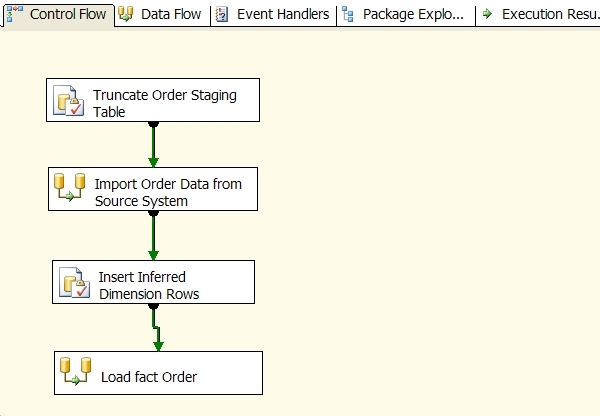
Main points about the Control Flow:
- Truncate Order Staging Table is an Execute SQL task that clears out the Order fact staging table.
- Import Order Data from Source System is a Data Flow task that extracts the rows from an Excel spreadsheet and writes the data out to the Order fact staging table.
- Insert Inferred Dimension Rows is an Execute SQL task that invokes the stp_InsertInferredFromOrder stored procedure described above.
- Load fact Order is a Data Flow task that loads the Order fact table from the Order staging table.
The Load fact Order Data Flow task is as follows:
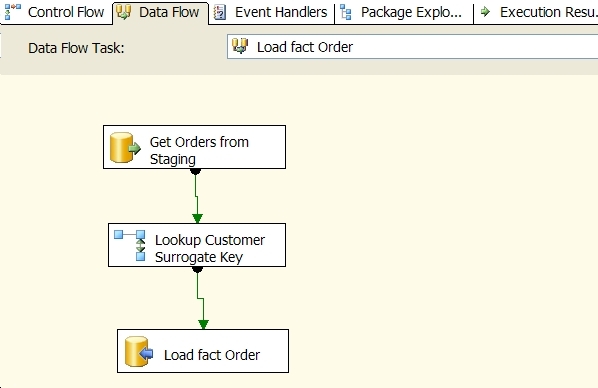
Main points about the Load fact Order Data Flow:
- Get Orders from Staging is an OLE DB Source that selects all orders from the Order staging table.
- Lookup Customer Surrogate Key is a Lookup task that retrieves the wk_Customer value (surrogate key) from the CustomerLookup table by joining on the natural key in the Order staging table.
- Load fact Order inserts rows into the fact Order table.
Next Steps
- Give some consideration to implementing inferred members as a way of handing early arriving facts. It's a practical solution to a fairly common issue in data warehousing.
- Download a copy of the sample SSIS package to experiment with inferred member processing. Note that the package assumes you have a SQL Server instance running locally with a database called MSSQLTips. Unzip the files into the folder "C:\MSSQLTips" to minimize changes to get the sample to run without editing the package.






About the author
 Ray Barley is a Principal Architect at IT Resource Partners and a MSSQLTips.com BI Expert.
This author pledges the content of this article is based on professional experience and not AI generated.
View all my tips
