By: Edwin Sarmiento | Comments (2) | Related: 1 | 2 | 3 | 4 | 5 | 6 | > Encryption
Problem
Security is a major concern in any organization. Database backups are prone to theft and can be restored on any SQL Server instance. As we are looking through the new features in SQL Server 2008 we found a potentially interesting one called Transparent Data Encryption which we can use to encrypt our database backups. Can you give us a detailed explanation of how we go about using this new functionality?
Solution
Transparent Data Encryption is a new feature in SQL Server 2008 which implements database-level encryption complementing the row-level encryption which is currently available in SQL Server 2005. This protects database access, either directly or by restoring a database backup on another SQL Server instance.
In this tip we are going to look at how to implement transparent data encryption to protect database backups. Let us first demonstrate how prone database backups are to security threats. By default, SQL Server backups are not encrypted. Let's start by creating a full backup of the Northwind database on my default instance.
BACKUP DATABASE Northwind |
Let's query the Northwind database for a specific record. We will use this record later on to view the contents of our database backup
SELECT * FROM dbo.Customers
|
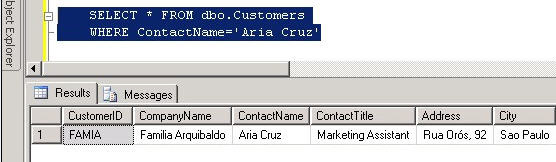
Open the database backup in Notepad and search for 'A r i a C r u z' (note the spaces between the letters and three spaces between "Aria" and "Cruz" as this is Unicode text.) Observe that the text data is readable.
|
|
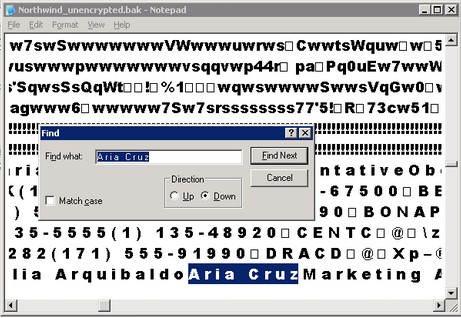
Since your native backups are readable they are prone to security risks since they can be read in clear text. This enables someone to just look at your database backups and retrieve data from the files. What's worse is that anybody can restore your database backups on another SQL Server instance. We will demonstrate this procedure shorlty.
Let's implement transparent data encryption on our Northwind database by first setting up encryption on the server. To do that, we create the database master key on the master database
USE master |
Then, we create the server-based certificate which will be used to encrypt the database
CREATE CERTIFICATE NorthwindCert |
We will then set the encryption for the Northwind database by creating a database encryption key and password using the certificate we just created.
USE Northwind |
The encryption algorithm choice is yours, since a few different options exist. For guidance on selecting an encryption algorithm on SQL Server, check out this Microsoft TechNet article. After creating the database encryption key, we'll enable encryption on the database level.
ALTER DATABASE Northwind |
Let's backup the encrypted Northwind database this time but using a different filename.
BACKUP DATABASE Northwind |
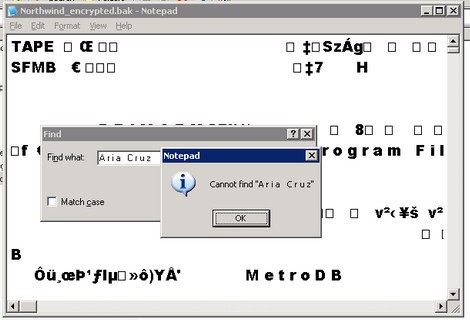
The encrypted backup would take a bit longer than the unencrypted backup. If you open the encrypted database backup and search for the string 'A r i a C r u z' which we searched for earlier, you will no longer find it. You can scroll thru the text and notice the encrypted data which is unlike the one you'll saw in the unencrypted backup.
|
|
Restoring the encrypted database backup on another SQL Server instance
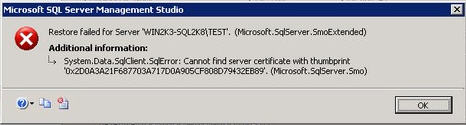
It is easy to restore the unencrypted backup on another SQL Server instance. In fact, this is what makes it prone to security risks. You can try restoring the encrypted database backup as Northwind_encrypted and you'll encounter an error. I am doing this on my TEST instance. The error message will tell you that the server certificate cannot be found. Even though the restore failed, you will still see the Northwind_encrypted database on the Object Explorer on a restoring state.
|
|
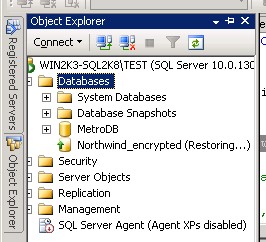
In order to restore the encrypted database backup on another SQL Server instance we need to first export the certificate we created on the instance on which the encrypted database backup was created. To export the certificate to a file, I'll connect on my default instance and run this query.
USE master |
Then, we'll need to copy the certificate and the private key file to the other SQL Server instance. Since I am running my default and my TEST instances on the same server, I'll just refer to those files when I do the import process. Now, on the TEST instance, import the certificate by first creating a master key.
USE master |
The password provided here is different from the one you used in the default instance as you are creating a new master key for this instance. After a master key has been created, you can create a certificate by importing the certificate we created earlier.
CREATE CERTIFICATE NorthwindCert |
Notice that the password specified here in the DECRYPTION BY PASSWORD parameter is the same as that which we used to export the certificate to a file. This is because we will use the same certificate on this new instance to access the encrypted database. After the certificate has been created, we can now restore the encrypted database backup on this instance. You might want to drop the initial encrypted database which you attempted to restore before proceeding. You will now be able to restore the encrypted database backup successfully.
Next Steps
- You have seen the following items:
- Native backups are in clear text
- How you can secure your SQL Server 2008 database and backups using transparent data encryption
- How to create a certificate and back it up in order to complete the restore process
- Download a copy of the latest Community Technology Preview of SQL Server 2008 from this site. The above examples were created using the February 2008 CTP.
- You can get the Northwind database used in the sample here.
- To view the SQL Server 2008 Books Online content on Transparent Data Encryption to this site.






About the author
 Edwin M Sarmiento is a Microsoft SQL Server MVP and Microsoft Certified Master from Ottawa, Canada specializing in high availability, disaster recovery and system infrastructures.
This author pledges the content of this article is based on professional experience and not AI generated.
View all my tips
