Problem
I’m designing a table and I want to enforce a relationship between two tables (a parent table and a child table). Would I be better off just writing triggers to enforce the relationship or should I declare a foreign key constraint? What are the pros and cons of each approach? Can you provide some sample code to show the various issues?
Solution
I have come across a lot of database models where the original developer had enforced basic referential integrity (RI) using triggers rather than declaratively via foreign keys. In versions prior to SQL Server 2000, triggers were one way to implement cascading deletes and updates of child tables since SQL Server versions prior to 2000 did not have this feature. However, SQL Server 2000 introduced cascading actions to foreign keys (ON DELETE CASCADE, ON UPDATE CASCADE) rendering the use of triggers for RI largely unnecessary except under specialized circumstances.
The following table examines some of the considerations in using either method:
| Enforcing RI: Foreign Keys vs Triggers | |
| Foreign Keys | Triggers |
| Checked before the data modification is made | Executed after the data modification has been made |
| Do not extend transactions | Extend the life of a transaction as it executes code to check RI (can be extended even longer if an integrity violation is encountered which requires ROLLBACK) |
| Can be added with an ALTER TABLE statement; No special coding required | Coding is required |
| Prevent TRUNCATE of a parent table/td> | Do not prevent TRUNCATE of a parent table; DELETE triggers are not fired when a TRUNCATE is issued |
| Table relationships can be easily seen in data model diagrams | Table relationships are not readily seen in data model diagrams |
In the following example, we’ll examine some of the drawbacks of using triggers to enforce data integrity. The following example data model has a parent table called saved_report and child table called saved_report_parameters. Using these tables, users are able to store custom copies of an application’s canned reports along with the parameters he/she used to produce a custom report. We’ll also create a delete trigger maintaining the relationship between them. In our example application, we do not cascade deletes through child rows; Child rows are maintained in a separate UI.
In a Management Studio connection, run the following script:
-- create a parent table
create table dbo.saved_report
(
saved_report_id int identity(1,1) not null primary key,
saved_name nvarchar(40) not null unique,
)
go

insert into dbo.saved_report (saved_name) select 'Customer Acme Sales Report - 2007'
go

-- create a the child table
create table dbo.saved_report_parameters
(
saved_report_parameters_id int identity(1,1) not null primary key,
saved_report_id int not null,
parameter_name nvarchar(20) not null,
parameter_value nvarchar(20) not null,
constraint uq_saved_report_parameter unique (saved_report_id, parameter_name, parameter_value)
)
go

insert into dbo.saved_report_parameters (saved_report_id, parameter_name, parameter_value)
select 1, 'customerid', '39'
insert into dbo.saved_report_parameters (saved_report_id, parameter_name, parameter_value)
select 1, 'asofdate', '2007-12-31'
go

-- create a trigger to enforce the parent/child relationship if the parent is deleted
create trigger dbo.tr_saved_report_delete on dbo.saved_report
for delete
as

set nocount on

if exists (select 1 from dbo.saved_report_parameters s
        join deleted d on d.saved_report_id = s.saved_report_id)
begin
    raiserror ('Delete not allowed; child rows exist', 16, 10)
    waitfor delay '00:00:10' -- delay a bit to allow the showing of held locks in a separate connection
    rollback
end
go
The application allows the user to delete saved reports via a UI which calls a stored procedure. However, any child rows must be deleted via a separate UI before the parent can be deleted. Run the following command in a new Management Studio connection to delete all saved reports:
delete from dbo.saved_report
go
In a separate Management Studio connection, run the following command while the delete is running:
select resource_type,
        resource_associated_entity_id,
        request_mode, request_type
from sys.dm_tran_locks
go
You’ll see that the trigger is part of the transaction as illustrated by the held locks.
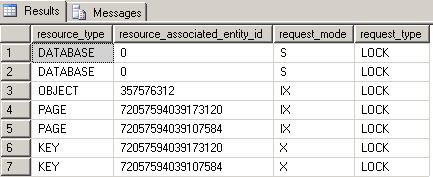
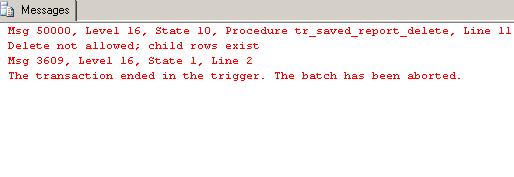
When the trigger completes, you’ll see the following message in the results pane of the delete query .
What if the stored procedure was coded to perform a TRUNCATE as opposed to a DELETE if the user chooses to delete all saved reports? Well, when performing wholesale purging of all of a table’s rows, a TRUNCATE can be faster since this operation is only minimally logged (only page deallocations are recorded in the transaction log). Let’s issue a TRUNCATE.
truncate table dbo.saved_report
go
After the TRUNCATE completes, we’ll examine the parent and child tables.
select * from dbo.saved_report
select * from dbo.saved_report_parameters
go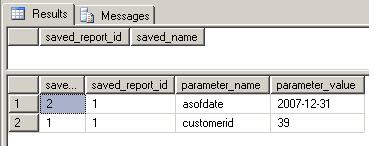
Since DELETE triggers are not fired when a TRUNCATE is issued, we’ve just orphaned the child rows.
If you re-create the tables without the trigger and declare the following foreign key, you will see that your data is protected from a stray TRUNCATE.
alter table dbo.saved_report_parameters
add constraint fk_saved_report_parameters
foreign key (saved_report_id)
references dbo.saved_report(saved_report_id)
go
truncate table dbo.saved_report
go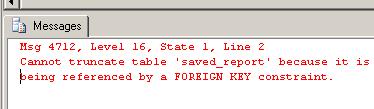
I believe in using foreign keys over triggers when enforcing basic referential integrity. I am very diligent about using declarative constraints in my data models for good reasons:
- I don’t have the time to code and maintain triggers or stored procedures to handle database integrity for every table I add to my model
- I don’t have the time to create repair scripts if a bug is exposed in one of these routines.
- I also want to keep my transactions short so I don’t end up in blocking situations.
- Furthermore, foreign keys and the other constraint options (i.e. CHECK, UNIQUE, PRIMARY KEY) are the database’s last line of defense in the prevention of orphaned and invalid data due to coding errors in the logic tier as well as the database tier.
Next Steps
- Read more about SQL Server Foreign Keys.
- If your database currently enforces data integrity via triggers or stored procedures, consider converting to foreign keys.
- Read more about foreign key Cascading Actions.
- Read more about the other SQL Server constraints: Primary Key, Unique, Default, and Check on MSSQLTips.com:
- Finding primary keys and missing primary keys in SQL Server
- SQL Server Index Analysis Script for All Indexes on All Tables
- The Importance of SQL Server Foreign Keys
- Working with DEFAULT constraints in SQL Server
- SQL Server Code Review Checklist
- Identify all of your foreign keys in a SQL Server database
- Finding and fixing SQL Server database constraint issues

For 20+ years, MSSQLTips.com has been delivering comprehensive technical solutions on a daily basis for the Microsoft SQL Server platform. In that time, an innovative team of over 300 authors from around the globe have delivered over 7000 articles and 1000 webcasts ranging from beginner topics to advanced solutions. Our community prides itself on delivering human only generated content.