![]() |
|
|
|
By: Armando Prato | Read Comments (17) | Related Tips: 1 | 2 | 3 | More > Database Administration |
Problem
My company has a number of SQL installation scripts that build a fresh copy of our database. Each script relates to a specific SQL task. One script builds the database, another builds the tables, etc. I call SQLCMD repeatedly to execute each script. Is it possible to concatenate these scripts together and execute them with a single call to SQLCMD?
Solution
Yes it is. SQLCMD offers the :r command. When :r is encountered in a SQL script, it essentially tells the SQLCMD utility to include the file referenced into the calling script. This can afford you the opportunity to break up a single script into multiple scripts that represent functional areas of the database or to replace multiple SQLCMD calls with a single call to a main SQL file. Furthermore, using the :r command to execute multiple scripts in a single batch allows you define a single set of variables which can be seen by all the included scripts (provided there is no intervening GO terminator). SQLCMD was introduced in SQL Server 2005 and is the replacement for osql which Microsoft will be deprecating in a future release. If you're not familiar with SQLCMD, it is a command line utility that can be used to execute T-SQL commands and scripts from the operating system.
NOTE: You can download the sample files via the attached .zip file which you can unzip and use to execute the sample code that will be presented in this tip.
In the forthcoming example, I'll create 5 .sql files representing functional areas of a sample database called MSSQLTIPS. The first script is called CREATE_DB.sql and creates a database on your SQL 2005 Server called MSSQLTIPS. This script then includes 4 scripts (using the :r command) to perform table creation, table inserts, index creation, and stored procedure creation. A .bat file is created to execute SQLCMD from the Windows operating system in order to create a fresh database.
I first create a sub-folder under my C: drive called C:\Scripts. I store the following SQL scripts in this folder.
| Script code to create tables |
/* SCRIPT: CREATE_TABLES.sql */ PRINT 'CREATING TABLES ' GO IF OBJECT_ID('EMPLOYEE') IS NOT NULL DROP TABLE DBO.EMPLOYEE GO CREATE TABLE DBO.EMPLOYEE ( EMPLOYEEID INT IDENTITY(1,1) NOT NULL PRIMARY KEY, FIRSTNAME VARCHAR(50), LASTNAME VARCHAR(50) ) GO IF OBJECT_ID('TIMECARD') IS NOT NULL DROP TABLE DBO.TIMECARD GO CREATE TABLE DBO.TIMECARD ( TIMECARDID INT IDENTITY(1,1) NOT NULL PRIMARY KEY, EMPLOYEEID INT NOT NULL, HOURSWORKED TINYINT NOT NULL, HOURLYRATE MONEY NOT NULL, DATEWORKED DATETIME NOT NULL ) GO DECLARE @TOTAL_TABLES INT SET @TOTAL_TABLES = 2 |
| Script code to insert data |
/* SCRIPT: TABLE_INSERTS.sql */ PRINT 'TOTAL TABLES CREATED = ' + CAST(@TOTAL_TABLES AS VARCHAR) GO PRINT 'INSERTING DATA INTO EMPLOYEE' GO INSERT INTO DBO.EMPLOYEE (FIRSTNAME, LASTNAME) SELECT 'JOHN', 'DOE' GO INSERT INTO DBO.EMPLOYEE (FIRSTNAME, LASTNAME) SELECT 'JANE', 'DOE' GO INSERT INTO DBO.EMPLOYEE (FIRSTNAME, LASTNAME) SELECT 'JEFF', 'DOE' GO |
| Script code to create indexes |
/* SCRIPT: CREATE_INDEXES.sql */ PRINT 'CREATING INDEXES' GO IF NOT EXISTS (SELECT 1 FROM SYS.INDEXES WHERE NAME = 'IX_EMPLOYEE_LASTNAME') CREATE INDEX IX_EMPLOYEE_LASTNAME ON DBO.EMPLOYEE(LASTNAME, FIRSTNAME) GO IF NOT EXISTS (SELECT 1 FROM SYS.INDEXES WHERE NAME = 'IX_TIMECARD_EMPLOYEEID') CREATE INDEX IX_TIMECARD_EMPLOYEEID ON DBO.TIMECARD(EMPLOYEEID) GO |
| Script code to create procedures |
/* SCRIPT: CREATE_PROCEDURES.sql */ PRINT 'CREATING PROCEDUREs' GO IF OBJECT_ID('GET_EMPLOYEE_TIMECARDS') IS NOT NULL DROP PROCEDURE DBO.GET_EMPLOYEE_TIMECARDS GO CREATE PROCEDURE DBO.GET_EMPLOYEE_TIMECARDS @EMPLOYEEID INT AS SET NOCOUNT ON SELECT * FROM DBO.EMPLOYEE E JOIN DBO.TIMECARD T ON E.EMPLOYEEID = T.EMPLOYEEID WHERE E.EMPLOYEEID = @EMPLOYEEID ORDER BY DATEWORKED GO |
| Script code to create the new database and objects |
/* SCRIPT: CREATE_DB.sql */ /* BUILD A DATABASE */ -- This is the main caller for each script SET NOCOUNT ON GO PRINT 'CREATING DATABASE' IF EXISTS (SELECT 1 FROM SYS.DATABASES WHERE NAME = 'MSSQLTIPS') DROP DATABASE MSSQLTIPS GO CREATE DATABASE MSSQLTIPS GO :On Error exit :r c:\Scripts\CREATE_TABLES.sql :r c:\Scripts\TABLE_INSERTS.sql :r c:\Scripts\CREATE_INDEXES.sql :r c:\Scripts\CREATE_PROCEDURES.sql PRINT 'DATABASE CREATE IS COMPLETE' GO |
In the root C:\ folder, I create a file called create_db.bat which I use to create the database with all objects
SQLCMD -E -dmaster -ic:\Scripts\create_db.sql PAUSE |
Double clicking the .bat file, I see that each script processed and that the database created successfully.
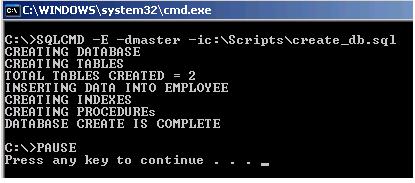
The SQLCMD utility offers a wealth of commands that can used to modify the .bat file to further control and refine output and error behavior.
Next Steps
| Wednesday, May 27, 2009 - 11:35:19 AM - Roberto12cr | Read The Tip |
|
And what happen if there are an error in the script #5, all the previous script already were executed.
There are any way to do this in a transaction? |
|
| Thursday, January 27, 2011 - 9:39:28 AM - tskelley | Read The Tip |
|
My same concern. Our scripts will sometimes have errors due to dependencies, etc. The errors are not always critical and require rollback; however, we would like to make sure the error condition is reported and the output is preserved, just in case... Maybe this could be the next part of this article. :)
|
|
| Wednesday, May 11, 2011 - 2:07:00 PM - Joffre | Read The Tip |
|
I use the script below to create a new database: sqlcmd -S srv-tsbd\sql2k -i D:\Scripts\create_db_2k.sql -o D:\Scripts\Logs\LOG_create_db_2k.txt Is it right? It creates... Now I'm trying to create the tables with some scripts that I have. The scripts for creating tables are in different places, and they CAN'T be moved. For example: The CREATE TABLE a is on Folder D:\Scripts\Create\A The CREATE TABLE b is on Folder D:\Scripts\Create\B
How do I do?
|
|
| Tuesday, March 13, 2012 - 4:10:59 AM - bob | Read The Tip |
|
You could try a small utility
https://scriptzrunner.codeplex.com/ |
|
| Friday, March 16, 2012 - 3:48:26 AM - Della | Read The Tip |
| Try these tipsEnable the TCP/IP poocrtol using the Surface Area Configuration Utility Make sure the TCP/IP poocrtol is enabled in the SQL Server Configuration UtilityMake sure the SQL Server browser is started. Note this stepis optional. It is possible to set the SQL Server instance to use a fixed IP address but this isnon-standard for named instancesMake sure SQL Server and SQL Server Browser are exempted by the firewall on the server machine.This is done by putting sqlservr.exe and sqlbrowser.exe as an exception in thewindows firewall.Note: In order to get things to work. You might need to completely reboot theserver machine after making the changes. There have been reports (thanks P.C.) that starting and stopping theSQL Server and Browser software is not enough. | |
| Wednesday, April 25, 2012 - 8:22:06 AM - Jorge Segarra | Read The Tip |
|
Regarding the concern about rollback. What you could do is include BEGIN/COMMIT TRAN in each script. This will give you rollback granualirity at each piece of the process. You cannot do nested transactions (See Paul Randal's post on the matter: http://www.sqlskills.com/BLOGS/PAUL/post/A-SQL-Server-DBA-myth-a-day-(2630)-nested-transactions-are-real.aspx). This tip was meant as general overview/example of using sqlcmd, not thorough breakdown of its uses, which I think the author did good job of showing. |
|
| Thursday, June 07, 2012 - 10:00:18 AM - Jason | Read The Tip |
|
https://scriptzrunner.codeplex.com/ I would like to know if the commandline parameters are available in order to make a automated run. If not, can you publish the source code, I will code it up for you. |
|
| Tuesday, July 17, 2012 - 2:17:32 PM - Mayur Sharma | Read The Tip |
|
I am using Create Database command as below sqlcmd -E -S%ServerName% -Q "Create Database HUM" ,,,but problem is its creating database on default path c:\MSSQL\MSSQLinstance\Data..... i want that to be in N:\SQLLog and N:\SQLData ...how it will be done pl. help me/// |
|
| Thursday, July 26, 2012 - 6:33:49 AM - Clinton Ryan Manigsaca | Read The Tip |
|
I followed the example above and was able to create the database, schema, logins and users but when I call the command to create the tables I got an error, its seems it is point to the database master instead of the new database that I created. Kindly give me an advise on how to deal with this problem.
|
|
| Friday, July 27, 2012 - 5:10:31 AM - Clinton Ryan Manigsaca | Read The Tip |
|
The create table script went to master database instead of the newly created db. Any suggestions on this please? |
|
| Friday, July 27, 2012 - 10:16:28 AM - Armando Prato | Read The Tip |
|
In the SQLCMD command , change the -d parameter to point to the database you want. I recommend you read up on SQLCMD in the books online. |
|
| Friday, July 27, 2012 - 10:21:41 AM - Armando Prato | Read The Tip |
|
Better yet, after the database is created, add a USE statement to set the database context. So you change the -d but the Db won't exist yet. Experiment. |
|
| Thursday, August 02, 2012 - 9:27:45 AM - Greg | Read The Tip |
|
Thanks for pointing this out. I create a DB as part of unit test setup and instead of calling SqlCmd.exe 200+ times for each file, I'm able to call it just once, greatly speeding things up. |
|
| Tuesday, September 11, 2012 - 10:42:55 AM - ugo | Read The Tip |
|
Regarding each file, how can one stop the rest of the files from executing if one fails? :On Error exit |
|
| Tuesday, October 30, 2012 - 4:14:55 PM - Tom | Read The Tip |
|
Have you considered using %ERRORLEVEL% to test for a error code return? |
|
| Wednesday, January 09, 2013 - 12:18:43 PM - Eric in Sacramento | Read The Tip |
|
In Books Online for SQLCMD, under the "SQLCMD Commands" section, it says: "Commands are executed immediately. They are not put in the execution buffer as statements are." Doesn't this mean that the .sql files are all being executed in parallel? How is it that SQLCMD knows to execute CREATE_TABLES.sql before executing TABLE_INSERTS.sql? Perhaps my confusion is rooted in the definition of "execution buffer." Could somebody please assist? Thanks, |
|
| Friday, May 17, 2013 - 2:01:34 AM - Siva | Read The Tip |
|
I am in a situation of extracting data from a database, however, from a single database. I wrote a simple batch script using a for loop to execute all the .sql files in the folder and write the output to a .txt file. The script is doing the job for me. The only problem i observe here is the time it is taking do the job. I have almost 120 queries that needs to be queried for and write the output to external files. The batch file is taking almost 90-100 minutes. I am looking for an alternative to do my job in much faster way. Can someone help me how can i achieve this in much faster way... |
|
|
privacy | disclaimer | copyright | advertise | about authors | contribute | feedback | giveaways | user groups Some names and products listed are the registered trademarks of their respective owners. Edgewood Solutions LLC | MSSharePointTips.com | MSSQLTips.com |