solving sql server problems for millions of dbas and developers since 2006


SQL Server DBA Tips SQL Server Developer Tips SQL Server Business Intelligence Tips SQL Server Career Tips SQL Server Tip Categories SQL Server Tutorials SQL Server Webcasts SQL Server Whitepapers SQL Server Tools SQL Server Questions and Answers MSSQLTips Authors About MSSQLTips SQL Server User Groups MSSLQTips Giveaways MSSQLTips Advertising Options

MSSQLTips Facebook Page MSSQLTips LinkedIn Page MSSQLTips RSS Feed MSSQLTips Twitter Page MSSQLTips Google+ Page


Auto generate SQL Server restore script from backup files in a directory

By: | Read Comments (23) | Print

Greg is the President of Edgewood Solutions and a co-founder of MSSQLTips.com.

Related Tips: 1 | 2 | 3 | 4 | More

Problem
One of the ongoing challenges of a DBA is to backup and restore databases.  Backups are done on an automated schedule, but restores can take on many different versions, you may need to restore a production database, restore a development or test database or just create another copy of the database somewhere else.  There are several ways of automating the restore process and creating a script, but this approach shows a way this can be done by just reading the contents of a directory for the backup files that exist.

Solution
The following is one simple approach of reading the contents of a directory and creating the restore commands that need to be issued to restore the database.  This script will work for full, differential and transaction log backups.

Before we get started the script below assumes the following:

  1. The restored database will have the same name as the backed up database
  2. The restored database will be restored in the same location as the backed up database
  3. The files have the following naming format
    • dbName_YYYYMMDDHHMM.xxx
  4. File extensions are as follows
    • Full backup – BAK
    • Differential backup – DIF
    • Transaction log backup – TRN
  5. XP_CMDSHELL is enabled
  6. There are no missing transaction logs that may break the restore chain

So let's say we are creating our backups on the following schedule:

  • Full backups at midnight
  • Differential backups every 3 hours starting at 3:15am
  • Log backups every 30 minutes starting at 1am

At 9am we would have the following backup files created for September 10, 2008 for the "Customer" database following the rules above.

  • Customer_200809100000.BAK
  • Customer_200809100100.TRN
  • Customer_200809100130.TRN
  • Customer_200809100200.TRN
  • Customer_200809100230.TRN
  • Customer_200809100300.TRN
  • Customer_200809100315.DIF
  • Customer_200809100330.TRN
  • Customer_200809100400.TRN
  • Customer_200809100430.TRN
  • Customer_200809100500.TRN
  • Customer_200809100530.TRN
  • Customer_200809100600.TRN
  • Customer_200809100615.DIF
  • Customer_200809100630.TRN
  • Customer_200809100700.TRN
  • Customer_200809100730.TRN
  • Customer_200809100800.TRN
  • Customer_200809100830.TRN
  • Customer_200809100900.TRN

If we wanted to do a restore of the latest Full, Differential and Transaction Log backups to 9am we would need to restore the following files:

  • Customer_200809100000.BAK
  • Customer_200809100615.DIF
  • Customer_200809100630.TRN
  • Customer_200809100700.TRN
  • Customer_200809100730.TRN
  • Customer_200809100800.TRN
  • Customer_200809100830.TRN
  • Customer_200809100900.TRN

The script below will read through the directory and create the restore script for us.  The only two parameters that would need to change are the @dbName and the @backupPath.

USE Master;
GO 
SET NOCOUNT ON

-- 1 - Variable declaration
DECLARE @dbName sysname
DECLARE @backupPath NVARCHAR(500)
DECLARE @cmd NVARCHAR(500)
DECLARE @fileList TABLE (backupFile NVARCHAR(255))
DECLARE @lastFullBackup NVARCHAR(500)
DECLARE @lastDiffBackup NVARCHAR(500)
DECLARE @backupFile NVARCHAR(500)

-- 2 - Initialize variables
SET @dbName 'Customer'
SET @backupPath 'D:\SQLBackups\'

-- 3 - get list of files
SET @cmd 'DIR /b ' @backupPath

INSERT INTO @fileList(backupFile)
EXEC master.sys.xp_cmdshell @cmd

-- 4 - Find latest full backup
SELECT @lastFullBackup = MAX(backupFile
FROM @fileList 
WHERE backupFile LIKE '%.BAK' 
   
AND backupFile LIKE @dbName '%'

SET @cmd 'RESTORE DATABASE ' @dbName ' FROM DISK = ''' 
       
@backupPath @lastFullBackup ''' WITH NORECOVERY, REPLACE'
PRINT @cmd

-- 4 - Find latest diff backup
SELECT @lastDiffBackup = MAX(backupFile
FROM @fileList 
WHERE backupFile LIKE '%.DIF' 
   
AND backupFile LIKE @dbName '%'
   
AND backupFile @lastFullBackup

-- check to make sure there is a diff backup
IF @lastDiffBackup IS NOT NULL
BEGIN
   SET 
@cmd 'RESTORE DATABASE ' @dbName ' FROM DISK = ''' 
       
@backupPath @lastDiffBackup ''' WITH NORECOVERY'
   
PRINT @cmd
   
SET @lastFullBackup @lastDiffBackup
END

-- 5 - check for log backups
DECLARE backupFiles CURSOR FOR 
   SELECT 
backupFile 
   
FROM @fileList
   
WHERE backupFile LIKE '%.TRN' 
   
AND backupFile LIKE @dbName '%'
   
AND backupFile @lastFullBackup

OPEN backupFiles 

-- Loop through all the files for the database 
FETCH NEXT FROM backupFiles INTO @backupFile 

WHILE @@FETCH_STATUS 
BEGIN 
   SET 
@cmd 'RESTORE LOG ' @dbName ' FROM DISK = ''' 
       
@backupPath @backupFile ''' WITH NORECOVERY'
   
PRINT @cmd
   
FETCH NEXT FROM backupFiles INTO @backupFile 
END

CLOSE 
backupFiles 
DEALLOCATE backupFiles 

-- 6 - put database in a useable state
SET @cmd 'RESTORE DATABASE ' @dbName ' WITH RECOVERY'
PRINT @cmd

If you run the above code in a query window, assuming the listed files above existed, you will get the following output.  At this point you can copy and paste this code into another query window and run the query to do the actual restore.
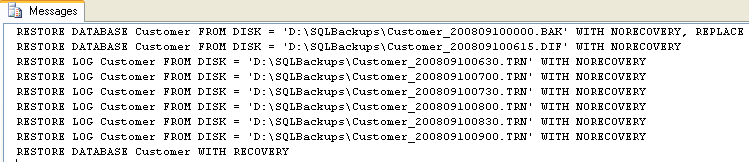
As you can see it does a Full restore, the latest Differential restore and all Transaction Logs after that.  The script also does a WITH RECOVERY at the end to put the database in a useable state.

Next Steps

  • This is a pretty straight forward and simple approach.  As mentioned above it restores using the same name and also restores to the same file location.  Try making some modifications to restore it to another database name as well as restoring the files to a different location by incorporating the RESTORE FILELISTONLY command
  • This script will work on any server where the files exists and you can run a SQL Server query.  So you can copy the files from one server to another, run this script and then have your restore script ready to go.
  • Check out these other restore scripts:


Related Tips: 1 | 2 | 3 | 4 | More | Become a paid author


Last Update: 9/16/2008

Share: Share 


Comments and Feedback:

Tuesday, September 16, 2008 - 10:46:48 AM - ChrisAVWood Read The Tip

Be carefull if you have 2 transaction backups with the same filename. We just had the situation where an SQL2005 maintenance plan created backup job wrote 2 log backups to the same filename. To differentiate you need to add the with file= parameter.

Chris 


Tuesday, September 16, 2008 - 1:18:52 PM - grobido Read The Tip

Thanks Chris for the input.  That is true this process assumes there is only one backup per file, so this is not taken into consideration.  I am surprised that a SQL Maintenance plan wrote two backups to the same file, but I guess it is possible.   The default is to "Append" new backups if the file already exists.

So yes there are some future improvements that could be made to this script.  If the RESTORE HEADERONLY option is used you could see what is in the file first and then figure out how to do build the restore script.


Monday, September 29, 2008 - 8:44:50 AM - jkli Read The Tip

This information is very useful as I need to run backup and restore programatically.  All that is missing from this post is running the restore script programmatically.  Is there anyway to send the generated script to a script file so that it can be run it through c# code?


Tuesday, October 28, 2008 - 2:16:48 PM - grobido Read The Tip

This could be run interactively where the restores happen in place of the PRINT commands.

If you run this on another SQL Server and replace the PRINT @cmd with EXEC (@cmd) this will do the actual restore for you instead of having to create a script file.


Tuesday, October 28, 2008 - 3:08:29 PM - jkli Read The Tip

Thanks.  I will be accessing these scripts through c#.  I think it will work.


Tuesday, February 16, 2010 - 5:51:15 PM - avadhanam Read The Tip

In my case the RESTORE LOG commands generated by the script were in random order. so I had to modify the following so that the RESTORE LOG commands are all generated in the correct order for each of the TRN files:

Original line: DIR /B

Modified line: DIR /B /O D

the /O indicates that the files need to be fetched from the file system based on the file creation date. This guaranteed that the RESTORE log commands were all generated in the same order that the TRNs were created and were ready to be executed AS IS.


Tuesday, May 17, 2011 - 6:20:19 AM - tommyketchup Read The Tip

Hi I tried that script, but I kept getting failures.

This is the first generated script with the DB name and location of files

RESTORE DATABASE Binary 5_01 FROM DISK = 'K:\Binary 5_01_backup_201105160917.bak' WITH NORECOVERY, REPLACE
RESTORE LOG Binary 5_01 FROM DISK = 'K:\Binary 5_01_backup_201105161005.trn' WITH NORECOVERY
RESTORE LOG Binary 5_01 FROM DISK = 'K:\Binary 5_01_backup_201105161100.trn' WITH NORECOVERY
RESTORE LOG Binary 5_01 FROM DISK = 'K:\Binary 5_01_backup_201105161155.trn' WITH NORECOVERY
RESTORE LOG Binary 5_01 FROM DISK = 'K:\Binary 5_01_backup_201105161250.trn' WITH NORECOVERY
RESTORE LOG Binary 5_01 FROM DISK = 'K:\Binary 5_01_backup_201105161345.trn' WITH NORECOVERY
RESTORE LOG Binary 5_01 FROM DISK = 'K:\Binary 5_01_backup_201105161440.trn' WITH NORECOVERY
RESTORE LOG Binary 5_01 FROM DISK = 'K:\Binary 5_01_backup_201105161535.trn' WITH NORECOVERY
RESTORE LOG Binary 5_01 FROM DISK = 'K:\Binary 5_01_backup_201105161630.trn' WITH NORECOVERY
RESTORE LOG Binary 5_01 FROM DISK = 'K:\Binary 5_01_backup_201105161725.trn' WITH NORECOVERY
RESTORE LOG Binary 5_01 FROM DISK = 'K:\Binary 5_01_backup_201105161820.trn' WITH NORECOVERY
RESTORE LOG Binary 5_01 FROM DISK = 'K:\Binary 5_01_backup_201105161915.trn' WITH NORECOVERY
RESTORE LOG Binary 5_01 FROM DISK = 'K:\Binary 5_01_backup_201105162010.trn' WITH NORECOVERY
RESTORE LOG Binary 5_01 FROM DISK = 'K:\Binary 5_01_backup_201105162105.trn' WITH NORECOVERY
RESTORE LOG Binary 5_01 FROM DISK = 'K:\Binary 5_01_backup_201105162200.trn' WITH NORECOVERY
RESTORE LOG Binary 5_01 FROM DISK = 'K:\Binary 5_01_backup_201105162255.trn' WITH NORECOVERY
RESTORE LOG Binary 5_01 FROM DISK = 'K:\Binary 5_01_backup_201105162350.trn' WITH NORECOVERY
RESTORE LOG Binary 5_01 FROM DISK = 'K:\Binary 5_01_backup_201105170000.trn' WITH NORECOVERY
RESTORE LOG Binary 5_01 FROM DISK = 'K:\Binary 5_01_backup_201105170055.trn' WITH NORECOVERY
RESTORE LOG Binary 5_01 FROM DISK = 'K:\Binary 5_01_backup_201105170150.trn' WITH NORECOVERY
RESTORE LOG Binary 5_01 FROM DISK = 'K:\Binary 5_01_backup_201105170245.trn' WITH NORECOVERY
RESTORE LOG Binary 5_01 FROM DISK = 'K:\Binary 5_01_backup_201105170340.trn' WITH NORECOVERY
RESTORE LOG Binary 5_01 FROM DISK = 'K:\Binary 5_01_backup_201105170435.trn' WITH NORECOVERY
RESTORE LOG Binary 5_01 FROM DISK = 'K:\Binary 5_01_backup_201105170530.trn' WITH NORECOVERY
RESTORE LOG Binary 5_01 FROM DISK = 'K:\Binary 5_01_backup_201105170625.trn' WITH NORECOVERY
RESTORE LOG Binary 5_01 FROM DISK = 'K:\Binary 5_01_backup_201105170720.trn' WITH NORECOVERY
RESTORE LOG Binary 5_01 FROM DISK = 'K:\Binary 5_01_backup_201105170815.trn' WITH NORECOVERY
RESTORE LOG Binary 5_01 FROM DISK = 'K:\Binary 5_01_backup_201105170910.trn' WITH NORECOVERY
RESTORE DATABASE Binary 5_01 WITH RECOVERY


When I try to run this, I get loads of errors which carry on like this :-


Msg 102, Level 15, State 1, Line 1
Incorrect syntax near '5'.
Msg 319, Level 15, State 1, Line 1
Incorrect syntax near the keyword 'with'. If this statement is a common table expression or an xmlnamespaces clause, the previous statement must be terminated with a semicolon.
Msg 102, Level 15, State 1, Line 2
Incorrect syntax near '5'.
Msg 319, Level 15, State 1, Line 2
Incorrect syntax near the keyword 'with'. If this statement is a common table expression or an xmlnamespaces clause, the previous statement must be terminated with a semicolon.
Msg 102, Level 15, State 1, Line 3
Incorrect syntax near '5'.
Msg 319, Level 15, State 1, Line 3


Tuesday, May 17, 2011 - 6:39:36 AM - tommyketchup Read The Tip

However if I script the action, then the command actually looks like this :-

RESTORE LOG [Binary 5_01] FROM  DISK = N'k:\Binary 5_01_backup_201105161005.trn' WITH  FILE = 1,  NORECOVERY,  NOUNLOAD,  STATS = 10

rather than

RESTORE LOG Binary 5_01 FROM DISK = 'K:\Binary 5_01_backup_201105170625.trn' WITH NORECOVERY

Regards TK


Tuesday, May 17, 2011 - 7:23:27 AM - Greg Robidoux Read The Tip

You need to change the script to include square brackets.  For each line like this:

SET @cmd = 'RESTORE DATABASE ' + @dbName + ' FROM DISK = ''' 

Change to this:

SET @cmd = 'RESTORE DATABASE [' + @dbName + '] FROM DISK = ''' 

There are a few places in the script where you will need to add the square brackets.


Tuesday, May 17, 2011 - 7:33:20 AM - tommyketchup Read The Tip

Thanks Greg, that worked.  However this command tried to recover the DB to the default locations of the MSSQL install, which is currently the C drive, with 10GB free space.  The DB plus log files comes to 17GB, and it fails each time.  Is there a move command I can incorporate into the script which will allow me to set the destination of the SQL DB and log files?


Regards TK


Tuesday, May 17, 2011 - 7:48:35 AM - Greg Robidoux Read The Tip

Take a look at this page: http://www.mssqltips.com/tutorial.asp?tutorial=122

You can generate the above and then add in the WITH MOVE.  You only need to do this for the DATABASE restore.  The logs will restore to the same location as where you restored the Full Backup.


Monday, November 28, 2011 - 4:39:54 PM - Ankit Shah Read The Tip

This Script works if i want to restore Full Backup and Differential Backup only every day ?

We do Full backup once in week every sunday .

Differential backup every night .

I have to setup automated restore after differential backup finished every night. So can this script helps me?


Monday, November 28, 2011 - 5:19:06 PM - Greg Robidoux Read The Tip

Yes this should still work because it gets the last FULL backup and last DIFFERENTIAL backup.


Monday, November 28, 2011 - 5:37:47 PM - Ankit Shah Read The Tip

So to runt his script both Full backup file and Differential backup file sholud be at one place or in one folder ?

or we can define different path ?

I have Full backup file on local machine and Differential backup file on shared drive so can you help me how i can put path in that script  please?

Because this script i want to put in sql agent job which runs mid night .


Wednesday, November 30, 2011 - 4:47:51 PM - Scott C Read The Tip

This seems like such a simple problem, until you start running into "What if there are multiple backups per file?" and "What if the files need to be relocated?".  The script below handles most of the issues that I have come across so far in my career.  This script is fairly robust, but it still has a list of assumptions that will cause it to fail if violated.

All backup operations must be simple one-file commands.  No striped backups, no partial backups, no file or filegroup backups.  It can handle multiple backups per file.
The backup files must still be in their original locations.
The backup filenames should be complete UNC paths.  Relative paths, mapped drives, or relying on the default backup folder setting will probably cause problems.
The folders containing the backup files must be readable by both SQL Server service accounts.
The destination folders for the restored files may be hardcoded, but the script includes code to get the DefaultDataDir and DefaultLogDir settings from the registry.  Obviously if these have not been set correctly then this section should be commented out.

/*  Restore a database backup from a different server
    Assumes both servers are at least SQL 2005.
    Use latest full and diff backups, and all subsequent log backups.
    Handles relocating all database files to correct local folders.  All data files and
        full-text files go to one folder, log files to another.
    Will overwrite an existing database of the same name.
    Does not handle complex backup scenarios such as multi-file striped backups,
        partial backups, or file/filegroup backups.
    Adjusts the database compatibility level when restoring to a later version.
    Assumes all relevant backup files are still online in their original locations.
    Assumes the backup filenames are valid and accessible from both servers.
    Assumes full backup filenames are found in msdb.dbo.backupmediafamily, not
        temporary backup device names created by some backup tools.
    The backup files may be spread around in different folders, if the above
        assumptions are true.
    Possible extension: use "EXEC sys.xp_fileexist" to check that all required
        files are available before starting the first RESTORE.
*/
:SETVAR SOURCE_SERVER SomeServer
:SETVAR DBNAME SomeDatabase
-- Create a temporary linked server named SourceServer to get backup history
-- Assumes the current user can login to the other server and read msdb
IF EXISTS(SELECT NULL FROM sys.servers WHERE is_linked = 1 AND name = 'SourceServer')
    EXEC sys.sp_dropserver @server = N'SourceServer', @droplogins = 'droplogins' ;
EXEC master.dbo.sp_addlinkedserver @server = N'SourceServer', @srvproduct=N'SQL_Server', @provider=N'SQLNCLI', @datasrc=N'$(SOURCE_SERVER)' ;
-- Assumes login will authenticate to the remote server (if Kerberos is configured correctly),
--  otherwise a SQL login will have to be provided in @rmtuser and @rmtpassword
EXEC master.dbo.sp_addlinkedsrvlogin @rmtsrvname=N'SourceServer',@useself=N'True',@locallogin=NULL,@rmtuser=NULL,@rmtpassword=NULL ;
EXEC master.dbo.sp_serveroption @server=N'SourceServer', @optname=N'collation compatible', @optvalue=N'false' ;
EXEC master.dbo.sp_serveroption @server=N'SourceServer', @optname=N'data access', @optvalue=N'true' ;
EXEC master.dbo.sp_serveroption @server=N'SourceServer', @optname=N'rpc', @optvalue=N'false' ;
EXEC master.dbo.sp_serveroption @server=N'SourceServer', @optname=N'rpc out', @optvalue=N'false' ;
GO
-- Decide where to put the restored database
DECLARE @DefaultDataDir VARCHAR(1000), @DefaultLogDir VARCHAR(1000)
-------------------------------------------------------------------------------------------------------
-- The destination data and log folders can be set manually
SET @DefaultDataDir = 'D:\SqlData' ;
SET @DefaultLogDir = 'E:\SqlLogs' ;
-------------------------------------------------------------------------------------------------------
-- Or the default locations can be obtained from the registry
-- Assumes these instance properties have been set correctly
DECLARE @ServerName SYSNAME,
    @RegRootPath VARCHAR(250),
    @InstanceKeysPath VARCHAR(250),
    @InstanceKeyPath VARCHAR(250),
    @HKLM VARCHAR(20);
SET @HKLM = 'HKEY_LOCAL_MACHINE' ;       
SET @RegRootPath = 'SOFTWARE\Microsoft\Microsoft SQL Server\' ;
SET @InstanceKeysPath = @RegRootPath + 'Instance Names\SQL' ;
-- get the instance name. If default, use MSSQLSERVER
SET @ServerName = ISNULL(CAST(SERVERPROPERTY('InstanceName') AS VARCHAR), 'MSSQLSERVER') ;
-- get the path for this instance
EXECUTE master..xp_regread @HKLM, @InstanceKeysPath, @ServerName, @InstanceKeyPath OUTPUT ;
SET @InstanceKeyPath = @RegRootPath + @InstanceKeyPath + '\MSSQLServer'
-- read the directory locations
EXECUTE master..xp_regread @HKLM, @InstanceKeyPath, 'DefaultData', @DefaultDataDir OUTPUT ;
EXECUTE master..xp_regread @HKLM, @InstanceKeyPath, 'DefaultLog', @DefaultLogDir OUTPUT ;
-------------------------------------------------------------------------------------------------------
/* If a separate folder is desired for a database with multiple data files, or to avoid filename conflicts:
SET @DefaultDataDir = @DefaultDataDir + '\$(DBNAME)' ;
-- Create a subfolder for the data files (no error occurs if it already exists)
EXEC sys.xp_create_subdir @DefaultDataDir ;
*/
DECLARE @cmd NVARCHAR(MAX) ;
DECLARE @LastBackup DATETIME ;
-- Initial restore of full backup, including MOVE clauses
SELECT TOP 1 @LastBackup = bs.backup_start_date,
        @cmd = N'RESTORE DATABASE [$(DBNAME)] FROM DISK=N''' + mf.physical_device_name
            + ''' WITH FILE=' + LTRIM(bs.position) + ', NORECOVERY, REPLACE, STATS=10'
        + ( SELECT    ', MOVE ''' + name + ''' TO '''
                    + CASE type WHEN 1 THEN @DefaultLogDir ELSE @DefaultDataDir END
                    + RIGHT(physical_name, CHARINDEX('\', REVERSE(physical_name))) + ''''
            FROM [SourceServer].master.sys.master_files
            WHERE database_id = (SELECT database_id FROM [SourceServer].master.sys.databases WHERE name = N'$(DBNAME)')
            FOR XML PATH(''))
FROM    [SourceServer].msdb.dbo.backupmediafamily AS mf
INNER JOIN [SourceServer].msdb.dbo.backupset AS bs ON mf.media_set_id = bs.media_set_id
WHERE   bs.database_name = N'$(DBNAME)' AND bs.type = 'D'
ORDER BY bs.backup_start_date DESC ;
-- Differential restore, if present (otherwise @cmd and @LastBackup are unchanged)
SELECT TOP 1 @LastBackup = bs.backup_start_date,
        @cmd = @cmd + N'; RESTORE DATABASE [$(DBNAME)] FROM DISK=N''' + mf.physical_device_name
            + ''' WITH FILE=' + LTRIM(bs.position) + ', NORECOVERY, STATS=10'
FROM    [SourceServer].msdb.dbo.backupmediafamily AS mf
INNER JOIN [SourceServer].msdb.dbo.backupset AS bs ON mf.media_set_id = bs.media_set_id
WHERE   bs.database_name = N'$(DBNAME)' AND bs.type = 'I' AND bs.backup_start_date > @LastBackup
ORDER BY bs.backup_start_date DESC ;
-- Log restores, if present
SELECT    @cmd = @cmd + N'; RESTORE LOG [$(DBNAME)] FROM DISK=N''' + mf.physical_device_name
            + ''' WITH FILE=' + LTRIM(bs.position) + ', NORECOVERY, STATS=10'
FROM    [SourceServer].msdb.dbo.backupmediafamily AS mf
INNER JOIN [SourceServer].msdb.dbo.backupset AS bs ON mf.media_set_id = bs.media_set_id
WHERE   bs.database_name = N'$(DBNAME)' AND bs.type = 'L' AND bs.backup_start_date > @LastBackup
ORDER BY bs.backup_start_date ;
SET @cmd = @cmd + N'; RESTORE DATABASE [$(DBNAME)] WITH RECOVERY;' ;
-- Update the database compatibility level if the database was at the current level on the old server,
--  and if this server is a later version.
SELECT @cmd = @cmd + N'; ALTER DATABASE [$(DBNAME)] SET COMPATIBILITY_LEVEL = ' + LTRIM(ThisServerLevel)
FROM (
    SELECT    SourceServerLevel = MAX(CASE WHEN db.name = 'master' THEN compatibility_level END),
            DatabaseLevel = MAX(CASE WHEN db.name = '$(DBNAME)' THEN compatibility_level END)
    FROM SourceServer.master.sys.databases db
    WHERE name IN ('master', '$(DBNAME)') ) there,
(
    SELECT    ThisServerLevel = compatibility_level
    FROM sys.databases
    WHERE name = 'master') here
WHERE DatabaseLevel = SourceServerLevel AND SourceServerLevel < ThisServerLevel ;
PRINT REPLACE(@cmd, ';', CHAR(10)) ;
-- Uncomment the following EXEC to perform the restore
-- EXEC (@cmd) ;
GO
-- Drop the SourceServer linked server
IF EXISTS(SELECT NULL FROM sys.servers WHERE is_linked = 1 AND name = 'SourceServer')
    EXEC sys.sp_dropserver @server = N'SourceServer', @droplogins = 'droplogins' ;

Wednesday, November 30, 2011 - 4:53:40 PM - Scott C Read The Tip

PS: The lines that begin with :SETVAR are SQLCMD commands.  This script runs in SQLMCD mode, which can be found on the Query menu in Management Studio.  I use SQLCMD mode a lot, so I customize the SSMS toolbar to add the SQLCMD mode button from the Query group.


Thursday, December 01, 2011 - 12:32:48 PM - Ankit Shah Read The Tip

I am Trying to run this Script to Restore Full and Differential Backup But it giving me only this message "

RESTORE DATABASE AdventureWorks WITH RECOVERY".

I am testing on AdventureWorks DB and Full and Diff backup file stored at C:\Temp.

Can you help me out with this script ?

Thanks


Thursday, December 01, 2011 - 12:53:08 PM - Scott C Read The Tip

The "RESTORE ... WITH RECOVERY" command is the only one that doesn't require backup history.

The other queries rely on data in backup history tables to know which files to restore.  Did you copy the files to C:\Temp, or is that your actual backup folder?  Are you setting the SOURCE_SERVER variable to the server that ran the backup commands?


Thursday, December 01, 2011 - 2:03:52 PM - Ankit Shah Read The Tip

I had 1 full backup file ,1 diff backup file and 2 T-log file on local machine C:\Temp\...

Just giving me same Message .

When i ran the other query to check history here what i got ..

http://www.mssqltips.com/sqlservertip/1243/auto-generate-sql-server-database-restore-scripts/

backup_set_id (No column name)
60                                 RESTORE DATABASE AdventureWorks FROM DISK = 'C:\Temp\ADW1.trn' WITH NORECOVERY
61                                 RESTORE LOG AdventureWorks FROM DISK = 'C:\Temp\ADW1.trn' WITH NORECOVERY
999999999                    RESTORE DATABASE AdventureWorks WITH RECOVERY


Thursday, December 01, 2011 - 3:00:28 PM - Scott C Read The Tip

The original script lists the backup files in the specified directory to create the RESTORE commands.  This requires making some  assumptions about backup file naming conventions and extensions, and that there is only one backup per file.  My script gets the filenames from the backup history tables and so makes no assumptions about file names or locations.  But it only works if it can read the backup history tables on the server that ran the BACKUP statements, and if the backup files have not been moved.  I doubt that you have one server writing backups to C:\Temp on the other server, so you are violating these assumptions.

If you want to restore backups from a couple of files in C:\Temp, the original script should work.  If my script adds something that you need, such as generating the MOVE clauses, then you'll have to merge the two scripts to suit yourself.


Thursday, December 01, 2011 - 3:19:08 PM - Ankit Shah Read The Tip

Thanks for your kind Help your script is nice  but the script how i want to lokking for i found it from here .

http://www.sqlservercentral.com/scripts/Restore/61810/

Thanks again


Thursday, May 10, 2012 - 2:41:52 AM - Jahirul Hassan Read The Tip

I run the script, It shows the following message:

Msg 15281, Level 16, State 1, Procedure xp_cmdshell, Line 1
SQL Server blocked access to procedure 'sys.xp_cmdshell' of component 'xp_cmdshell' because this component is turned off as part of the security configuration for this server. A system administrator can enable the use of 'xp_cmdshell' by using sp_configure. For more information about enabling 'xp_cmdshell', see "Surface Area Configuration" in SQL Server Books Online.
 
RESTORE DATABASE [PromotionalExpenseDB] WITH RECOVERY


Thursday, May 10, 2012 - 3:22:15 AM - Jahirul Hassan Read The Tip

Solved through following code.

sp_configure 'show advanced options', 1
GO
RECONFIGURE
GO
sp_configure 'xp_cmdshell', 1
GO
RECONFIGURE
GO


Post a Comment or Question

Keep it clean and stay on the subject or we may delete your comment.
Your email address is not published. Required fields are marked with an asterisk (*)

*Name   *Email   Notify for updates
Comments
*Enter Code refresh code


Sponsor Information
Try the award winning SQL diagnostic manager as a free 14-day trial!

The 10 tools in the SQL Developer Bundle cut the time spent in dull and tedious tasks. Learn more.

What grade do you think your SQL Servers get? Find out with Edgewood's SQL Server Health Check starting at $995.

Get SQL Server Tips Straight from Kevin Kline.

Join the over million SQL Server Professionals who get their issues resolved daily.

Learn SQL Server 2012, Performance Tuning, Development, Administration, Replication and more - free webcasts


Copyright (c) 2006-2012 Edgewood Solutions, LLC All rights reserved
privacy | disclaimer | copyright | advertise | about
authors | contribute | feedback | giveaways | user groups
Some names and products listed are the registered trademarks of their respective owners.


Edgewood Solutions LLC | MSSharePointTips.com | MSSQLTips.com






