By: Ray Barley | Comments (24) | Related: More > Integration Services Development
Problem
I'm trying to build an SSIS package where the entire package is encapsulated in a transaction. In addition there is a table that needs to remain locked for the duration of the SSIS package execution. Can you provide an example of how to do this?
Solution
The transaction handling that is built in to SSIS can easily support your requirements. Before we get in to the specifics of implementing this in SSIS, let's discuss the transaction isolation level, transactions in SSIS at a high level, then walk through an example of using transactions in an SSIS package to solve your problem.
Transaction Isolation Levels
The transaction isolation level determines the duration that locks are held. We'll use SQL Server as an example. The following transaction isolation levels are available in SQL Server:
- READ UNCOMMITTED - reads do not acquire share locks and they don't wait on locks. This is often referred to as a dirty read because you can read modified data that hasn't been committed yet and it could get rolled back after you read it.
- READ COMMITTED - reads acquire share locks and wait on any data modified by a transaction in process. This is the SQL Server default.
- REPEATABLE READ - same as READ COMMITTED but in addition share locks are retained on rows read for the duration of the transaction. In other words any row that is read cannot be modified by another connection until the transaction commits or rolls back.
- SERIALIZABLE - same as REPEATABLE READ but in addition no other connection can insert rows if the new rows would appear in a SELECT statement already issued. In other words if you issue a select statement in a transaction using the SERIALIZABLE isolation level you will get the same exact result set if you issue the select statement again within the same transaction.
SQL Server 2005 added two new options:
- A variation on READ COMMITTED where you set READ_COMMITTED_SNAPHOT ON at the database level and any transaction that uses the READ COMMITTED isolation level will not acquire share locks and will not wait on any locks. Rather, you will get the committed version of all rows at the time the SELECT statement begins.
- A new isolation level called SNAPSHOT where you set ALLOW_SNAPSHOT_ISOLATION ON at the database level and any transaction that explicitly sets the transaction isolation level to snapshot will not acquire share locks and will not wait on any locks. Rather, you will get the committed version of all rows at the time the transaction begins.
Both of the above SQL Server 2005 enhancements are made possible by maintaining committed versions of rows in tempdb (referred to as the version store). When a read encounters a row that has been modified and not yet committed, it retrieves the appropriate latest committed row from the version store. The maintenance and traversing of the version store is performed by SQL Server automatically; there are no code changes required.
Transactions in SSIS
Transaction support is built in to SSIS. The TransactionOption property exists at the package level, container level (e.g. For Loop, Foreach Loop, Sequence, etc.), as well as just about any Control Flow task (e.g. Execute SQL task, Data Flow task, etc.). TransactionOption can be set to one of the following:
- Required - if a transaction exists join it else start a new one
- Supported - if a transaction exists join it (this is the default)
- NotSupported - do not join an existing transaction
The built-in transaction support in SSIS makes use of the Distributed Transaction Coordinator (MSDTC) service which must be running. MSDTC also allows you to perform distributed transactions; e.g. updating a SQL Server database and an Oracle database in the same transaction. If you execute an SSIS package that utilizes the built-in transaction support and MSDTC is not running, you will get an error message like the following:
Note also that the SSIS package elements also have an IsolationLevel property with a default of Serializable. As discussed above in the section on Transaction Isolation Levels, this setting impacts the duration of locks as well as whether shared locks are acquired.
SSIS Package Example
Let's take a look at a sample SSIS package that we will use to demonstrate how to implement transactions at the package level and lock a table for the duration of the package's execution:
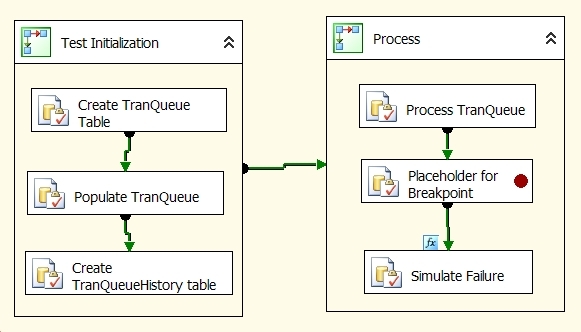
The Test Initialization sequence container is used to create a test environment. Two tables are created (TranQueue and TranQueueHistory) and a row is inserted into TranQueue. This will allow us to simulate a process where the SSIS package processes a group of rows inside of a transaction. The TransactionOption setting for the Test Initialization sequence container is NotSupported since it only exists to create the test environment; i.e. we don't need any transaction support here which would rollback any successful steps in the event of a failure.
The Process sequence container has its TransactionOption set to Supported; since the package setting for TransactionOption is set to Required, a transaction is created at the package level and the container will join that transaction. Process TranQueue is an Execute SQL task that executes the following SQL command to simulate processing a group of rows in the TranQueue table:
DELETE TOP(10) dbo.TranQueue
OUTPUT DELETED.*
INTO dbo.TranQueueHistory
FROM dbo.TranQueue WITH (TABLOCKX)
The main points about this SQL command are:
- It deletes the first ten rows from the TranQueue table to simulate pulling them out for processing
- It uses the OUTPUT clause to insert the message column of each deleted row into the TranQueueHistory table to simulate processing has completed and history is being updated
- It uses the TABLOCKX table hint to lock the TranQueue table
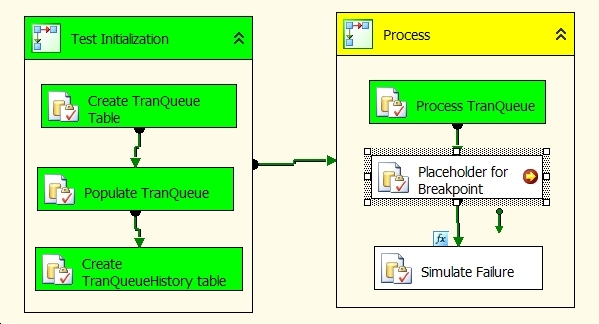
The Placeholder for Breakpoint Execute SQL task does not execute a command; it's there so we can set a breakpoint and run some queries while the package is running and the transaction is open (discussed below). The Simulate Failure Execute SQL task is executed if the package variable v_SimulateFailure = 1; it does a SELECT 1/0 to generate an error (i.e. a divide by zero) which will cause a rollback on the package transaction.
The above example is intentionally short just for demonstration purposes. You can certainly have multiple tasks in the Process sequence container, all of which would participate in the transaction, and either all succeed on none succeed (i.e. rollback on failure).
You can download the project containing the sample SSIS package here. The package is hard-coded to use a local database named mssqltips; create it if it doesn't exist. Open the project using SQL Server Business Intelligence Development Studio (BIDS) and double click on the package Transaction.dtsx. Follow these steps to see the transaction handling in an SSIS package:
- Make sure the value of the variable v_SimulateFailure = 1; this will demonstrate the rollback
- Make sure there is a breakpoint on the Placeholder for Breakpoint Execute SQL task
- Execute the package; your screen should look like this (stopping at the breakpoint):
- Open a new query window in SQL Server Management Studio, connect to the mssqltips database and execute the command below. You should see a single row result set; e.g. Test Message2008-09-08 14:22:31.043 (your date and time will be different of course). The NOLOCK hint ignores locks; the row you see is not committed yet.
SELECT * FROM dbo.TranQueueHistory WITH (NOLOCK)
- Open another new query window in SQL Server Management Studio, connect to the mssqltips database and execute the command below. You will be blocked waiting for the transaction executing in the SSIS package to either rollback or commit since we added the TABLOCKX hint which will keep the TranQueue table locked for the duration of the transaction. Alternatively you could issue an INSERT INTO the dbo.TranQueue table and you will see that it also is blocked until the transaction either commits or does a rollback.
SELECT * FROM dbo.TranQueue
- Click Continue in BIDS (or click Debug on the top-level menu then Continue) and you will see the package fail. Execute the SELECT statement above on the TranQueueHistory table again and you will see no rows; the select statement above on the TranQueue table will complete showing a single row. Thus the error caused the transaction to rollback. After the rollback the deleted row(s) in the TranQueue table are restored and the inserted row(s) in the TranQueueHistory table are not committed (i.e. they will disappear).
You can change the value of the v_SimulateFailure variable to 0 and run the package and queries above again to validate that the transaction commit works as we expect.
Next Steps
- Download the sample SSIS package here to experiment with transaction handling in SSIS.
- Check the Books on Line topic "Incorporating Transactions in Packages" for additional details on handling transactions in SSIS.






About the author
 Ray Barley is a Principal Architect at IT Resource Partners and a MSSQLTips.com BI Expert.
This author pledges the content of this article is based on professional experience and not AI generated.
View all my tips
