By: Ken Simmons | Comments (20) | Related: 1 | 2 | 3 | 4 | > Restore
Problem
There are a lot of scripts out there that will allow you to use the msdb to auto-generate restore scripts, but what if you cannot access the msdb database. What is the easiest way to make sure I have the proper restore scripts on hand without relying on the msdb database?
Solution
The best way to make sure you have the proper restore scripts when the time comes is to make use of PRINT statements and OUTPUT files. Every time your backup job runs, whether it is a Full or Log, place a step at the end of the job to read the new data from the msdb database and write it to an output file. I generally place the restore script in the root of my backup folders and make sure the script is backed up as well.
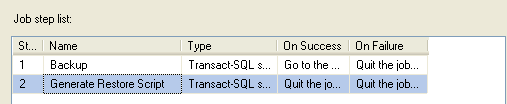
First, create a new SQL Agent Job step called "Generate Restore Script" at the end of your backup job and insert the script listed below.
SET NOCOUNT ON
DECLARE @databaseName sysname

CREATE TABLE #TmpCommands
(ID INT IDENTITY(1,1),
Cmd VARCHAR(8000) )

DECLARE dbnames_cursor CURSOR
FOR
   SELECT name
   FROM master..sysdatabases
   WHERE name NOT IN ( 'model','tempdb', 'pubs','northwind')
   AND (status & 32) =0         -- Do not include loading
   AND (status & 64) =0         -- Do not include loading
   AND (status & 128) =0        -- Do not include recovering
   AND (status & 256) =0        -- Do not include not recovered
   AND (status & 512) =0        -- Do not include offline
   AND (status & 32768) =0      -- Do not include emergency
   AND (status & 1073741824) =0 -- Do not include cleanly shutdown

OPEN dbnames_cursor

FETCH NEXT FROM dbnames_cursor INTO @databaseName
WHILE (@@FETCH_STATUS <> -1)
   BEGIN
   IF (@@FETCH_STATUS <> -2)
   BEGIN
      INSERT INTO #TmpCommands(Cmd)
      VALUES ('----------------Script to Restore the ' + @databaseName + ' Database--------------')

      DECLARE @backupStartDate datetime
      DECLARE @backup_set_id_start INT
      DECLARE @backup_set_id_end INT

      SELECT @backup_set_id_start = MAX(backup_set_id)
      FROM msdb.dbo.backupset
      WHERE database_name = @databaseName AND type = 'D'

      SELECT @backup_set_id_end = MIN(backup_set_id)
      FROM msdb.dbo.backupset
      WHERE database_name = @databaseName AND type = 'D'
      AND backup_set_id > @backup_set_id_start

      IF @backup_set_id_end IS NULL SET @backup_set_id_end = 999999999

      INSERT INTO #TmpCommands(Cmd)
      SELECT Cmd FROM(
      SELECT backup_set_id, 'RESTORE DATABASE ' + @databaseName + ' FROM DISK = '''
      + mf.physical_device_name + ''' WITH NORECOVERY --' Cmd
      FROM msdb.dbo.backupset b,
      msdb.dbo.backupmediafamily mf
      WHERE b.media_set_id = mf.media_set_id
      AND b.database_name = @databaseName
      AND b.backup_set_id = @backup_set_id_start
      UNION
      SELECT backup_set_id, 'RESTORE LOG ' + @databaseName + ' FROM DISK = '''
      + mf.physical_device_name + ''' WITH FILE = ' + CAST(position AS VARCHAR(10)) + ', NORECOVERY --' Cmd
      FROM msdb.dbo.backupset b,
      msdb.dbo.backupmediafamily mf
      WHERE b.media_set_id = mf.media_set_id
      AND b.database_name = @databaseName
      AND b.backup_set_id >= @backup_set_id_start AND b.backup_set_id < @backup_set_id_end
      AND b.type = 'L'
      UNION
      SELECT 999999999 AS backup_set_id, 'RESTORE DATABASE ' + @databaseName + ' WITH RECOVERY --' Cmd
      ) A
      ORDER BY backup_set_id
   END

   FETCH NEXT FROM dbnames_cursor INTO @DatabaseName

END

CLOSE dbnames_cursor
DEALLOCATE dbnames_cursor

DECLARE @PrintCommand VARCHAR(8000)

DECLARE Print_cursor CURSOR
FOR
   SELECT Cmd FROM #TmpCommands
   ORDER BY ID

OPEN Print_cursor

FETCH NEXT FROM Print_cursor INTO @PrintCommand
WHILE (@@FETCH_STATUS <> -1)
   BEGIN
   IF (@@FETCH_STATUS <> -2)
      BEGIN
         PRINT @PrintCommand
   END

   FETCH NEXT FROM Print_cursor INTO @PrintCommand
END

CLOSE Print_cursor
DEALLOCATE Print_cursor

DROP TABLE #TmpCommands
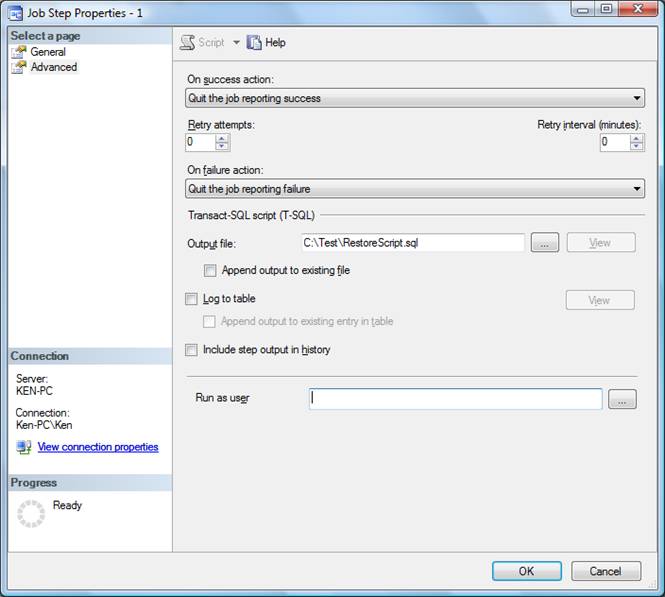
Next, go to the Advanced Tab of the Job Step and enter a destination for the Output File as shown below.
Here is sample of what the output looks like:
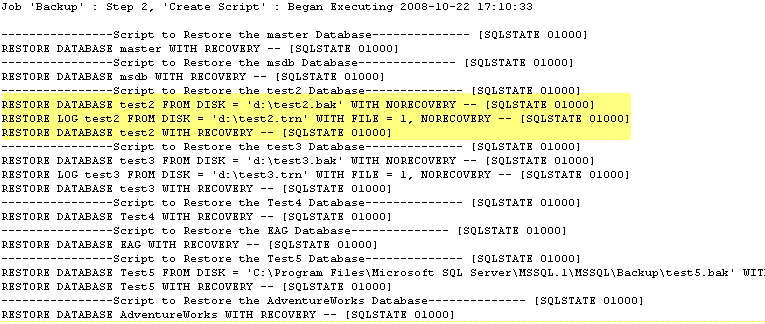
So if I want to restore the "test2" database, I would just use the three lines highlighted above.
That's all there is to it. The next time your backup runs it will generate a script in the output file that can be used to restore any of the databases for the instance. Since the script runs when the backup runs, you will always have a current restore script on hand.
Next Steps
- Review this tip to get a better understanding of how the restore script works.
- Test your restore scripts. No matter how automated you make things, make sure you do not get a false sense of security when it comes to restoring your databases. There is no substitution for manually testing your restore process.






About the author
 Ken Simmons is a database administrator, developer, SQL Server book author and Microsoft SQL Server MVP.
This author pledges the content of this article is based on professional experience and not AI generated.
View all my tips
