Free SQL Server Learning - Making the most out of SQL Server Agent
solving sql server problems for millions of dbas and developers since 2006


SQL Server DBA Tips SQL Server Developer Tips SQL Server Business Intelligence Tips SQL Server Career Tips SQL Server Tip Categories SQL Server Tutorials SQL Server Webcasts SQL Server Whitepapers SQL Server Tools SQL Server Questions and Answers MSSQLTips Authors About MSSQLTips SQL Server User Groups SQL Server Events I am MSSQLTips MSSQLTips Advertising Options

MSSQLTips Facebook Page MSSQLTips LinkedIn Page MSSQLTips RSS Feed MSSQLTips Pinterest Page MSSQLTips Twitter Page MSSQLTips Google+ Page


Script to build a SQL Server Data Dictionary and report with Microsoft Excel

By:   |   Read Comments (11)   |   Related Tips: More > Database Design

Problem
In an earlier tip (Building a SQL Server Data Dictionary with the Extended Properties and Third Party Tools) I outlined the value of using the extended properties across some of the industry leading data modeling tools.  What if I do not have access to any of those tools?  Is it possible to build the extended properties and then be able to generate reports by using Excel or Reporting Services?  How can I capture the data dictionary at a point in time?

Solution
That is a great question.  The easiest way to solve this problem is capture the values from the extended properties into physical table so that you can easily export the data by using Microsoft Excel, Reporting Services or any other reporting tool.


To start the process you need do deploy the store procedure dbo.sp_get_extendedproperty outlined below. 

[dbo].[sp_get_extendedproperty]

USE [master]
GO
CREATE PROCEDURE [dbo].[sp_get_extendedproperty]
@databasename varchar(128) = NULL
as

BEGIN
SET NOCOUNT ON
SET TRANSACTION ISOLATION LEVEL READ UNCOMMITTED


IF @databasename IS NULL
SET @databasename = db_name()

DECLARE @sqltext nvarchar(4000)

IF object_id(N'tempdb.dbo.##temp___DataDictionary') IS NOT NULL
DROP TABLE ##temp___DataDictionary

IF object_id(N'tempdb.dbo.##temp___DataDictionary_schema') IS NOT NULL
DROP TABLE ##temp___DataDictionary_schema


CREATE TABLE ##temp___DataDictionary(
[tableschema] varchar(128) NULL,
[tablename] varchar(128) NULL,
[columnname] varchar(128) NULL,
[xtype] varchar(8) NULL,
[description] nvarchar(4000) NULL
)

CREATE TABLE ##temp___DataDictionary_schema(
[tableschema] varchar(128),
[tablename] varchar(128) NULL,
)

-- Deploy Database Property
SET @sqltext = 'INSERT INTO ##temp___DataDictionary ([description], [xtype]) SELECT cast(value as nvarchar(4000)), ''D'' FROM '
+ @databasename + '.sys.fn_listextendedproperty(default, default, default, default, default, default, default)'

EXECUTE (@sqltext)

-- Get table level data dictionary

SET @sqltext = 'INSERT INTO ##temp___DataDictionary_schema SELECT DISTINCT TABLE_SCHEMA, TABLE_NAME FROM '
+ @databasename + '.INFORMATION_SCHEMA.TABLES'
EXECUTE(@sqltext)

DECLARE table_cursor CURSOR FOR
SELECT DISTINCT [tableschema] FROM ##temp___DataDictionary_schema

DECLARE @TABLE_SCHEMA VARCHAR(128)

OPEN table_cursor
FETCH NEXT FROM table_cursor INTO @TABLE_SCHEMA

WHILE @@FETCH_STATUS = 0
BEGIN

SET @sqltext = 'INSERT INTO ##temp___DataDictionary ([tableschema], [tablename],[description], [xtype]) SELECT '
+ '''' + @TABLE_SCHEMA + '''' + + ', objname, cast(value as nvarchar(4000)), ''U'' FROM '
+ @databasename + '.sys.fn_listextendedproperty (NULL, ''schema'', '
+ '''' + @TABLE_SCHEMA + ''''+ ', ''table'', default, NULL, NULL)'

EXECUTE(@sqltext)

FETCH NEXT FROM table_cursor INTO @TABLE_SCHEMA
END

CLOSE table_cursor
DEALLOCATE table_cursor

CREATE TABLE ##temp___DataDictionary_keys(
[tableschema] varchar(128) NULL,
[tablename] varchar(128) NULL,
[columnname] varchar(128) NULL,
[xtype] varchar(8) NULL
)

-- Populate all the key types
SET @sqltext = 'INSERT INTO ##temp___DataDictionary_keys SELECT U.TABLE_SCHEMA,U.TABLE_NAME, U.COLUMN_NAME, xtype '
+ 'FROM ' + @databasename + '.INFORMATION_SCHEMA.CONSTRAINT_COLUMN_USAGE U '
+ 'JOIN ' + @databasename + '.sys.sysobjects O ON U.CONSTRAINT_NAME = O.name WHERE O.xtype in (''F'',''PK'')'
EXECUTE(@sqltext)

-- Get column level
DECLARE @TABLE_NAME varchar(128)

DECLARE column_cursor CURSOR FAST_FORWARD FOR
SELECT [tableschema], [tablename] FROM ##temp___DataDictionary_schema

OPEN column_cursor
FETCH NEXT FROM column_cursor INTO @TABLE_SCHEMA, @TABLE_NAME

WHILE @@FETCH_STATUS = 0
BEGIN
-- display all columns under MyTable
SET @sqltext = 'INSERT INTO ##temp___DataDictionary ([tableschema], [tablename],[columnname], [description]) SELECT '
+ '''' + @TABLE_SCHEMA + '''' + ','
+ '''' + @TABLE_NAME + '''' + ', objname, cast(value as nvarchar(4000))'
+ ' FROM ' + @databasename + '.sys.fn_listextendedproperty (NULL, ''schema'', '
+ '''' + @TABLE_SCHEMA + '''' + ', ''table'', '
+ '''' + @TABLE_NAME + '''' + ', ''column'', default)'

EXECUTE(@sqltext)

FETCH NEXT FROM column_cursor INTO @TABLE_SCHEMA, @TABLE_NAME
END

CLOSE column_cursor
DEALLOCATE column_cursor

UPDATE D
SET D.[xtype] = K.[xtype]
FROM ##temp___DataDictionary D JOIN ##temp___DataDictionary_keys K
ON D.tableschema = K.tableschema AND D.tablename = K.tablename AND D.columnname = K.columnname

SELECT @@servername as servername,@databasename as dbname,tableschema,tablename,columnname,[xtype],[description]
FROM ##temp___DataDictionary
ORDER BY @@servername ,dbname,tableschema,tablename,columnname,[xtype] asc

DROP TABLE ##temp___DataDictionary

DROP TABLE ##temp___DataDictionary_keys

END

Second, you need to create a database and table to store the data for reporting purposes.  For this tip, I have created a database called 'DBA' and a table called 'DataDictionary' to store the final data for reporting purposes.

-- Create DBA Database
CREATE DATABASE DBA
GO

USE DBA
-- Create Table
CREATE TABLE [dbo].[DataDictionary](
[sqlinstance] [varchar](128) NOT NULL,
[databasename] [varchar](128) NOT NULL,
[tableschema] [varchar](128) NULL,
[tablename] [varchar](128) NULL,
[columnname] [varchar](128) NULL,
[xtype] [varchar](8) NULL,
[description] [nvarchar](4000) NULL
)

Third, let's run the stored procedure to populate the table with the data from the "AdventureWorks2008" database for this sample.

INSERT INTO DBA.dbo.[DataDictionary] exec sp_get_extendedproperty 'AdventureWorks2008'

Now, you can use one of the well known Microsoft SQL Server system store procedures 'sp_MSforeachdb' to populate the table from each of the databases.

TRUNCATE TABLE DBA.dbo.[DataDictionary]
EXEC master.sys.sp_MSforeachdb 'INSERT INTO DBA.dbo.[DataDictionary] exec sp_get_extendedproperty "?"'

Now, if you issue a simple select statement against the [dbo].[DataDictionary] table, you will see results like this:
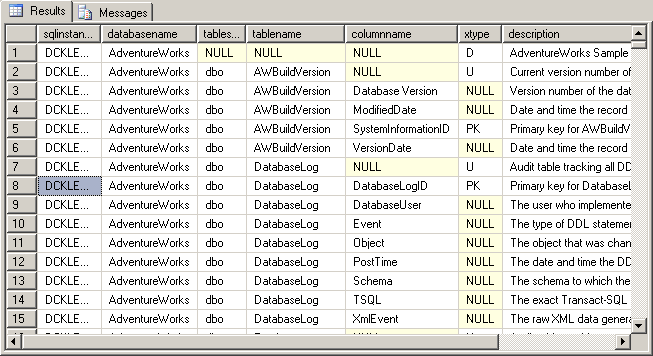

Now, you just need to report on the data from the [dbo].[DataDictionary] table.  Check out the tips below to report on the data from Excel, Reporting Service, Access, etc.

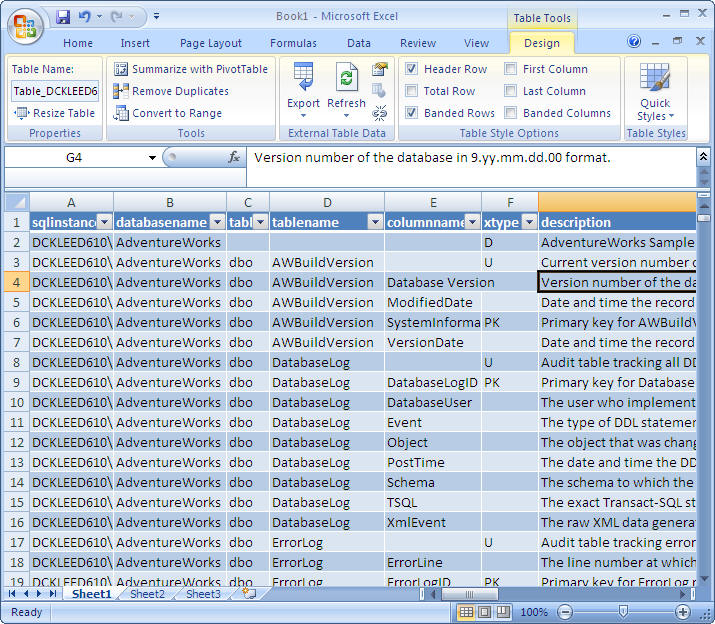
Here is a sample result set in Excel:


So, now you have it.  Wasn't that easy to manage?  Here is another reason to use Extended Properties to build a Data Dictionary.

Next Steps

  • Keep in mind how easy it is to build and use the Extended Properties to build a Data Dictionary and leverage third party tools or your own solution.
  • If you build your own solution, you can setup Reporting Services or Excel to extract the data dictionary and share it with users.
  • If you have a lot of servers, I would consider writing an SSIS package to pull the data from all the server into one repository.  In the table used in this tip, that is the reason I included the SQL instance name.
  • If you want to force SQL Server Developer to force to fill out data dictionary, you can also modify the query and write an alert based on missing data dictionary values and send the report to the application owner to update the data dictionary.



Last Update: 12/2/2008

About the author

Kun is a database administrator and his areas of interest are database administration, architecture, data modeling and development.

View all my tips


Print  
Become a paid author


Comments and Feedback:

Tuesday, December 02, 2008 - 12:10:09 PM - CalleM Read The Tip

That is great. I just run the scripts. But the command

INSERT INTO DBA.dbo.[DataDictionary] exec sp_get_extendedproperty 'myDatabase'

only created 5 rows for my database with about 50 tables and hundreds of fields.
It just took three tables and there 1 or 2 fields.

The scripts all seem to run ok.

What is wrong?

Thanks

Calle


Thursday, December 04, 2008 - 1:46:00 AM - CalleM Read The Tip

That was my fault - it runs ok now.

But how can I store additionally type and length of the fields in the DataDictionary table ? 

Regards


Thursday, December 04, 2008 - 2:55:38 PM - kunsikl@gmail.com Read The Tip

That is great. Sorry about late response. Regarding data type and lengh, I was planning to add those but never had chance to add to it. When I get a chance, I will update here.

 Regards,

Kun


Thursday, December 04, 2008 - 3:21:20 PM - tosc Read The Tip

Good Job.


Friday, December 05, 2008 - 8:01:25 AM - kunsikl@gmail.com Read The Tip
thank you:)

Tuesday, December 09, 2008 - 2:46:40 PM - karunadave Read The Tip

I use an Excel based modelling tool created by Ralph Kimball's group in their Microsoft DW book (available here http://www.rkimball.com/html/booksMDWTtools.html), which makes extensive use of Extended properties for metadata.  11 kinds of Extended property for columns, 6 kinds for tables, for example table metadata extended property 'names' are:

'Display Name'
'Table Description'
'Table Name'
'Table Type'
'Used In Models'
'View Name' 


 To surface this in Reporting Services, here are two queries, one for table metadata and one for column metadata.

/*
Query all column metadata in a database
  */
SELECT
  t.name AS [Table Name]
  ,c.name AS [Column Name]
  ,MAX(y.name) as [Data Type]
  ,MAX(c.max_length) AS [Max Length]
  ,MAX(CASE WHEN c.is_nullable = 0                           THEN 'NOT NULL' ELSE 'NULL' END) AS [Is Nullable]
  ,MAX(CASE WHEN ep.name = 'Example Values'                  THEN ep.value ELSE NULL END) AS [Example Values]
  ,MAX(CASE WHEN ep.name = 'Description'                     THEN ep.value ELSE NULL END) AS [Description]
  ,MAX(CASE WHEN ep.name = 'FK To'                           THEN ep.value ELSE NULL END) AS [FK To]
  ,MAX(CASE WHEN ep.name = 'Comments'                        THEN ep.value ELSE NULL END) AS [Comments]
  ,MAX(CASE WHEN ep.name = 'Display Name'                    THEN ep.value ELSE NULL END) AS [Display Name]
  ,MAX(CASE WHEN ep.name = 'Source Table'                    THEN ep.value ELSE NULL END) AS [Source Table]
  ,MAX(CASE WHEN ep.name = 'Source Schema'                   THEN ep.value ELSE NULL END) AS [Source Schema]
  ,MAX(CASE WHEN ep.name = 'ETL Rules'                       THEN ep.value ELSE NULL END) AS [ETL Rules]
  ,MAX(CASE WHEN ep.name = 'SCD  Type'                       THEN ep.value ELSE NULL END) AS [SCD  Type]
  ,MAX(CASE WHEN ep.name = 'Source Field Name'               THEN ep.value ELSE NULL END) AS [Source Field Name]
  ,MAX(CASE WHEN ep.name = 'Source System'                   THEN ep.value ELSE NULL END) AS [Source System]
  ,MAX(CASE WHEN ep.name = 'Extraction Transformation Rules' THEN ep.value ELSE NULL END) AS [Extraction Transformation Rules]
FROM sys.extended_properties AS ep
INNER JOIN sys.tables AS t ON ep.major_id = t.object_id
INNER JOIN sys.columns AS c ON ep.major_id = c.object_id AND ep.minor_id = c.column_id
INNER JOIN sys.types AS y on c.system_type_id = y.system_type_id
WHERE class = 1
  AND minor_id <> 0
GROUP BY
  t.name
  ,c.name
ORDER BY
  t.name
  ,c.name
;
GO

/*
Query all table column extended property metadata in a database
  */
SELECT
  (t.name) AS [Table Name]
  ,MAX(CASE WHEN ep.name = 'Display Name'      THEN ep.value ELSE NULL END) AS [Display Name]
  ,MAX(CASE WHEN ep.name = 'Table Description' THEN ep.value ELSE NULL END) AS [Table Description]
  ,MAX(CASE WHEN ep.name = 'Table Name'        THEN ep.value ELSE NULL END) AS [Table Name]
  ,MAX(CASE WHEN ep.name = 'Table Type'        THEN ep.value ELSE NULL END) AS [Table Type]
  ,MAX(CASE WHEN ep.name = 'Used In Models'    THEN ep.value ELSE NULL END) AS [Used In Models]
  ,MAX(CASE WHEN ep.name = 'View Name'         THEN ep.value ELSE NULL END) AS [View Name]
FROM sys.extended_properties AS ep
INNER JOIN sys.tables AS t ON ep.major_id = t.object_id
WHERE class = 1
  AND minor_id = 0
GROUP BY
  t.name
ORDER BY t.name
  ;
GO


Thursday, February 17, 2011 - 4:27:11 AM - Wally Read The Tip

This script doesn't handle all of my SQL Server object names.  It chokes on $, % in object names, which I inherited from a previous database.


------------------------------------------------------

INSERT INTO DBA.dbo.[DataDictionary] exec sp_get_extendedproperty 'dbExcel'


Msg 102, Level 15, State 1, Line 1

Incorrect syntax near '&'.

Msg 102, Level 15, State 1, Line 1

Incorrect syntax near '&'.

Msg 102, Level 15, State 1, Line 1

Incorrect syntax near ''.

Msg 102, Level 15, State 1, Line 1

Incorrect syntax near '_xlnm#Print_Area'.

Msg 102, Level 15, State 1, Line 1

Incorrect syntax near 'FTE$'.

Msg 102, Level 15, State 1, Line 1

Incorrect syntax near 'FTE$'.

Msg 102, Level 15, State 1, Line 1

Incorrect syntax near 'Qs$'.

Msg 102, Level 15, State 1, Line 1

Incorrect syntax near 'Qs$'.


Tuesday, February 22, 2011 - 8:13:14 AM - Kun Lee Read The Tip

Hi,

Could you do me a favor? Could you post a script to generate table with extended property that I can simulate the problem? Lost like I need to add blacket but I want to make sure I can double check. I am asking because I have a few tables with special charactors and those are fine so I want to make sure I reproduct correctly first.

thank you,

Kun


Thursday, August 11, 2011 - 7:00:03 AM - Hugo Durana Read The Tip
Hello there Kun
 
In your next steps, you mention the below bullet point.
  • If you want to force SQL Server Developer to force to fill out data dictionary, you can also modify the query and write an alert based on missing data dictionary values and send the report to the application owner to update the data dictionary.

Since i am a web developer / db developer / front-end... well, a jack-of-all-trades, how could i write such a report?
 
Best regards,
Hugo

Tuesday, September 20, 2011 - 10:34:00 AM - Karl Olson Read The Tip

Many thanks, great article


Wednesday, October 05, 2011 - 8:33:34 AM - Jason Yousef Read The Tip

Great article and script, I know it's intended for DBA use, and thus every DBA will have sa or permission account, but how can you execute it on a remote server, if you don't have permission to create the SP? the only way is to copy the DB locally and run it on it?


Post a Comment or Question

Keep it clean and stay on the subject or we may delete your comment.
Your email address is not published. Required fields are marked with an asterisk (*)

*Name   *Email Notify for updates

Signup for our newsletter


Comments
*Enter Code refresh code


Sponsor Information
Find and fix SQL Server problems before they happen - SQL diagnostic manager now with predictive analysis!

SQL Monitor: prioritize your SQL Server workload with easy-to-use performance monitoring

Wish your SQL Servers could run wide open? Learn how the Edgewood SQL Server Consultants can make it happen.

Spring Clean Your Data - Clean your global contact data with Melissa Data tools for SSIS. Download a free trial!

Optimizing SQL Server performance can be a daunting task. Or is it?


Copyright (c) 2006-2013 Edgewood Solutions, LLC All rights reserved
privacy | disclaimer | copyright | advertise | about
authors | contribute | feedback | giveaways | user groups
Some names and products listed are the registered trademarks of their respective owners.


Edgewood Solutions LLC | MSSharePointTips.com | MSSQLTips.com