By: Tim Ford | Comments (4) | Related: 1 | 2 | 3 | 4 | 5 | 6 | 7 | 8 | 9 | > JOIN Tables
Problem
Recently I had to create a SQL Server instance with a non-standard collation (or as the vendor that created the database solution we were implementing called it "non-default", which gave me a chuckle that they were arguing the matter.) Now that the collation for the instance is Latin1_General_BIN none of my managerial scripts are working. This is causing a great deal of difficulties in our standardized maintenance jobs we've created for such items as backups, statistics updates, and indexing rebuilds and reorganizations. Is there an easy way to resolve collation issues when the server collation is different than the collation on one or more of the user databases on an instance?
Solution
It sounds as though you have a similar process for customizing maintenance tasks as I do. Most DBAs realize that the built in Maintenance Plans within SQL Server are good for the beginning Junior DBA or the "Mom-and-Pop" shops that don't have an IT department, but for enterprise systems, they simply do not hold up. We too have a system for maintenance tasks that rely on a user database for storing exception information; which databases shouldn't I backup, run indexing maintenance on, so-on-and-so-forth. I compare the contents of these "ignore tables" as I refer to them against the sys.databases system catalog table and then only apply the maintenance process to the database names list that result from the sub query of the two objects. Let's take a quick look at my scenario. Given the following environmental conditions:
The SQL instance in question has the following databases:
SELECT [name]
FROM sys.databases
ORDER BY [name]
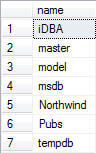
And the records for the iDBA.backupBOT.ignore_databases table look like this:
SELECT [name]
FROM iDBA.backupBOT.ignore
ORDER BY [name]

The simple query below will provide a listing of the databases that will be backed up by the process I use on my SQL Server 2005 instances:
SELECT SD.name
FROM master.sys.databases SD
WHERE [name] NOT IN
   (
   SELECT database_nm
   FROM iDBA.backupBOT.ignore_databases
   )

This is of course only the case where the collations between the system databases and the iDBA database are compatible. However, what happens when you have a situation like what you're experiencing? I've taken the time to create a new SQL Server instance with a collation of Latin1_General_BIN. I've also restored a copy of my iDBA database to this instance. A simple query against sys.databases gives some insight into the collation situation on the instance:
SELECT [name], [collation_name]
FROM [master].sys.databases
WHERE [name] = 'master' OR [name] = 'iDBA'
ORDER BY [name]
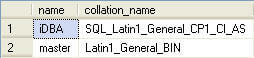
We'll proceed by running the same query that produced results for listing the names of databases to backup as we did on our other SQL Server instance. However this time we'll get an error that probably looks familiar to you now at this point:
SELECT SD.name
FROM master.sys.databases SD
WHERE [name] NOT IN
   (
   SELECT database_nm
   FROM iDBA.backupBOT.ignore_databases
   )
Msg 468,
Level 16, State 9, Line 2
Cannot resolve the collation conflict between "SQL_Latin1_General_CP1_CI_AS"
and "Latin1_General_BIN" in the equal to operation.
What proves to be interesting is that I can convert the collation of the iDBA database to match the instance collation and still receive the same error:
ALTER DATABASE iDBA
COLLATE Latin1_General_BIN

SELECT [name], [collation_name]
FROM [master].sys.databases
WHERE [name] = 'master' OR [name] = 'iDBA'
ORDER BY [name]
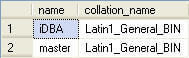
SELECT SD.name
FROM master.sys.databases SD
WHERE [name] NOT IN
   (
   SELECT database_nm
   FROM iDBA.backupBOT.ignore_databases
   )
Msg 468,
Level 16, State 9, Line 2
Cannot resolve the collation conflict between "SQL_Latin1_General_CP1_CI_AS"
and "Latin1_General_BIN" in the equal to operation.
Furthermore I have tested out a process by which I create a new database, using the server collation of SQL_Latin1_BIN; then using the SELECT...INTO code structure, create the ignore_databases table and populate it from iDBA (using the incompatible collation). We still receive a error due to collation conflict:
CREATE DATABASE [iDBA2] ON  PRIMARY
   (NAME = N'iDBA2', FILENAME = N'D:\Data\iDBA2.mdf' , SIZE = 5MB , FILEGROWTH = 5MB    )
   LOG ON
   (NAME = N'iDBA2_log', FILENAME = N'E:\Logs\iDBA2_log.ldf' , SIZE = 3MB , FILEGROWTH = 3MB)
GO

USE [iDBA2]
GO
CREATE SCHEMA backup_BOT AUTHORIZATION dbo;

SELECT database_nm INTO iDBA2.[backupBOT].ignore_databases
FROM iDBA.[backupBOT].ignore_databases;

SELECT [name], [collation_name]
FROM [master].sys.databases
WHERE [name] = 'master' OR [name] = 'iDBA'
ORDER BY [name]
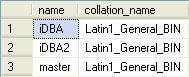
SELECT SD.name
FROM master.sys.databases SD
WHERE [name] NOT IN
   (
   SELECT database_nm
   FROM iDBA.backupBOT.ignore_databases
   )
Msg 468,
Level 16, State 9, Line 2
Cannot resolve the collation conflict between "SQL_Latin1_General_CP1_CI_AS"
and "Latin1_General_BIN" in the equal to operation.
Finally, there are two solutions to this problem. The first involves a new database, creation of new database objects and population of the database tables in question with new data that matches the existing data in your other, non-compatible collation databases:
CREATE DATABASE [iDBA3] ON  PRIMARY
   (NAME = N'iDBA3', FILENAME = N'D:\Data\iDBA3.mdf' , SIZE = 5MB , FILEGROWTH = 5MB    )
   LOG ON
   (NAME = N'iDBA3_log', FILENAME = N'E:\Logs\iDBA3_log.ldf' , SIZE = 3MB , FILEGROWTH = 3MB)
GO

USE [iDBA3]
GO

CREATE SCHEMA backup_BOT AUTHORIZATION dbo;
CREATE TABLE [backupBOT].[ignore_databases]([database_nm] VARCHAR(50) NOT NULL) ON [PRIMARY];

INSERT INTO [backupBOT].[ignore_databases] (database_nm) VALUES ('tempdb');
INSERT INTO [backupBOT].[ignore_databases] (database_nm) VALUES ('iDBA');
INSERT INTO [backupBOT].[ignore_databases] (database_nm) VALUES ('Northwind');
INSERT INTO [backupBOT].[ignore_databases] (database_nm) VALUES ('pubs');
I can then run either of the following queries to obtain the correct results:
SELECT SD.name
FROM master.sys.databases SD
WHERE [name] NOT IN
   (
   SELECT database_nm
   FROM iDBA.backupBOT.ignore_databases
   )

--or

SELECT SD.name
FROM master.sys.databases SD LEFT JOIN iDBA3.backupBOT.ignore_databases ID ON SD.NAME = ID.database_nm
WHERE ID.[database_nm] IS NULL
will now yield the following results.
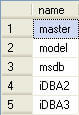
As I said, there are two options. This first option is quite a pain: creation of a new database, creation of new objects, manually inputting new values? That is ridiculous and there must be a better way. In fact, there is. It requires use of the COLLATE keyword. The COLLATE keyword, in the context of a SELECT statement, allows you to cast the collation of a column just as you would use CAST function to alter the implied data type of a column. The following query casts the output for the [name] column into the Latin1_General_BIN collation so it can then be compared to the values in sys.databases.
SELECT SD.name
FROM master.sys.databases SD
WHERE [name] NOT IN
   (
   SELECT database_nm COLLATE Latin1_General_BIN
   FROM iDBA.backupBOT.ignore_databases
   )
This process requires no additional objects or databases to be created. Furthermore all you are changing in the initial SELECT statement is the addition of the COLLATE keyword and collation name. It is a very lightweight (and quick) change that has your administrative functions running as expected in no time.
Next Steps






About the author
 Tim Ford is a Senior Database Administrator with MindBody.
This author pledges the content of this article is based on professional experience and not AI generated.
View all my tips
