By: Armando Prato | Comments (2) | Related: > Backup
Problem
In one of your recent tips, you mention that SQL Server keeps a history of all backups and restores that have been made in the system. Our organization performs backups and restores frequently and I've noticed our msdb database is very large because of this. How can I purge some of this data and free some database space?
Solution
As mentioned in this tip, SQL Server keeps records of backup and restore activity in system tables within the msdb database. Without regular maintenance, these system tables can grow to very large sizes leading to a large overall size for the msdb database.
These msdb tables include:
- backupfile
- backupfilegroup
- backupmediafamily
- backupmediaset
- backupset
- restorefile
- restorefilegroup
- restorehistory
Luckily, Microsoft provides two system stored procedures that you can use to trim the size of the msdb database tables that hold this data. The first procedure deletes all backup and restore history older than a provided date. The 2nd procedure allows you to delete all backup and restore history for a specific database. Let's look at these in more detail.
On my system, looking at msdb tables backupset and restorehistory, I see the following database backups and restores that have been performed:
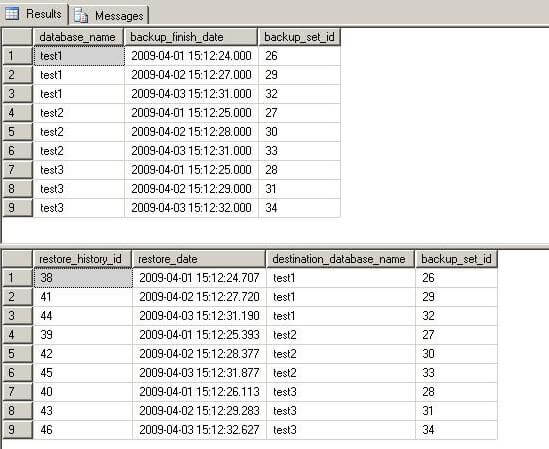
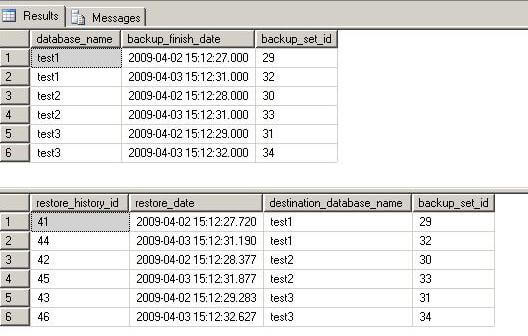
The first procedure that can be used is sp_delete_backuphistory. This system stored procedure takes a single parameter - a cutoff date. Any data older than the supplied date is purged from the msdb tables listed earlier in this tip. In the following example, I'll purge all data older than 4/2/2009.
-- delete all backup/restore history prior to a specified date
use msdb
go
exec sp_delete_backuphistory '2009-04-02'
go
Examining the tables again, we see that all backup history prior to 4/2/2009 has been purged with restorehistory tied to these entries being purged as well:
The 2nd system stored procedure allows you to delete historical backup data for a specific database and is called sp_delete_database_backuphistory. Unfortunately, this procedure does not offer the finer option of choosing a cutoff date; It's all or nothing. In the next example, I'll delete all backup history for a specific database.
-- delete all backup history for a specific database
use msdb
go
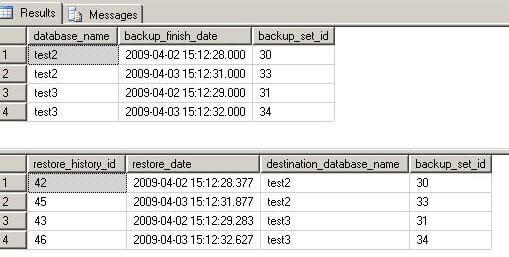
exec sp_delete_database_backuphistory 'test1'
go
As you can see, only history for the specified database has been purged:
Next Steps
- If you're concerned about the size of your msdb database, look at incorporating these system procedures as part of your routine database maintenance
- If you have a lot of data to purge and you want to use sp_delete_backuphistory look at purging in batches to minimize contention on the msdb tables
- Read this tip about analyzing and correcting a large SQL Server MSDB database
- Read more about sp_delete_backuphistory and sp_delete_database_backuphistory in the SQL Server Books Online
- Read SQL Server MVP Geoff Hiten's blog entry about adding indexes to the msdb database tables to efficiently support purges






About the author
 Armando Prato has close to 30 years of industry experience and has been working with SQL Server since version 6.5.
This author pledges the content of this article is based on professional experience and not AI generated.
View all my tips
