By: Divya Agrawal | Comments (9) | Related: 1 | 2 | 3 | 4 | 5 | 6 | More > Scripts
Problem
This article will help developers looking for a way to split delimited strings in a single query using XML. We generally use a user defined function to do this, which you have probably found in many places that splits the string based on the delimiter passed. But, when it comes to separating the string in a single query without any help of a user defined function there are not many options. I have found a much simpler and shorter way of splitting any string based on a delimiter. I will be using the power of XML to do the splitting of the string instead of a user defined function.
Solution
Let's say for example there is a string 'A,B,C,D,E' and I want to split it based on the delimiter ','.
The first step would be to convert that string into XML and replace the delimiter with some start and end XML tags.
DECLARE @xml as xml,@str as varchar(100),@delimiter as varchar(10)
SET @str='A,B,C,D,E'
SET @delimiter =','
SET @xml = cast(('<X>'+replace(@str,@delimiter ,'</X><X>')+'</X>') as xml)
SELECT @xml
Here is what this looks like after the delimiter ',' is replaced by </X><X> tags. When you see the output after converting the string into XML, you will be able to see the string as shown in the image below:

Once the string is converted into XML you can easily query that using XQuery
DECLARE @xml as xml,@str as varchar(100),@delimiter as varchar(10)
SET @str='A,B,C,D,E'
SET @delimiter =','
SET @xml = cast(('<X>'+replace(@str,@delimiter ,'</X><X>')+'</X>') as xml)
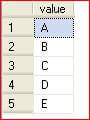
SELECT N.value('.', 'varchar(10)') as value FROM @xml.nodes('X') as T(N)
.This will give the output as a separated string as:
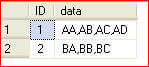
Now, say I have a table that has an ID column and comma separated string data as shown below.
DECLARE @t TABLE( ID INT IDENTITY, data VARCHAR(50))
INSERT INTO @t(data) SELECT 'AA,AB,AC,AD'
INSERT INTO @t(data) SELECT 'BA,BB,BC'
SELECT * F
I can use the method shown above to split the string.
DECLARE @t TABLE( ID INT IDENTITY, data VARCHAR(50))
INSERT INTO @t(data) SELECT 'AA,AB,AC,AD'
INSERT INTO @t(data) SELECT 'BA,BB,BC'
SELECT F1.id,
 F1.data,
 O.splitdata
FROM
 (
 SELECT *,
 cast('<X>'+replace(F.data,',','</X><X>')+'</X>' as XML) as xmlfilter from @t F
 )F1
 CROSS APPLY
 (
 SELECT fdata.D.value('.','varchar(50)') as splitdata
 FROM f1.xmlfilter.nodes('X') as fdata(D)) O
When the above is run this is the output we get:
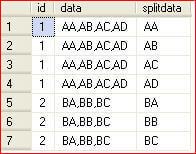
This is what is being done. First of all I cast the 'data' column of table @t into an XML data type by replacing the delimiter with starting and ending tags '<X></X>'.
I have used 'CROSS APPLY' for splitting the data. The APPLY clause lets you join a table to a table-valued-function. The APPLY clause acts like a JOIN without the ON clause and comes in two flavors: CROSS and OUTER.
- The OUTER APPLY clause returns all the rows on the left side (@t) whether they return any rows in the table-valued-function or not. The columns that the table-valued-function returns are null if no rows are returned.
- The CROSS APPLY only returns rows from the left side (@t) if the table-valued-function returns rows.
This tip hopefully shows you the power of XML and the use of 'CROSS APPLY'. There are other options to split strings in a single query using recursive CTEs, but we will save that for another tip.
Next Steps
- Now whenever splitting of string is required you can easily cast the string into XML, by replacing the delimiter with XML start and end tags and then use the method shown above to split the string.
- Take some time to get familiar with the XML features in SQL Server to see if you can simplify your processing.






About the author
 Divya Agrawal's bio is coming soon...
This author pledges the content of this article is based on professional experience and not AI generated.
View all my tips
