By: Tim Ford | Comments (20) | Related: 1 | 2 | 3 | 4 | 5 | 6 | 7 | More > Scripts
Problem
Just yesterday I had a colleague ask if I could help document all the columns in each table in one of our databases to share with a vendor working on an interface between that system and one the vendor developed for a different aspect of our business. This vendor needed to know the column names, max length, data type and whether a null value was acceptable for each of the columns in the database. He was planning on opening each table individually within Microsoft SQL Server Management Studio (SSMS) and then document each column individually within Microsoft Excel.
His thought: "there must be a better way!"
He was right. I offered up assistance and dug into the system catalog views that have been around since SQL Server 2005. These system views complement the system compatibility views which were a replacement for direct queries against the system tables in previous releases of Microsoft SQL Server up until SQL Server 2005. By tapping into the metadata exposed via these views, a very simple query provided everything that he needed to know.
Solution
The system catalog views used in this query are:
- sys.tables
- sys.all_columns
- sys.types
sys.tables provides one row for each table in a database. This does include user tables and system tables that exist in each database. There is a column within sys.tables: [is_ms_shipped] that identifies system tables. This allows you to filter your results to just user tables if you so desire without having to join to the sys.sysobject system compatibility view's type column (where sys.sysobjects.type = 'U') in order to do so.
sys.all_columns offers a row for each column for every object in a database. Many of the columns are shared with sys.types, and we pull most of the metadata from this view, but there is still one column lacking from our result set that we must pull from sys.types.
sys.types is the catalog view that stores rows relating to system and user-defined data types and their properties. The only field from this view we will need is the data type's name, as it is the only field in our desired result set we can't return from sys.all_columns as it pertains to column metadata.
Each of the catalog views are scoped at the database level, meaning that they exist in each database (system or user) on the SQL Server instance. Even sys.types, a catalog view you may expect to be the same across all databases on an instance is scoped at the database level. Why? Quite simply put, sys.types includes user-defined datatypes that are unique to a database. Database collation also has an impact on sys.types, therefore making native data types such as text, ntext, varchar(), char(), nvarchar(), nchar(), and sysname different between databases if their collations differ.
Because each of our system catalog views we're using is scoped to the database level I strongly suggest that you run it from within the context of the database you're attempting to document. The first example below does just that, returning all columns for all user tables in the database.
USE [Northwind];
SELECT OBJECT_SCHEMA_NAME(T.[object_id],DB_ID()) AS [Schema],
        T.[name] AS [table_name], AC.[name] AS [column_name],
        TY.[name] AS system_data_type, AC.[max_length],
        AC.[precision], AC.[scale], AC.[is_nullable], AC.[is_ansi_padded]
FROM sys.[tables] AS T
 INNER JOIN sys.[all_columns] AC ON T.[object_id] = AC.[object_id]
 INNER JOIN sys.[types] TY ON AC.[system_type_id] = TY.[system_type_id] AND AC.[user_type_id] = TY.[user_type_id]
WHERE T.[is_ms_shipped] = 0
ORDER BY T.[name], AC.[column_id]
Here is the output if you run this against the Northwind database.
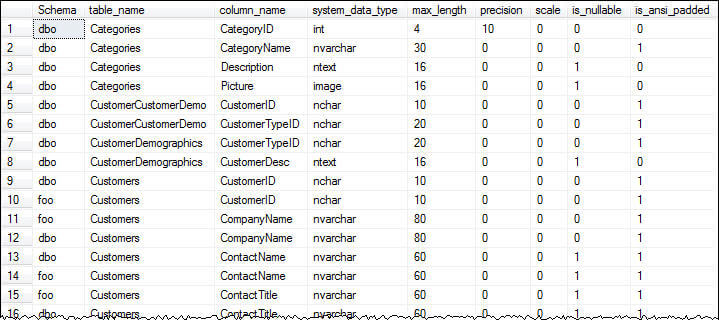
If, for some reason, you must run the query from a database context that is not the one you wish to document you can use the following code and still return the same results. As you can see you need to hardcode the database name. In this example the Northwind database is hardcoded for each of the system tables. It works, but not recommended.
USE [master];
SELECT OBJECT_SCHEMA_NAME(T.[object_id],DB_ID('Northwind')) AS [Schema],
        T.[name] AS [table_name], AC.[name] AS [column_name],
        TY.[name] AS system_data_type, AC.[max_length],
        AC.[precision], AC.[scale], AC.[is_nullable], AC.[is_ansi_padded]
FROM Northwind.sys.[tables] AS T
 INNER JOIN Northwind.sys.[all_columns] AC ON T.[object_id] = AC.[object_id]
 INNER JOIN Northwind.sys.[types] TY ON AC.[system_type_id] = TY.[system_type_id] AND AC.[user_type_id] = TY.[user_type_id]
WHERE T.[is_ms_shipped] = 0
ORDER BY T.[name], AC.[column_id]
As you can see you must use fully-qualified naming conventions for the objects and also supply the database name as a parameter for the DB_ID() function.
Using the first query I was able to return the results, drop them into an Excel spreadsheet, and provide them to the developer and his vendor contact to satisfy their needs without the manual work he was dreading that was to come.
Next Steps
- Need to determine which columns in your database include default values. If so, here is a previous tip to satisfy that need.
- You might ask yourself why not just use the INFORMATION_SCHEMA.COLUMNS system view to get this information. The simple answer is you can, but it combines information for both tables and views.
- Next tip in this series focuses on documentation of all index columns in your database. Stay tuned!






About the author
 Tim Ford is a Senior Database Administrator with MindBody.
This author pledges the content of this article is based on professional experience and not AI generated.
View all my tips
