By: Arshad Ali | Comments (6) | Related: > Indexing
Problem
SQL Server 2008 introduces Filtered Indexes which is an index with a WHERE clause. Doesn't it sound awesome especially for a table that has huge amount of data and you often select only a subset of that data? For example, you have a lot of NULL values in a column and you want to retrieve records with only non-NULL values (in SQL Server 2008, this is called Sparse Column). Or in another scenario you have several categories of data in a particular column, but you often retrieve data only for a particular category value.
In this tip, I am going to walk through what a Filtered Index is, how it differs from other indexes, its usage scenario, its benefits and limitations.
Solution
A Filtered Index, which is an optimized non-clustered index, allows us to define a filter predicate, a WHERE clause, while creating the index. The B-Tree containing rows from the filtered index will contain only those rows which satisfy the filter criteria used while creating the index. This optimized index offers several benefits over a full table non-clustered index as follows:
- As discussed above, the filtered index contains only those rows which satisfy the defined filter criteria. As a result it reduces the storage space requirement for the index. In the example below I will explain it more.
- The filtered statistics or statistics for a filtered index are more compact and accurate, because they consider only the rows in the filtered index and the smaller size of the filtered index reduces the cost/overhead of updating the statistics.
- The impact of data modification is less with a filtered index as it is updated only when the data of the index is impacted or a new record is inserted matching the filter criteria.
- Maintenance costs will be reduced as well since only a subset of rows will be in consideration while re-organizing or rebuilding the index.
- And most important, as it is an optimized non-clustered index, the query performance will improve if only a subset of data, which is covered by the filtered index criteria, is required.
How it differs from Indexed views
In prior versions of SQL Server, to get a similar benefit we had an option to use indexed views or partitioning the table. Though the approach of indexed view looks similar to a filtered index there are some significant differences between these two concepts, I have summarized some of them in the below table:
| Criteria | Filtered Index | Indexed Views |
|---|---|---|
| Only One Table | A Filtered Index is created on column(s) of a particular table. |
Index Views can be created on column(s) from multiple base tables. |
| Simple WHERE criteria | A Filtered Index can not use complex logic in its WHERE clause, for example the LIKE clause is not allowed, only simple comparison operators are allowed. | This limitation does not apply to indexed views and you can design your criteria as complex as you want. |
| Can do Online Rebuild | A Filtered Index can be rebuilt online. | Indexed views cannot be rebuilt online. |
| Non-Unique or Unique | You can create your Filtered Index as a non-unique index. | Indexed views can only be created as unique index. |
Usage Scenario
The benefit of using a filtered index is apparent in the scenario when you only select a subset of records from a huge table, for example I am providing some usage scenarios below where it will be of beneficial use:
- When you have mostly NULL values (this column can be defined as SPARSE column in SQL Server 2008 to save space required by NULL storage) and you normally pull rows with non-NULL values.
- When you have several categories of data (multiple domain range) in a single
column and often select rows for one or few categories. For example, let's consider
the State column in the CustomerAddress table and often you query customers
addresses by state. So you can create a filtered index on the State column for
StateA, StateB, StateC values. If you execute a query to pull data where State
= StateA, the filtered index where State = StateA will be used and so on.
Example
In Script #1, I am creating an Employee table which will have two columns HireDate and DOJ of data type DATE (a new data type in SQL Server 2008 to store only the date component). I am creating a full table non-clustered index on the HireDate column and a non-clustered filtered index on the DOJ column. Further I am adding 10,000 records into this table, the HireDate and DOJ columns will have 90% NULL values and only 10% NOT NULL values (both columns will have same data for demonstration purposes).
-- Script 1

-- Create Employee table with a clustered index on primary key
CREATE TABLE Employee
(
EmpID INT PRIMARY KEY CLUSTERED,
EmpName VARCHAR(100) NOT NULL,
HireDate DATE NULL, --DATE is a new data type in SQL Server 2008
DOJ DATE NULL, --DATE is a new data type in SQL Server 2008
)
GO
-- Creating a non clustered index on HireDate column
CREATE NONCLUSTERED INDEX NC_Employee_HireDate
ON Employee(HireDate)
GO
-- Creating a non clustered Filetered index on DOJ column
CREATE NONCLUSTERED INDEX FI_Employee_DOJ
ON Employee(DOJ)
WHERE DOJ IS NOT NULL --Notice here the filter criteria for the index
GO
DECLARE @intCounter INT = 1 --With SQL 2008, you can assign value in variable declaration as well
WHILE @intCounter <= 10000
BEGIN
IF (@intCounter % 100) = 0
BEGIN
INSERT INTO Employee(EmpID, EmpName, HireDate, DOJ)
VALUES (@intCounter, 'ABC' + CAST(@intCounter AS VARCHAR), CAST((GETDATE() - @intCounter) AS DATE)
, CAST((GETDATE() - @intCounter) AS DATE))
END
ELSE
BEGIN
INSERT INTO Employee(EmpID, EmpName, HireDate, DOJ)
VALUES (@intCounter, 'ABC' + CAST(@intCounter AS VARCHAR), NULL, NULL)
END
SET @intCounter = @intCounter + 1
END
Script #2 will show you, how the two columns of the same data type, having same amount of data need different amount of storage space for the full table non-clustered index vs the filtered non-clustered index. If you look closely at the image below, you will notice the filtered index has only 100 rows (only those rows matching the filter criteria) whereas the full table non clustered index has all rows of the table; in other words the filtered index contains only those rows which meet the filter criteria and since the filtered index contains only rows matching the filter criteria it requires less space (index pages) to store those records compared to the full table non-clustered index.
-- Script 2

SELECT ind.index_id, ind.name, ind.type_desc, par.reserved_page_count, par.used_page_count,
par.row_count, ind.filter_definition FROM sys.dm_db_partition_stats par
INNER JOIN sys.indexes ind ON par.object_id = ind.object_id AND par.index_id = ind.index_id
WHERE par.object_id = OBJECT_ID('Employee')
Query Result:

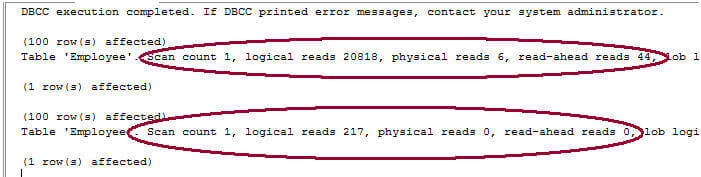
Script #3 will show you the performance benefits of using a filtered index. First it will execute a checkpoint and a DBCC DROPCLEANBUFFERS to flush the changes to disk and clear the buffers. Further, to see IO statistics I am setting STATISTICS IO to ON. The next two queries are the same except the index name is used as a query hint. The first query uses the query hint to instruct the Query optimizer to use the full table non-clustered index whereas the second query uses a query hint to instruct the Query optimizer to use the filtered index, by providing the index name as input to the index query hint.
If you look at the IO statistics result of these queries, you will notice that the query which uses the full table non-clustered index has high IO operations compared with the query which uses the filtered index. Further if you look at the execution plan for these queries, you will notice the first query (which uses the full table non-clustered index) has 93% relative query cost compared to only 7% for the second query (which uses the filtered index).
-- Script 3

CHECKPOINT
DBCC DROPCLEANBUFFERS -- It clears out the SQL Server buffer cache
GO
SET STATISTICS IO ON
SELECT * FROM Employee WITH(INDEX(NC_Employee_HireDate))
WHERE DOJ IS NOT NULL
SELECT * FROM Employee WITH(INDEX(FI_Employee_DOJ))
WHERE DOJ IS NOT NULL
SET STATISTICS IO OFF
IO Statistics result:
Execution Plan:
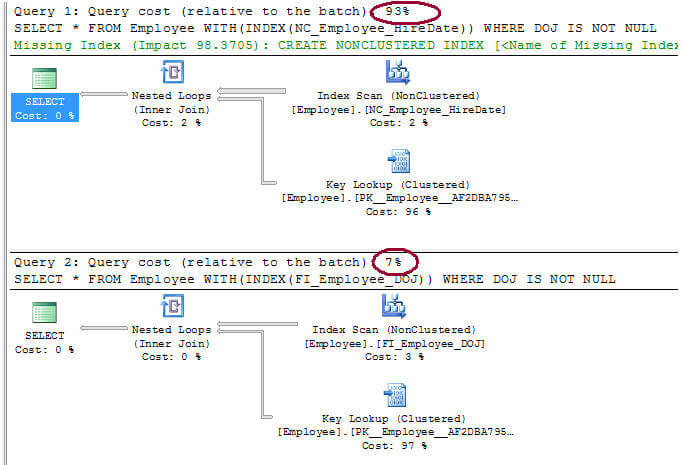
The execution plan generated for Script #3 above shows that both the queries use Key Lookups to pull additional columns requested in the SELECT statement which are not part of the indexes.
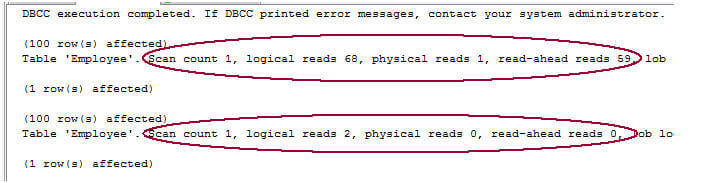
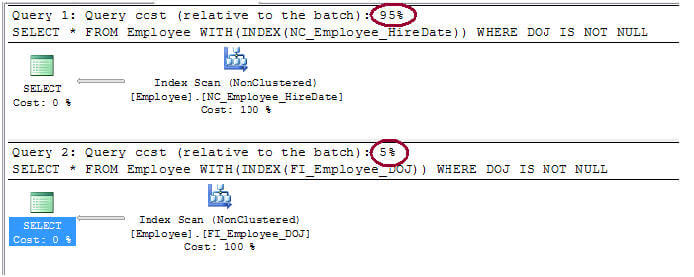
Script #4 shows you how you can INCLUDE additional columns in your index itself and improve the query performance if your index key does not have all the columns queried within the SELECT statement. First you need to drop the indexes we created above and recreate the indexes, as shown in Script #4, with the INCLUDE clause to include remaining columns (Please note, I am not including the primary key column, because the primary key is automatically included in all full table non-clustered and filtered indexes). Once you have created the indexes with the INCLUDE, run the next query scripts (same as Script #3) and observe the IO statistics results and execution plans. You will notice a significant improvement this time compared to the previous run without the INCLUDE option. The IO and CPU cost dramatically reduce with the inclusion of the additional columns in the index, though on the maintenance side of things it would be a bit costlier, so a trade-off is needed.
-- Script 4

-- Creating a non clustered index on DOJ column
CREATE NONCLUSTERED INDEX NC_Employee_HireDate
ON Employee(HireDate)
INCLUDE(EmpName, DOJ) --Including remaining columns in the index
GO
-- Creating a non clustered Filetered index on DOJ column
CREATE NONCLUSTERED INDEX FI_Employee_DOJ
ON Employee(DOJ)
INCLUDE(EmpName, HireDate) --Including remaining columns in the index
WHERE DOJ IS NOT NULL --Notice here the filter criteria for the index
GO
---------------------------------------------------------------------------------------
CHECKPOINT
DBCC DROPCLEANBUFFERS -- It clears out the SQL Server buffer cache
GO
SET STATISTICS IO ON
SELECT * FROM Employee WITH(INDEX(NC_Employee_HireDate))
WHERE DOJ IS NOT NULL
SELECT * FROM Employee WITH(INDEX(FI_Employee_DOJ))
WHERE DOJ IS NOT NULL
SET STATISTICS IO OFF
IO Statistics result:
Execution Plan:
Notes:
- You can create only a non-clustered filtered index, it means no clustered filtered index is allowed.
- Like with other indexes, you can use query hints to force the query optimizer to choose the filtered index.
- If the rows returned from the query are beyond the filtered index criteria, the optimizer will not use the filtered index. In this scenario, if you use a query hint to use the filtered index then in that case it will generate Error 8622.
- If the columns requested in the query are not in the filtered index, even in that case the optimizer may choose to use the filtered index. It uses key lookups to pull the remaining columns not available in the filtered index.
- You can INCLUDE columns with the filtered index similar to the way you do when creating other indexes
- A filtered index is beneficial in the scenario if the number of rows covered by the filter criteria is small compared to the total number of rows. If the covered rows include all the rows of a table, then in that case its better to use a regular non-clustered index.
Next Steps
- Review SQL Server 2008 Sparse Columns Identifying Columns For Conversion tip.
- Review Filtered Index Design Guidelines on MSDN.






About the author
 Arshad Ali is a SQL and BI Developer focusing on Data Warehousing projects for Microsoft.
This author pledges the content of this article is based on professional experience and not AI generated.
View all my tips
