By: Arshad Ali | Comments (17) | Related: 1 | 2 | 3 | 4 | 5 | 6 | > Backup
Problem
In my last set of tips, I discussed SMO at a basic level. In this tip I am going to provide examples to SQL Server Database Administrators on how to backup and restore SQL Server databases with SMO. I will start with how you can issue different types (Full, Differential and Log) of backups with SMO and how to restore them when required programmatically using SMO.
Solution
As I discussed in my last tip, SMO provides utility classes for specific tasks. For backup and restore, it provides two main utility classes (Backup and Restore) which are available in Microsoft.SqlServer.Management.Smo namespace.
Before you start writing SMO code, you need to reference several assemblies which contain the SMO namespaces. For more details on these assemblies and how properly to reference them in your code, refer to my tip Getting started with SQL Server Management Objects (SMO).C# Code Block 1 - Full Database Backup
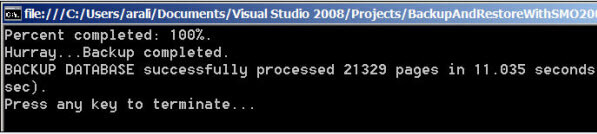
This example shows how to issue full database backups with SMO. First, create an instance of the Backup class and set the associated properties. With the Action property you can specify the type of backup such as full, files or log backup. With the Database property specify the name of the database being backed up. The device is the backup media type such as disk or tape, so you need to add a device (one or more) to the Devices collection of backup instance. With the BackupSetName and BackupSetDescription properties you can specify the name and description for the backup set. The Backup class also has a property called ExpirationDate which indicates how long backup data is considered valid and to expire the backup after that date. The backup object instance generates several events during the backup operation, we can write event-handlers for these events and wire them up with events. This is what I am doing for progress monitoring. I am wiring up CompletionStatusInPercent and Backup_Completed methods (event-handlers) with PercentComplete and Complete events of backup object instance. Finally, I am calling the SqlBackup method for starting up the backup operation, SMO provides a variant of this method called SqlBackupAsync if you want to start the backup operation asynchronously.
Backup bkpDBFull = new Backup();
/* Specify whether you want to back up database or files or log */
bkpDBFull.Action = BackupActionType.Database;
/* Specify the name of the database to back up */
bkpDBFull.Database = myDatabase.Name;
/* You can take backup on several media type (disk or tape), here I am
 * using File type and storing backup on the file system */
bkpDBFull.Devices.AddDevice(@"D:\AdventureWorksFull.bak", DeviceType.File);
bkpDBFull.BackupSetName = "Adventureworks database Backup";
bkpDBFull.BackupSetDescription = "Adventureworks database - Full Backup";
/* You can specify the expiration date for your backup data
 * after that date backup data would not be relevant */
bkpDBFull.ExpirationDate = DateTime.Today.AddDays(10);

/* You can specify Initialize = false (default) to create a new
 * backup set which will be appended as last backup set on the media. You
 * can specify Initialize = true to make the backup as first set on the
 * medium and to overwrite any other existing backup sets if the all the
 * backup sets have expired and specified backup set name matches with
 * the name on the medium */
bkpDBFull.Initialize = false;

/* Wiring up events for progress monitoring */
bkpDBFull.PercentComplete += CompletionStatusInPercent;
bkpDBFull.Complete += Backup_Completed;

/* SqlBackup method starts to take back up
 * You can also use SqlBackupAsync method to perform the backup
 * operation asynchronously */
bkpDBFull.SqlBackup(myServer);
private static void CompletionStatusInPercent(object sender, PercentCompleteEventArgs args)
{
    Console.Clear();
    Console.WriteLine("Percent completed: {0}%.", args.Percent);
}
private static void Backup_Completed(object sender, ServerMessageEventArgs args)
{
    Console.WriteLine("Hurray...Backup completed." );
    Console.WriteLine(args.Error.Message);
}
private static void Restore_Completed(object sender, ServerMessageEventArgs args)
{
    Console.WriteLine("Hurray...Restore completed.");
    Console.WriteLine(args.Error.Message);
}
Result:
C# Code Block 2 - Differential Database Backup
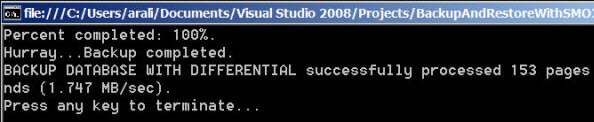
The process of issuing differential backups is not much different from issuing full backups. To issue a differential backup, set the property Incremental = true. If you set this property the incremental/differential backup will be taken since last full backup.
Backup bkpDBDifferential = new Backup();
/* Specify whether you want to backup database, files or log */
bkpDBDifferential.Action = BackupActionType.Database;
/* Specify the name of the database to backup */
bkpDBDifferential.Database = myDatabase.Name;
/* You can issue backups on several media types (disk or tape), here I am * using the File type and storing the backup on the file system */
bkpDBDifferential.Devices.AddDevice(@"D:\AdventureWorksDifferential.bak", DeviceType.File);
bkpDBDifferential.BackupSetName = "Adventureworks database Backup";
bkpDBDifferential.BackupSetDescription = "Adventureworks database - Differential Backup";
/* You can specify the expiration date for your backup data
 * after that date backup data would not be relevant */
bkpDBDifferential.ExpirationDate = DateTime.Today.AddDays(10);

/* You can specify Initialize = false (default) to create a new
 * backup set which will be appended as last backup set on the media.
 * You can specify Initialize = true to make the backup as the first set
 * on the medium and to overwrite any other existing backup sets if the
 * backup sets have expired and specified backup set name matches
 * with the name on the medium */
bkpDBDifferential.Initialize = false;

/* You can specify Incremental = false (default) to perform full backup
 * or Incremental = true to perform differential backup since most recent
 * full backup */
bkpDBDifferential.Incremental = true;

/* Wiring up events for progress monitoring */
bkpDBDifferential.PercentComplete += CompletionStatusInPercent;
bkpDBDifferential.Complete += Backup_Completed;

/* SqlBackup method starts to take back up
 * You cab also use SqlBackupAsync method to perform backup
 * operation asynchronously */
bkpDBDifferential.SqlBackup(myServer);
Result:
C# Code Block 3 Transaction Log Backups
Again the process of issuing transactional log backup is not much different from issuing full backups. To issue transactional log backups, set the property Action = BackupActionType.Log instead of BackupActionType.Database as in the case of a full backup.
Backup bkpDBLog = new Backup();
/* Specify whether you want to back up database or files or log */
bkpDBLog.Action = BackupActionType.Log;
/* Specify the name of the database to back up */
bkpDBLog.Database = myDatabase.Name;
/* You can take backup on several media type (disk or tape), here I am
 * using File type and storing backup on the file system */
bkpDBLog.Devices.AddDevice(@"D:\AdventureWorksLog.bak", DeviceType.File);
bkpDBLog.BackupSetName = "Adventureworks database Backup";
bkpDBLog.BackupSetDescription = "Adventureworks database - Log Backup";
/* You can specify the expiration date for your backup data
 * after that date backup data would not be relevant */
bkpDBLog.ExpirationDate = DateTime.Today.AddDays(10);

/* You can specify Initialize = false (default) to create a new
 * backup set which will be appended as last backup set on the media. You
 * can specify Initialize = true to make the backup as first set on the
 * medium and to overwrite any other existing backup sets if the all the
 * backup sets have expired and specified backup set name matches with
 * the name on the medium */
bkpDBLog.Initialize = false;

/* Wiring up events for progress monitoring */
bkpDBLog.PercentComplete += CompletionStatusInPercent;
bkpDBLog.Complete += Backup_Completed;

/* SqlBackup method starts to take back up
 * You cab also use SqlBackupAsync method to perform backup
 * operation asynchronously */
bkpDBLog.SqlBackup(myServer);
Result:

C# Code Block 4 Backup with Compression
SQL Server 2008 introduces a new feature to issues backups in a compressed form. As such, SMO for SQL Server 2008 has been enhanced to support this feature. If you look at the image below you will notice the compressed backup size is almost 25% of full backup, though the level of compression depends on the several factors.
C# Code Block 4 - Backup with Compression (SQL Server 2008)
Backup bkpDBFullWithCompression = new Backup();
/* Specify whether you want to back up database or files or log */
bkpDBFullWithCompression.Action = BackupActionType.Database;
/* Specify the name of the database to back up */
bkpDBFullWithCompression.Database = myDatabase.Name;
/* You can use back up compression technique of SQL Server 2008,
 * specify CompressionOption property to On for compressed backup */
bkpDBFullWithCompression.CompressionOption = BackupCompressionOptions.On;
bkpDBFullWithCompression.Devices.AddDevice(@"D:\AdventureWorksFullWithCompression.bak", DeviceType.File);
bkpDBFullWithCompression.BackupSetName = "Adventureworks database Backup - Compressed";
bkpDBFullWithCompression.BackupSetDescription = "Adventureworks database - Full Backup with Compressin - only in SQL Server 2008";
bkpDBFullWithCompression.SqlBackup(myServer);
Result:

C# Code Block 5 Full or Differential Restores
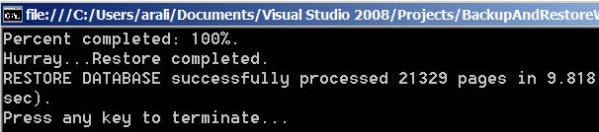
Thus far we have worked through SMO backup examples. Now let's change gears to restore with SMO. SMO provides a Restore class to restore a database, similar to the Backup class. With these classes it is necessary to specify the Action property to indicate the type of restore i.e. database, files or log. In a scenario where if you have additional differential or log backups to be restored after it is necessary to specify the NoRecovery = true except for the final restore. In this example, I am wiring up events of the Restore object instance to event-handlers for progress monitoring. Finally the SqlRestore method is called to start the restoration. If you want to start the restore operation asynchronously you would need to call SqlRestoreAsync method instead.
Restore restoreDB = new Restore();
restoreDB.Database = myDatabase.Name;
/* Specify whether you want to restore database, files or log */
restoreDB.Action = RestoreActionType.Database;
restoreDB.Devices.AddDevice(@"D:\AdventureWorksFull.bak", DeviceType.File);

/* You can specify ReplaceDatabase = false (default) to not create a new
 * database, the specified database must exist on SQL Server
 * instance. If you can specify ReplaceDatabase = true to create new
 * database image regardless of the existence of specified database with
 * the same name */
restoreDB.ReplaceDatabase = true;

/* If you have a differential or log restore after the current restore,
 * you would need to specify NoRecovery = true, this will ensure no
 * recovery performed and subsequent restores are allowed. It means it
 * the database will be in a restoring state. */
restoreDB.NoRecovery = true;

/* Wiring up events for progress monitoring */
restoreDB.PercentComplete += CompletionStatusInPercent;
restoreDB.Complete += Restore_Completed;

/* SqlRestore method starts to restore the database
 * You can also use SqlRestoreAsync method to perform restore
 * operation asynchronously */
restoreDB.SqlRestore(myServer);
Result:
To restore a database SQL Server needs to acquire exclusive lock on the database being restored. If you try to restore a database which is in use, SQL Server will throw the following exception:

C# Code Block 6 Transaction Log Restore
The process of restoring a transactional log is similar to restoring a full or differential backup. While restoring a transactional log, it is necessary to set the property Action = RestoreActionType.Log instead of RestoreActionType.Database as in case of full/differential restore. Here is an example:
Restore restoreDBLog = new Restore();
restoreDBLog.Database = myDatabase.Name;
restoreDBLog.Action = RestoreActionType.Log;
restoreDBLog.Devices.AddDevice(@"D:\AdventureWorksLog.bak", DeviceType.File);

/* You can specify NoRecovery = false (default) so that transactions are
 * rolled forward and recovered. */
restoreDBLog.NoRecovery = false;

/* Wiring up events for progress monitoring */
restoreDBLog.PercentComplete += CompletionStatusInPercent;
restoreDBLog.Complete += Restore_Completed;

/* SqlRestore method starts to restore database
 * You cab also use SqlRestoreAsync method to perform restore
 * operation asynchronously */
restoreDBLog.SqlRestore(myServer);
Result:

C# Code Block 7 Database Restore to a new location
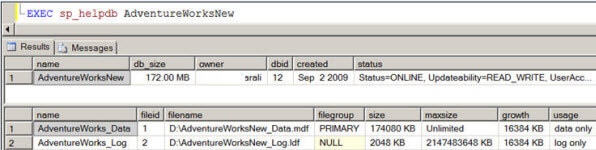
At times you need to create a new database and restore to a new physical location which differs from the original database. For that purpose, the Restore class has the RelocateFiles collection which can be completed for each file with the new location as shown in the code below.
Restore restoreDB = new Restore();
restoreDB.Database = myDatabase.Name + "New";
/* Specify whether you want to restore database or files or log etc */
restoreDB.Action = RestoreActionType.Database;
restoreDB.Devices.AddDevice(@"D:\AdventureWorksFull.bak", DeviceType.File);

/* You can specify ReplaceDatabase = false (default) to not create a new
 * database, the specified database must exist on SQL Server instance.
 * You can specify ReplaceDatabase = true to create new database
 * regardless of the existence of specified database */
restoreDB.ReplaceDatabase = true;

/* If you have a differential or log restore to be followed, you would
 * specify NoRecovery = true, this will ensure no recovery is done
 * after the restore and subsequent restores are completed. The database
 * would be in a recovered state. */
restoreDB.NoRecovery = false;

/* RelocateFiles collection allows you to specify the logical file names
 * and physical file names (new locations) if you want to restore to a
 * different location.*/
restoreDB.RelocateFiles.Add(new RelocateFile("AdventureWorks_Data", @"D:\AdventureWorksNew_Data.mdf"));
restoreDB.RelocateFiles.Add(new RelocateFile("AdventureWorks_Log", @"D:\AdventureWorksNew_Log.ldf"));

/* Wiring up events for progress monitoring */
restoreDB.PercentComplete += CompletionStatusInPercent;
restoreDB.Complete += Restore_Completed;

/* SqlRestore method starts to restore database
 * You can also use SqlRestoreAsync method to perform restore
 * operation asynchronously */
restoreDB.SqlRestore(myServer);
Result:
Complete Code Listing
Complete code listing (created on SQL Server 2008 and Visual Studio 2008, though there is not much difference if you are using it on SQL Server 2005 and Visual Studio 2005) can be found in the below text box.
using System;
using System.Collections.Generic;
using System.Text;
using Microsoft.SqlServer.Management.Smo;
using Microsoft.SqlServer.Management.Common;
namespace BackupAndRestoreWithSMO2008
{
    class Program
    {
        static void Main(string[] args)
        {
            Server myServer = new Server(@"ARSHADALI-LAP\ARSHADALI");
            try
            {
                //Using windows authentication
                myServer.ConnectionContext.LoginSecure = true;
                myServer.ConnectionContext.Connect();
                Database myDatabase = myServer.Databases["AdventureWorks"];
                BackupDatabaseFull(myServer, myDatabase);
                //BackupDatabaseDifferential(myServer, myDatabase);
                //BackupDatabaseLog(myServer, myDatabase);
                //BackupDatabaseFullWithCompression(myServer, myDatabase);

                RestoreDatabase(myServer, myDatabase);
                //RestoreDatabaseLog(myServer, myDatabase);
                //RestoreDatabaseWithDifferentNameAndLocation(myServer, myDatabase);
            }
            catch (Exception ex)
            {
                Console.WriteLine(ex.Message);
                Console.WriteLine(ex.InnerException.Message);
            }
            finally
            {
                if (myServer.ConnectionContext.IsOpen)
                    myServer.ConnectionContext.Disconnect();
                Console.WriteLine("Press any key to terminate...");
                Console.ReadKey();
            }
        }
        private static void BackupDatabaseFull(Server myServer, Database myDatabase)
        {
            Backup bkpDBFull = new Backup();
            /* Specify whether you want to back up database or files or log */
            bkpDBFull.Action = BackupActionType.Database;
            /* Specify the name of the database to back up */
            bkpDBFull.Database = myDatabase.Name;
            /* You can take backup on several media type (disk or tape), here I am using
             * File type and storing backup on the file system */
            bkpDBFull.Devices.AddDevice(@"D:\AdventureWorksFull.bak", DeviceType.File);
            bkpDBFull.BackupSetName = "Adventureworks database Backup";
            bkpDBFull.BackupSetDescription = "Adventureworks database - Full Backup";
            /* You can specify the expiration date for your backup data
             * after that date backup data would not be relevant */
            bkpDBFull.ExpirationDate = DateTime.Today.AddDays(10);
            /* You can specify Initialize = false (default) to create a new
             * backup set which will be appended as last backup set on the media. You can
             * specify Initialize = true to make the backup as first set on the mediuam and
             * to overwrite any other existing backup sets if the all the backup sets have
             * expired and specified backup set name matches with the name on the medium */
            bkpDBFull.Initialize = false;
            /* Wiring up events for progress monitoring */
            bkpDBFull.PercentComplete += CompletionStatusInPercent;
            bkpDBFull.Complete += Backup_Completed;
            /* SqlBackup method starts to take back up
             * You cab also use SqlBackupAsync method to perform backup
             * operation asynchronously */
            bkpDBFull.SqlBackup(myServer);
        }
        private static void BackupDatabaseDifferential(Server myServer, Database myDatabase)
        {
            Backup bkpDBDifferential = new Backup();
            /* Specify whether you want to back up database or files or log */
            bkpDBDifferential.Action = BackupActionType.Database;
            /* Specify the name of the database to back up */
            bkpDBDifferential.Database = myDatabase.Name;
            /* You can take backup on several media type (disk or tape), here I am using
             * File type and storing backup on the file system */
            bkpDBDifferential.Devices.AddDevice(@"D:\AdventureWorksDifferential.bak", DeviceType.File);
            bkpDBDifferential.BackupSetName = "Adventureworks database Backup";
            bkpDBDifferential.BackupSetDescription = "Adventureworks database - Differential Backup";
            /* You can specify the expiration date for your backup data
             * after that date backup data would not be relevant */
            bkpDBDifferential.ExpirationDate = DateTime.Today.AddDays(10);
            /* You can specify Initialize = false (default) to create a new
             * backup set which will be appended as last backup set on the media. You can
             * specify Initialize = true to make the backup as first set on the mediuam and
             * to overwrite any other existing backup sets if the all the backup sets have
             * expired and specified backup set name matches with the name on the medium */
            bkpDBDifferential.Initialize = false;
            /* You can specify Incremental = false (default) to perform full backup
             * or Incremental = true to perform differential backup since most recent
             * full backup */
            bkpDBDifferential.Incremental = true;
            /* Wiring up events for progress monitoring */
            bkpDBDifferential.PercentComplete += CompletionStatusInPercent;
            bkpDBDifferential.Complete += Backup_Completed;
            /* SqlBackup method starts to take back up
             * You cab also use SqlBackupAsync method to perform backup
             * operation asynchronously */
            bkpDBDifferential.SqlBackup(myServer);
        }
        private static void BackupDatabaseLog(Server myServer, Database myDatabase)
        {
            Backup bkpDBLog = new Backup();
            /* Specify whether you want to back up database or files or log */
            bkpDBLog.Action = BackupActionType.Log;
            /* Specify the name of the database to back up */
            bkpDBLog.Database = myDatabase.Name;
            /* You can take backup on several media type (disk or tape), here I am using
             * File type and storing backup on the file system */
            bkpDBLog.Devices.AddDevice(@"D:\AdventureWorksLog.bak", DeviceType.File);
            bkpDBLog.BackupSetName = "Adventureworks database Backup";
            bkpDBLog.BackupSetDescription = "Adventureworks database - Log Backup";
            /* You can specify the expiration date for your backup data
             * after that date backup data would not be relevant */
            bkpDBLog.ExpirationDate = DateTime.Today.AddDays(10);
            /* You can specify Initialize = false (default) to create a new
             * backup set which will be appended as last backup set on the media. You can
             * specify Initialize = true to make the backup as first set on the mediuam and
             * to overwrite any other existing backup sets if the all the backup sets have
             * expired and specified backup set name matches with the name on the medium */
            bkpDBLog.Initialize = false;
            /* Wiring up events for progress monitoring */
            bkpDBLog.PercentComplete += CompletionStatusInPercent;
            bkpDBLog.Complete += Backup_Completed;
            /* SqlBackup method starts to take back up
             * You cab also use SqlBackupAsync method to perform backup
             * operation asynchronously */
            bkpDBLog.SqlBackup(myServer);
        }
        private static void BackupDatabaseFullWithCompression(Server myServer, Database myDatabase)
        {
            Backup bkpDBFullWithCompression = new Backup();
            /* Specify whether you want to back up database or files or log */
            bkpDBFullWithCompression.Action = BackupActionType.Database;
            /* Specify the name of the database to back up */
            bkpDBFullWithCompression.Database = myDatabase.Name;
            /* You can use back up compression technique of SQL Server 2008,
             * specify CompressionOption property to On for compressed backup */
            bkpDBFullWithCompression.CompressionOption = BackupCompressionOptions.On;
            bkpDBFullWithCompression.Devices.AddDevice(@"D:\AdventureWorksFullWithCompression.bak", DeviceType.File);
            bkpDBFullWithCompression.BackupSetName = "Adventureworks database Backup - Compressed";
            bkpDBFullWithCompression.BackupSetDescription = "Adventureworks database - Full Backup with Compressin - only in SQL Server 2008";
            bkpDBFullWithCompression.SqlBackup(myServer);
        }
        private static void CompletionStatusInPercent(object sender, PercentCompleteEventArgs args)
        {
            Console.Clear();
            Console.WriteLine("Percent completed: {0}%.", args.Percent);
        }
        private static void Backup_Completed(object sender, ServerMessageEventArgs args)
        {
            Console.WriteLine("Hurray...Backup completed." );
            Console.WriteLine(args.Error.Message);
        }
        private static void Restore_Completed(object sender, ServerMessageEventArgs args)
        {
            Console.WriteLine("Hurray...Restore completed.");
            Console.WriteLine(args.Error.Message);
        }
        private static void RestoreDatabase(Server myServer, Database myDatabase)
        {
            Restore restoreDB = new Restore();
            restoreDB.Database = myDatabase.Name;
            /* Specify whether you want to restore database or files or log etc */
            restoreDB.Action = RestoreActionType.Database;
            restoreDB.Devices.AddDevice(@"D:\AdventureWorksFull.bak", DeviceType.File);
            /* You can specify ReplaceDatabase = false (default) to not create a new image
             * of the database, the specified database must exist on SQL Server instance.
             * If you can specify ReplaceDatabase = true to create new database image
             * regardless of the existence of specified database with same name */
            restoreDB.ReplaceDatabase = true;

            /* If you have differential or log restore to be followed, you would need
             * to specify NoRecovery = true, this will ensure no recovery is done after the
             * restore and subsequent restores are allowed. It means it will database
             * in the Restoring state. */
            restoreDB.NoRecovery = true;
            /* Wiring up events for progress monitoring */
            restoreDB.PercentComplete += CompletionStatusInPercent;
            restoreDB.Complete += Restore_Completed;
            /* SqlRestore method starts to restore database
             * You cab also use SqlRestoreAsync method to perform restore
             * operation asynchronously */
            restoreDB.SqlRestore(myServer);
        }
    }
}
Notes:
- Location of assemblies in SQL Server 2005 is the C:\Program Files\Microsoft SQL Server\90\SDK\Assemblies folder.
- Location of assemblies in SQL Server 2008 is the C:\Program Files\Microsoft SQL Server\100\SDK\Assemblies folder.
- In SQL Server 2005, the Backup and Restore classes are available in the Microsoft.SqlServer.Management.Smo namespace and in the Microsoft.SqlServer.Smo (microsoft.sqlserver.smo.dll) assembly.
- In SQL Server 2008, the Backup and Restore classes are available in the Microsoft.SqlServer.Management.Smo namespace and in the Microsoft.SqlServer.SmoExtended (microsoft.sqlserver.smoextended.dll) assembly.
- If you are restoring a transaction log, you can specify a particular point in time with ToPointInTime property of the Restore class.
- The Restore class methods (SqlVerify, SqlVerifyAsync and SqlVerifyLatest) to verify and validate (backup set is complete and the entire backup is readable) the backup media before restoration.
- The SQL Server service account must have access to the folders where backup or restore operations are executed.
- You need to have sufficient permissions to perform backup and restore operations. For example, for backup you need to be either in sysadmin/db_owner/db_backupoperator role or must have BACKUP DATABASE or BACKUP LOG permission on the database.
- If you try to connect SQL Server 2008 from SMO 2005, you will get an exception "SQL Server <10.0> version is not supported".
Next Steps
Review the following tips:
- Getting started with SQL Server Management Objects (SMO)
- SQL Script Generation Programmatically with SMO
- Exploring Database Backup Compression in SQL Server 2008
- Review Backup and Restore classes on MSDN.
- Review the MSSQLTips Backup and Recovery category.






About the author
 Arshad Ali is a SQL and BI Developer focusing on Data Warehousing projects for Microsoft.
This author pledges the content of this article is based on professional experience and not AI generated.
View all my tips
