By: Ray Barley | Comments (11) | Related: > Analysis Services Security
Problem
I have a requirement to implement a custom security scheme where roles and the user's place in the organization hierarchy are used to determine which customers a user can access. In particular the requirements are that a sales person can only access their customers and any other role can access any customer in their level of the organization hierarchy and below. We have a simple hierarchy that is made up of regions and offices. Can you provide us with an example of how to do this?
Solution
Based on your requirements we can design a solution that leverages a parent-child hierarchy to determine what customers a user can access. Our goal is to create a table that we can query that will return the list of customers that a user can access based on his role and level in the organization hierarchy. In this tip we will walk through the following steps to achieve our goal:
- Review a T-SQL script to create the CustomerHierarchy table and its constraints
- Review a T-SQL script to populate the CustomerHierarchy table
- Review T-SQL queries to show the list of customers that a user can access
Create the CustomerHierarchy Table
We will use the following table to define the organization hierarchy, user roles, and customers:
CREATE TABLE [dbo].[CustomerHierarchy]
(
 [HierarchyKey] [int] IDENTITY(1,1) NOT NULL,
 [HierarchyType] [varchar](50) NOT NULL,
 [Description] [varchar](50) NOT NULL,
 [UserLogin] [varchar](50) NULL,
 [RoleName] [varchar](50) NULL,
 [CustomerKey] [int] NULL,
 [ParentHierarchyKey] [int] NULL
)
ALTER TABLE [dbo].[CustomerHierarchy]
ADD CONSTRAINT [PK_CustomerHierarchy]
PRIMARY KEY CLUSTERED ([HierarchyKey] ASC)
ALTER TABLE [dbo].[CustomerHierarchy]
ADD CONSTRAINT [FK_CustomerHierarchy]
FOREIGN KEY ([ParentHierarchyKey])
REFERENCES [dbo].[CustomerHierarchy] ([HierarchyKey])
ALTER TABLE [dbo].[CustomerHierarchy]
ADD CONSTRAINT [FK_CustomerHierarchy_Customer]
FOREIGN KEY ([CustomerKey])
REFERENCES [dbo].[Customer] ([CustomerKey])
The following are the main points about the above script:
- HierarchyType determines the row type; it can be REGION, OFFICE, ROLE, CUSTOMER, or ROOT (i.e. the top level of the hierarchy)
- Description is based on HierarchyType; it could be a region name, office name, role name, customer name, or 'CUSTOMER-HIERARCHY' for the top level of the hierarchy
- UserLogin is the windows login in the form DOMAIN\USERNAME; it only appears in rows with a HierarchyType of ROLE
- RoleName is the user's role; it can be MANAGER, ASSOCIATE, or SALES; it only appears in rows with a HierarchyType of ROLE
- CustomerKey is a foreign key to the customer table; it only appears in rows with a HierarchyType of CUSTOMER
- ParentHierarchyKey links a row to its parent row via a foreign key; this is the parent-child hierarchy where the value of ParentHierarchyKey is equal to the HierarchyKey in another row in the same table
Populate the CustomerHierarchy Table
Let's manually populate the CustomerHierarchy table with some sample data so that we can execute some queries to show which customers a particular user can access. The following T-SQL command inserts a row as the top level of the hierarchy:
INSERT [dbo].[CustomerHierarchy] (
 [HierarchyType]
, [Description]
)
VALUES (
 'ROOT'
, 'CUSTOMER HIERARCHY'
)
Add regions by specifying a ParentHierarchyKey value of 1 which is the HierarchyKey value of the top level of the hierarchy:
INSERT [dbo].[CustomerHierarchy] (
 [HierarchyType]
, [Description]
, [ParentHierarchyKey]
)
SELECT 'REGION', 'RED', 1
UNION ALL
SELECT 'REGION', 'WHITE', 1
UNION ALL
SELECT 'REGION', 'BLUE', 1
Add offices to each region by specifying a ParentHierarchyKey value which is the HierarchyKey value of its region:
INSERT [dbo].[CustomerHierarchy] (
 [HierarchyType]
, [Description]
, [ParentHierarchyKey]
)
SELECT 'OFFICE', 'Pittsburgh, PA', 2
UNION ALL
SELECT 'OFFICE', 'New York, NY', 2
UNION ALL
SELECT 'OFFICE', 'Chicago, IL', 3
UNION ALL
SELECT 'OFFICE', 'St. Louis, MO', 3
UNION ALL
SELECT 'OFFICE', 'Dallas, TX', 4
UNION ALL
SELECT 'OFFICE', 'New Orleans, LA', 4
Add user roles to each region by specifying a ParentHierarchyKey value which is the HierarchyKey value of its region:
INSERT [dbo].[CustomerHierarchy] (
 [HierarchyType]
, [Description]
, [UserLogin]
, [RoleName]
, [ParentHierarchyKey]
)
SELECT 'ROLE', 'John Smith', 'DOMAIN\jsmith', 'MANAGER', 2
UNION ALL
SELECT 'ROLE', 'Mark Jones', 'DOMAIN\mjones', 'MANAGER', 3
UNION ALL
SELECT 'ROLE', 'Will Thomas', 'DOMAIN\wthomas', 'MANAGER', 4
Add user roles to an office by specifying a ParentHierarchyKey value which is the HierarchyKey value of its office:
INSERT [dbo].[CustomerHierarchy] (
 [HierarchyType]
, [Description]
, [UserLogin]
, [RoleName]
, [ParentHierarchyKey]
)
SELECT 'ROLE', 'Tim Willis', 'DOMAIN\twillis', 'ASSOCIATE', 6
UNION ALL
SELECT 'ROLE', 'Ron Lewis', 'DOMAIN\rlewis', 'SALES', 6
UNION ALL
SELECT 'ROLE', 'Bill Miller', 'DOMAIN\bmiller', 'SALES', 6
Connect customers to their sales person by specifying a ParentHierarchyKey value which is the HierarchyKey value of the sales person:
INSERT [dbo].[CustomerHierarchy] (
 [HierarchyType]
, [Description]
, [CustomerKey]
, [ParentHierarchyKey]
)
SELECT 'CUSTOMER', 'A Bike Store', 1, 15
UNION ALL
SELECT 'CUSTOMER', 'Progressive Sports', 2, 15
UNION ALL
SELECT 'CUSTOMER', 'Advanced Bike Components', 3, 16
UNION ALL
SELECT 'CUSTOMER', 'Modular Cycle Systems', 4, 16
After running the T-SQL commands above, the following is the result set of SELECT * FROM dbo.CustomerHierarchy:
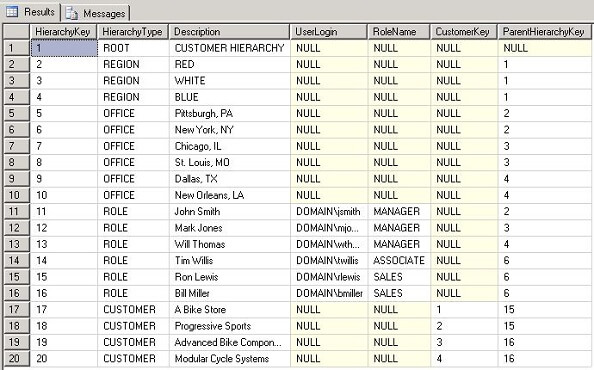
The above result set represents a parent-child hierarchy where each row's ParentHierarchyKey specifies the HierarchyKey of its parent and:
- ROOT is the parent of REGION rows
- REGION is the parent of OFFICE rows
- REGION and OFFICE can be the parent of ROLE rows
- ROLE is the parent of CUSTOMER rows (but only the SALES role has customers)
Query the CustomerHierarchy Table
We need to create queries to satisfy the following business rules:
- A user in the SALES role can access any customer that is a child of the SALES role row
- A user in any other role can access any customer in the same level of the organization hierarchy or below
Here is our first query that returns the list of customers that are directly connected to a user in the SALES role:
SELECT c.CustomerKey
FROM dbo.CustomerHierarchy p
JOIN dbo.CustomerHierarchy c
ON c.ParentHierarchyKey = p.HierarchyKey
WHERE p.UserLogin = 'DOMAIN\rlewis'
AND p.RoleName = 'SALES'
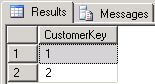
The following is the result set from the above query:
The following are the main points about the above query:
- The p table alias is used to mean "parent"; the c table alias is used to mean "child"
- Get all rows from the parent where the UserLogin = 'DOMAIN\rlewis' and the RoleName = 'SALES'
- Join the parent rows to the child rows by joining the child's ParentHierarchKey to the parent's HierarchyKey
- Referring back to the result set from SELECT * FROM dbo.CustomerHierarchy, you can see that the UserLogin 'DOMAIN\rlewis' is in the SALES role in the New York office and he has two customers
Here is our second query that returns the list of customers that are either in the same level of the hierarchy or below based on the level of our user role:
; WITH customer_cte AS (
 SELECT p.*
 FROM dbo.CustomerHierarchy c
 JOIN dbo.CustomerHierarchy p
 ON p.HierarchyKey = c.ParentHierarchyKey
 WHERE c.UserLogin = 'DOMAIN\jsmith'
 AND c.RoleName NOT IN ('SALES')
 UNION ALL

 SELECT c.*
 FROM customer_cte p
 JOIN dbo.CustomerHierarchy c
 ON c.ParentHierarchyKey = p.HierarchyKey
)
SELECT CustomerKey FROM customer_cte
WHERE HierarchyType = 'CUSTOMER'
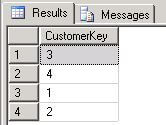
The following is the result set from the above query:
The following are the main points about the above query:
- The query uses a recursive common table expression
- The first SELECT statement retrieves the parents for all rows for a particular user login where the role name is not SALES; we exclude the SALES role because anyone in the SALES role can only see customers that are directly connected (we did this in the first query)
- The second SELECT statement retrieves all rows that are children of the rows returned by the first SELECT statement
- The recursive aspect of the common table expression is that the second SELECT statement essentially keeps going down the hierarchy until the CUSTOMER rows are returned; i.e. we reach the bottom of the hierarchy
- Referring back to the result set from SELECT * FROM dbo.CustomerHierarchy, you can see that the UserLogin 'DOMAIN\jsmith' is a MANAGER in the RED region so he can see all customers in that region; we have two customers connected to each person in the SALES role in the New York office which is in the RED region
Next Steps
- A parent-child hierarchy can be a great choice for implementing data-driven security; it can easily handle the scenario where a user role can access everything in the same level of the hierarchy and below.
- You can download a backup of the sample database and T-SQL scripts here and use it as a basis for your own testing and experimentation.
- In a future tip I will show how to leverage a parent-child hierarchy to implement dimension security in a cube with an MDX expression.






About the author
 Ray Barley is a Principal Architect at IT Resource Partners and a MSSQLTips.com BI Expert.
This author pledges the content of this article is based on professional experience and not AI generated.
View all my tips
