By: Arshad Ali | Updated: 2023-12-07 | Comments (63) | Related: 1 | 2 | 3 | 4 | 5 | 6 | 7 | > JOIN Tables
Problem
Microsoft introduced the APPLY operator in SQL Server 2005. It's like a JOIN clause, which allows joining between two table expressions. The key difference between the JOIN and APPLY operators is when you have a table-valued expression on the right side and want to evaluate it for each row from the left table expression. Since they produce similar results, when do you choose an APPLY versus a JOIN?
Solution
In this article, I'll explore how the APPLY operator joins two table expressions. Also, I'll show how it differs from regular JOINs. Additionally, we'll explore a few use cases. By the end, you'll know when to choose a JOIN or an APPLY operator when crafting scripts.
I've included a summary table and code snippets below for your convenience.
| Operator | Similar | When to Use | When NOT to Use |
|---|---|---|---|
| CROSS APPLY | INNER JOIN | Use a CROSS APPLY when no easy join exists and when the right table is an expression or table-valued function. It's like an INNER JOIN since rows must exist in both tables/expressions for SQL to return results. | If you can get the same results with an inner join, don't use a CROSS APPLY. It is not clear and leaves people scratching their heads. |
| OUTER APPLY | LEFT JOIN | Use OUTER APPLY when no easy join exists and when the right table is an expression or table-valued function. It's like a LEFT JOIN since rows do not need to exist on the right side to return results from the left table. | If you can get the same results with a LEFT OUTER JOIN, don't use an OUTER APPLY for the reason mentioned above. |
-- https://www.mssqltips.com

DROP TABLE IF EXISTS #LeftTable;
CREATE TABLE #LeftTable
(
    Id INT,
    Name NVARCHAR(10)
)
INSERT INTO #LeftTable
(
    Id,
    Name
)
VALUES
(1, 'Red'), (2, 'Green'), (3, 'Blue'), (4, 'Yellow'), (5, 'Purple');

DROP TABLE IF EXISTS #RightTable;
CREATE TABLE #RightTable
(
    Id INT,
    ReferenceId INT,
    Name NVARCHAR(10)
)
INSERT INTO #RightTable
(
    Id,
    ReferenceId,
    Name
)
VALUES
(1, 1, 'Dog'), (2, 1, 'Cat'), (3, 2, 'Bird'), (4, 4, 'Horse'), (5, 3, 'Bear'), (6, 1, 'Deer');
GO

-- CROSS APPLY
SELECT L.Name,
       R.Name
FROM #LeftTable L
    CROSS APPLY
(SELECT Name FROM #RightTable R WHERE R.ReferenceId = L.Id) R;

-- INNER JOIN
SELECT L.Name,
       R.Name
FROM #LeftTable L
    INNER JOIN #RightTable R
        ON R.ReferenceId = L.Id;

-- OUTER APPLY
SELECT L.Name,
       R.Name
FROM #LeftTable L
    OUTER APPLY
(SELECT Name FROM #RightTable R WHERE R.ReferenceId = L.Id) R;

-- LEFT OUTER JOIN
SELECT L.Name,
       R.Name
FROM #LeftTable L
    LEFT OUTER JOIN #RightTable R
        ON R.ReferenceId = L.Id;

-- CROSS APPLY with a Table Expression
SELECT *
FROM #LeftTable L
    CROSS APPLY
(
    SELECT TOP 2
        R.Name
    FROM #RightTable R
    WHERE R.ReferenceId = L.Id
    ORDER BY R.Id DESC
) R;
SQL Server APPLY Operator Variants
The APPLY operator allows you to join two table expressions. SQL processes the right table expression for each row from the left table expression. Similarly, SQL evaluates the left table expression first, and then the right table expression is evaluated against each row of the left table expression for the final result set. Finally, our result set contains all the selected columns from the left table expression followed by all the columns of the right table expression.
Let's take a minute and review the two types of APPLY operators:
- CROSS APPLY
- OUTER APPLY
And similarities they have with a JOIN.
CROSS APPLY
The CROSS APPLY operator returns rows from the left table expression (in its final output) if it matches the right table expression. In other words, when matched, the right table expression returns rows for the left expression. It's helpful to think of a CROSS APPLY as equivalent to an INNER JOIN (or, more precisely, it's like a CROSS JOIN with a correlated sub-query) with an implicit join condition of 1=1.
OUTER APPLY
The OUTER APPLY operator returns all the rows from the left table expression irrespective of whether it matches the expression from the right table. For rows with no corresponding matches in the right table expression, it contains NULL values in columns of the right table expression. The OUTER APPLY is equivalent to a LEFT OUTER JOIN.
If you can achieve the same results with a regular JOIN clause, why and when do you use the APPLY operator? Although you can achieve the same with a regular JOIN, the need for APPLY arises if you have a table-valued expression on the right part. Let me explain with some examples.
Video Example of CROSS APPLY and OUTER APPLY
Build Sample Data
The following script creates two tables. First, it builds a Department table and then an Employee table. Please note that each employee belongs to a department, giving us referential integrity.
-- https://www.mssqltips.com

USE [tempdb];
GO

DROP TABLE IF EXISTS [Employee];
GO

DROP TABLE IF EXISTS [Department];
GO

CREATE TABLE [Department]
(
    [DepartmentID] [INT] NOT NULL PRIMARY KEY,
    [Name] VARCHAR(250) NOT NULL,
);
GO

CREATE TABLE [Employee]
(
    [EmployeeID] [INT] NOT NULL PRIMARY KEY,
    [FirstName] VARCHAR(250) NOT NULL,
    [LastName] VARCHAR(250) NOT NULL,
    [HireDate] DATE NOT NULL,
    [YearlySalary] DECIMAL(16, 2) NOT NULL,
    [DepartmentID] [INT] NOT NULL
        REFERENCES [Department] (DepartmentID),
);
GO

INSERT INTO [Department]
(
    [DepartmentID],
    [Name]
)
VALUES
(1, N'Engineering'),
(2, N'Administration'),
(3, N'Sales'),
(4, N'Marketing'),
(5, N'Finance');
GO

INSERT INTO [Employee]
(
    [EmployeeID],
    [FirstName],
    [LastName],
    [HireDate],
    [YearlySalary],
    [DepartmentID]
)
VALUES
(1, N'Orlando', N'Gee', '01-01-2023', 60000.00, 1),
(2, N'Keith', N'Harris', '01-21-2023', 60000.00, 2),
(3, N'Donna', N'Carreras', '03-01-2021', 82000.00, 3),
(4, N'Janet', N'Gates', '04-01-2022', 90000.00, 3),
(5, N'Bill', N'North', '07-01-2000', 85000.00, 1),
(6, N'Sally', N'Smith', '07-01-2000', 88000.00, 1);
GO
SQL Server CROSS APPLY vs INNER JOIN
The first query below selects data from the Department table and uses a CROSS APPLY to evaluate the Employee table for each record of the Department table. The second query joins the Department table with the Employee table and returns all matching records. Both queries have the same results.
-- https://www.mssqltips.com

-- Query #1
SELECT *
FROM Department D
    CROSS APPLY
   (SELECT * FROM Employee E WHERE E.DepartmentID = D.DepartmentID) A;
GO

-- Query #2
SELECT *
FROM Department D
    INNER JOIN Employee E
        ON D.DepartmentID = E.DepartmentID;
GO
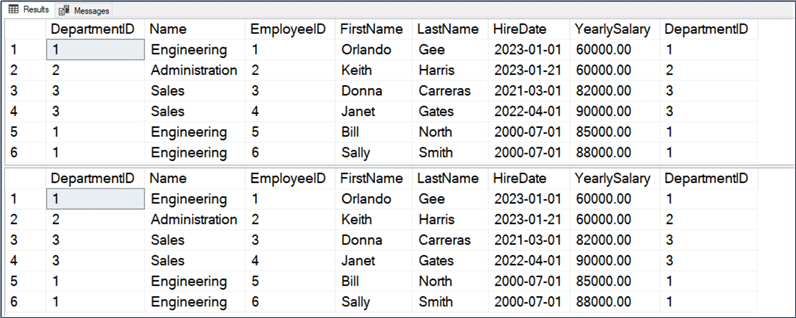
Also, the optimizer picks the same execution plans for both queries, which have an equal query cost, as shown in the screenshot below.
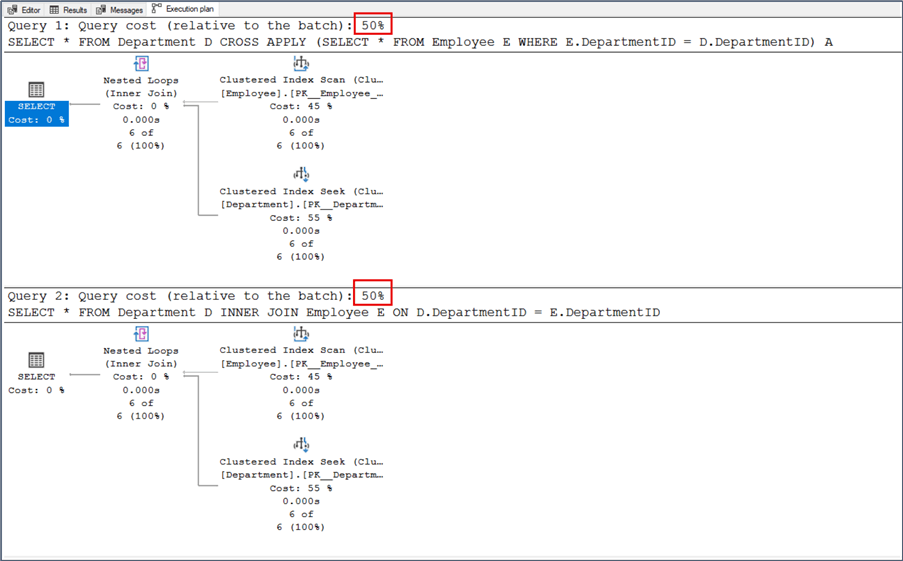
I'll stick with an INNER JOIN for a simple query that joins tables. Using CROSS APPLY for this job is like using email for file storage. It works, but it's not what anyone expects when reviewing the query.
SQL Server OUTER APPLY vs LEFT OUTER JOIN
Let's take a minute and look at another example. The first query in the code block below, selects data from the Department table. It uses an OUTER APPLY to evaluate the Employee table for each record of the Department table. For those rows for which there is no match in the Employee table, SQL returns NULL, as you can see in the screenshots below.
The second query uses a LEFT OUTER JOIN between the Department and Employee tables. As expected, the query returns all rows from the Department table, even for those rows for which there is no match in the Employee table.
-- https://www.mssqltips.com

-- Query #1
SELECT *
FROM Department D
    OUTER APPLY
   (SELECT * FROM Employee E WHERE E.DepartmentID = D.DepartmentID) A;
GO

-- Query #2
SELECT *
FROM Department D
    LEFT OUTER JOIN Employee E
        ON D.DepartmentID = E.DepartmentID;
GO
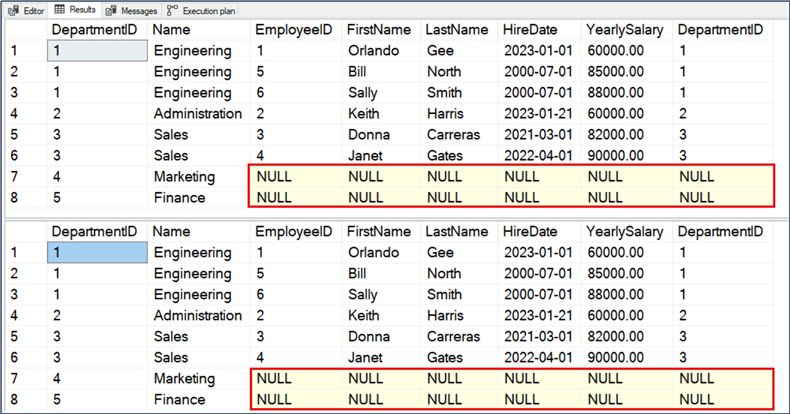
Even though the above two queries return the same data, the execution plan is different. Cost-wise, there is little difference. The query with the OUTER APPLY uses a Compute Scalar operator before the Nested Loops operator to evaluate and produce the columns of the Employee table.
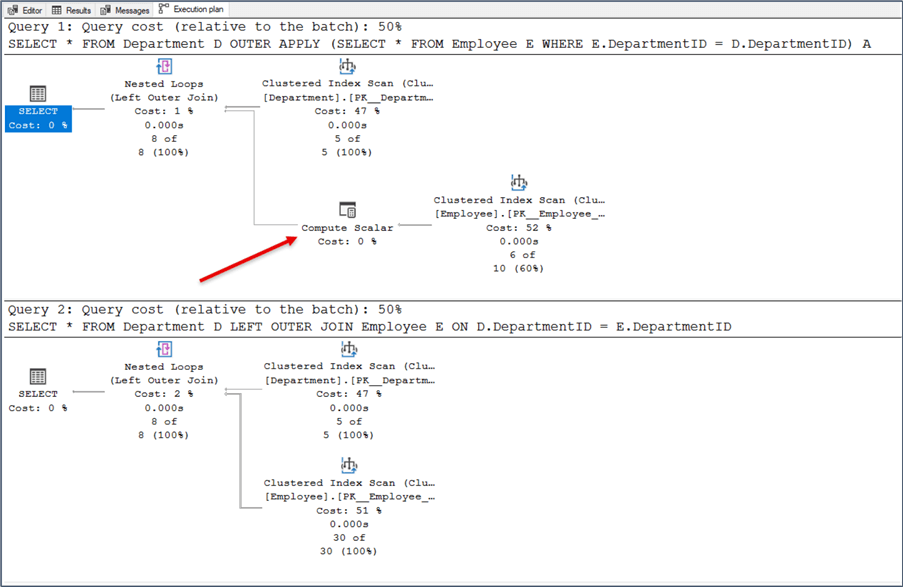
The cost difference would not stop me from using OUTER APPLY. But, like the CROSS APPLY, I'll stick to a LEFT OUTER JOIN if all I'm doing is joining two tables.
Joining Table-valued Functions and Tables Using APPLY
We've looked at examples where we prefer a JOIN to an APPLY. Now, let's look at an example where the APPLY operator shines.
I'm creating a table-valued function in the script below that accepts DepartmentID as its parameter. Then, it returns the top two employees, based on salary, who belong to that department. The first query selects data from the Department table and uses a CROSS APPLY to join with the function. It passes the DepartmentID for each row from the outer table expression (in our case, the Department table) and evaluates the function for each row, like a correlated subquery.
The next query uses the OUTER APPLY instead of the CROSS APPLY. Unlike the CROSS APPLY, which returns only correlated data, the OUTER APPLY returns non-correlated data, placing NULLs into the missing columns.
-- https://www.mssqltips.com

CREATE OR ALTER FUNCTION dbo.fn_GetTopEmployeeSalary
(
    @DeptID AS INT
)
RETURNS TABLE
AS
RETURN
     (SELECT TOP 2
             CONCAT(LastName, ', ', FirstName) AS EmployeeName,
             YearlySalary
      FROM Employee E
      WHERE E.DepartmentID = @DeptID
      ORDER BY E.YearlySalary DESC);
GO
SELECT D.Name AS DepartmentName,
       E.EmployeeName,
       E.YearlySalary
FROM Department D
    CROSS APPLY dbo.fn_GetTopEmployeeSalary(D.DepartmentID) E;
GO
SELECT D.Name AS DepartmentName,
       E.EmployeeName,
       E.YearlySalary
FROM Department D
    OUTER APPLY dbo.fn_GetTopEmployeeSalary(D.DepartmentID) E;
GO
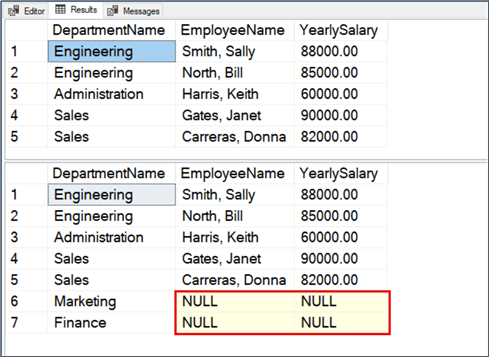
Can you use a simple join in place of the above queries? The answer is no. If you replace the CROSS/OUTER APPLY in the above queries with an INNER JOIN/LEFT OUTER JOIN, specifying the ON clause with 1=1, and run the query, you will get the error message below.
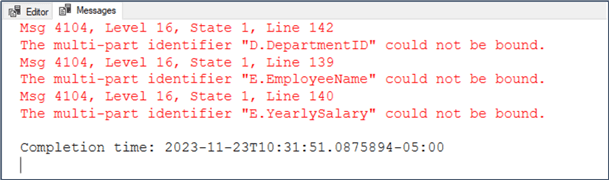
This error happens because, with JOINs, the execution context of the outer query differs from the execution context of the function (or a derived table). You can't bind a value/variable from the outer query to the function as a parameter. You need the APPLY operator for such queries.
In short, queries need the APPLY operator when using a table-valued function, but you can only use it with inline SELECT statements.
Joining Table-valued System Functions and Tables Using APPLY
Let me show you another query using a Dynamic Management Function (DMF).
The script below returns all executing user queries except ones for the current session. As you can see, the sys.dm_exec_requests dynamic management view (DMV) is CROSS APPLY'ed with the sys.dm_exec_sql_text (DMF), which accepts a "plan handle" for the query. Finally, the "plan handle" is passed from the left/outer expression to the function to return results.
USE master;
GO

SELECT DB_NAME(r.database_id) AS [Database],
       st.[text] AS [Query]
FROM sys.dm_exec_requests r
    CROSS APPLY sys.dm_exec_sql_text(r.plan_handle) st
WHERE r.session_id > 50 -- Consider spids for users only, no system spids.
            AND r.session_id NOT IN ( @@SPID ); -- Don't include request from current spid.
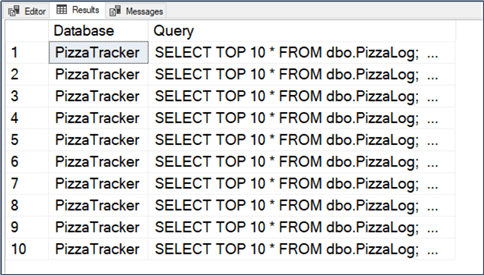
Notice for the above query, the [text] column returns all queries submitted in a batch. If you want to see only the active (currently executing) queries, you can use the statement_start_offset and statement_end_offset columns to trim the active part of the query. Refer to this tip: How to isolate the current running commands in SQL Server for a good example.
Other Notes
Remember, the APPLY operator is not an ANSI operator but an extension of T-SQL. Consider this if you plan to port your database to some other DBMS.
Also, a query with an APPLY operator performs better in specific scenarios than a query with regular joins. Here are two articles that discuss this effect in detail.
Finally, I invite you to review the slew of comments below. Thank you all for sharing your experiences with the APPLY operator.
Next Steps
- Jared Westover compares the performance of using an APPLY operator or the ROW_NUMBER() function in the article, Return TOP (N) Rows using APPLY or ROW_NUMBER() in SQL Server.
- Aaron Bertrand wrote a short article, Advanced JSON Techniques in SQL Server - Part 3, on reading JSON using CROSS APPLY and the OPENJSON function.
- In the article, Convert OUTER APPLY and CROSS APPLY Joins for Snowflake using LEFT JOINS, Sergey Gigoyan explores alternatives to APPLY in Snowflake.
Last updated by Jared Westover on 2023-12-07






About the author
 Arshad Ali is a SQL and BI Developer focusing on Data Warehousing projects for Microsoft.
This author pledges the content of this article is based on professional experience and not AI generated.
View all my tips
Article Last Updated: 2023-12-07
