By: Jugal Shah | Comments (7) | Related: More > Database Administration
Problem
When installing a SQL Server cluster, Services Packs, Hotfixes, etc.. there may be a need to reboot both the nodes for changes to take affect and to reboot the server we have to login to each node which is time consuming. Also, there may be a time when you are not able to login to the server after a reboot due to the server being hung. In this tip we will take a look at the SHUTDOWN command and how it could be used.
Solution
This article will guide you through how to use the DOS SHUTDOWN command in Windows to remotely shutdown, restart or log off the local or network computer..
Shutdown command is useful for these scenarios:
1. In case we have to restart multiple computers
2. Server is pingable, but
not allowing user to login, in that case we can restart the server remotely
3.
User is able to login, but can see only a blue screen, so at that time we can remotely
restart the computer
Permission
You must have administrative access to the local or network computer to restart it remotely. For multiple computers in the domain it is recommended to use the Domain Administrator account.
Command Syntax
Usage: shutdown [-i | -l | -s | -r | -a] [-f] [-m \\computername] [-t xx] [-c "comment"] [-d up:xx:yy]
| -i | Show the graphical user interface of shutdown window |
| -l | To log off from the machine. Make sure that you are not using -l switch with -m switch |
| -s | Shutdown the desired computer |
| -r | Shutdown and restart the computer |
| -a | Abort a system shutdown |
| -m | -m\\machine name is used for to shutdown/restart/abort remote computer |
| -f | Forces running application to close without warning |
| -t | -t xx set timeout for shutdown command to xx seconds |
| -c | -c"comment" to add shutdown comment, you can add up to max 127 characters |
You can also see above output by executing shutdown \? command from DOS
SHUTDOWN command using GUI
Go to > Run -- Cmd -- type the shutdown -I command
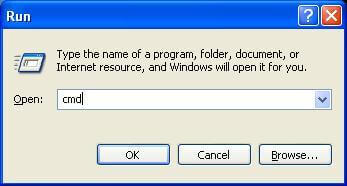
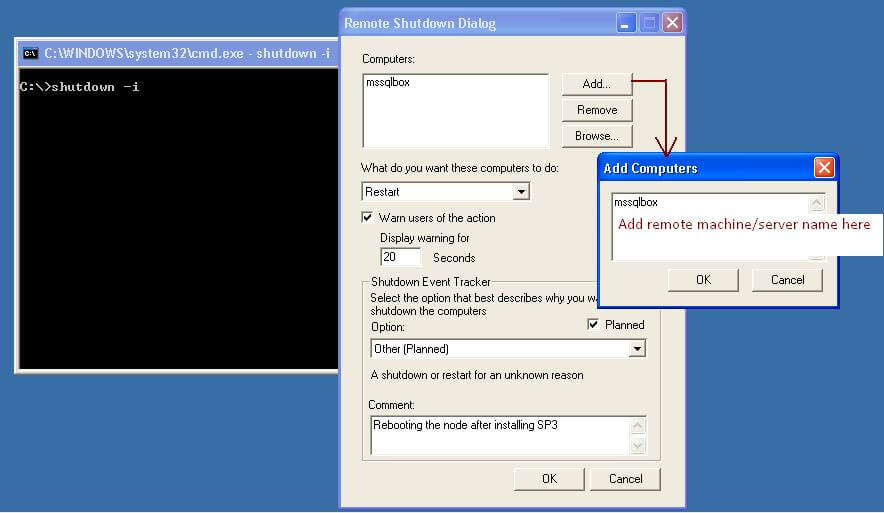
Here you can select the different options (Restart/Shutdown/Log Off) as per your
need. Click on Add... button to add the remote server name.
Execute SHUTDOWN command using command prompt
Here I am restarting remote server (MSSSQLBOX) from the command prompt
shutdown -m \\mssqlbox -r
If you get an access denied/permission error, use the NET USE command
net use \\machine /USER:
shutdown -r -f -m \\machine name
Next Steps
- Take some time to lear about the different switches
- Create a batch file by adding a number of servers with the SHUTDOWN command
- Execute shutdown command by using the time (-s,-t) and immediately execute the abort (-a) command






About the author
 Jugal Shah has 8+ years of extensive SQL Server experience and has worked on SQL Server 2000, 2005, 2008 and 2008 R2.
This author pledges the content of this article is based on professional experience and not AI generated.
View all my tips
