By: Jugal Shah | Comments (3) | Related: > SQL Server Management Studio
Problem
As a best practice in the industry, a DBA often has two logins that are used to access SQL Server; one is their normal Windows login and the other is an admin level login account which has sysAdmin rights on the SQL Server boxes. In addition, most of the time the SQL Server client tools are only installed on the local desktop and not on the servers. So in order to use the different login to connect to SQL Server using SSMS you need to use the "Run as" feature, but when doing this you may get this error message "The directory name is invalid". In this tip we look at how to resolve this issue.
Solution
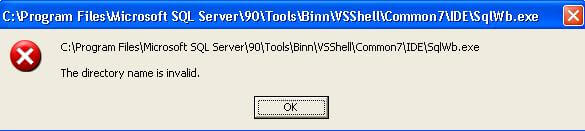
As mentioned above when using the "Run as" feature you may get this error message: "The directory name is invalid" as shown below.
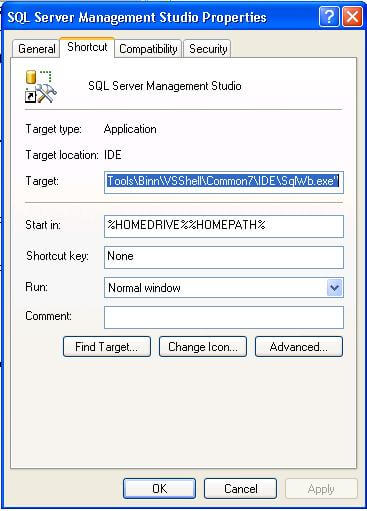
Step 1:
Click Start, point to All Programs, and then point to SQL Server Management Studio.
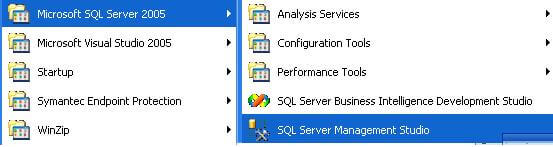
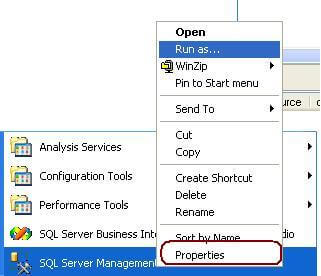
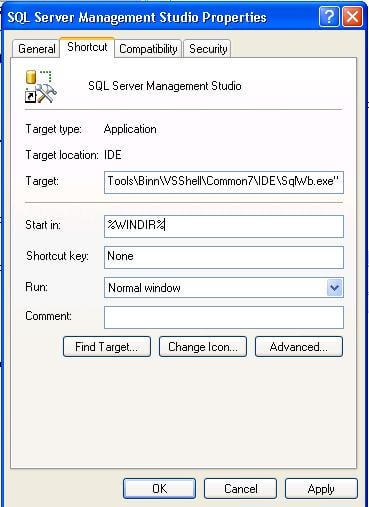
Right-click SQL Server Management Studio and then click Properties.
In the Start in box, change the value from %HOMEDRIVE%%HOMEPATH% to value %WINDIR%. and Click OK as shown below.
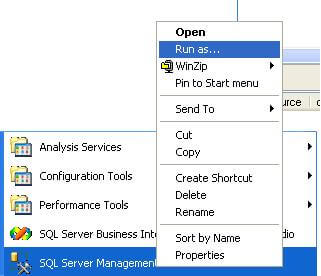
Right Click on SQL Server Management Studio and Click on "Run as", if the Run as option does not come up press Shift and Right Click. At this point, specify the login account you want to use and SSMS should work for you.
Next Steps
- You can also use this solution with other programs such as Internet Explorer, and other tools if you are facing this kind of issue.
- Take a look at these other tips about SQL Server Management Studio






About the author
 Jugal Shah has 8+ years of extensive SQL Server experience and has worked on SQL Server 2000, 2005, 2008 and 2008 R2.
This author pledges the content of this article is based on professional experience and not AI generated.
View all my tips
