By: Atif Shehzad | Comments (4) | Related: > SQL Server Management Studio
Problem
I am always conscious to keep a record of all operations performed on my database servers. Operations through T-SQL in an SSMS query pane can easily be saved in query files. For table modifications through SSMS designer I have predefined setting to generate T-SQL scripts. However there are numerous database and server level tasks that I use the SSMS GUI and I would like to have a script of these changes for later reference. Examples of such actions through the SSMS GUI are backup/restore, changing compatibility level of a database, manipulating permissions, dealing with database or log files or creating/manipulating any login/user. I am looking for any way to generate T-SQL code for such actions, so that it may be kept for later reference. Also I would like to be able to reuse this T-SQL code for database tasks or scheduled jobs if needed.
Solution
SQL Server Management Studio (SSMS) provides a very good option to generate scripts for any operation performed through the GUI. It is an effective way to save the T-SQL code of actions performed through SSMS. Here is list of some of the tasks categories for which you may generate T-SQL scripts from SSMS GUI actions
- Changing any server instance level option
- Changing any database level option
- Managing server roles, logins, permissions
- Managing database roles, users, permissions
- Backup/Restore operations
- Managing policies (SQL Server 2008)
The above mentioned categories cover almost all operations that you may require to have script for. Now here are the simple steps to use this powerful option of SSMS.
- Open SSMS GUI for any required task
- Configure values in the GUI window
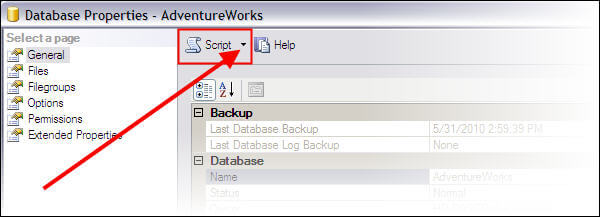
- Before clicking OK, find the Script option in the upper top of the GUI frame as shown below
- Click on the down arrow pointer and four options will be displayed to manipulate the action script
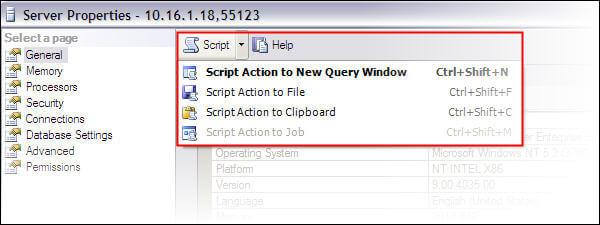
- Choose the appropriate option and click OK to complete the required task
The options shown are pretty self explanatory. You can directly open the script in a SSMS query window, directly save the script to a .SQL file or put the script in the Windows clipboard to paste where required. The last option is related to scheduled jobs and it will not be enabled in SSMS SQL Server Express edition.
Here are some scenarios to use this simple yet powerful option of SSMS. You may go through any of these examples to get familiar with the functionality.
Example 1: Enable filestream "Transact-SQL access enabled" option and open script for this action in a new SSMS query pane
- Right click on SQL Server 2008 instance in SSMS and select Properties
- Click on Advanced option in left panel
- Select 'Transact-SQL access enabled" for the Filestream Access Level option
- Before clicking OK to save the setting, click on arrow pointer next to the Script option
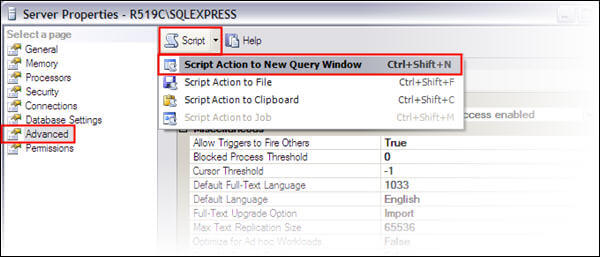
- Select first option "Script Action to New Query Window"
- The script is now in a new SSMS query pane and you can click the OK button to complete the action or Cancel to just have the script.
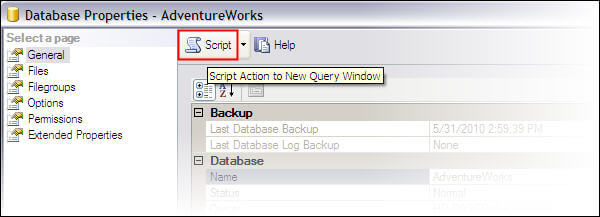
It is notable that instead of choosing the option from the drop list through small arrow, if you click directly on the Script option the script will be created in a new query Window, because this is the default option.
Example 2: Create a new database through SSMS and save the script for this action in .SQL file
- Right click on Databases folder
- Choose to "New Database.." from menu
- Enter name for new database and configure any other required options
- Before clicking OK to save the setting, click on arrow pointer provided with Script option
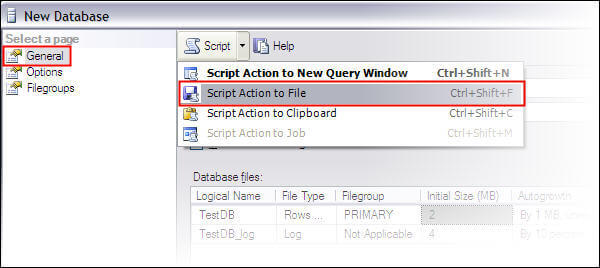
- Select second option "Script Action to File"
- Save the script file by providing a name in the file save dialogue and you may click OK button to create the database or Cancel to just have the script.
Example 3: Disable a Login through SSMS and copy the script for this operation to clipboard
- Right click on a login in Security folder in SSMS and select Properties
- Click on Status option in left pane
- Check the "Disabled" radio button
- Before clicking OK to save the action, click on arrow pointer provided with Script option
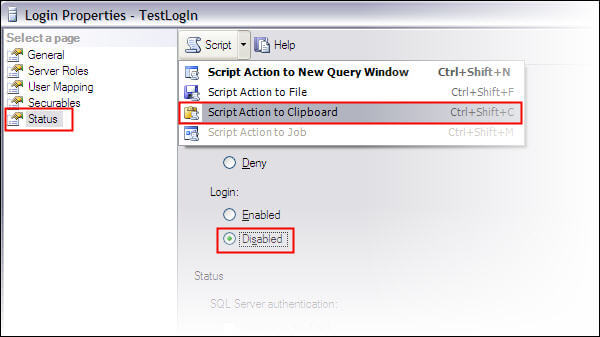
- Select third option "Script Action to Clipboard"
- Click OK button to disable the particular login or Cancel to just have the script.
Now you can paste the script as needed to confirm the operation.
Example 4: Create database backup through SSMS (non express edition) and directly create a schedule job for this action
- Right click on appropriate database in SSMS
- Go to Tasks and click on Back Up option
- Provide backup name and path along with other required customized options
- Before clicking OK to save the action, click on arrow pointer provided with Script option
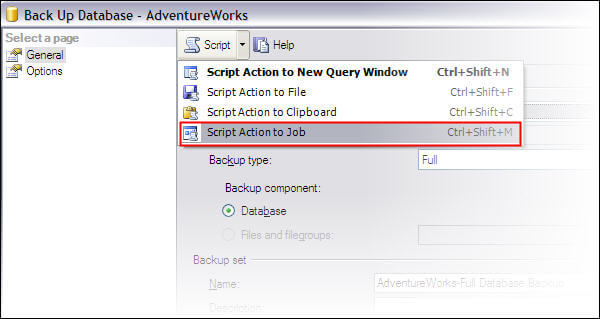
- Select the fourth option "Script Action to Job"
A job configuration window will open with the create backup script already present in the job step. Note: this option will not be enabled in SSMS SQL Server Express edition.
Shortcuts
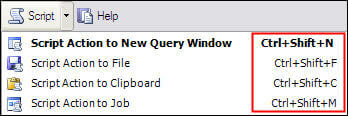
Instead of using the options through the menu in upper part of the GUI frame, we can also use shortcuts for any of the four options. These are noted below:
Next Steps
- Use this valuable feature of SSMS and make sure to save every script that is manipulating data, objects, environment or permissions on your database server
- Click here to enable script generation for table operations through SSMS GUI
- T-SQL code generated through this option may be reused in future
- For effective use of SSMS have a look at these valuable tips






About the author
 Atif Shehzad is a passionate SQL Server DBA, technical reviewer and article author.
This author pledges the content of this article is based on professional experience and not AI generated.
View all my tips
