By: K. Brian Kelley | Comments | Related: 1 | 2 | 3 | 4 | > Security
Problem
I'm trying to set up SQL Server and I know that I'm not supposed to use an account that's an administrator on the system, as per best practices. I see that the System account is a possibility, but I've been advised not to use it. Why not? Check out this tip to learn more.
Solution
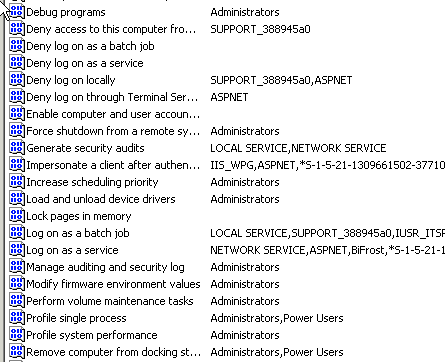
First and foremost, the security recommendation is to use the least privileged account possible. The local System account is an administrator on the system, so if you're ruling out administrators, then on the basis of that alone, System should be out. Ruling out administrators is a good thing, because the members of the administrators group has far more rights than SQL Server typically needs. For instance, this snapshot of part of the local security policy shows just how powerful a member of the administrators group is.
In actuality, though, the System account is more powerful than a normal member of the Administrators group. One place where you can clearly see this is the registry hive HKEY_LOCAL_MACHINE\Security, which is a protected part of the registry. By default, administrators only have the following rights:
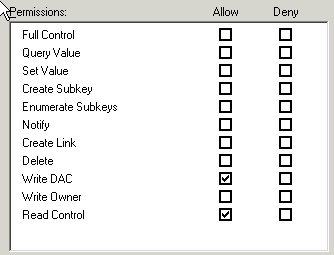
That's not very much, but it's more than any other type of user with the exception of System. System has Full Control, so it has all the rights:
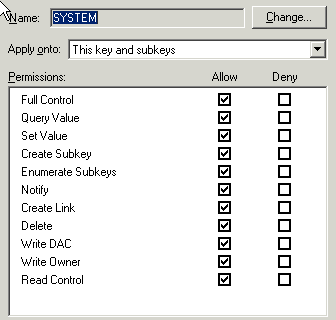
This is definitely a part of the registry SQL Server shouldn't have access to. Therefore, even a regular member of the Administrators group is a better choice than the System account.
Given the permissions granted to the Administrators group plus the additional permissions granted to the System account, using System is a really bad idea when it comes to selecting a SQL Server service account.
Next Steps
- As you install your SQL Server instances, be sure to take the time to determine the SQL Server service account and its associated rights.
- Check your the service account for your existing SQL Server instances to see if System or another privileged account is used. Once you have an inventory of the accounts, build a plan to improve your service account privileges.
- Check out these related tips:
- SQL Server Service Account Privileges
- How to determine service-related privileges for Sql Server service account
- Secure and disable the SQL Server SA Account
- Security Issues with the SQL Server BUILTIN\Administrators Group
- Server level permissions for SQL Server 2005 and SQL Server 2008
- Understanding SQL Server fixed server roles






About the author
 K. Brian Kelley is a SQL Server author and columnist focusing primarily on SQL Server security.
This author pledges the content of this article is based on professional experience and not AI generated.
View all my tips
