solving sql server problems for millions of dbas and developers since 2006


SQL Server DBA Tips SQL Server Developer Tips SQL Server Business Intelligence Tips SQL Server Career Tips SQL Server Tip Categories SQL Server Tutorials SQL Server Webcasts SQL Server Whitepapers SQL Server Tools SQL Server Questions and Answers MSSQLTips Authors About MSSQLTips SQL Server User Groups MSSLQTips Giveaways MSSQLTips Advertising Options

MSSQLTips Facebook Page MSSQLTips LinkedIn Page MSSQLTips RSS Feed MSSQLTips Twitter Page MSSQLTips Google+ Page


Script to Get Available and Free Disk Space for SQL Server

By: | Read Comments (15) | Print

Jugal has 8+ years of extensive SQL Server experience and has worked on SQL Server 2000, 2005, 2008 and 2008 R2.

Related Tips: 1 | 2 | 3 | More

Problem

Often we face the situation where we need to check the total disk space and available disk space for both physical and LUN/Mount drives. The extended stored procedure XP_FixedDrives is unable to help us in this scenario, so we have to log into the machine to check the total and free disk space for each physical/LUN/mount drive. In this tip, I show how this can be done using PowerShell.

Solution

Before we proceed with the script, let's discuss what a LUN/Mount drive is. A LUN/Mount drive is a logical unit of a SAN created by the SAN administrator and presented to an attached server's operating system. The server is unaware of the physical makeup of the disks involved in the LUN and sees it as a single locally attached disk. That's why XP_FixedDrives is unable to query the LUN/Mount drive.

We can check the disk space by executing a PowerShell script using XP_CMDShell from SSMS. In order to do this, you need to make sure that XP_CMDSHELL is enabled on the SQL instance.

You can execute the below script to check and enable XP_Cmdshell. To enable XP_Cmdshell you must have at least the ALTER SETTINGS server-level permission. The ALTER SETTINGS permission is implicitly held by the sysadmin and serveradmin fixed server roles.

declare @chkCMDShell as sql_variant
select @chkCMDShell = value from sys.configurations where name = 'xp_cmdshell'
if @chkCMDShell = 0
begin
 EXEC sp_configure 'xp_cmdshell', 1
 RECONFIGURE;
end
else
begin
 Print 'xp_cmdshell is already enabled'
end

SQL Script to check total and free disk space of physical drive/LUN/mount drive

This is the script that can be used to get the information we are looking for. This uses PowerShell and xp_cmdshell so it can be run from a SSMS query window. You could also do this just using PowerShell, but I wanted to show how this can be done directly from SSMS.

declare @svrName varchar(255)
declare @sql varchar(400)
--by default it will take the current server name, we can the set the server name as well
set @svrName = @@SERVERNAME
set @sql = 'powershell.exe -c "Get-WmiObject -ComputerName ' + QUOTENAME(@svrName,'''') + ' -Class Win32_Volume -Filter ''DriveType = 3'' | select name,capacity,freespace | foreach{$_.name+''|''+$_.capacity/1048576+''%''+$_.freespace/1048576+''*''}"'
--creating a temporary table
CREATE TABLE #output
(line varchar(255))
--inserting disk name, total space and free space value in to temporary table
insert #output
EXEC xp_cmdshell @sql
--script to retrieve the values in MB from PS Script output
select rtrim(ltrim(SUBSTRING(line,1,CHARINDEX('|',line) -1))) as drivename
      ,round(cast(rtrim(ltrim(SUBSTRING(line,CHARINDEX('|',line)+1,
      (CHARINDEX('%',line) -1)-CHARINDEX('|',line)) )) as Float),0) as 'capacity(MB)'
      ,round(cast(rtrim(ltrim(SUBSTRING(line,CHARINDEX('%',line)+1,
      (CHARINDEX('*',line) -1)-CHARINDEX('%',line)) )) as Float),0) as 'freespace(MB)'
from #output
where line like '[A-Z][:]%'
order by drivename
--script to retrieve the values in GB from PS Script output
select rtrim(ltrim(SUBSTRING(line,1,CHARINDEX('|',line) -1))) as drivename
      ,round(cast(rtrim(ltrim(SUBSTRING(line,CHARINDEX('|',line)+1,
      (CHARINDEX('%',line) -1)-CHARINDEX('|',line)) )) as Float)/1024,0) as 'capacity(GB)'
      ,round(cast(rtrim(ltrim(SUBSTRING(line,CHARINDEX('%',line)+1,
      (CHARINDEX('*',line) -1)-CHARINDEX('%',line)) )) as Float) /1024 ,0)as 'freespace(GB)'
from #output
where line like '[A-Z][:]%'
order by drivename
--script to drop the temporary table
drop table #output

Sample Output

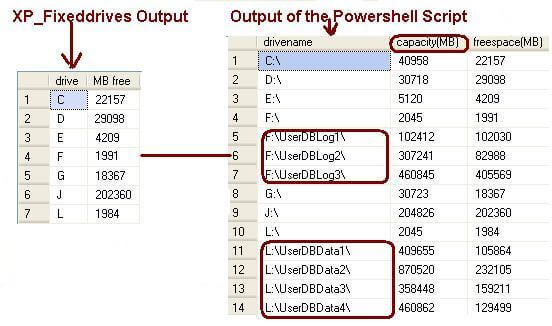
I executed the XP_Fixeddrives extended stored procedure and the above script on the same machine. You can see that XP_Fixeddrives does not show the total space or the LUN/mount drive information.

As you can see in the below image XP_FIXEDDRIVES is able to retrieve the information for the L:\ and F:\ physical disks, but is not able to retrieve the information of the LUNs or Mount Drives for example L:\UserDBData1 and F:\UserDBLog1.
sql script to check total and free disk space


Next Step

  • Create the procedure SP_CheckDiskSpace using the above script in the master database and use it whenever required
  • Execute the above script against CMS servers and get the disk space of all registered servers


Related Tips: 1 | 2 | 3 | More | Become a paid author


Last Update: 7/27/2011

Share: Share 


Comments and Feedback:

Wednesday, July 27, 2011 - 8:53:27 AM - Tim G Read The Tip


When running on my server, which only has named instances, the set @srvname was resolved to server\instance.

The call to WMI expects only a servername, not a server\instance name.

I changed the code to read:

set @svrName =CONVERT(VARCHAR(128),SERVERPROPERTY('machinename') )-- @@SERVERNAME

and now it works for me.


Wednesday, July 27, 2011 - 9:36:27 AM - Tripp Southern Read The Tip

Thanks for a very useful script.  I've long been a heavy user of xp_fixeddrives but this is much better.  Question though, is there any reason you used a temp table instead of a table variable?  I've already changed the script to use a table variable on my end, so I know it works.  But I've only tested it on my own, SQL 2008 R2 Standard Edition (CU#7) sandbox instance running on my laptop. 


Wednesday, July 27, 2011 - 9:39:57 AM - Tim G Read The Tip

On one of my servers, I did not have xp_cmdshell enabled nor the advanced options shown.  I had to run


declare @chkCMDShell as sql_variant
select @chkCMDShell = value from sys.configurations where name = 'xp_cmdshell'
if @chkCMDShell = 0
BEGIN
 EXEC sp_configure 'show advanced options', 1
 RECONFIGURE;
 EXEC sp_configure 'xp_cmdshell', 1
 RECONFIGURE;
end
else
begin
 Print 'xp_cmdshell is already enabled'
end

to turn on the option to see the xp_cmdshell and then enable it.

 I will be putting this script on a number of my servers. Thanks for sharing this valuable tip.


Thursday, July 28, 2011 - 4:40:56 AM - Ilya Read The Tip

Thanks! It's very useful! One question: How can I add column of volume label name. BTW, thank u Tim G for named instance change.


Friday, July 29, 2011 - 9:36:46 AM - Johnny Read The Tip

I put in the effort of pre-poulating a table with the disk space available for each drive on each individual server. The values don't change (unless a drive is lost and then I have serious problems), so I don't need to enable xp_cmdshell and just use xp_fixeddrives to populate the free space.


Tuesday, August 23, 2011 - 3:14:36 AM - Praveen Nakka Read The Tip

Hi, when im executing the given code, I do not get any results and the result is shown as


drivename|capacity()MB|freespace(MB)

Please advise..

Tuesday, August 23, 2011 - 9:51:43 AM - Ihor Kinal Read The Tip

The powershell objects with the following:

Get-WmiObject : Invalid namespace
At line:1 char:14
+ Get-WmiObject  <<<< -ComputerName 'CMPSQLC01\CMPSQLC01' -Class Win32_Volume -
Filter 'DriveType = 3' | select name,capacity,freespace | foreach{$_.name+'|'+$
_.capacity/1048576+'%'+$_.freespace/1048576+'*'}
[NULL]


????


Tuesday, August 23, 2011 - 11:49:51 AM - Jugal Read The Tip


Hi Ihor,

You are passing the CMPSQLC01\CMPSQLC01 (Computer Name\Instance Name), Please pass the machine name only. You can get the machine name using below query.

Select CONVERT(VARCHAR(128),SERVERPROPERTY('machinename') )


Tuesday, August 23, 2011 - 11:52:07 AM - Jugal Read The Tip

Hi Pravin, Can you give more information? SQL Server Version, OS, SQL Service Account Permission on OS, your permission and more...


Tuesday, August 23, 2011 - 10:15:39 PM - Praveen Nakka Read The Tip

Hi Jugal,

I have Local Admin Acess upon the windows server and sysadmin on the sql level.

The windows version is 2003 x64 standard edition and sql is 2005 x64 standard..

Im running this query in Master DB..

Kind Regards,

Praveen Nakka


Thursday, August 25, 2011 - 5:37:41 AM - Maha Read The Tip

Hi

this script works fine for me too. I tried it by executing the script for a remote server, unfortunate to get no results. can this script be modified so that it can be executed for a remote server; this would help us executing the script from a central server to all servers in the domain.


Thursday, August 25, 2011 - 9:53:49 AM - Jugal Shah Read The Tip

Hi Pravin

SQL Server service account should have administration permission to retrieve the disk details. Please grant the permission to service account and it will work.

Thanks,

Jugal


Thursday, August 25, 2011 - 9:55:56 AM - Jugal Shah Read The Tip

Hi Maha,

To run it on all the remote servers from CMS, SQL Server Service account should have permission windows OS to query win 32. I have checked for the remote servers where service account has permission and it is working fine.

Thanks,

Jugal Shah


Tuesday, February 28, 2012 - 4:20:57 PM - SQL Read The Tip

Jugal,

I tried running this query in CMS but it turned no results for 2005 server. Can you help me with this?


Tuesday, February 28, 2012 - 4:52:14 PM - Jugal Read The Tip

Can you please put the below code in the server name and let me know the output.

set @svrName =CONVERT(VARCHAR(128),SERVERPROPERTY('machinename') ) -- instead of @@SERVERNAME


Post a Comment or Question

Keep it clean and stay on the subject or we may delete your comment.
Your email address is not published. Required fields are marked with an asterisk (*)

*Name   *Email   Notify for updates
Comments
*Enter Code refresh code


New SQL Monitor v3.0

New SQL Monitor v3.0


Sponsor Information
"SQL doctor is the best SQL product on the market, by far. All of Idera's tools are great, but this is the icing on the cake!"

It takes just 5 minutes to connect your SQL Databases to source control. Got 5 minutes? Get started now.

Need SQL Server help and not sure where to turn? Reach out to expert consultants for a Health Check.

Find and Fix SQL issues with Foglight Performance Analysis. Get a free copy.

Join the over million SQL Server Professionals who get their issues resolved daily.

Learn SQL Server 2012, Performance Tuning, Development, Administration, Replication and more - free webcasts


Copyright (c) 2006-2012 Edgewood Solutions, LLC All rights reserved
privacy | disclaimer | copyright | advertise | about
authors | contribute | feedback | giveaways | user groups
Some names and products listed are the registered trademarks of their respective owners.


Edgewood Solutions LLC | MSSharePointTips.com | MSSQLTips.com