By: Greg Robidoux | Updated: 2022-02-23 | Comments (61) | Related: 1 | 2 | 3 | 4 | 5 | 6 | 7 | > Locking and Blocking
Problem
I see the use of the NOLOCK hint in existing code for my stored procedures and I am not exactly sure if this is helpful or not. It seems like this has been a practice that was put in place and now is throughout all of the code wherever there are SELECT statements. Can you explain what NOLOCK does and whether this is a good practice or not?
Solution
It seems that in some SQL Server shops the use of the NOLOCK (aka READUNCOMMITED) hint is used throughout the application. In this tip we take a closer look at how this works and what the issues maybe when using NOLOCK.
What does the SQL Server NOLOCK hint do?
- The NOLOCK hint allows SQL to read data from tables by ignoring any locks and therefore not get blocked by other processes.
- This can improve query performance by removing the blocks, but introduces the possibility of dirty reads.
- Read further to better understand the use of NOLOCK.
Example of SQL Server NOLOCK
Let's walk through some simple examples to see how this works. (These queries are run against the AdventureWorks database.)
Here is a query that returns all of the data from the Person.Contact table. If I run this query I can see there is only one record that has a Suffix value for ContactID = 12.
SELECT * FROM Person.Contact WHERE ContactID < 20
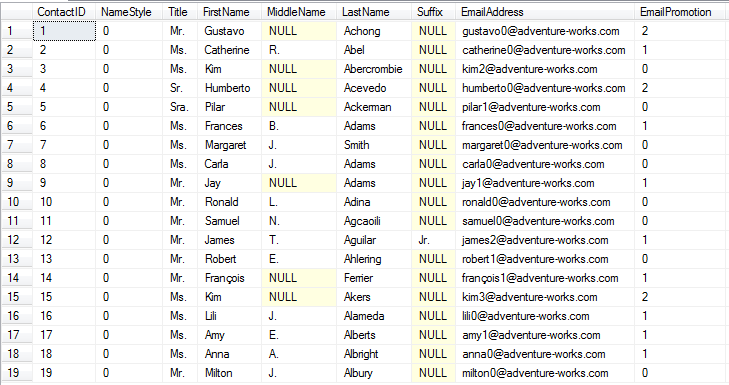
Let's say another user runs the below query in a transaction. The query completes and updates the records, but it is not yet committed to the database so the records are locked.
-- run in query window 1
BEGIN TRAN
UPDATE Person.Contact SET Suffix = 'B' WHERE ContactID < 20
-- ROLLBACK or COMMIT
If you run the same query that was run above again, you will notice that it never completes, because the UPDATE statement run in "query window 1" has not yet been committed, so the locks are not released.
-- run in query window 2
SELECT * FROM Person.Contact WHERE ContactID < 20
If I run sp_who2 I can see that the SELECT statement is being blocked. I will need to either cancel this query or COMMIT or ROLLBACK the query in window 1 for this to complete. For this example I am going to cancel the SELECT query.

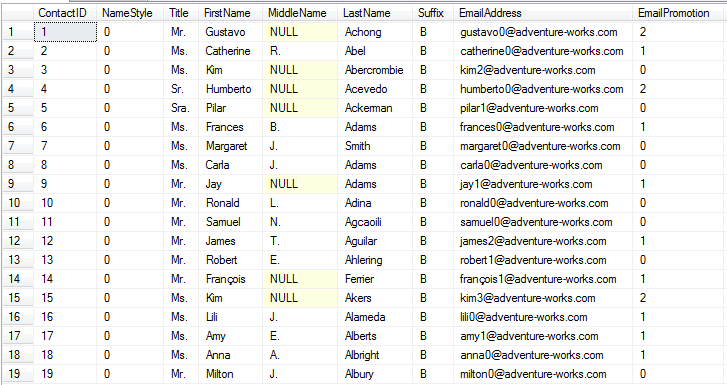
To get around the locked records, I can use the NOLOCK hint as shown below and the query will complete even though the query in window 1 is still running and has not been committed or rolled back.
-- run in query window 2
SELECT * FROM Person.Contact WITH (NOLOCK) WHERE ContactID < 20
If you notice below the Suffix column now has "B" for all records. This is because the UPDATE in window 1 updated these records. Even though that transaction has not been committed, since we are using the NOLOCK hint SQL Server ignores the locks and returns the data. If the UPDATE is rolled back the data will revert back to what it looked like before, so this is considered a Dirty Read because this data may or may not exist depending on the final outcome in query window 1.
If I rollback the UPDATE using the ROLLBACK command and rerun the SELECT query we can see the Suffix is back to what it looked like before.
-- run in query window 1
ROLLBACK
-- run in query window 2
SELECT * FROM Person.Contact WITH (NOLOCK) WHERE ContactID < 20
-- or
SELECT * FROM Person.Contact WHERE ContactID < 20
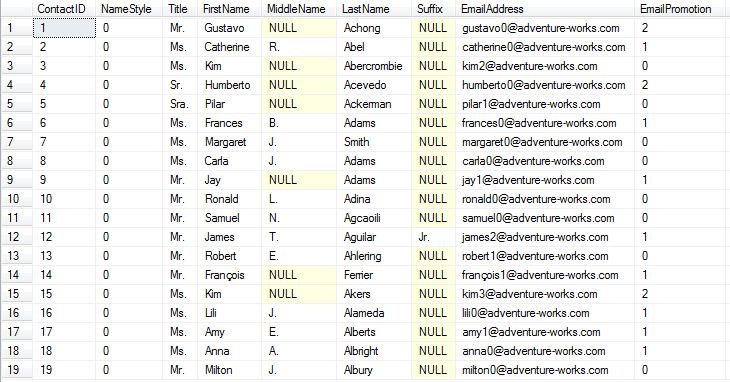
So the issue with using the NOLOCK hint is that there is the possibility of reading data that has been changed, but not yet committed to the database. If you are running reports and do not care if the data might be off then this is not an issue, but if you are creating transactions where the data needs to be in a consistent state you can see how the NOLOCK hint could return false data.
Types of SQL Server Locks Used with NOLOCK
So what kind of locking is used when the NOLOCK hint is used.
If we run our SELECT without NOLOCK we can see the locks that are taken if we use sp_lock. (To get the lock information I ran sp_lock in another query window while this was running.)
SELECT * FROM Person.Contact WHERE ContactID < 20

If we do the same for our SELECT with the NOLOCK we can see these locks.
SELECT * FROM Person.Contact WITH (NOLOCK) WHERE ContactID < 20

The differences are that there is a "S" shared access lock that is put on the page (PAG) that we are reading for the first 19 rows of data in the table when we don't use NOLOCK. Also, we are getting a Sch-S lock versus an IS lock for the table (TAB).
So another thing to point out is that even when you just SELECT data SQL Server still creates a lock to make sure the data is consistent.
These are the lock types and the lock modes that are used for the above two queries.
Lock Types
- MD - metadata lock
- DB - database lock
- TAB - table lock
- PAG - page lock
Mode
- S - Shared access
- Sch-S - Schema stability makes sure the schema is not changed while object is in use
- IS - Intent shared indicates intention to use S locks
SQL Server READUNCOMMITED and NOLOCK
The NOLOCK hint is the same as the READUNCOMMITED hint and can be used as follows with the same results.
SELECT * FROM Person.Contact WITH (READUNCOMMITTED)
SELECT statements only with NOLOCK
The NOLOCK and READUNCOMMITED hints should only be used with SELECT statements. If we try to use this for an UPDATE, DELETE or INSERT we will get an error.
UPDATE Person.Contact with (NOLOCK) SET Suffix = 'B' WHERE ContactID < 20
You will see this error.
The NOLOCK and READUNCOMMITTED lock hints are not allowed for target tables of INSERT, UPDATE, DELETE or MERGE statements.
But there is a way to get around this if the query is written differenlty, but you shouldn't.
UPDATE p SET Suffix = 'B'
   FROM Person.Contact p WITH (NOLOCK)
WHERE ContactID < 20
See this article Avoid using NOLOCK on SQL Server UPDATE and DELETE statements to learn why this is not a good idea.
Schema Change Blocking with NOLOCK
Since a NOLOCK hint needs to get a Sch-S (schema stability) lock, a SELECT using NOLOCK could still be blocked if a table is being altered and not committed. Here is an example.
-- run in query window 1
BEGIN TRAN
ALTER TABLE Person.Contact ADD column_b
VARCHAR(20) NULL ;
If we try to run our SELECT statement it will be blocked until the above is committed or rolled back.
-- run in query window 2
SELECT * FROM Person.Contact WITH (NOLOCK) WHERE ContactID < 20
Issues with NOLOCK
We mentioned above how you can get dirty reads using the NOLOCK hint. These are also other terms you may encounter for this hint.
- Dirty Reads - this occurs when updates are done, so the data you select could be different.
- Nonrepeatable Reads - this occurs when you need to read the data more than once and the data changes during that process
- Phantom Reads - occurs where data is inserted or deleted and the transaction is rolled back. So for the insert you will get more records and for the delete you will get less records.
To learn more about these issues read this article: Concurrency Effects
Isolation Level
You can also set the Isolation Level for all queries instead of using the NOLOCK or READUNCOMMITTED hint. The isolation level will apply the READUNCOMMITTED to all SELECT statements that are performed from when this is turned on until it is turned off.
In the example below, the two SELECT statements will use the READUNCOMMITED (aka NOLOCK) hint and the UPDATE will still function as normal. This way you can set a whole batch of statements instead of modifying each query.
SET TRANSACTION ISOLATION LEVEL READ UNCOMMITTED; -- turn it on

SELECT * FROM Person.Contact WHERE ContactID < 20

UPDATE Person.Contact SET Suffix = 'B' WHERE ContactID = 1

SELECT * FROM Person.Contact WHERE ContactID < 20

SET TRANSACTION ISOLATION LEVEL READ COMMITTED; -- turn it off
Next Steps
- Now that you have a better understanding of how NOLOCK works check your code to see if there are instances where the NOLOCK hint doesn't make sense and you may not be getting the results you thought you were.






About the author
 Greg Robidoux is the President and founder of Edgewood Solutions, a technology services company delivering services and solutions for Microsoft SQL Server. He is also one of the co-founders of MSSQLTips.com. Greg has been working with SQL Server since 1999, has authored numerous database-related articles, and delivered several presentations related to SQL Server. Before SQL Server, he worked on many data platforms such as DB2, Oracle, Sybase, and Informix.
This author pledges the content of this article is based on professional experience and not AI generated.
View all my tips
Article Last Updated: 2022-02-23
