By: Robert Pearl | Comments (15) | Related: 1 | 2 | 3 | 4 | More > Database Administration
Problem
As a production DBA, one of the key things that must proactively be checked on a daily basis is the status of the SQL Server instances, and all of its related SQL Server Services. In editions of SQL Server 2000 and earlier, there were only two main services for concern, MSSQLSERVER and SQLSERVERAGENT. In SQL Server 2005 and higher, there are several new services to consider, as well as some of them being instance independent. This means there could be a multitude of services on a single server, which must be sorted out of all the other existing windows services.
The individual services we need to monitor are:
-
MS SQL Server Service
-
SQL Server Agent Service
-
SQL Browser Service - Instance Independent
-
Integration Services - Instance Independent
-
Reporting Services
-
Analysis Services
-
Full Text Search Service
Solution
Through the versions of SQL Server, us DBA's had to do some t-sql acrobatics in order to create a script to gather all the relevant services, and return its status. I will present the various scripts and methods here, (specifically for SQL 2005, 2008/R2, and 2012), and the pros and cons of each. You will be happy to know, it is indeed an evolution from version to version, culminating in a neat new DMV for SQL Server 2012. I will discuss different methods in this first of a three-part series.
Method 1 - Using xp_cmdshell and sc.exe
You may already know that SQL Server 2005 out of the box is "secure by default." Therefore, this method requires that 'xp_cmdshell' is enabled on each server, in order to query the services. As a quick public service message, xp_cmdshell should only be enabled when absolutely needed, and is best practice to leave it disabled to reduce the surface area of attack.
Also, you'll need to be on Windows XP/Server 2003 or higher, to use sc.exe. SC.exe retrieves and sets control information about services - you can find more information here on Technet or more specific SC query, which obtains and displays information about a specified service (or driver).
We will be using xp_cmdshell and sc.exe for this first exercise. There is a world of potential with these components, such as automation, batch scripts, etc., but we will define its use in the SQL Server world. For folks still using SQL 2000/Windows 2000, you can get the equivalent .exe from the NT Resource Kit called NETSVC.EXE - but it is not installed by default. If you make few adjustments to my script, you can use it for SQL2K. You would typically install it in the system32 directory, so you can call it from the command line (cmd). Here is some further information on NETSVC, and a comparative on using SC.exe and Netsvc.exe to control services.
So, to enable xp_cmdshell on you SQL Server, you need to run the following:
sp_configure 'Show Advanced Options',1
go

reconfigure
go
sp_configure 'xp_cmdshell',1
go
reconfigure
go
Now, the only way to make xp_cmdshell to play nice in SQL Server is to get creative with the T-SQL Exec command, using INSERT.. EXEC xp_cmdshell... You can click on the highlighted link for the MSDN article. The script below shows the various ways to insert results of a stored procedure into a table, passes values persisted in temporary tables, uses a cursor to iterate through the list of services, and finally, eliminate NULL values that are created with xp_cmdshell. You can see it is not the most elegant code, but nonetheless works as intended.
How the Script Works
The way it works is that we build our list of SQL Services, and then we query each one's current status.
First, a temporary table is created to hold all the SQL Services we will discover, using SC.
Then, we will use the above INSERT..EXEC xp_cmdshell, and have SC query do two searches, one for each insert. One is for all the services with "SQL" in its name, and the second one searches for "MsDts", which is the service name for Integration Services (SSIS). You will notice I use a cmd and parameter "find /V "string". You can specifiy this multiple times separated with the "|" pipe symbol to eliminate these strings from the search. I specifically eliminate the "DISPLAY_NAME", so it returns the actual "SERVICE_NAME" that we will use to enumerate the service status.
Next, we delete all the NULLs from the table, and add an identity column, that we will use later to join the two tables.
We build our cursor to iterate through the list of SQL Server services, and run the 'sc query ' + @nSvcName + '|find "STATE. What this does is get the current status, and only returns the line output which gives us the "STATE" of the service. The various states can be:
-
1 - STOPPED
-
2 - START_PENDING
-
3 - STOP_PENDING
-
4 - RUNNING
The unformatted cmd output looks like this:
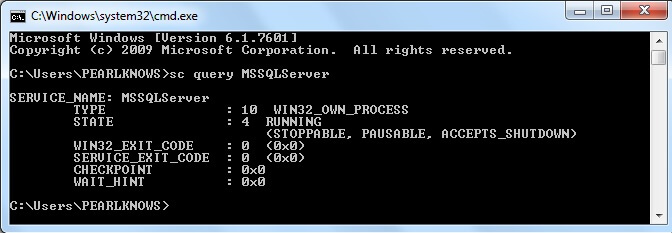
As it iterates through the list of SQL Services, it inserts the status output, where the line references "STATE", into the #hold_sql_status temporary table, and deletes the extra NULL. At the end, it will then add an Identity column to this table as well. Now that we have both tables populated in the same order, we can create a query that joins them together on the identity column. Here is the final complete script:
CREATE TABLE tempdb.dbo.hold_sql_services
   (
     SQL_ServiceName VARCHAR(100)
     )

INSERT INTO tempdb.dbo.hold_sql_services EXEC xp_cmdshell 'sc query type= service state= all |find "SQL" |find /V "DISPLAY_NAME" |find /V "AD" | find /V "Writer"'

INSERT INTO tempdb.dbo.hold_sql_services EXEC xp_cmdshell 'sc query type= service state= all |find "MsDts" |find /V "DISPLAY_NAME"'

DELETE tempdb.dbo.hold_sql_services WHERE SQL_ServiceName IS NULL

ALTER TABLE tempdb.dbo.hold_sql_services
    ADD SNID INT IDENTITY(1,1)

CREATE TABLE tempdb.dbo.hold_sql_status
    (
    SvcStatus VARCHAR(55)
    )

DECLARE @SvcStatus VARCHAR(100)
DECLARE @nSvcName VARCHAR(100)
DECLARE @oSvcName VARCHAR(100)
DECLARE @gService CURSOR
DECLARE @cmd VARCHAR(500)
DECLARE @cSTOP INT
DECLARE @SvcStatTxt VARCHAR(100)

SET @gService = CURSOR FOR
SELECT SQL_ServiceName
FROM tempdb.dbo.hold_sql_services

OPEN @gService

FETCH NEXT
FROM @gService INTO @oSvcName

WHILE @@FETCH_STATUS = 0
BEGIN
   SET @nSvcName=REPLACE(@oSvcName,'SERVICE_NAME: ','')
   --Print @nSvcName

   SET @cmd='sc query ' + @nSvcName + '|find "STATE"'
   --Print @cmd

   INSERT INTO tempdb.dbo.hold_sql_status EXEC xp_cmdshell @cmd

   DELETE tempdb.dbo.hold_sql_status WHERE SvcStatus IS NULL

   FETCH NEXT
   FROM @gService INTO @oSvcName
END

CLOSE @gService
DEALLOCATE @gService

ALTER TABLE tempdb.dbo.hold_sql_status
    ADD SSID INT IDENTITY(1,1)

SET NOCOUNT ON

SELECT sn.SQL_ServiceName,
CASE WHEN CHARINDEX('RUNNING',ss.SvcStatus) > 0 THEN 'RUNNING'
       WHEN CHARINDEX('STOPPED',ss.SvcStatus) > 0 THEN 'STOPPED'
       WHEN CHARINDEX('START_PENDING',ss.SvcStatus) > 0 THEN 'START PENDING'
       WHEN CHARINDEX('STOP_PENDING',ss.SvcStatus) > 0 THEN 'STOP PENDING'
       ELSE 'UNKNOWN' END AS ServiceStatus
FROM tempdb.dbo.hold_sql_status ss
INNER JOIN tempdb.dbo.hold_sql_services sn ON sn.SNID=ss.SSID

/* select @cSTOP=COUNT(*) from tempdb.dbo.hold_sql_status
where SvcStatus like '%STOPPED'
If @cSTOP > 0  -- You can uncomment this block if you want to add logic to email only for STOPPED services -
  BEGIN  */

EXEC msdb.dbo.sp_send_dbmail --@profile_name='SQLAdmin',
@recipients='[email protected]',
@subject='SQL Service(s) Status Update',
@body='This is the latest SQL Server Service(s) Status Report. Please review and take appropriate action if necessary',
@query='select RTRIM(sn.SQL_ServiceName) AS SQL_ServiceName,
  CASE WHEN CHARINDEX(''RUNNING'',ss.SvcStatus) > 0 THEN ''RUNNING''
       WHEN CHARINDEX(''STOPPED'',ss.SvcStatus) > 0 THEN ''STOPPED''
       WHEN CHARINDEX(''START_PENDING'',ss.SvcStatus) > 0 THEN ''START PENDING''
       WHEN CHARINDEX(''STOP_PENDING'',ss.SvcStatus) > 0 THEN ''STOP PENDING''
       ELSE ''UNKNOWN'' END AS ServiceStatus
from tempdb.dbo.hold_sql_status ss
inner join tempdb.dbo.hold_sql_services sn on sn.SNID= ss.SSID'

--END --uncomment this if you uncomment the BEGIN..END block above

DROP TABLE tempdb.dbo.hold_sql_services
The results should look similar to this:
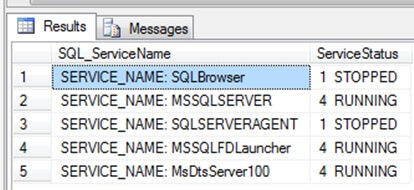
Conclusion
The above method is one way to get the current status of your SQL Services. As you can see, there are a lot of caveats and moving parts here. There must be an easier and cleaner way. Indeed, we can continue on the evolution of gathering service status, and next we will talk about an alternative solution, method 2, in Part II of this three part series.
Next Steps
In the meanwhile, to learn some more about using the above-referenced components, check out some of these previous tips and resources below:
- Getting operating system content into SQL Server
- Enabling xp_cmdshell in SQL Server 2005
- Windows SC command
- Here a Technet Blog that lists all the SQL Server Service Names from version 7.0 through SQL 2008/R2






About the author
 Robert Pearl is a SQL MVP, and President of Pearl Knowledge Solutions, Inc., offering SQLCentric monitoring and DBA services.
This author pledges the content of this article is based on professional experience and not AI generated.
View all my tips
