By: Edwin Sarmiento | Comments (32) | Related: > Availability Groups
Problem
In a previous tip on New SQL Server AlwaysOn Feature - Part 1 configuration, we have seen how we can configure AlwaysOn Availability Groups. AlwaysOn Availability Groups promise to maximize your IT investments by allowing read-only workloads on the secondary replicas. How can we configure the secondary replicas to allow read-only workloads? And, how do we configure SQL Server to automatically redirect the read-only workloads after a failover? Check out this tip to learn more.
Solution
SQL Server 2012 AlwaysOn Availability Groups help organizations maximize IT investments by making full use of standby hardware for read-only workloads. Not only that, it also improves performance on the primary database by offloading read-only workloads and redirecting them to a secondary replica. In this tip, we will configure databases in an Availability Group to allow read-only workloads when acting as a secondary replica. We will also configure SQL Server to automatically redirect read-only workloads after an Availability Group failover.
Enable Readable Secondary's in SQL Server 2012 AlwaysOn Availability Groups
The first thing that we need to do is configure the secondary replica to allow read-only workload. This can be done by modifying the Readable Secondary option in the Availability Group Properties window.
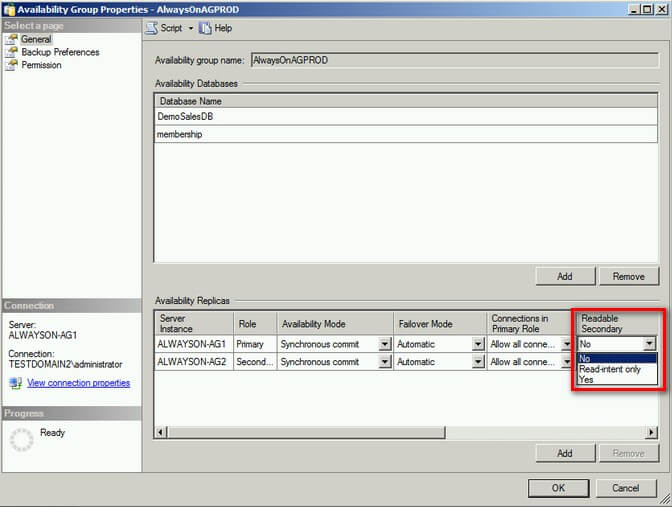
There are three different options under the Readable Secondary drop-down menu.
- No. This is the default value. This means that the database does not allow read-only workloads when running as a secondary role. Any attempts to run SELECT statements in this database will return an error similar to that of when running queries against a database mirror.
- Read-intent only. This setting allows read-only workloads when running as a secondary role only if the application connection string contains the parameter: Application Intent=Read-only.
- Yes. This setting allows read-only workloads regardless of whether or not the application connection string contains the parameter: Application Intent=Read-only.
For the purpose of this tip, we will configure the replicas' Readable Secondary option to Read-intent only. This will allow us to appreciate how read-only routing works when configured later in this tip.
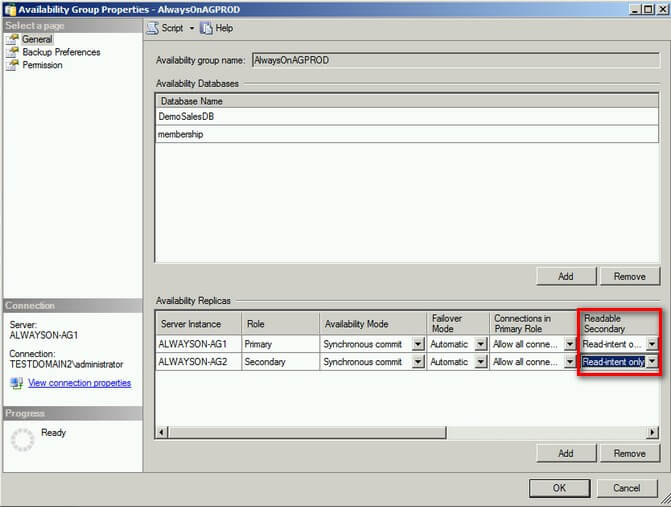
Once the Readable Secondary option has been configured, you can test this by running your read-only applications against the secondary replica. Be sure to add the connection string parameter Application Intent=Read-only in your applications.
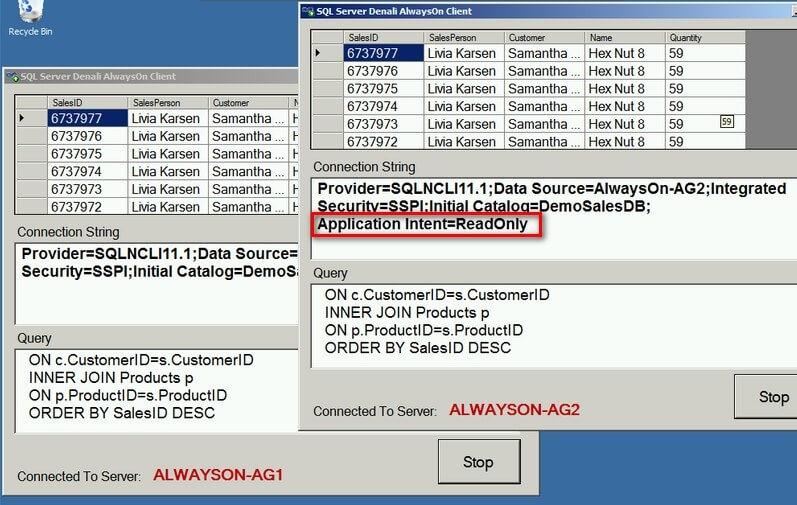
In the screenshot above, my applications are connected to both the primary (ALWAYSON-AG1) and the secondary replica (ALWAYSON-AG2.) Since we configured the replicas' Readable Secondary option to Read-intent only, I've added the connection string parameter Application Intent=Read-only in one of the applications.
Enable Read-Only Routing using T-SQL in SQL Server 2012 AlwaysOn Availability Groups
So far, I've only used the Availability Group Listener Name on the application connecting to the primary replica whereas I've still used the SQL Server instance name to connect to my readable secondary. This is because if I use the Listener Name to connect to my readable secondary, it will automatically be redirected to my primary replica even if I specify the Application Intent=Read-only parameter in the connection string. The Listener Name will always redirect to the primary replica unless we configure a read-only routing list. A read-only routing list is a list of all Availability Group Replicas that are configured to accept read-only workloads. SQL Server will redirect client connections that have the Application Intent=Read-only parameter in the connection string to one of the replicas in the read-only routing list. A more comprehensive explanation of what is happening in the background is described in this blog post by Matt Neerincx, a developer in the SQL Server Engine Team. We want to configure all of our applications to use the Listener Name instead of the instance names for simplicity's sake and possibly for standardization. However, we also want our read-only workloads to be redirected not to the primary replica, but to the secondary replica and failed over accordingly should the Availability Group fail over. To configure read-only routing, we need to do the following on our Availability Group.
- Specify a read_only_routing_url. A read_only_routing_url is the entry point of an application to connect to a readable secondary. It contains the system address and the port number that identifies the replica when acting as a readable secondary. This is similar to the endpoint URL we specify when configuring database mirroring.
- Specify a read-only routing list on all replicas. For each replica that will act as primary, we need to define the corresponding secondary replicas that will act as the routing target for read-only workloads. This means that if the replica is acting as a primary, all read-only workloads will be redirected to the replicas in the read-only routing list
Unfortunately, there is no graphical user interface to perform these tasks in SQL Server Management Studio. Therefore, we will need to do these using T-SQL. Let's first specify a read_only_routing_url for all of the replicas in our Availability Group. Since we already have an existing Availability Group, we will simply use the ALTER AVAILABILITY GROUP command for these tasks.
ALTER AVAILABILITY
GROUP AlwaysOnAGProd
MODIFY REPLICA
ON
'ALWAYSON-AG1'
WITH
(
   SECONDARY_ROLE

    (
       READ_ONLY_ROUTING_URL='TCP://ALWAYSON-AG1.TESTDOMAIN.local:1433'

    )
)
The code simply modifies the Availability Group named AlwaysOnAGProd and assigns the read_only_routing_url to the replica ALWAYSON-AG1 when it is acting as a secondary replica. This needs to be done on all replicas in your Availability Group.
Next, we need to specify a read-only routing list.
ALTER AVAILABILITY GROUP AlwaysOnAGProd
MODIFY REPLICA ON
'ALWAYSON-AG1'
WITH
(
   PRIMARY_ROLE
   (
       READ_ONLY_ROUTING_LIST =('ALWAYSON-AG2')
   )
)
The code simply lists the replica ALWAYSON-AG2 in the read-only routing list for ALWAYSON-AG1 if it is acting as the primary. This also needs to be done on all replicas in your Availability Group.
A complete T-SQL script for my 2-node Availability Group configuration is shown below.
--Specify a read_only_routing_url
ALTER AVAILABILITY GROUP AlwaysOnAGProd
MODIFY REPLICA ON
'ALWAYSON-AG1'
WITH
(
   SECONDARY_ROLE
   (
       READ_ONLY_ROUTING_URL='TCP://ALWAYSON-AG1.TESTDOMAIN.local:1433'
   )
)


ALTER AVAILABILITY GROUP AlwaysOnAGProd
MODIFY REPLICA ON
'ALWAYSON-AG2'
WITH
(
   SECONDARY_ROLE
   (
       READ_ONLY_ROUTING_URL='TCP://ALWAYSON-AG2.TESTDOMAIN.local:1433'
   )
)

--Specify a read-only routing list
ALTER AVAILABILITY GROUP AlwaysOnAGProd
MODIFY REPLICA ON
'ALWAYSON-AG1'
WITH
(
   PRIMARY_ROLE
   (
       READ_ONLY_ROUTING_LIST =('ALWAYSON-AG2')
   )
)


ALTER AVAILABILITY GROUP AlwaysOnAGProd
MODIFY REPLICA ON
'ALWAYSON-AG2'
WITH
(
   PRIMARY_ROLE
   (
       READ_ONLY_ROUTING_LIST =('ALWAYSON-AG1')
   )
)
Of course, the more replicas you have in your Availability Group, the more configuration has to be made.
Testing Read-Only Routing in SQL Server 2012 AlwaysOn Availability Groups
Now that we've enabled Readable Secondary replicas and configured read-only routing, let's test this with our applications. We will use the Availability Group Listener Name on all of our application connection strings. Also, on the application that we want to connect to the secondary replica for read-only workload, we will specify the Application Intent=Read-only parameter in the connection string. Let's see how our applications behave.
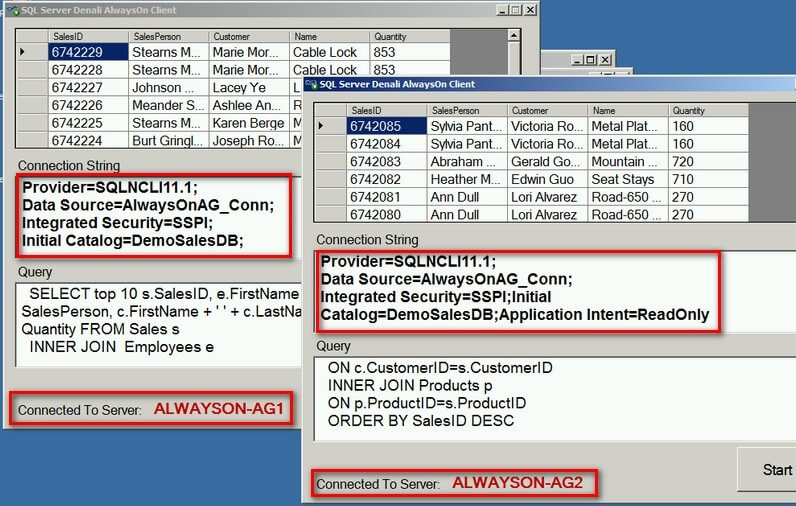
Note that I am using the same connection string values for both application except for the additional Application Intent=Read-only parameter in one of them. Because of this parameter, the application gets redirected to the replica defined in the read-only routing list - ALWAYSON-AG2 - when ALWAYSON-AG1 acts as my primary replica. When you failover the Availability Group, the application automatically gets redirected to the new secondary replica without making changes to the application. This makes the failover and failback process very seamless with the applications.
Next Steps
- Review this tip on New SQL Server AlwaysOn Feature - Part 1 configuration
- Configure your AlwaysOn Availability Groups with readable secondary's and read-only replica to see if this fits your high availability strategies.






About the author
 Edwin M Sarmiento is a Microsoft SQL Server MVP and Microsoft Certified Master from Ottawa, Canada specializing in high availability, disaster recovery and system infrastructures.
This author pledges the content of this article is based on professional experience and not AI generated.
View all my tips
