By: Dallas Snider | Comments (31) | Related: 1 | 2 | 3 | 4 | 5 | 6 | 7 | > TSQL
Problem
In my 18-plus years of T-SQL experience, the MERGE statement has got to be one of the most difficult statements I have had to implement. It is powerful and multifunctional, yet it can be hard to master. Oftentimes I would find examples of the MERGE statement that just didn't do what I needed it to do, that is to process a Type 2 slowly changing dimension. Check out this tip to learn more.
Solution
The solution presented in this tip will walk through the steps of how to use the MERGE statement nested inside an INSERT statement to handle both new records and changed records in a Type 2 Slowly Changing Dimension table within a data warehouse. This solution will walk through the processing over three days. Each day, new and changed records are processed. Records are first inserted into a staging table and then the MERGE statement will insert new records into the slowly changing dimension table.
I suggest that you copy and paste each of the code samples into its own editor window in SQL Server Management Studio for ease of execution.
In Code Sample 1 below, we will create our staging table and our slowly changing dimension table.
--=============================================================================
-- Code Sample 1
--=============================================================================
-- Create the staging table for the type two slowly changing dimension table data
create table dbo.tblStaging
(
  SourceSystemID int not null,
  Attribute1 varchar(128) not null
    constraint DF_tblStaging_Attribute1 default 'N/A',
  Attribute2 varchar(128) not null
    constraint DF_tblStaging_Attribute2 default 'N/A',
  Attribute3 int not null
    constraint DF_tblStaging_Attribute3 default -1,
  DimensionCheckSum int not null
    constraint DF_tblStaging_DimensionCheckSum default -1,
  LastUpdated datetime  not null
    constraint DF_tblStaging_LastUpdated default getdate(),
  UpdatedBy varchar(50) not null
    constraint DF_tblStaging_UpdatedBy default suser_sname()
)
-- Create the type two slowly changing dimension table
create table dbo.tblDimSCDType2Example
(
  SurrogateKey int not null identity(1,1) PRIMARY KEY,
  SourceSystemID int not null,
  Attribute1 varchar(128) not null
    constraint DF_tblDimSCDType2Example_Attribute1 default 'N/A',
  Attribute2 varchar(128) not null
    constraint DF_tblDimSCDType2Example_Attribute2 default 'N/A',
  Attribute3 int not null
    constraint DF_tblDimSCDType2Example_Attribute3 default -1,
  DimensionCheckSum int not null
    constraint DF_tblDimSCDType2Example_DimensionCheckSum default -1,
  EffectiveDate date not null
    constraint DF_tblDimSCDType2Example_EffectiveDate default getdate(),
  EndDate date not null
    constraint DF_tblDimSCDType2Example_EndDate default '12/31/9999',
  CurrentRecord char(1) not null
    constraint DF_tblDimSCDType2Example_CurrentRecord default 'Y',
  LastUpdated datetime  not null
    constraint DF_tblDimSCDType2Example_LastUpdated default getdate(),
  UpdatedBy varchar(50) not null
    constraint DF_tblDimSCDType2Example_UpdatedBy default suser_sname()
)
In Code Sample 2, we insert two "new" records from the source system into the staging table. Then, we use the BINARY_CHECKSUM function to create a checksum value for the records in the staging table. This checksum value will be utilized later during the MERGE statement to detect changed records.
--=============================================================================
--Code Sample 2
--=============================================================================
-- Start of Day 1 - truncate the staging table
truncate table dbo.tblStaging
-- insert a new record into the staging table into the staging table
insert into dbo.tblStaging
(SourceSystemID, Attribute1,   Attribute2, Attribute3)
values (1      , 'Mary Brown', 'Single'  , 143)
-- insert a new record into the staging table into the staging table
insert into dbo.tblStaging
(SourceSystemID, Attribute1,  Attribute2,  Attribute3)
values (2      , 'Ricky Green', 'Married'  ,   189)
-- Update the checksum value in the staging table
update dbo.tblStaging set DimensionCheckSum=
BINARY_CHECKSUM(SourceSystemID, Attribute1, Attribute2, Attribute3)
Code Sample 3 shows the MERGE statement (which happens to be embedded within an INSERT statement) that will be used to process the records between the two tables. The comments in the T-SQL code will help to explain what is happening throughout the statement. We will reuse Code Sample 3 throughout this tip.
There are two things that need to be noticed.
- When executing Code Sample 3, only the count of updated records will be shown as "row(s) affected." Therefore, the first time it is executed against an empty slowly changing dimension table, there will be "(0 rows() affected)" because there are only inserts and no updates.
- Please don't forget the semicolon at the end.
--=============================================================================
-- Code Sample 3
--=============================================================================
-- begin of insert using merge
insert into dbo.tblDimSCDType2Example
( --Table and columns in which to insert the data
  SourceSystemID,
  Attribute1,
  Attribute2,
  Attribute3,
  DimensionCheckSum,
  EffectiveDate,
  EndDate
)
-- Select the rows/columns to insert that are output from this merge statement
-- In this example, the rows to be inserted are the rows that have changed (UPDATE).
select
SourceSystemID,
Attribute1,
Attribute2,
Attribute3,
DimensionCheckSum,
EffectiveDate,
EndDate
from
(
  -- This is the beginning of the merge statement.
  -- The target must be defined, in this example it is our slowly changing
  -- dimension table
  MERGE into dbo.tblDimSCDType2Example AS target
  -- The source must be defined with the USING clause
  USING
  (
    -- The source is made up of the attribute columns from the staging table.
    SELECT
    SourceSystemID,
    Attribute1,
    Attribute2,
    Attribute3,
    DimensionCheckSum
    from dbo.tblStaging
  ) AS source
  (
    SourceSystemID,
    Attribute1,
    Attribute2,
    Attribute3,
    DimensionCheckSum
  ) ON --We are matching on the SourceSystemID in the target table and the source table.
  (
    target.SourceSystemID = source.SourceSystemID
  )
  -- If the ID's match but the CheckSums are different, then the record has changed;
  -- therefore, update the existing record in the target, end dating the record
  -- and set the CurrentRecord flag to N
  WHEN MATCHED and target.DimensionCheckSum <> source.DimensionCheckSum
                                 and target.CurrentRecord='Y'
  THEN
  UPDATE SET
    EndDate=getdate()-1,
    CurrentRecord='N',
    LastUpdated=getdate(),
    UpdatedBy=suser_sname()
  -- If the ID's do not match, then the record is new;
  -- therefore, insert the new record into the target using the values from the source.
  WHEN NOT MATCHED THEN
  INSERT
  (
    SourceSystemID,
    Attribute1,
    Attribute2,
    Attribute3,
    DimensionCheckSum
  )
  VALUES
  (
    source.SourceSystemID,
    source.Attribute1,
    source.Attribute2,
    source.Attribute3,
    source.DimensionCheckSum
  )
  OUTPUT $action,
    source.SourceSystemID,
    source.Attribute1,
    source.Attribute2,
    source.Attribute3,
    source.DimensionCheckSum,
    getdate(),
    '12/31/9999'
) -- the end of the merge statement
--The changes output below are the records that have changed and will need
--to be inserted into the slowly changing dimension.
as changes
(
  action,
  SourceSystemID,
  Attribute1,
  Attribute2,
  Attribute3,
  DimensionCheckSum,
  EffectiveDate,
  EndDate
)
where action='UPDATE';
So let's review the steps to get this example to work:
- Execute Code Sample 1 to create the tables in this tip.
- Execute Code Sample 2 to insert records into the staging table.
- Execute Code Sample 3 to merge the new and changed records into the slowly changing dimension table.
- Execute Code Sample 4 below to examine the records in both of the tables.
--=============================================================================
--Code Sample 4
--=============================================================================
select * from dbo.tblStaging order by SourceSystemID
select * from dbo.tblDimSCDType2Example order by SourceSystemID, SurrogateKey
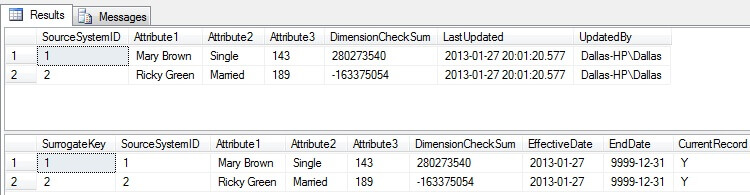
In the figure below, we see the results from Code Sample 4 where our two new records in the staging table have been inserted into the slowly changing dimension table. Please notice the SurrogateKey, EffectiveDate, EndDate, and CurrentRecord columns as they will change as we move forward with this example.
In Code Sample 5 shown below, two new records (SourceSystemID 3 and SourceSystemID 4) and one updated record (SourceSystemID 2) are inserted into the staging table and checksums are calculated.
--=============================================================================
--Code Sample 5
--=============================================================================
--Start of Day 2 - truncate the staging table
truncate table dbo.tblStaging
-- insert a new record into the staging table
insert into dbo.tblStaging
(SourceSystemID, Attribute1, Attribute2, Attribute3)
values (3      , 'Jane Doe', 'Single'  , 123)
-- insert a new record into the staging table
insert into dbo.tblStaging
(SourceSystemID, Attribute1, Attribute2, Attribute3)
values (4      , 'John Doe', 'Married' , 246)
-- insert a changed record into the staging table
insert into dbo.tblStaging
(SourceSystemID, Attribute1,       Attribute2, Attribute3)
values (2      , 'Ricky L. Green', 'Married' , 189)
-- Update the checksum value in the staging table
update dbo.tblStaging set DimensionCheckSum=
BINARY_CHECKSUM(SourceSystemID, Attribute1, Attribute2, Attribute3)
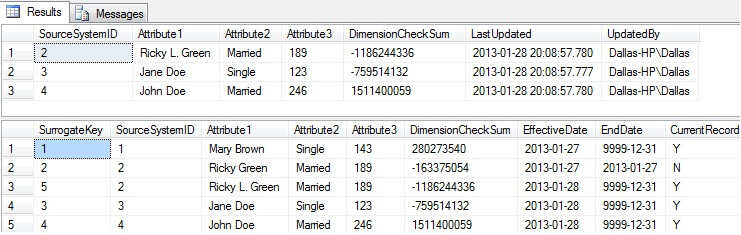
After executing Code Sample 5 to insert records into the staging table, execute the MERGE/INSERT statement in Code Sample 3 and the SELECT statements in Code Sample 4. The results of the SELECT statements are shown in the figure below. Notice how there is a second record for SourceSystemID 2 (SurrogateKey 5) that reflects the change in the Attribute2 column. Also, notice how the DimensionCheckSum column is different between SurrogateKeys 2 and 5. Furthermore, the EndDate for SurrogateKey 2 has changed from 12/31/9999 to 01/27/2013 and the CurrentRecord is set to 'N'.
In Code Sample 6 shown below, one new record (SourceSystemID 5) and three updated records (SourceSystemIDs 3, 4 and 5) are inserted into the staging table and checksums are calculated.
--=============================================================================
-- Code Sample 6
--=============================================================================
--Start of Day 3 - truncate the staging table
truncate table dbo.tblStaging
-- insert a changed record into the staging table
insert into dbo.tblStaging
(SourceSystemID, Attribute1,       Attribute2, Attribute3)
values (3      , 'Jane Doe-Jones', 'Married' , 123)
-- insert a changed record into the staging table
insert into dbo.tblStaging
(SourceSystemID, Attribute1,  Attribute2, Attribute3)
values (4      , 'John Doe', 'Married'  , 220)
-- insert a new record into the staging table
insert into dbo.tblStaging
(SourceSystemID, Attribute1,   Attribute2, Attribute3)
values (5      , 'Bill Smith', 'Married' , 198)
-- insert a changed record into the staging table
insert into dbo.tblStaging
(SourceSystemID, Attribute1,   Attribute2, Attribute3)
values (1      , 'Mary Brown', 'Single'  , 136)
-- Update the checksum value in the staging table
update dbo.tblStaging set DimensionCheckSum=
BINARY_CHECKSUM(SourceSystemID, Attribute1, Attribute2, Attribute3)
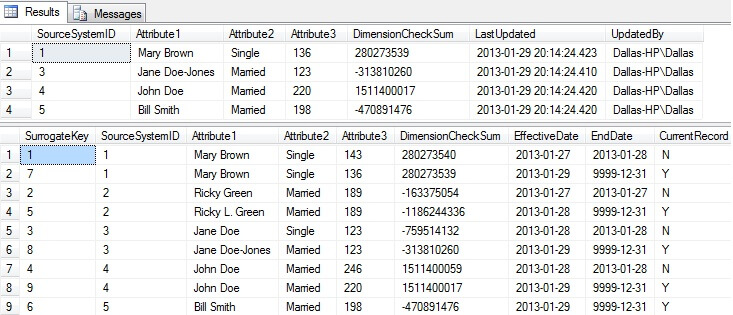
After executing Code Sample 6 to insert records into the staging table, again execute the MERGE/INSERT statement in Code Sample 3 and the SELECT statements in Code Sample 4. The results of the latest SELECT statements are shown in the figure below. Notice how there are new records for SourceSystemID 1, 3 and 4 where the CurrentRecord column is set to 'Y' and the EndDate is 12/31/9999.
Next Steps
- Try building a SQL Server Agent Job to execute the above steps.
- Try building an SSIS package to process slowly changing dimensions.
- Read more about the BINARY_CHECKSUM and other SQL Server T-SQL Aggregate Functions at the following link: SQL Server TSQL Aggregate Functions






About the author
 Dr. Dallas Snider is an Assistant Professor in the Computer Science Department at the University of West Florida and has 18+ years of SQL experience.
This author pledges the content of this article is based on professional experience and not AI generated.
View all my tips
