By: Jeremy Kadlec | Comments | Related: > Security
Problem
Extended stored procedures in SQL Server 2000 were the only option to extend the capabilities of the relational engine such as access to the file system or to send and receive emails directly in SQL Server. Securing these objects is not straight forward so few organizations have done so leaving SQL Server 2000 in an insecure state.
Solution
Step 1 - Extended Stored Procedures Backgrounder
Extended stored procedures are objects that are stored in the master database of the SQL Server 2000 instance. These objects can be accessed via T-SQL commands that under the covers call *.dll's. Some of the most used extended stored procedures are xp_cmdshell (file system commands) and xp_sendmail (email directly from SQL Server), but it is possible to build custom extended stored procedures to meet your business needs.
Step 2 - Security Requirements
Gather the security requirements for your environment as they pertain to using extended stored procedures in your applications or to complete operational needs. Then determine who should have access to which extended stored procedures and why.
Keep in mind that by default particular extended stored procedures are only accessible by the sysadmin fixed server role or the db_owner fixed database role.
Step 3 - Analyze
Next, review the execute permissions on the extended stored procedures which can be accomplished by the following steps:
- Open Enterprise Manager
- Once Enterprise Manager loads, navigate to SQL Server root | Databases | Master | Extended Stored Procedures
- Review the list of extended stored procedures and locate the extended stored procedure of choice
- Right click on the extended stored procedure and select the 'Properties' option
- Once the 'Properties' window loads, click the 'Permissions' button on the top right of the interface
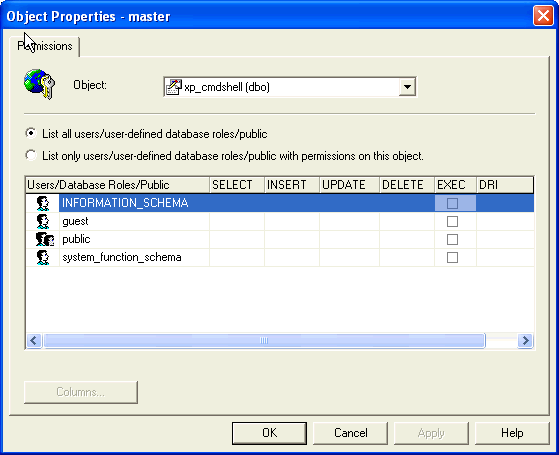
- Review and document the extended stored procedure permissions granted to the database users as shown below
Step 4 - Modify the Security
Rather than granting rights directly to users to execute the extended stored procedures, the recommendation would be to build stored procedures that call the extended stored procedures with the needed logic. Then the users can be granted execute permissions on the user defined stored procedure.
To modify the users with rights to the extended stored procedures, follow the steps from step 3 above and remove the 'EXEC' permissions.
A final option, sometimes considered drastic, is to drop the extended stored procedures. Although, from a security perspective this may be appropriate for some environments.
Step 5 - SQL Server 2005
Consider upgrading to SQL Server 2005 and using the CLR (Common Language Runtime) which has the ability to build assemblies in SQL Server 2005 which have the functionality to extend the relational engine's capabilities. The assemblies can then have execute and deny permissions granted to users similar to other relational objects.
Another SQL Server 2005 advancement is the ability to use the Surface Area Configuration tool to deny access to particular functionality such as the xp_cmdshell extended stored procedure. With SQL Server 2005, Microsoft has taken a step toward not allowing functionality until it has been explicitly granted.
Next Steps
- Review the extended stored procedure security in your environment.
- Determine if the extended stored procedure security is tight enough or if it requires improvements.
- Document the security configuration and then determine if a plan needs to be built to improve the SQL Server security.
- Check out the recent security tips from MSSQLTips.com.






About the author
 Jeremy Kadlec is a Co-Founder, Editor and Author at MSSQLTips.com with more than 300 contributions. He is also the CTO @ Edgewood Solutions and a six-time SQL Server MVP. Jeremy brings 20+ years of SQL Server DBA and Developer experience to the community after earning a bachelor's degree from SSU and master's from UMBC.
This author pledges the content of this article is based on professional experience and not AI generated.
View all my tips
