By: Jeremy Kadlec | Comments | Related: > Reporting Services Installation
Problem
During the SQL Server 2005 Reporting Services installation it is possible to complete the installation without completing the configuration. This may be needed if for example the encryption key is unknown at the installation time or if it is updated at a later date.
Solution
Regardless of which configuration needs to be changed or when the change is necessary do not be alarmed. It is possible to first complete the installation and then configure SQL Server 2005 Reporting Services via the Reporting Services Configuration tool. In order to complete the installation or reconfigure Reporting Services navigate to the Reporting Services Configuration tool which is located by default at Start | All Programs | Microsoft SQL Server 2005 | Configuration Tools.
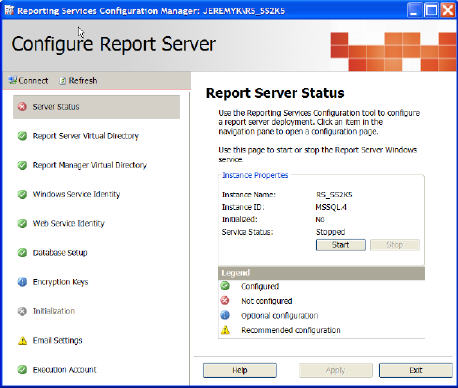
The Reporting Services Configuration tool allows you to perform the following configurations:
- Server Status
- Report Server Virtual Directory
- Report Manager Virtual Directory
- Windows Service Identity
- Web Service Identity
- Database Setup
- Encryption Keys
- Initialization
- Email Settings
- Execution Account
Below is a screen shot of the main interface for the Reporting Services Configuration tool:
Next Steps
- Browse to this tool to review the SQL Server 2005 Reporting Services configurations.
- Document these configurations for operational and disaster recovery purposes.
- Keep this tool in mind the next time any Reporting Services configurations need tweaking.






About the author
 Jeremy Kadlec is a Co-Founder, Editor and Author at MSSQLTips.com with more than 300 contributions. He is also the CTO @ Edgewood Solutions and a six-time SQL Server MVP. Jeremy brings 20+ years of SQL Server DBA and Developer experience to the community after earning a bachelor's degree from SSU and master's from UMBC.
This author pledges the content of this article is based on professional experience and not AI generated.
View all my tips
