By: Greg Robidoux | Updated: 2021-10-13 | Comments (8) | Related: 1 | 2 | 3 | 4 | 5 | 6 | 7 | > Security
Problem
Sometimes there may be a need to run some external processing from within Microsoft SQL Server. So, to make this task easy for both Database Administrators (DBAs) and Developers, Microsoft has a built-in extended stored procedure, called xp_cmdshell. With this extended stored procedure you have the ability to run any command line process, so you can embed this within your stored procedures, jobs or batch processing. This option is disabled by default. Also, to limit access to using xp_cmdshell only members of the sysadmin server role have default rights.
Solution
In this tutorial we will look at how to enable xp_cmshell and some of the errors you may see.
SQL Server Errors for xp_cmdshell
Here are some errors you may encounter with xp_cmdshell.
SQL Server blocked access to procedure sys.xp_cmdshell
If you have sysadmin privileges and don't enable xp_cmdshell and you issue a T-SQL command such as the following to get a directory listing of the C: drive in SQL Server Management Studio (SSMS):
xp_cmdshell 'dir c:\'
you get the following error message:
SQL Server blocked access to procedure 'sys.xp_cmdshell' of component 'xp_cmdshell' because this component is turned off as part of the security configuration for this server. A system administrator can enable the use of 'xp_cmdshell' by using sp_configure. For more information about enabling 'xp_cmdshell', search for 'xp_cmdshell' in SQL Server Books Online.
Execute Permission Denied on xp_cmdshell
If you don't have sysadmin privileges and try to run xp_cmdshell whether it is enabled or not you get this error message:
The EXECUTE permission was denied on the object 'xp_cmdshell', database 'mssqlsystemresource', schema 'sys'.
The configuration option xp_cmdshell does not exist
Another error you may get if you try to enable xp_cmdshell using sp_configure when advanced options is not set is the following error:
The configuration option 'xp_cmdshell' does not exist, or it may be an advanced option.
So in order to use xp_cmdshell whether you are a sysadmin or a regular user you need to first enable the use of xp_cmdshell.
Enable xp_cmdshell with sp_configure
The following code with enable xp_cmdshell using sp_configure. You need to issue the RECONFIGURE command after each of these settings for it to take effect.
-- this turns on advanced options and is needed to configure xp_cmdshell
EXEC sp_configure 'show advanced options', '1'
RECONFIGURE
-- this enables xp_cmdshell
EXEC sp_configure 'xp_cmdshell', '1'
RECONFIGURE
Disable xp_cmdshell with sp_configure
The following code with disable xp_cmdshell using sp_configure:
-- this turns on advanced options and is needed to configure xp_cmdshell
EXEC sp_configure 'show advanced options', '1'
RECONFIGURE
-- this disables xp_cmdshell
EXEC sp_configure 'xp_cmdshell', '0'
RECONFIGURE
Enable or Disable xp_cmdshell with SSMS Facets
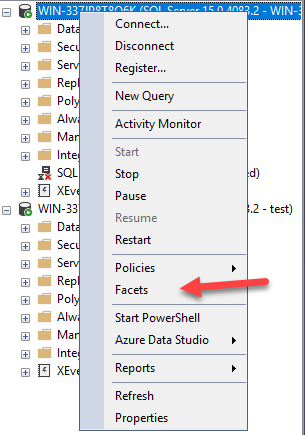
From within SSMS, right click on the instance name and select Facets.
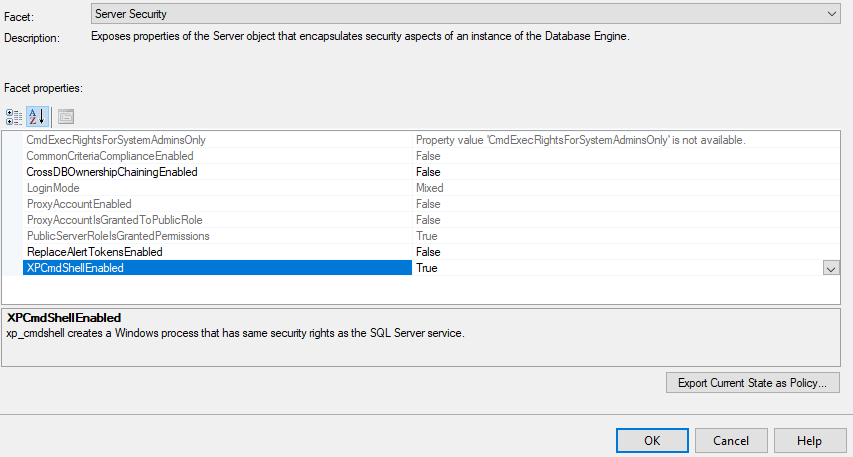
In the Facet dropdown, change to Server Security as shown below.
You can then change the setting for XpCmdShellEnabled as needed to either True or False. After changing the value, click OK to save the setting and the change will take effect immediately. There is not a need to enable show advanced options or use reconfigure, the GUI takes care of this automatically.
Granting Access to xp_cmdshell
Let's say we have a user that is not a sysadmin, but is a user of the master database and we want to grant access to run xp_cmdshell.
-- add user test to the master database
USE master
GO
CREATE USER [test] FOR LOGIN [test]
GO

-- grant execute access to xp_cmdshell
GRANT EXEC ON xp_cmdshell TO [test]
We get this error message:
The xp_cmdshell proxy account information cannot be retrieved or is invalid. Verify that the '##xp_cmdshell_proxy_account##' credential exists and contains valid information.
There is not a need to give a user sysadmin permissions or elevated permissions to run xp_cmdshell. To do so you can create a proxy account as shown in this tip Creating a SQL Server proxy account to run xp_cmdshell.
Next Steps
- Check your SQL Server instances and enable or disable xp_cmdshell as needed.
- Be sure to check out - Get Started with SQL Server xp_cmdshell.
- Review all of the SQL Server Security tips for DBAs and Developers on MSSQLTips.com.






About the author
 Greg Robidoux is the President and founder of Edgewood Solutions, a technology services company delivering services and solutions for Microsoft SQL Server. He is also one of the co-founders of MSSQLTips.com. Greg has been working with SQL Server since 1999, has authored numerous database-related articles, and delivered several presentations related to SQL Server. Before SQL Server, he worked on many data platforms such as DB2, Oracle, Sybase, and Informix.
This author pledges the content of this article is based on professional experience and not AI generated.
View all my tips
Article Last Updated: 2021-10-13
