By: Armando Prato | Comments (4) | Related: 1 | 2 | 3 | 4 | > Identities
Problem
When inserting a row into a database table that contains an identity column, I need a way to capture the identity value generated by the database engine after it inserts the row into this table. What can I use to capture this value while also making sure this value is accurate?
Solution
SQL Server provides three different functions for capturing the last generated identity value on a table that contains an identity column:
- @@IDENTITY
- SCOPE_IDENTITY()
- IDENT_CURRENT(‘tablename')
All three functions return the last value inserted into an identity column by the database engine. However, the three differ in functionality depending on the scope (or source) of the insert (i.e. a stored procedure or a trigger) and the connection that inserted the row.
Function @@IDENTITY returns the last generated table identity value for the current connection across all scope (i.e. any called stored procedures and any fired triggers). This function is not table specific. The value returned will be for the last table insert where an identity value was generated.
Function SCOPE_IDENTITY() is identical to @@IDENTITY with the following very notable exception: the value returned is limited to the current scope (i.e. the executed stored procedure).
Finally, function IDENT_CURRENT spans all scope and all connections to retrieve the last generated table identity value. Unlike @@IDENTITY and SCOPE_IDENTITY(), it is table specific and takes a tablename as a parameter.
We'll create an example to illustrate these functions in action.
First, we'll create 2 simple example tables: one table representing a customer table and another representing an audit table. The audit table's purpose is to track all inserts and deletes of customers to/from the database.
CREATE TABLE dbo.customer |
Second, we'll create an example stored procedure that inserts a customer row and returns the generated identity value along with a supporting trigger on customer that inserts a row into our audit table:
CREATE PROCEDURE dbo.p_InsertCustomer @customerid INT output |
Now we're ready to execute our procedure so we can create our first customer row:
DECLARE @customerid INT |
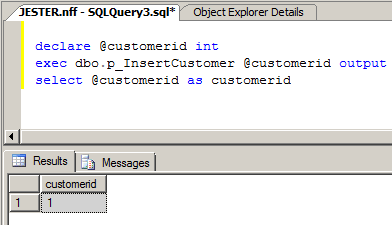
We returned the expected value for the first customer and we've logged an entry for the insert into our audit table. So far, the data looks good.
Imagine that a customer service rep needs to delete this newly entered customer from the database due to some miscommunication. Let's delete the inserted customer row:
DELETE FROM dbo.customer WHERE customerid = 1 |
At this point, the customer table is empty and the audit table has 2 rows - one for the first insert and a second for the delete of the customer. So far, so good.
Now, let's add a 2nd customer to our database and examine the captured identity value:
DECLARE @customerid INT |
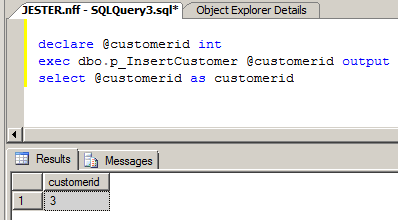
Whoa! What happened here? If we examine the customer table, we'll see that customer 2 was created, but our procedure is returning 3! What's going on here? Well recall that earlier in this tip, it's mentioned that @@IDENTITY spans scope. What this means is that it will return the last identity value generated from any stored procedure that was called by the main procedure or by any trigger that was fired - whichever generates an identity value last prior to the function being invoked. In our example, the primary scope is p_InsertCustomer and the secondary scope is the trigger tr_customer_log which was fired to record the insert. As a result, we're getting the identity value generated by the trigger insert on the auditlog table and not the one we're expecting on customer.
Prior to SQL Server 2000, the @@IDENTITY function was the only way to capture identity values. Due to this stored procedure/trigger issue, the SQL Server development team introduced both SCOPE_IDENTITY() and IDENT_CURRENT in SQL Server 2000 to mitigate this. In older versions of SQL Server, there was no easy workaround. In SQL Server 6.5, I would sometimes remove the identity from the column and create a supporting table that would hold the next value to use in effect mimicking the behavior of the identity column. It was an ugly kludge to say the least.
Let's alter our stored procedure to use SCOPE_IDENTITY() and re-execute the procedure to add a 3rd customer:
ALTER PROCEDURE dbo.p_InsertCustomer @customerid INT output |
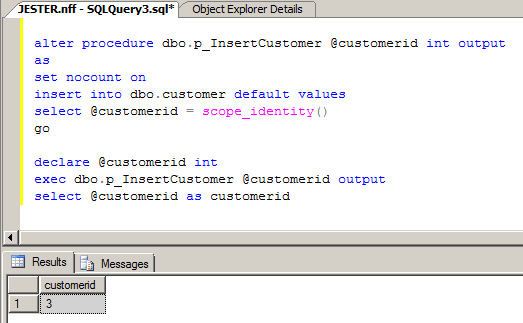
Now, we get 3 again but this time it's correct! We've added customer 3. If we examine the auditlog table, we'll see a 4th entry that records the newly inserted customer. Since SCOPE_IDENTITY() does not span scope and is relegated to only capturing values based on execution of the current procedure (the current scope), we've eliminated our identity capture issue.
As mentioned earlier, both @@IDENTITY and SCOPE_IDENTITY() are not table specific, unlike IDENT_CURRENT which can take a table parameter. Using @@IDENTITY or SCOPE_IDENTITY() requires careful placement within your code, so the appropriate identity value is captured from the intended table. On its surface, it would appear safer to forego both SCOPE_IDENTITY() and @@IDENTITY and instead use IDENT_CURRENT and specify a table. That should solve any issues with inaccurate capturing of identity values, right? Recall that I mentioned that IDENT_CURRENT not only spans scope, but it also spans connections. In other words, the value generated by IDENT_CURRENT is not confined to the processing done within your connection, but also spans all connections across the entire database. As a result, even in a moderately active OLTP environment there is a real concern about reliability of the value returned by this function. The value you capture may not necessarily be accurate which could lead to data corruption issues similar to the @@IDENTITY/trigger issue presented in this tip.
My opinion is that SCOPE_IDENTITY() is the safest function of the three and should be your default choice to be used over @@IDENTITY and IDENT_CURRENT. By using SCOPE_IDENTITY() you can safely add triggers and sub procedures without inadvertently corrupting your data. Furthermore, both @@IDENTITY and IDENT_CURRENT should be reserved for very specialized business cases (if at all - I've never come across a business case that required the use of either one over SCOPE_IDENTITY). In those cases where you find you require either, their use should be properly documented and carefully tested due to the nature of their behavior (i.e. the range of their scope and their range of connection).
Next Steps
- Examine your database logic for references to @@IDENTITY and consider changing this logic to reference SCOPE_IDENTITY()
- Examine your database logic for any references to IDENT_CURRENT and make sure its use is confined to single user processing. Consider using SCOPE_IDENTITY() instead.
- Read more about @@IDENTITY, SCOPE_IDENTITY, and IDENT_CURRENT in the SQL Server 2000 and 2005 Books Online






About the author
 Armando Prato has close to 30 years of industry experience and has been working with SQL Server since version 6.5.
This author pledges the content of this article is based on professional experience and not AI generated.
View all my tips
