By: Armando Prato | Comments (5) | Related: > Monitoring
Problem
From time to time, I encounter blocking situations where I end up issuing a KILL command against the blocking SPID. When I run sp_who2, I can see the killed SPID is in a ROLLBACK state. Is there any way I can get an idea of how long the rollback for the SPID will take?
Solution
There sure is! The KILL command offers the WITH STATUSONLY argument which displays
an estimation of completion for an in progress ROLLBACK. Using KILL with this argument
does not kill a connection; it simply produces a progress report.
Run the
following script in a new query window. It captures the connected SPID for the query
and displays the fact that the SPID has an open transaction when the script completes:
set nocount on
go
select 'SPID = ' + cast(@@spid as varchar) -- what connection is this?
go

create table test (col1 int identity) -- create a test table
go

begin tran tran1 -- start a transaction

while (1 = 1)
begin
   insert test default values
   if scope_identity() > 999999 -- break after inserting 1m rows
      break
end
go
dbcc opentran(0)
go
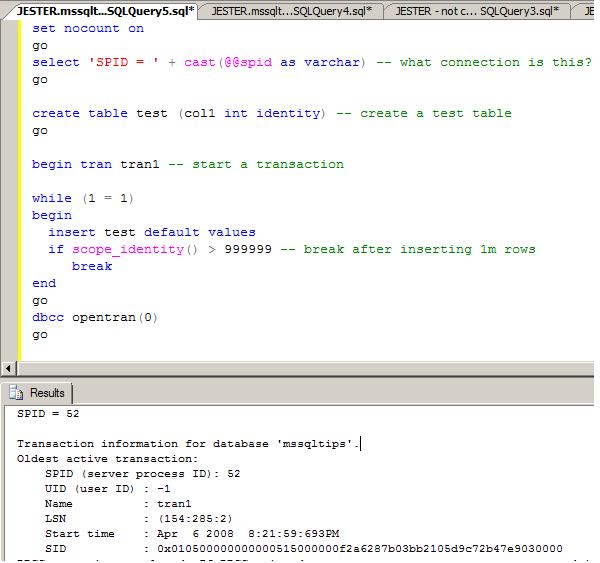
Now open a new connection and issue the following statements to kill the connection we just opened and to examine the connection's state:
kill 52
go
exec sp_who2
go
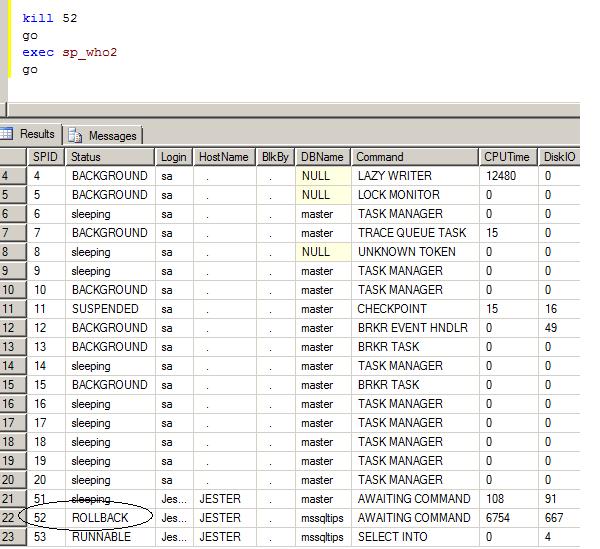
Now that we've KILLed the SPID, we can monitor its rollback progress by issuing KILL using the WITH STATUSONLY argument.
kill 52 with statusonly
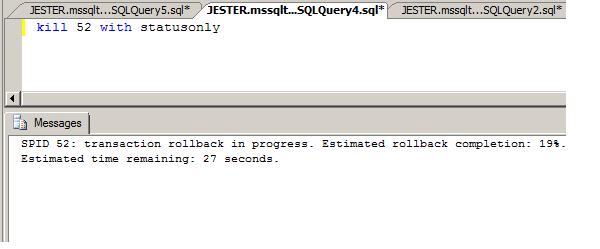
As you can see, you can get a good estimation from the server of rollback progress.
Next Steps
- Read about KILL UOW in the SQL Server Books Online
- Read about DBCC OPENTRAN in the SQL Server Books Online






About the author
 Armando Prato has close to 30 years of industry experience and has been working with SQL Server since version 6.5.
This author pledges the content of this article is based on professional experience and not AI generated.
View all my tips
