By: Ray Barley | Comments (5) | Related: > Table Valued Parameters
Problem
A new feature introduced in SQL Server 2008 is Table-Valued Parameters. In this tip we will look at some examples.
Solution
Table-Valued Parameters is a new feature introduced in SQL Server 2008. As the name implies, you can now pass a table type as a parameter to a function or stored procedure. At a high level the TVP allows you to populate a table declared as a T-SQL variable, then pass that table as a parameter to a stored procedure or function. The benefit of the TVP is that you can send multiple rows of data to the stored procedure or function rather than having to declare multiple parameters or possibly use an XML parameter type to handle a variable number of rows. According to Books on Line, a TVP is an efficient option for up to 1,000 or so rows.
In this tip we are going to gain an understanding of TVP by walking through a simple code sample to demonstrate how to:
- Create a table type that can be passed as a TVP to a function or stored procedure
- Create a stored procedure that uses a TVP
- Declare the table type, populate it with data, and pass it to a stored procedure
Now let's describe our example. In the extract, transform, and load (ETL) process in our data warehousing applications we typically map source system keys to surrogate keys during dimension processing; we then use the surrogate keys to uniquely identify the dimension rows in the warehouse. This allows us to retain the complete history of dimension rows, as each change to a dimension row can be stored in a new row with a new surrogate key. As dimension rows are changed or added, we simply assign a new surrogate key to the source system key and insert a new row into the dimension table. For more details on surrogate key processing see our earlier tip Handling Slowly Changing Dimensions in SQL Server Integration Services (SSIS) Packages. When processing fact rows we lookup the surrogate keys for the source system keys in the fact and store the surrogate key in the fact table; our queries join the fact table to the dimension table by the surrogate key. Since multiple fact tables typically reference a given dimension (e.g. Customer), the surrogate key lookup provides a good example for using TVP, allowing us to implement the surrogate key lookup one time in a stored procedure, then call it during our ETL process for multiple fact tables.
In addition to simply looking up the surrogate key for a source system key, we also have a situation where a fact table may have a source system key that doesn't exist in a dimension table. In this case we want to create an inferred member in the dimension; i.e. create a new surrogate key and add it to the dimension then update it later when we get the actual dimension row from the source system. For more details on inferred member processing for a dimension, take a look at our earlier tip Handling Early Arriving Facts in SQL Server Integration Services (SSIS) Packages.
Create a Table Type
In order to pass a table as parameter to a stored procedure or function, you first create a TABLE TYPE as follows:
CREATE TYPE SourceKeyList AS TABLE (
  SourceKey NVARCHAR(50)
)
GO
The T-SQL code is very similar to creating an ordinary table. You can query sys.types in the current database to determine any table types that have been created:
SELECT name, system_type_id, user_type_id
FROM sys.types
WHERE is_table_type = 1
Create a Stored Procedure with a TVP
We are going to create a stored procedure that performs the surrogate key lookup and adds an inferred member if the source key doesn't exist. First we need to create a sample dimension table:
CREATE TABLE dbo.dim_Customer (
 sk_Customer  INT IDENTITY NOT NULL,
 CustomerSourceKey NVARCHAR(50) NOT NULL,
 CustomerName  NVARCHAR(50) NOT NULL,
 InferredMember  BIT NOT NULL
)
The surrogate key is an integer type and we use the IDENTITY property to automatically assign the next sequential number when inserting rows. The InferredMember column gets set to 1 when we insert a row for a source key that doesn't exist. When the row is extracted from the source system during dimension processing, the inferred row is updated with the columns from the source and the InferredMember column is set to 0.
Now let's create a stored procedure that takes our table type as a parameter and performs the surrogate key lookup and inferred processing:
CREATE PROCEDURE dbo.stp_GetCustomerSK
@source_key_list SourceKeyList READONLY
AS
BEGIN
 INSERT INTO dbo.dim_Customer(
 CustomerSourceKey, CustomerName, InferredMember
 )
 SELECT SourceKey, N'INFERRED', 1
 FROM @source_key_list k
 LEFT JOIN dbo.dim_Customer c ON c.CustomerSourceKey = k.SourceKey
 WHERE sk_Customer IS NULL

 SELECT sk_Customer, CustomerSourceKey
 FROM dbo.dim_Customer c
 JOIN @source_key_list k ON k.SourceKey = c.CustomerSourceKey
END
GO
The TVP must be declared READONLY. You cannot perform any DML (i.e. INSERT, UPDATE, DELETE) against the TVP; you can only reference it in a SELECT statement. The stored procedure joins the TVP to the customer dimension to determine any source keys that do not already exist then inserts them. The stored procedure then joins the TVP to the customer dimension to return a result set of the source key and their corresponding surrogate key.
You can query sys.parameters to view any parameters that have been declared READONLY:
SELECT object_id, name FROM sys.parameters
WHERE is_readonly = 1
GO
Declare TVP, Populate and Pass as a Parameter
You declare a T-SQL variable as a table type then populate it with rows by using an INSERT statement:
DECLARE @source_key_list SourceKeyList

INSERT INTO @source_key_list
SELECT 'CustomerID_001' UNION ALL
SELECT 'CustomerID_002' UNION ALL
SELECT 'CustomerID_003'

EXEC dbo.stp_GetCustomerSK @source_key_list
GO
For demonstration purposes the above SELECT statement just hard-codes values to insert for the source system keys; you would normally do a SELECT DISTINCT from your source system table to extract the list of source system keys on which you want to perform the surrogate key lookup. The output from the above would look like this:
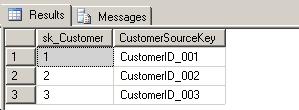
The output shows the surrogate key for each source key.
Next Steps
- Download a copy of the latest Community Technology Preview of SQL Server 2008 from this site. The above examples were created using the February, 2008 CTP.
- Download a copy of the sample code here and experiment with TVP.
- Review the SQL Server 2008 Books on Line content for CREATE TYPE and Table-Valued Parameters for additional information.






About the author
 Ray Barley is a Principal Architect at IT Resource Partners and a MSSQLTips.com BI Expert.
This author pledges the content of this article is based on professional experience and not AI generated.
View all my tips
