By: Armando Prato | Comments (14) | Related: > Constraints
Problem
I am modifying a table and I need to add a column that must be defined as being unique. I see that SQL Server allows you to define a UNIQUE constraint on a column but I also see that you can create a unique index on a column. Which one should I use?
Solution
The differences between the two methods are very subtle. UNIQUE constraints are part of the ANSI SQL definition and defining UNIQUE constraints is part of defining a database's logical design. In addition, UNIQUE constraints can be created as part of a table's definition and, as a by-product, SQL Server will automatically create a unique index under the hood when the constraint is created. In contrast, defining unique indexes are part of designing the physical data model and they are not ANSI standard.
From a performance standpoint, UNIQUE constraints and unique indexes are effectively the same to the query optimizer and you will not see any performance benefit to using one vs the other. In my model, I stick to the ANSI standard and implement column uniqueness via constraints. In my opinion, UNIQUE constraints help in better documenting a table and I use them over defining unique indexes.
In a Management Studio connection, run the following script to create a table called CAR. The table defines a UNIQUE constraint on a car based on its make and model.
| CREATE TABLE dbo.CAR ( CARID INT IDENTITY(1,1) NOT NULL, MAKE VARCHAR(10) NOT NULL, MODEL VARCHAR(10) NOT NULL, TOTALDOORS TINYINT NOT NULL, TOTALCYLINDERS TINYINT NOT NULL, CONSTRAINT PK_CAR PRIMARY KEY NONCLUSTERED (CARID), CONSTRAINT UQ_CAR UNIQUE NONCLUSTERED (MAKE, MODEL) ) GO |
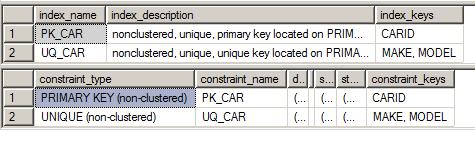
Running SP_HELP CAR shows that the engine has created both the constraint and a supporting index:
A requirement has now crossed my desk. For reporting purposes, management wants to track cars by their year made, in addition to the make and model. We'll alter the table to include a YEAR column:
|
ALTER TABLE DBO.CAR |
Adding this column requires me to change the constraint's uniqueness otherwise I won't be able to add more than one car by MAKE and MODEL regardless of year. In addition, it's probably a good idea to not allow duplicate cars by make, model, and year. As a result, I'll re-create the constraint's unique index to include the year.
| DROP INDEX DBO.CAR.UQ_CAR GO CREATE UNIQUE INDEX UQ_CAR ON DBO.CAR(MAKE, MODEL, [YEAR]) GO |
Running the above code, you'll see the following errors:
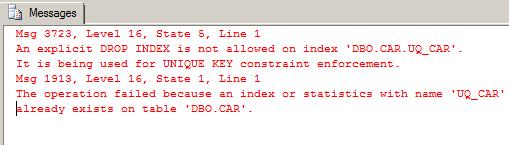
Boy, does that look ugly. The DROP failed because the index is tied to the constraint and it must match the constraint's definition. To change the uniqueness in our example, we can first drop then re-add constraint:
| ALTER TABLE DBO.CAR DROP CONSTRAINT UQ_CAR GO ALTER TABLE DBO.CAR ADD CONSTRAINT UQ_CAR UNIQUE (MAKE, MODEL, [YEAR]) GO |
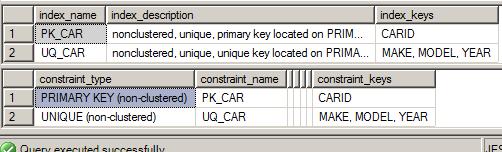
Running SP_HELP CAR again shows that the change has been made:
I just noticed I don't have a clustered index on this table. I'd like to make the unique constraint the clustered index since all our reports will sort by make, model, and year. While you can again DROP and CREATE the constraint making it UNIQUE CLUSTERED, you can actually use CREATE INDEX using the DROP_EXISTING option as well. Since the constraint's constraint keys aren't changing, the SQL Server engine will allow you to issue the following statement to change the UNIQUE constraint to clustered:
| CREATE UNIQUE CLUSTERED INDEX UQ_CAR ON DBO.CAR(MAKE, MODEL, [YEAR]) WITH DROP_EXISTING GO |
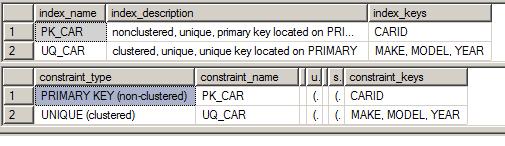
Running SP_HELP CAR one more time shows that the constraint's index has been changed to a clustered index:
Next Steps
- Read more about UNIQUE constraints in the SQL Server 2005 Books Online
- Familiarize yourself with how SQL Server relates to ANSI standards
- Read more about the other SQL Server constraints - Primary Key, Foreign Key, Default, and Check - in the SQL Server 2005 Books Online






About the author
 Armando Prato has close to 30 years of industry experience and has been working with SQL Server since version 6.5.
This author pledges the content of this article is based on professional experience and not AI generated.
View all my tips
