By: Greg Robidoux | Comments (7) | Related: > Database Mirroring
Problem
Database Mirroring is becoming a popular feature of SQL Server 2005. By following a few simple steps either by using the SQL Server Management Studio or by running a few T-SQL commands you can easily establish database mirroring for one or more of your databases. One of the configuration options for Database Mirroring is the High Availability mode. With this option three servers are put in place the principal, mirror and witness servers. This is the only option that allows for automatic failover. One of the things that I have noticed is that when there are periodic network issues a failover occurs even though there are no issues with the Principal server. Are there any options to delay the failover, I did not see anything in SQL Server Management Studio?
Solution
As mentioned above it is pretty simple and straightforward to setup Database Mirroring in the High Availability mode either by using SQL Server Management Studio or by issuing a few T-SQL commands. If you do a little digging in SQL Server Books online you will notice that some of the options that are documented are not available in the GUI. One of these options is the PARTNER TIMEOUT.
The PARTNER TIMEOUT is the value that SQL Server uses to determine the maximum period of time an instance waits to get a "ping" message from another instance of SQL Server before determining whether a failover should occur.
With the High Availability mode of Database Mirroring there are three servers that are involved as shown below:
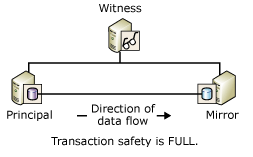
(source: SQL Server 2005 Books Online)
The three servers constantly ping each other, forming a quorum, and if one of the machines is not available the other machines determine how to handle the failover. Depending on where the machines are located and the reliability of your network it is possible that the Principal server may be disconnected and the Witness server and the Mirror server still have quorum and therefore initiate the failover.
If there are potential issues with network load or some other reason that may be causing a delay in communicating with all three servers one solution is to change the PARTNER TIMEOUT. By default this value is set to 10 seconds, so if a "ping" is not received in this 10 second period a failover may occur.
To make this change to a longer value, such as 20 seconds, the following command would be issued on the Principal server for the database that is mirrored.
ALTER DATABASE dbName SET PARTNER TIMEOUT 20
Be careful on the value that use for this option. If this value is set to high and a failure really does occur, the automatic failover will take longer based on the value you set.
In addition, the lowest this value can be set to is 5 seconds based on information found in SQL Server Books Online.
Next Steps
- If you are using the High Availability mode of Database Mirroring and are experiencing failovers look into this option to see if this will help
- Knowing what to change this value to is the tricky part. As mentioned you do not want the value too high, because this could delay the failover if there really is an issue. Since Microsoft started with 10 seconds it may make sense to adjust this to 20 or 30 seconds to see if this solves your problem..
- Here are some additional Database Mirroring tips






About the author
 Greg Robidoux is the President and founder of Edgewood Solutions, a technology services company delivering services and solutions for Microsoft SQL Server. He is also one of the co-founders of MSSQLTips.com. Greg has been working with SQL Server since 1999, has authored numerous database-related articles, and delivered several presentations related to SQL Server. Before SQL Server, he worked on many data platforms such as DB2, Oracle, Sybase, and Informix.
This author pledges the content of this article is based on professional experience and not AI generated.
View all my tips
