By: Andy Novick | Comments (1) | Related: More > DBA Best Practices
Problem
A colleague wanted to know a way to make it easy to write stored procedures that reference objects in a different database when the name of the databases might change. For example, when the code is moved into production. He couldn't find a way and neither could I. What could we do about it? Had we missed some feature in SQL Server? Would a feature to help us out ever be part of SQL Server?
Solution
The answer to the immediate question about an easy way to switch the database name was that there isn't one. It's possible to define an Alias for an instance of SQL Server but that doesn't help. It's also possible to define a Synonym for an individual object in another database. There's just no way to define a Synonym like object that provides an indirect reference to a database or to a schema. The best solution that I could offer my colleague is to create synonyms in the database that has the stored procedures to each and every table and view that the stored procedures might reference in the database with the tables. Then when the code is moved to production, write a script to change all the synonyms to use the correct database name. Creating Synonyms is described in the tip Benefits and limitations of using synonyms in SQL Server 2005. An alternative solution is to write all the queries using dynamic SQL and store the name of the target database in a setting table or pass it as a parameter. Dynamic SQL exposes your code to the possibility of SQL Injection Attacks and should really be the choice of last resort.
A decade ago I had a suggestion for an improved feature in SQL Server. The only avenue for communicating the suggestion that I could find at the time was an e-mail address that took suggestions for all Microsoft products. I sent in my suggestion and in response I got nothing. No acknowledgement of my email; no call; no posting of the suggestion on the web; and no eventual reply informing me of what Microsoft intended to do with the great suggestion that I had made. It wasn't very satisfying and I never did that again.
My experience reporting bugs to Product Services (PSS) has been very different. In 2005, I ran into a bug in the Visual Basic compiler. My client and I decided it was important enough to take the issue to Product Services and chance having to pay for them to provide a solution. PSS confirmed that it was a bug in the compiler and there was no charge. What's more, they fixed the problem and provided us with a hotfix in about three months that was eventually rolled into a service pack of Visual Studio.
The situation with reporting issues casually and without having to pay for the privilege has changed in the last couple of years. There's now a web site Connect.Microsoft.com that serves the purpose of two way communication between Microsoft and individuals and the community of developers. The page Connect.Microsoft.com/SQLServer is devoted to our favorite product. It has links to new service packs and trial editions, a link to the forums on SQL Server and the link that I'm most interested in the Submit_Product_Feedback link.
Connect allows you to search the product feedback to see if someone else has made a suggestion similar to the one that interest you. You can do more than just search for suggestions. You can make your own suggestions, watch the status of suggestions and rate the importance of suggestions made by others. To do any of the functions beyond searching you'll need to have a Windows Live ID and fill in a profile on the connect site.
To address my colleague's issue I first searched for a similar problem on the term "synonyms for databases". There were seven possibilities shown in the results:
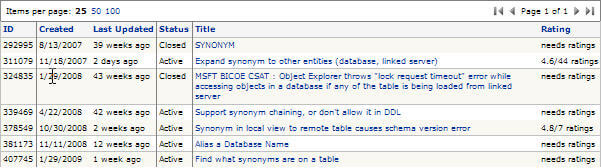
The first item was closed but the second, 311079, sounded like exactly what I was looking for. Take a look:
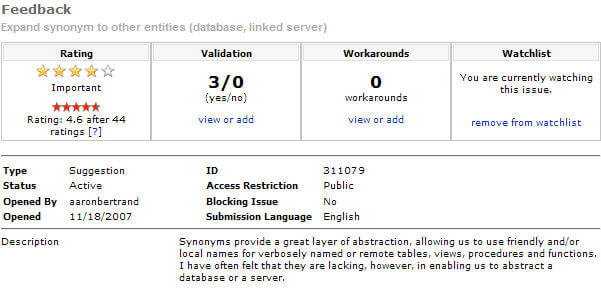
The description told me that Aaron Bertrand, who entered the item, was looking for the same feature that I was. It also told me that there weren't any published workarounds. That let me answer my colleague's question with a high degree of confidence that I wasn't missing something.
Of course, I signed in and rated the item a five. There are only seven ratings in a little over a year so I'm not that surprised that the feature wasn't added to SQL Server 2008, but we can hope for the future. If you like the idea, please rate it. Every vote helps. I also added the item to my watch list so that I'll get an e-mail of the status of every change or if someone posts a workaround.
I've made suggestions before. Item, 273443 is for the Scalar Expression Function, which now has 35 ratings after a year and a half and is still open. Item 398203 reports a bug in sp_rename, which doesn't change the name of the function or stored procedure in the text of the system table where it stores the module allowing sp_help_text to show the original name in error. That one is resolved with a status of "Won't Fix". We'll just have to live with it.
Establishing the Connect web site shows a big change in the attitude that Microsoft is showing to the community of developers. They're taking in suggestions and responding. I may not like every answer that I've received, but at least it's an answer. Connect also provides a way to validate that you've come across an issue that doesn't have an existing solution or a workaround.
Next Steps
- I suggest that you get on to the SQL Server page of Connect, register with your Windows Live ID, and poke around.
- Search for the enhancements that interest you and if you don't find them, don't be shy about making a suggestion or two.
- If you like the suggestions that I discussed in this tip (Synonyms to Databases and Scalar User-Defined Function) , please rate them a 5 so there's a better chance they'll be in the next version of SQL Server.






About the author
 Andy Novick is a SQL Server Developer in the Boston area with 25 years of database and application development experience.
This author pledges the content of this article is based on professional experience and not AI generated.
View all my tips
