By: Thomas LaRock | Comments (13) | Related: > Backup
Problem
Many shops do full backups of their databases as part of a job within SQL Agent, typically as part of a maintenance plan. This job will often times do all database backups in secession. As such, while you may know how long the job takes, you may not know how long any one particular database takes to have a full backup taken. When deploying changes it is advised to take a full backup of a database prior to deploying the change and a common question faced will be "how long will it take?".
Solution
The information is readily available inside the msdb database, making the solution as easy as a few lines of T-SQL.
The T-SQL provided below allows for you to input the name of a database if desired. I have also added a line that will filter the results, limiting your view to only the databases that are currently listed in the master.dbo.sysdatabases table. If you comment out that line of code you will return information on the last time a database was backed up on the instance, regardless if the database is currently listed in master.dbo.sysdatabases.
List of Most Recent SQL Server Backups
Here is the T-SQL
DECLARE @dbname sysname
SET @dbname = NULL --set this to be whatever dbname you want
SELECT
  bup.user_name AS [User],
  bup.database_name AS [Database],
  bup.server_name AS [Server],
  bup.backup_start_date AS [Backup Started],
  bup.backup_finish_date AS [Backup Finished]
  ,CAST((CAST(DATEDIFF(s, bup.backup_start_date, bup.backup_finish_date) AS int))/3600 AS varchar) + ' hours, '
  + CAST((CAST(DATEDIFF(s, bup.backup_start_date, bup.backup_finish_date) AS int))/60 AS varchar)+ ' minutes, '
  + CAST((CAST(DATEDIFF(s, bup.backup_start_date, bup.backup_finish_date) AS int))%60 AS varchar)+ ' seconds'
  AS [Total Time]
FROM msdb.dbo.backupset bup
WHERE bup.backup_set_id IN
  (SELECT MAX(backup_set_id)
   FROM msdb.dbo.backupset
   WHERE database_name = ISNULL(@dbname, database_name) --if no dbname, then return all
   AND type = 'D' --only interested in the time of last full backup
   GROUP BY database_name)
/* COMMENT THE NEXT LINE IF YOU WANT ALL BACKUP HISTORY */
AND bup.database_name IN (SELECT name FROM master.dbo.sysdatabases)
ORDER BY bup.database_name
The script will return the following result set:
| Column Name | Description |
|---|---|
| User | The name of the user that issued the BACKUP DATABASE command. |
| Database | The name of the database. |
| Server | The name of the server instance. |
| Backup Started | The time at which the backup was started. |
| Backup Finished | The time at which the backup was completed. |
| Total Time | The total amount of time it took to complete the backup for that database. |
Here is a screenshot of a sample result set returned by the script.
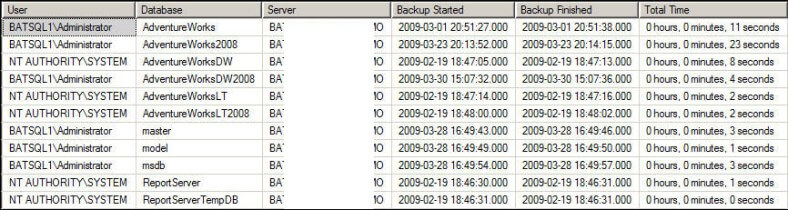
List of SQL Server Backups
If you want to get a list of all backups and not just the most recent you can issue the following:
DECLARE @dbname sysname
SET @dbname = NULL --set this to be whatever dbname you want
SELECT
  bup.user_name AS [User],
  bup.database_name AS [Database],
  bup.server_name AS [Server],
  bup.backup_start_date AS [Backup Started],
  bup.backup_finish_date AS [Backup Finished]
  ,CAST((CAST(DATEDIFF(s, bup.backup_start_date, bup.backup_finish_date) AS int))/3600 AS varchar) + ' hours, '
  + CAST((CAST(DATEDIFF(s, bup.backup_start_date, bup.backup_finish_date) AS int))/60 AS varchar)+ ' minutes, '
  + CAST((CAST(DATEDIFF(s, bup.backup_start_date, bup.backup_finish_date) AS int))%60 AS varchar)+ ' seconds'
  AS [Total Time]
FROM msdb.dbo.backupset bup
/* COMMENT THE NEXT LINE IF YOU WANT ALL BACKUP HISTORY */
WHERE bup.database_name IN (SELECT name FROM master.dbo.sysdatabases)
ORDER BY bup.database_name
Next Steps
- Take the above code and execute against your instance, making certain to insert the correct database name if you want to filter it to a specific database






About the author
 Thomas LaRock is a Head Geek at SolarWinds and a Microsoft Certified Master, Microsoft Data Platform MVP, VMware vExpert, and a former Microsoft Certified Trainer with over 20 years’ experience.
This author pledges the content of this article is based on professional experience and not AI generated.
View all my tips
