By: Matteo Lorini | Comments (1) | Related: More > Database Administration
Problem
Suppose that my SELECT statement returns some corrupted data or some values are not stored correctly; for example, a varchar field that contains some Unicode characters. It would be nice if we could use the DBCC PAGE command to see exactly what it is stored at the page level, however, in order to do this we need to find a way to correlate the results returned from a SELECT statement with the physical data location.
Is that possible? The answer is: YES. All we need to do is use the sys.fn_physLocFormatter function. In this tip, I will cover how to use this undocumented function.
Solution
SQL 2008 comes with an undocumented function called sys.fn_physLocFormatter that helps us correlate the results returned by a SELECT statement with the physical location of the data.
To see what the function does, I ran the following:
sp_helptext ‘sys.fn_physLocFormatter'
Below is the output from the above command.
-------------------------------------------------------------------------------
-- Name: sys.fn_PhysLocFormatter
--
-- Description:
-- Formats the output of %%physloc%% virtual column
--
-- Notes:
-------------------------------------------------------------------------------
create function sys.fn_PhysLocFormatter (@physical_locator binary (8))
returns varchar (128)
as
begin
declare @page_id binary (4)
 declare @file_id binary (2)
 declare @slot_id binary (2)
 -- Page ID is the first four bytes, then 2 bytes of page ID, then 2 bytes of slot
 --
 select @page_id = convert (binary (4), reverse (substring (@physical_locator, 1, 4)))
 select @file_id = convert (binary (2), reverse (substring (@physical_locator, 5, 2)))
 select @slot_id = convert (binary (2), reverse (substring (@physical_locator, 7, 2)))
 return '(' + cast (cast (@file_id as int) as varchar) + ':' +
cast (cast (@page_id as int) as varchar) + ':' +
cast (cast (@slot_id as int) as varchar) + ')'
end
To better understand how it can be used I wrote the following example on SQL 2008.
CREATE DATABASE MYTEST
GO
USE MYTEST
GO
CREATE TABLE MYTestTable(MYID INT IDENTITY, NAME CHAR(500), LNAME CHAR(500))
GO
INSERT INTO MYTestTable VALUES ('NAME-1','LNAME-1');
GO
INSERT INTO MYTestTable VALUES ('NAME-2','LNAME-2');
GO
INSERT INTO MYTestTable VALUES ('NAME-3','LNAME-3');
GO
INSERT INTO MYTestTable VALUES ('NAME-4','LNAME-4');
GO
INSERT INTO MYTestTable VALUES ('NAME-5','LNAME-5');
GO
INSERT INTO MYTestTable VALUES ('NAME-6','LNAME-6');
GO
INSERT INTO MYTestTable VALUES ('NAME-7','LNAME-7');
GO
INSERT INTO MYTestTable VALUES ('NAME-8','LNAME-8');
GO
INSERT INTO MYTestTable VALUES ('NAME-9','LNAME-9');
GO
In order to see the physical location of my data, I ran the following:
SELECT sys.fn_PhysLocFormatter(%%physloc%%) as [Physical RID], *
FROM MYTestTable
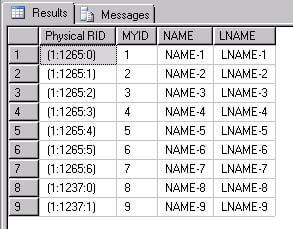
The values displayed in the Physical RID column represent the physical location of my data.
For example (1:1265:0) stands for:
- 1 is database file,
- 1265 is the page within the file and
- 0 is the slot number.
From the above example we can see that all my inserted data has been placed in two distinct pages 1237 and 1265.
To verify it, we can use the DBCC PAGE command as follows. This should be run in the database you are examining.
DBCC TRACEON(3604)
DBCC PAGE (MYTEST,1,1237,1)
Below is the output from the above commands.
PAGE: (1:1237)

BUFFER:

BUF @0x04474AA8

bpage = 0x1097C000 bhash = 0x00000000 bpageno = (1:1237)
bdbid = 6 breferences = 0 bUse1 = 38151
bstat = 0xc0000b blog = 0x21bbbbbb bnext = 0x00000000

PAGE HEADER:

Page @0x1097C000

m_pageId = (1:1237) m_headerVersion = 1 m_type = 1
m_typeFlagBits = 0x4 m_level = 0 m_flagBits = 0x8000
m_objId (AllocUnitId.idObj) = 209 m_indexId (AllocUnitId.idInd) = 256
Metadata: AllocUnitId = 72057594051624960
Metadata: PartitionId = 72057594048348160 Metadata: IndexId = 0
Metadata: ObjectId = 1538104520 m_prevPage = (0:0) m_nextPage = (0:0)
pminlen = 1008 m_slotCnt = 2 m_freeCnt = 6070
m_freeData = 2118 m_reservedCnt = 0 m_lsn = (47:255:3)
m_xactReserved = 0 m_xdesId = (0:0) m_ghostRecCnt = 0
m_tornBits = 0

Allocation Status

GAM (1:2) = ALLOCATED SGAM (1:3) = ALLOCATED
PFS (1:1) = 0x61 MIXED_EXT ALLOCATED 50_PCT_FULL DIFF (1:6) = CHANGED
ML (1:7) = NOT MIN_LOGGED

DATA:

Slot 0, Offset 0x60, Length 1011, DumpStyle BYTE

Record Type = PRIMARY_RECORD Record Attributes = NULL_BITMAP Record Size = 1011

Memory Dump @0x65C6C060

00000000: 1000f003 08000000 4e414d45 2d382020 †..ð.....NAME-8
00000010: 20202020 20202020 20202020 20202020 †
000001F0: 20202020 20202020 20202020 4c4e414d † LNAM
00000200: 452d3820 20202020 20202020 20202020 †E-8

000003D0: 20202020 20202020 20202020 20202020 †
000003E0: 20202020 20202020 20202020 20202020 †
000003F0: 030000†††††††††††††††††††††††††††††††...

Slot 1, Offset 0x453, Length 1011, DumpStyle BYTE

Record Type = PRIMARY_RECORD Record Attributes = NULL_BITMAP Record Size = 1011

Memory Dump @0x65C6C453

00000000: 1000f003 09000000 4e414d45 2d392020 †..ð. ...NAME-9
00000010: 20202020 20202020 20202020 20202020 †

000001F0: 20202020 20202020 20202020 4c4e414d † LNAM
00000200: 452d3920 20202020 20202020 20202020 †E-9
00000210: 20202020 20202020 20202020 20202020 †

000003D0: 20202020 20202020 20202020 20202020 †
000003E0: 20202020 20202020 20202020 20202020 †
000003F0: 030000†††††††††††††††††††††††††††††††...

OFFSET TABLE:

Row - Offset
1 (0x1) - 1107 (0x453)
0 (0x0) - 96 (0x60)
The above screenshot shows that page 1237 contains our values NAME-8, LNAME-8, NAME-9 and LNAME-9
To verify that all the other data is stored inside page 1265 I ran:
DBCC PAGE (MYTEST,1,1265,1)
Below is the output from the above commands.
PAGE: (1:1265)

BUFFER:

BUF @0x0446866C

bpage = 0x10452000 bhash = 0x00000000 bpageno = (1:1265)
bdbid = 6 breferences = 0 bUse1 = 38454
bstat = 0xc0000b blog = 0x2159bbbb bnext = 0x00000000

PAGE HEADER:

Page @0x10452000

m_pageId = (1:1265) m_headerVersion = 1 m_type = 1
m_typeFlagBits = 0x4 m_level = 0 m_flagBits = 0x8000
m_objId (AllocUnitId.idObj) = 209 m_indexId (AllocUnitId.idInd) = 256
Metadata: AllocUnitId = 72057594051624960
Metadata: PartitionId = 72057594048348160                   Metadata: IndexId = 0
Metadata: ObjectId = 1538104520 m_prevPage = (0:0) m_nextPage = (0:0)
pminlen = 1008 m_slotCnt = 7 m_freeCnt = 1005
m_freeData = 7173      m_reservedCnt = 0 m_lsn = (47:247:3)
m_xactReserved = 0 m_xdesId = (0:0) m_ghostRecCnt = 0
m_tornBits = 0

Allocation Status

GAM (1:2) = ALLOCATED SGAM (1:3) = NOT ALLOCATED
PFS (1:1) = 0x63 MIXED_EXT ALLOCATED 95_PCT_FULL DIFF (1:6) = CHANGED
ML (1:7) = NOT MIN_LOGGED

DATA:

Slot 0, Offset 0x60, Length 1011, DumpStyle BYTE

Record Type = PRIMARY_RECORD    Record Attributes = NULL_BITMAP Record Size = 1011

Memory Dump @0x65C6C060

00000000: 1000f003 01000000 4e414d45 2d312020 †..ð.....NAME-1
00000010: 20202020 20202020 20202020 20202020 †
00000020: 20202020 20202020 20202020 20202020 †

000001F0: 20202020 20202020 20202020 4c4e414d † LNAM
00000200: 452d3120 20202020 20202020 20202020 †E-1
00000210: 20202020 20202020 20202020 20202020 †
000003F0: 030000†††††††††††††††††††††††††††††††...

Slot 1, Offset 0x453, Length 1011, DumpStyle BYTE

Record Type = PRIMARY_RECORD Record Attributes = NULL_BITMAP Record Size = 1011

Memory Dump @0x65C6C453

00000000: 1000f003 02000000 4e414d45 2d322020 †..ð.....NAME-2
00000010: 20202020 20202020 20202020 20202020 †
000001F0: 20202020 20202020 20202020 4c4e414d † LNAM
00000200: 452d3220 20202020 20202020 20202020 †E-2
00000210: 20202020 20202020 20202020 20202020 †
00000220: 20202020 20202020 20202020 20202020 †
000003F0: 030000†††††††††††††††††††††††††††††††...

Slot 2, Offset 0x846, Length 1011, DumpStyle BYTE

Record Type = PRIMARY_RECORD Record Attributes = NULL_BITMAP Record Size = 1011

Memory Dump @0x65C6C846

00000000: 1000f003 03000000 4e414d45 2d332020 †..ð.....NAME-3
00000010: 20202020 20202020 20202020 20202020 †
00000020: 20202020 20202020 20202020 20202020 †

000001F0: 20202020 20202020 20202020 4c4e414d † LNAM
00000200: 452d3320 20202020 20202020 20202020 †E-3
00000210: 20202020 20202020 20202020 20202020 †
00000220: 20202020 20202020 20202020 20202020 †
00000230: 20202020 20202020 20202020 20202020 †
00000240: 20202020 20202020 20202020 20202020 †
00000250: 20202020 20202020 20202020 20202020 †
000003E0: 20202020 20202020 20202020 20202020 †
000003F0: 030000†††††††††††††††††††††††††††††††...

Slot 3, Offset 0xc39, Length 1011, DumpStyle BYTE

Record Type = PRIMARY_RECORD Record Attributes = NULL_BITMAP Record Size = 1011

Memory Dump @0x65C6CC39

00000000: 1000f003 04000000 4e414d45 2d342020 †..ð.....NAME-4
00000010: 20202020 20202020 20202020 20202020 †
00000020: 20202020 20202020 20202020 20202020 †
000001F0: 20202020 20202020 20202020 4c4e414d † LNAM
00000200: 452d3420 20202020 20202020 20202020 †E-4
00000210: 20202020 20202020 20202020 20202020 †
00000220: 20202020 20202020 20202020 20202020 †
000003D0: 20202020 20202020 20202020 20202020 †
000003E0: 20202020 20202020 20202020 20202020 †
000003F0: 030000†††††††††††††††††††††††††††††††...

Slot 4, Offset 0x102c, Length 1011, DumpStyle BYTE

Record Type = PRIMARY_RECORD Record Attributes = NULL_BITMAP Record Size = 1011

Memory Dump @0x65C6D02C

00000000: 1000f003 05000000 4e414d45 2d352020 †..ð.....NAME-5
00000010: 20202020 20202020 20202020 20202020 †
000001E0: 20202020 20202020 20202020 20202020 †
000001F0: 20202020 20202020 20202020 4c4e414d † LNAM
00000200: 452d3520 20202020 20202020 20202020 †E-5
00000210: 20202020 20202020 20202020 20202020 †
000003E0: 20202020 20202020 20202020 20202020 †
000003F0: 030000†††††††††††††††††††††††††††††††...

Slot 5, Offset 0x141f, Length 1011, DumpStyle BYTE

Record Type = PRIMARY_RECORD Record Attributes = NULL_BITMAP Record Size = 1011

Memory Dump @0x65C6D41F

00000000: 1000f003 06000000 4e414d45 2d362020 †..ð.....NAME-6
00000010: 20202020 20202020 20202020 20202020 †
000001E0: 20202020 20202020 20202020 20202020 †
000001F0: 20202020 20202020 20202020 4c4e414d † LNAM
00000200: 452d3620 20202020 20202020 20202020 †E-6
00000210: 20202020 20202020 20202020 20202020 †
00000220: 20202020 20202020 20202020 20202020 †
000003E0: 20202020 20202020 20202020 20202020 †
000003F0: 030000†††††††††††††††††††††††††††††††...

Slot 6, Offset 0x1812, Length 1011, DumpStyle BYTE

Record Type = PRIMARY_RECORD Record Attributes = NULL_BITMAP Record Size = 1011

Memory Dump @0x65C6D812

00000000: 1000f003 07000000 4e414d45 2d372020 †..ð.....NAME-7
00000010: 20202020 20202020 20202020 20202020 †
000001F0: 20202020 20202020 20202020 4c4e414d † LNAM
00000200: 452d3720 20202020 20202020 20202020 †E-7
00000210: 20202020 20202020 20202020 20202020 †
000003D0: 20202020 20202020 20202020 20202020 †
000003E0: 20202020 20202020 20202020 20202020 †
000003F0: 030000†††††††††††††††††††††††††††††††...

OFFSET TABLE:

Row - Offset
6 (0x6) - 6162 (0x1812)
5 (0x5) - 5151 (0x141f)
4 (0x4) - 4140 (0x102c)
3 (0x3) - 3129 (0xc39)
2 (0x2) - 2118 (0x846)
1 (0x1) - 1107 (0x453)
0 (0x0) - 96 (0x60)
The above screenshot shows that page 1265 contains all our values from NAME-1 to LNAME-6.
Conclusion
I think that sys.fn_physLocFormatter offers nice functionality that allows us to investigate to the page level any kind of data inconsistency that we may come across.
Next Steps
- Since the sys.fn_physLocFormatter function is undocumented, one of the best sources for finding additional information on this function is MSDN blogs
- To learn more about DBCC PAGE, check http://www.mssqltips.com/sqlservertip/1578/using-dbcc-page-to-examine-sql-server-table-and-index-data/






About the author
 Matteo Lorini is a DBA and has been working in IT since 1993. He specializes in SQL Server and also has knowledge of MySQL.
This author pledges the content of this article is based on professional experience and not AI generated.
View all my tips
