By: Alan Cranfield | Comments (5) | Related: More > Professional Development Career Planning
Problem
You're leaving your current employer for a new opportunity and want to make the move as smooth as possible. You don't want to burn your bridges and want to make sure that everything you've left behind can be managed by the people you've left behind or the DBA who is replacing you. So, you've done your handover documentation and trained up the new guy. You definitely don't want to be that DBA who is cursed the week after they leave when their network account is disabled and a bunch of stuff ‘breaks'.
Solution
What follows is a list of things to check and how to check them when a DBA is leaving. Ideally, you want the DBA who is leaving to go through these steps themselves and make the changes. It shouldn't be up to NewDBA to do this.
SQL Server 2005 severed the implicit connection between database users and schemas. Ownership of schemas can now be transferred without changing their names. This has simplified the work of us DBAs and now allows us to transfer the ownership of schemas without changing their names. For the sake of this tip I will only address operational issues that may arise when a DBAs account is disabled or deleted in Active Directory or a login is dropped from the SQL Server.
Steps
DBAs are always in the sysadmin server role and usually in the db_owner role in all databases. This means that all objects created by DBAs are usually in the dbo schema which means we usually don't have to re-assign any schema ownership when a DBA leaves.
There are, however, some objects that retain the DBAs windows account as owner and these need to be addressed.
SQL Jobs
By default when a SQL Server Agent Job is created it records the owner of the job as the login creating the job. I usually change this to ‘sa' or the SQLServerAgent service account where applicable. If a job owner is a windows login then SQL Server checks the windows login in AD when the job runs and if it can't find the login in AD then it will fail as this error below shows:
Also, if the DBA has moved departments and his account still exists but his access from your servers has been removed then you may get this error:
To resolve this find all the jobs on the server owned by exDBA using this simple query:
from msdb..sysjobs
where owner_sid = (select sid
from sys.syslogins
where name = 'domain\exDBA')
GO
Then update them either through SSMS Job Properties:
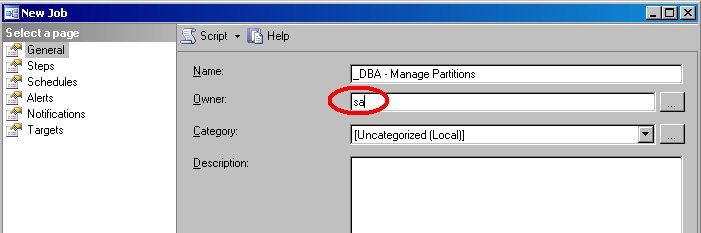
Or you can use this update query:
GO
EXEC msdb.dbo.sp_update_job @job_name='_DBA - Manage Partitions', @owner_login_name='sa'
GO
Database Principals
Database Roles are the only database principals that don't have to be owned by dbo so let's check all databases for any roles owned by exDBA:
from sys.database_principals
where type_desc = ''DATABASE_ROLE''
and owning_principal_id = (select principal_id
from sys.database_principals
where name = ''domain\exDBA '')'
These can be easily fixed by transferring ownership of the database role.
GO
ALTER AUTHORIZATION ON ROLE::[myRole] TO [domain\sqlservice]
GO
EndPoints and other Entities
You may experience errors like this when dropping a login or user.
The database principal owns an endpoint and cannot be dropped. (Microsoft SQL Server, Error: 15141)
The database principal owns data types in the database and cannot be dropped. (Microsoft SQL Server, Error: 15184)
To transfer ownership of these entities you can use the ALTER AUTHORIZATION statement. The example below transfers ownership of the Database Mirroring endpoint to ‘sa':
GO
ALTER AUTHORIZATION ON ENDPOINT::Mirroring TO [sa]
GO
It is also possible that the exDBA could be an owner of any of these database entities. Again, use the ALTER AUTHORIZATION statement to transfer ownership if you have:
- Type
- XML Schema Collection
- Fulltext Catalog
- Schema
- Assembly
- Role
- Message Type
- Contract
- Service
- Remote Service Binding
- Route
- Symmetric Key
- Certificate
Changing database owners
I have never found the owner of a database to ever be an issue. I often see database owner logins which were employees that have long since left the company. If you want to change ownership of the database then you can do so as follows. I like to have the database owned by ‘sa'. Preferences may vary. The new owner either has to be a valid login or a valid Windows account:
USE myDB
GO
EXEC sp_changedbowner 'sa'
GO
-- the new way
USE master
GO
ALTER AUTHORIZATION ON Database::myDB TO [sa]
GO
DTS Packages
Many of us still run legacy DTS packages. There is no problem with deleting an account that owns DTS packages. For example if you delete the domain\exDBA Windows account it will not cause any problems with DTS packages owned by this account.
If you do want to re-assign package ownership for other reasons then you can use the following undocumented stored procedure:
@name = 'London Equities Paris2 Extract_NEW_RERUN',
@id = '80A50206-A739-4CE9-906F-833A1094BBF6', -- get this from the msdb..sysdtspackages table
@newloginname = 'domain\SQLService'
GO
You can also update the owner and owner_sid columns directly in the msdb..sysdtspackages table but take precautions and backups as this is a system table.
SSRS Report schedules
We recently experienced scheduled SSRS report failures when an account was deleted from Active Directory and that account owned schedules in SSRS.
To prevent this from happening I suggest checking for any subscriptions owned by the exDBA and changing ownership before exDBA is removed from AD. This can't be done from Report Manager but can be done directly against the ReportServer database as follows:
--NB: backup the ReportServer DB
USE ReportServer
GO

DECLARE @OldUserID uniqueidentifier
DECLARE @NewUserID uniqueidentifier

SELECT @OldUserID = UserID
FROM dbo.Users
WHERE UserName = 'domain\exDBA'

SELECT @NewUserID = UserID
FROM dbo.Users
WHERE UserName = 'domain\SQLService'

UPDATE dbo.Subscriptions
SET OwnerID = @NewUserID
WHERE OwnerID = @OldUserID
GO
Also, run the following query against the ReportServer database periodically to check for any report delivery failures which may be related to removing exDBA from AD:
FROM ReportServer.dbo.Subscriptions AS S
LEFT OUTER JOIN ReportServer.dbo.[Catalog] AS C
ON C.ItemID = S.Report_OID
WHERE S.LastStatus LIKE 'Failure sending mail: The user or group name %% is not recognized.'
GO
You may get some errors like this which you will need to investigate:

Orphaned users
SQL Server will allow you to drop a login without actually removing all associated database users. This has the undesirable side effect of creating orphaned users. You do, however, get the following warning when dropping a login through SSMS as a reminder to also delete the database users:
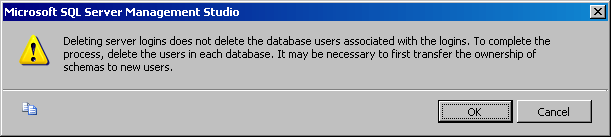
What I usually do is drop the mapped users from each database BEFORE I drop the login so that I have no orphaned users:
GO
-- drop all users first
EXEC sp_msforeachdb 'USE ? SELECT db_name() DROP USER [domain\exDBA]'
GO
-- then drop login
DROP LOGIN [domian\exDBA]
GO
Next Steps
- Check for any Windows Services running under exDBA's account.
- Check DatabaseMail profiles and update to new email addresses.
- Remove or edit any Operators that have been defined using exDBA's email address.
- Monitor the SQL Error logs for any failed logins from exDBA






About the author
 Alan Cranfield is a versatile SQL Server DBA with over 10 years experience managing critical systems in large distributed environments.
This author pledges the content of this article is based on professional experience and not AI generated.
View all my tips
