By: Arshad Ali | Comments (9) | Related: 1 | 2 | 3 | 4 | > Analysis Services Performance
Problem
There are several aspects that can take a toll on performance for your Analysis Services cubes. Some problems could be related to the source systems, some could be because of poor design of your cube and MDX queries and some could be related to network issues. In this tip series, I am going to talk about some of the best practices which you should consider during the design and development of your Analysis Services cube and some tips which you can follow to tune your existing environment if it is suffering from performance issues.
Solution
Before we start digging into the details of performance optimization, let's see how a typical Microsoft Business Intelligence (BI) application architecture would look. This will give you an understanding of identifying and locating the performance issues/bottlenecks.
The below diagram shows a typical Microsoft BI application architecture which has different layers shown from left to right. On the left layer you have source systems or a relational data warehouse, in the middle layer you have the Analysis Services cube pulling data from the source systems and storing it in an Analysis Services cube/OLAP store and on the right layer you have reporting applications which consume the data from the Analysis Services cube/OLAP cube.
Although a typical Microsoft BI application architecture is to have each layer on a different physical machine, that's not usually the case. Very often you will see these layers overlap; for example in one scenario you have the relational data warehouse, Analysis Services cube and reporting services/applications on the same machine whereas in another scenario you might have a relational data warehouse and the Analysis Services cube on one machine and reporting applications on another machine or relational data warehouse on one machine and Analysis Services cube, reporting services/applications on another machine or all on separate machines.
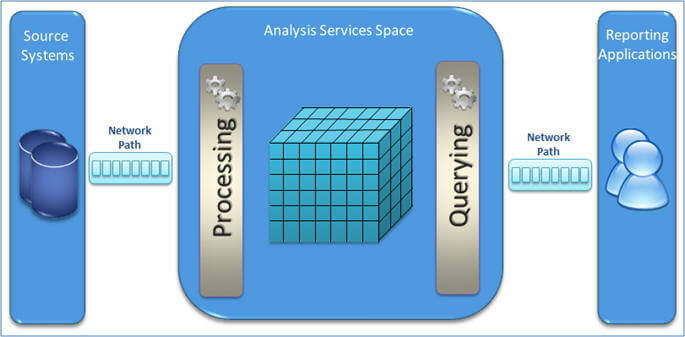
Whatever your system architecture or design approach is, you need to make sure that your OLAP query performance is very fast which the Microsoft BI platform is known for. But we can not overlook the processing performance as well, as this ensures data gets refreshed within the defined SLA (Service Level Agreement ).
So basically when we talk of SSAS performance optimization, we need to take care of:
- Query Performance
- Processing Performance
- Proper and adequate utilization of hardware resources
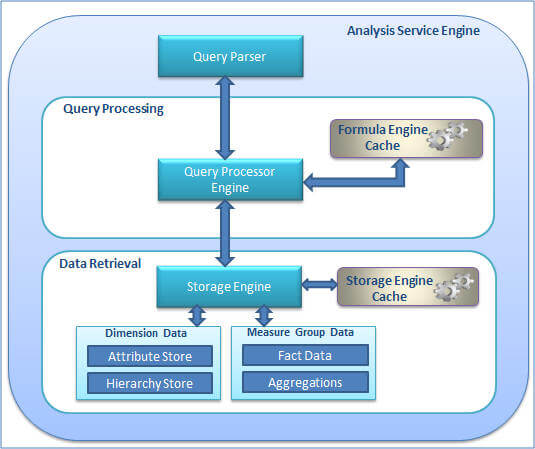
Let me briefly talk about the SSAS internal architecture which will help you understand the different components in a SSAS environment, the operations they perform and how they work together as shown in the below diagram.
Query Parser
The Query Parser has an XMLA listener which accepts requests, parses the request and passes it along to the Query Processor for query execution.
Query Processor
Upon receiving the validated and parsed query from the Query Parser, the Query Processor prepares an execution plan which dictates how the requested results will be provided from the cube data and the calculations used. The Query Processor caches the calculation results in the formula engine cache (a.k.a Query Processor Cache) so it can be reused across users with the same security permissions on subsequent requests.
This summarizes the Query Processor operations:
- Makes a request for sub cube data from storage engine
- Translation of request into sub cube data requests
- Produces result set by doing
- Bulk calculation of sub cube
- Cell-by-cell calculations
- Stores calculation results in formula engine cache with varying scope
- Query scope - cache will not be shared across queries in a session
- Session scope - cache will be shared across queries in a session
- Global scope - cache can be shared across sessions if the sessions have the same security roles
Storage Engine
The Storage Engine responds to the sub cube data (a subset or logical unit of data for querying, caching and data retrieval) request generated by the Query Processor. It first checks if the requested sub cube data is already available in the Storage Engine cache, if yes then it serves it from there. If not then it checks if the aggregation is already available for the request, if yes then it takes the aggregations from the aggregation store and caches it to the Storage Engine cache and also sends it to Query Processor for serving the request. If not then it grabs the detail data, calculates the required aggregations, caches it to the Storage Engine and then sends it to Query Processor for serving the request.
This summarizes the Storage Engine operations:
- Creates Attribute Store (Key store, relationship store, bitmap indexes etc)
- Creates Hierarchy Store
- Creates Aggregation Store
- Storage Engine Cache
- Loads data from storage engine cache as queries execute
- CClears data from storage engine cache with cleaner thread (in case of memory pressure) or processing of partitions
- Aggregation Data
- RResponds to request with aggregated values in storage
- If new then summarizes lower level aggregated values on the fly as needed
- Fact Data
- Scans MOLAP partitions and partitions segments in parallel
- Uses bitmap indexes to scan pages to find requested data
While troubleshooting you need to understand which component is taking more time and needs to be optimized; such as the Query Processing Engine or Storage Engine. To understand this you can use SQL Server Profiler and capture certain events which will tell you the time taken by these components for a cold cache (empty cache, to learn more about cache warning refer to the next tip in this series):
- Storage Engine Time = Add elapsed time for each Query Subcube event
- Formula Engine = Total execution time (Query End event) - Storage Engine time (A)
If most of the time is spent in the Storage Engine with long running Query Subcube events, the problem is more likely with the Storage Engine. In this case you need to optimize the dimension design, design of the aggregations and create partitions to improve query performance (discussed in details in next tips in this series). If the Storage Engine is not taking much time then it is the Query Processor which is making things slow, in that case you need to focus on optimizing the MDX queries.
So to address performance optimization, here are three different areas to address:
Processing Performance
DDuring processing, SSAS refreshes the Cube/OLAP store with the latest data from the source systems and relational data warehouse and generates aggregates if any are defined. It also creates an Attribute store for all the attributes of the dimensions and a Hierarchy store for all natural hierarchies. Though it sounds like the processing time does not matter much in comparison with Query Processing since users are not directly impacted, I would say its equally important to make sure you provide reports with refreshed data within the defined SLA.
Querying Performance
QQuerying performance is what SSAS is known for. There are several ways you can improve the performance of your queries running against a SSAS cube. You should spend time in designing dimension and measure groups for optimal performance, create aggregation and bitmap indexes (by setting appropriate properties), optimize your MDX queries for faster execution (for example to avoid the cell by cell mode and using subspace mode).
SSAS instance/hardware resources optimization
BBoth processing and querying performance is determined by how well you tune your resources for better throughput. You can specify number of threads that can be created for parallel processing, specify the amount of memory available to SSAS for its usage, improving or using better I/O (Input/Output) systems or placing your data and temp files on the fastest disks possible.
Stay tuned for the next tip in the series.
Next Steps
- Review Analysis Services Performance Guide whitepaper
- Review Analysis Services Operations Guide whitepaper
- Review SQL Server Integration Services SSIS Best Practices tips
- Review the SQL Server Analysis Services Tutorial






About the author
 Arshad Ali is a SQL and BI Developer focusing on Data Warehousing projects for Microsoft.
This author pledges the content of this article is based on professional experience and not AI generated.
View all my tips
