![]() |
|
|
By: Greg Robidoux | Read Comments (5) | Print Greg is the President of Edgewood Solutions and a co-founder of MSSQLTips.com. Related Tips: More |
|
Problem
With the release of SQL Server 2005, Microsoft also released SQL Server 2005 Express Edition. This is the free version of the SQL Server engine that existed in prior releases under the MSDE namesake. While there were several great enhancements with SQL Server 2005, one great change was the release of SQL Server Management Studio Express a GUI based management environment for this free version of the database engine. Although having a GUI to manage this version is great, one thing that is still lacking is the ability to schedule jobs, since SQL Server Agent is not part of this version. If nothing else job scheduling is extremely helpful for scheduling backups.
Solution
Although there is not the direct ability to schedule jobs in the Express Edition there are third party tools that give you this capability. One of these tools is called SQLScheduler. This is a free tool that works with both SQL Server 2000 and SQL Server 2005. The tool allows you to do the following:
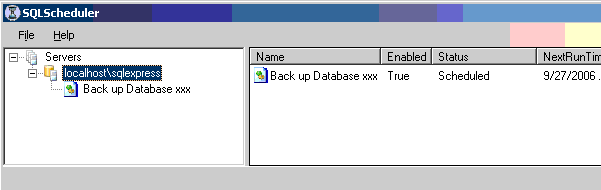
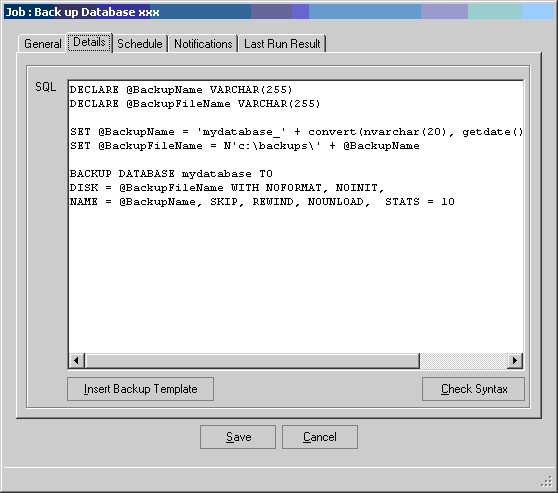
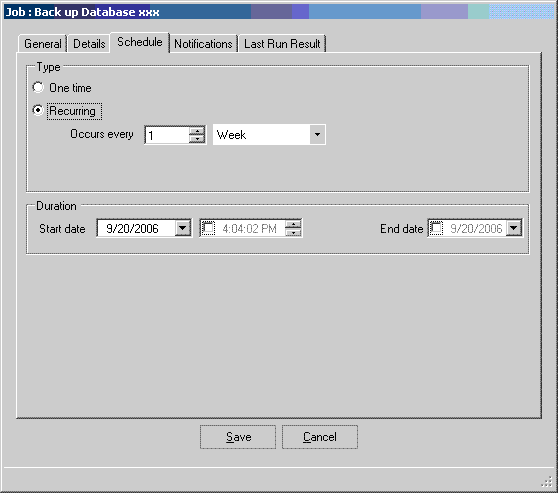
The following are screen shots from the SQLScheduler website.
This first image is shows you the management interface to create and manage existing jobs.
This screen shot shows you the tabs for setting the parameters for your job.
This screen shot shows you the scheduling parameters
To install the product you need to download the zip from from this location.
The zip file contains the following contents
For the most part you just need to download the zip file, extract the contents and run the Installservice.bat to get it up and running. One thing I noticed was that the "Logs" directory was not created, so I just created an empty folder called "Logs" underneath where I extracted the files and everything worked without a problem.
The way the job scheduling works is based on an XML file that stores the contents of the job parameters that you setup. So this makes it very easy to open up the XML file to see the contents of the job, but the GUI makes that task much more manageable.
The GUI only shows you the status of the last run, but the log files show you the contents for each job that was run.
Next Steps
| Share: | Share | Tweet |
|
![]() |
![]() |
Connect with MSSQLTips.com |
| Tuesday, May 27, 2008 - 10:51:54 AM - cawiggins | Read The Tip |
|
Maybe this is a SQL issue, but I seem unable to backup a database named 2008TKSQL, though I can back up master, model, etc. with the utility. Am I missing something? Thanks.
Craig Wiggins Keystone Technical, Inc. |
|
| Tuesday, May 27, 2008 - 7:00:49 PM - aprato | Read The Tip |
|
Craig Try it like this via the the Management Studio You may need the brackets around the db name |
|
| Wednesday, May 28, 2008 - 1:25:38 PM - cawiggins | Read The Tip |
|
*THUMPS Forehead* Yeah, that did it. Talk about missing the forest for the trees... Thanks.
Craig W. |
|
| Friday, August 15, 2008 - 11:21:13 AM - applyaaa | Read The Tip |
|
Pl. help me immediately. If you need to call me, I am at 610-208-9026. I installed your software on our 2005 Express edition server. 1. In Service Folder, I entered our MS excahnge server name(copied from my outlook email account settings) & my email ID, password in next fields. On Notification tab, I selected to notify on success on failure both. I am not getting any email notifications. in my outlook, for my account under 'more setting', 'security' tab, under 'Logon network security', they have selected 'KERBEROS/NTLM Password Authentication' 2. On General tab I am selecting 'SQL Server Authentication' & entering user name & password. I have admin rights to all servers. When I execute or 'check syntax', It gives me error message - Login failed for user 'SVRN\a-aarvind'. In details it says followings. System.Data.DataException: Login failed for user 'SVRN\a-aarvind'. ---> System.Data.SqlClient.SqlException: Login failed for user 'SVRN\a-aarvind'. at System.Data.SqlClient.SqlInternalConnection.OnError(SqlException exception, Boolean breakConnection) at System.Data.SqlClient.TdsParser.ThrowExceptionAndWarning(TdsParserStateObject stateObj) at System.Data.SqlClient.TdsParser.Run(RunBehavior runBehavior, SqlCommand cmdHandler, SqlDataReader dataStream, BulkCopySimpleResultSet bulkCopyHandler, TdsParserStateObject stateObj) at System.Data.SqlClient.SqlInternalConnectionTds.CompleteLogin(Boolean enlistOK) at System.Data.SqlClient.SqlInternalConnectionTds.AttemptOneLogin(ServerInfo serverInfo, String newPassword, Boolean ignoreSniOpenTimeout, Int64 timerExpire, SqlConnection owningObject) at System.Data.SqlClient.SqlInternalConnectionTds.LoginNoFailover(String host, String newPassword, Boolean redirectedUserInstance, SqlConnection owningObject, SqlConnectionString connectionOptions, Int64 timerStart) at System.Data.SqlClient.SqlInternalConnectionTds.OpenLoginEnlist(SqlConnection owningObject, SqlConnectionString connectionOptions, String newPassword, Boolean redirectedUserInstance) at System.Data.SqlClient.SqlInternalConnectionTds..ctor(DbConnectionPoolIdentity identity, SqlConnectionString connectionOptions, Object providerInfo, String newPassword, SqlConnection owningObject, Boolean redirectedUserInstance) at System.Data.SqlClient.SqlConnectionFactory.CreateConnection(DbConnectionOptions options, Object poolGroupProviderInfo, DbConnectionPool pool, DbConnection owningConnection) at System.Data.ProviderBase.DbConnectionFactory.CreatePooledConnection(DbConnection owningConnection, DbConnectionPool pool, DbConnectionOptions options) at System.Data.ProviderBase.DbConnectionPool.CreateObject(DbConnection owningObject) at System.Data.ProviderBase.DbConnectionPool.UserCreateRequest(DbConnection owningObject) at System.Data.ProviderBase.DbConnectionPool.GetConnection(DbConnection owningObject) at System.Data.ProviderBase.DbConnectionFactory.GetConnection(DbConnection owningConnection) at System.Data.ProviderBase.DbConnectionClosed.OpenConnection(DbConnection outerConnection, DbConnectionFactory connectionFactory) at System.Data.SqlClient.SqlConnection.Open() at SQLScheduler.Data.DataWorker.RunSQL(String p_strSQL, Int32 commandTimeout, DataSet& dataResults) --- End of inner exception stack trace --- Server stack trace: at SQLScheduler.Data.DataWorker.RunSQL(String p_strSQL, Int32 commandTimeout, DataSet& dataResults) at SQLScheduler.Data.DataWorker.RunSQL(String p_strSQL) at SQLScheduler.Data.DataWorker.CheckSQL(String script) at SQLScheduler.Services.JobService.CheckSQLSyntax(String serverName, String jobName, String script) at System.Runtime.Remoting.Messaging.StackBuilderSink._PrivateProcessMessage(IntPtr md, Object[ args, Object server, Int32 methodPtr, Boolean fExecuteInContext, Object[& outArgs) at System.Runtime.Remoting.Messaging.StackBuilderSink.PrivateProcessMessage(RuntimeMethodHandle md, Object[ args, Object server, Int32 methodPtr, Boolean fExecuteInContext, Object[& outArgs) at System.Runtime.Remoting.Messaging.StackBuilderSink.SyncProcessMessage(IMessage msg, Int32 methodPtr, Boolean fExecuteInContext) Exception rethrown at [0]: at System.Runtime.Remoting.Proxies.RealProxy.HandleReturnMessage(IMessage reqMsg, IMessage retMsg) at System.Runtime.Remoting.Proxies.RealProxy.PrivateInvoke(MessageData& msgData, Int32 type) at SQLScheduler.Services.JobService.CheckSQLSyntax(String serverName, String jobName, String script) at SQLScheduler.Client.JobForm._btnCheckSyntax_Click(Object sender, EventArgs e)
|
|
| Monday, March 29, 2010 - 1:50:07 PM - Micro7 | Read The Tip |
|
Hi there,
I just tried this and it seemed to start running but the file disappeared! After clicking execute, to test it now, the file name appeared in my backup location directory with 0 size. A second or two later it vanished! I tried a few times- still nothing. Any idea why this won't work? I have SQL server 2005 express on a W2k3 enterprise edition 64 bit server. In the Scheduling tool, I set the server name to SERVERNAME\SQLINSTANCENAME I user the template and filled in the db name and path. Syntax check was successsful. I just tried using the direct command in the management studio as shown in an earlier post and that worked. I also noted that for the last week I have been manually commanding a backup by directly clicking on the database in management studio and selecting Tasks...Backup; it produces a file with the database name but no extension, whereas your program and script produces a .bak extension. Is the extension not necessary? Will I be able to restore the DB by using the taped backups that I have with no extensions? |
|
|
privacy | disclaimer | copyright | advertise | about authors | contribute | feedback | giveaways | user groups Some names and products listed are the registered trademarks of their respective owners. Edgewood Solutions LLC | MSSharePointTips.com | MSSQLTips.com |







