Problem
Microsoft SQL Server system views have a multitude of data for mining. This data presents information back to the end user of the SQL Server Management Studio (SSMS) and all third-party management tools that are available for SQL Server Professionals. Be it database backup information, file statistics, indexing information, or one of the thousands of other metrics that the instance maintains, this data is readily available for direct querying and assimilation into your “home-grown” monitoring solutions as well.
This tip focuses on that first metric: database backup information. Where it resides, data structure and available data for mining.
Solution
The msdb system database is the primary repository for storage of SQL Agent, backup, Service Broker, Database Mail, Log Shipping, restore, and maintenance plan metadata. We will be focusing on the handful of system views associated with database backups for this tip:
- dbo.backupset: provides information concerning the most-granular details of the backup process
- dbo.backupmediafamily: provides metadata for the physical backup files as they relate to backup sets
- dbo.backupfile: this system view provides the most-granular information for the physical backup files
Based upon these MSDB tables, we can create a variety of queries to collect a detailed insight into the status of backups for the databases in any given SQL Server instance.
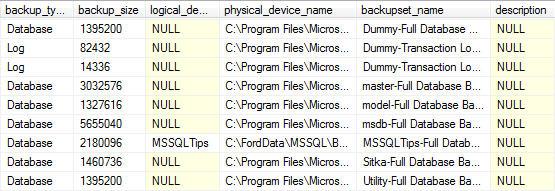
Database Backups for all databases for the Previous Week
---------------------------------------------------------------------------------
--Database Backups for all databases For Previous Week
---------------------------------------------------------------------------------
SELECT
   CONVERT(CHAR(100), SERVERPROPERTY('Servername')) AS Server,
   msdb.dbo.backupset.database_name,
   msdb.dbo.backupset.backup_start_date,
   msdb.dbo.backupset.backup_finish_date,
   msdb.dbo.backupset.expiration_date,
   CASE msdb..backupset.type
      WHEN 'D' THEN 'Database'
      WHEN 'L' THEN 'Log'
      END AS backup_type,
   msdb.dbo.backupset.backup_size,
   msdb.dbo.backupmediafamily.logical_device_name,
   msdb.dbo.backupmediafamily.physical_device_name,
   msdb.dbo.backupset.name AS backupset_name,
   msdb.dbo.backupset.description
FROM
   msdb.dbo.backupmediafamily
   INNER JOIN msdb.dbo.backupset ON msdb.dbo.backupmediafamily.media_set_id = msdb.dbo.backupset.media_set_id
WHERE
   (CONVERT(datetime, msdb.dbo.backupset.backup_start_date, 102) >= GETDATE() - 7)
ORDER BY
   msdb.dbo.backupset.database_name,
   msdb.dbo.backupset.backup_finish_date
Note: for readability the output was split into two screenshots.

Most Recent Database Backup for Each Database
-------------------------------------------------------------------------------------------
--Most Recent Database Backup for Each Database
-------------------------------------------------------------------------------------------
SELECT
   CONVERT(CHAR(100), SERVERPROPERTY('Servername')) AS Server,
   msdb.dbo.backupset.database_name,
   MAX(msdb.dbo.backupset.backup_finish_date) AS last_db_backup_date
FROM
   msdb.dbo.backupmediafamily
   INNER JOIN msdb.dbo.backupset ON msdb.dbo.backupmediafamily.media_set_id = msdb.dbo.backupset.media_set_id
WHERE msdb..backupset.type = 'D'
GROUP BY
   msdb.dbo.backupset.database_name
ORDER BY
msdb.dbo.backupset.database_name 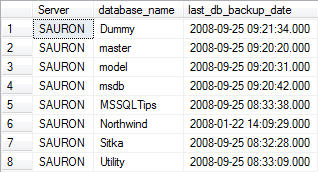
Most Recent Database Backup for Each Database – Detailed
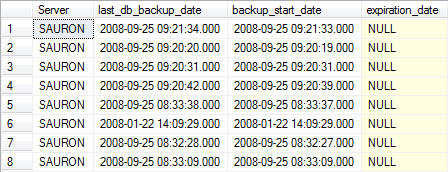
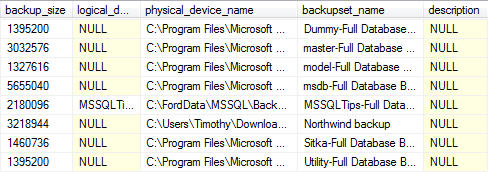
You can join the two result sets together by using the following query in order to return more detailed information about the last database backup for each database. The LEFT JOIN allows you to match up grouped data with the detailed data from the previous query without having to include the fields you do not wish to group on in the query itself.
-------------------------------------------------------------------------------------------
--Most Recent Database Backup for Each Database - Detailed
-------------------------------------------------------------------------------------------
SELECT
   A.[Server],
   A.last_db_backup_date,
   B.backup_start_date,
   B.expiration_date,
   B.backup_size,
   B.logical_device_name,
   B.physical_device_name,
   B.backupset_name,
   B.description
FROM
   (
   SELECT
      CONVERT(CHAR(100), SERVERPROPERTY('Servername')) AS Server,
      msdb.dbo.backupset.database_name,
      MAX(msdb.dbo.backupset.backup_finish_date) AS last_db_backup_date
   FROM
      msdb.dbo.backupmediafamily
      INNER JOIN msdb.dbo.backupset ON msdb.dbo.backupmediafamily.media_set_id = msdb.dbo.backupset.media_set_id
   WHERE
      msdb..backupset.type = 'D'
   GROUP BY
      msdb.dbo.backupset.database_name
   ) AS A
   LEFT JOIN
   (
   SELECT
      CONVERT(CHAR(100), SERVERPROPERTY('Servername')) AS Server,
      msdb.dbo.backupset.database_name,
      msdb.dbo.backupset.backup_start_date,
      msdb.dbo.backupset.backup_finish_date,
      msdb.dbo.backupset.expiration_date,
      msdb.dbo.backupset.backup_size,
      msdb.dbo.backupmediafamily.logical_device_name,
      msdb.dbo.backupmediafamily.physical_device_name,
      msdb.dbo.backupset.name AS backupset_name,
      msdb.dbo.backupset.description
   FROM
      msdb.dbo.backupmediafamily
      INNER JOIN msdb.dbo.backupset ON msdb.dbo.backupmediafamily.media_set_id = msdb.dbo.backupset.media_set_id
   WHERE
      msdb..backupset.type = 'D'
   ) AS B
   ON A.[server] = B.[server] AND A.[database_name] = B.[database_name] AND A.[last_db_backup_date] = B.[backup_finish_date]
ORDER BY
   A.database_name
Note: for readability the output was split into two screenshots.
Missing Full Backups in the Last 24 Hours
At this point, we know how to look at the database backup history. How do we know which databases have not been backed up? The following query provides you with that information (with some caveats.)
-------------------------------------------------------------------------------------------
--Databases Missing a Data (aka Full) Back-Up Within Past 24 Hours
-------------------------------------------------------------------------------------------
--Databases with data backup over 24 hours old
SELECT
   CONVERT(CHAR(100), SERVERPROPERTY('Servername')) AS Server,
   msdb.dbo.backupset.database_name,
   MAX(msdb.dbo.backupset.backup_finish_date) AS last_db_backup_date,
   DATEDIFF(hh, MAX(msdb.dbo.backupset.backup_finish_date), GETDATE()) AS [Backup Age (Hours)]
FROM
   msdb.dbo.backupset
WHERE
   msdb.dbo.backupset.type = 'D'
GROUP BY
   msdb.dbo.backupset.database_name
HAVING
   (MAX(msdb.dbo.backupset.backup_finish_date) < DATEADD(hh, - 24, GETDATE()))
UNION
--Databases without any backup history
SELECT
   CONVERT(CHAR(100), SERVERPROPERTY('Servername')) AS Server,
   master.sys.sysdatabases.NAME AS database_name,
   NULL AS [Last Data Backup Date],
   9999 AS [Backup Age (Hours)]
FROM
   master.sys.sysdatabases
   LEFT JOIN msdb.dbo.backupset ON master.sys.sysdatabases.name = msdb.dbo.backupset.database_name
WHERE
   msdb.dbo.backupset.database_name IS NULL
   AND master.sys.sysdatabases.name <> 'tempdb'
ORDER BY
msdb.dbo.backupset.database_name 
Now let me explain those caveats, and this query.
- Caveat #1 – the first part of the query returns all records where the last database (full) backup is older than 24 hours from the current system date. Combine this data via the UNION statement to the second portion of the query. That second statement returns information on all databases that have no backup history. I’ve taken the liberty of singling tempdb out from the result set since you do not back up that system database.
- Caveat #2 – is the arbitrary value I’ve assigned to the aging value for databases without any backup history. I’ve set that value at 9999 hours. In my environment, I place a higher emphasis on never backed up databases.
Using this final query, I produce a report distributed to the DBA Team on a daily basis highlighting any missed backups.
Key Takeaways
- Microsoft SQL Server system views provide important metrics, such as database backup information, available for querying to proactively uncover any potential issues.
- The msdb system database contains key metadata, including dbo.backupset, dbo.backupmediafamily, and dbo.backupfile views related to backups.
- You can use SQL queries to analyze backup history and identify missing full backups within defined timeframes.
- Queries allow you to join data for detailed views of backups and highlight databases that have not been backed up recently.
- This guide is compatible with SQL Server 2005 and later, making it a valuable resource for monitoring SQL Server backup history.
Next Steps
- This tip has been tested with SQL Server 2019 and should work from SQL Server 2005 and later.
- Review this tip, Do you know if your SQL Server database backups are successful.
- Managing SQL Server Database and Application Metadata provides further information on creating repositories for database metadata.
- Learn about about the Backup and Restore Tables (Transact-SQL)

Tim Ford is a Senior Database Administrator with MindBody in San Luis Obispo, California and is in the process of relocating west to the Pacific Northwest from Michigan. Since 2010 he’s produced Microsoft Data Platform training events branded as SQL Cruise from Alaska to the Caribbean and the Mediterranean at Tech Outbound, an events company specializing in technical training in unconventional locations. His SQL Cruise events take place on cruise ships in the Caribbean, Alaska, and the Mediterranean. Tim also is the Executive VP of Marketing for PASS, the global association for Microsoft data professionals. He also is a contributing author for itprotoday. Tim loves helping people find their true potential through education and building networks between Thought Leaders in various fields and those who are just starting on their careers or struggling to find their footing in established careers. If you’re looking for this sort of experience then check out the next SQL Cruise event taking place this August in Seattle.
- MSSQLTips Awards: Acheiver (75+ tips) – 2010


Hi,
How to replace COUNT(*) as ‘NumberLogBackups’ with Sum, need Sum of all backup size.
Please help.
Thanks,
Dalgeet
this very nice article very good i got good knowledge for this article
when using availability groups these scripts fail after failover. how to pull the backup history from other nodes as well?
Great article and thank you so much.
Great article, thanks for sharing
Good scripts!!! I need to include the database owner in the report.