By: Arshad Ali | Updated: 2021-06-10 | Comments (55) | Related: 1 | 2 | 3 | 4 | 5 | 6 | 7 | > TSQL
Problem
In a typical Microsoft SQL Server data warehouse, quite often during the ETL cycle you need to perform INSERT, UPDATE and DELETE operations on a target table by matching the records from the source table. For example, a products dimension table has information about the products and you need to sync-up this table with the latest information about the products from the source table. You would need to write separate DML commands (INSERT statements, UPDATE statements and DELETE statements) to refresh the target table with an updated product list or perform lookups in your SQL database. Though it seems to be straight forward at first glance, it can become cumbersome when you first start using the command. Be sure performance does not degrade significantly with this approach. In this tip we will walk through how to use the MERGE statement.
Solution
Beginning with SQL Server 2008, you can use MERGE command to perform these operations in a single statement in a stored procedure or T-SQL script. This new command is similar to the UPSERT (fusion of the words UPDATE operation and INSERT operation) command of Oracle where it inserts rows that don't exist and updates the rows that do exist. With the introduction of the MERGE command, developers can more effectively handle common data warehousing scenarios, like checking whether a row exists, and then executing an INSERT or UPDATE or DELETE.
The MERGE operation basically merges data from a source result set to a target table based on a condition that you specify and if the data from the source already exists in the target or not. The new SQL command combines the sequence of conditional INSERT, UPDATE and DELETE commands in a single atomic statement, depending on the existence of a record. Here is the new MERGE syntax:
MERGE <target_table> [AS TARGET]
USING <table_source> [AS SOURCE]
ON <search_condition>
[WHEN MATCHED
   THEN <merge_matched> ]
[WHEN NOT MATCHED [BY TARGET]
   THEN <merge_not_matched> ]
[WHEN NOT MATCHED BY SOURCE
   THEN <merge_matched> ];
The MERGE statement basically works as separate INSERT, UPDATE, and DELETE statements all within the same statement. You specify a "Source" record set and a "Target" table and the JOIN condition between the two. You then specify the type of data modification that is to occur when the records between the two data are matched or are not matched. MERGE is very useful, especially when it comes to loading data warehouse tables, which can be very large and require specific actions to be taken when rows are or are not present.
How to get started with the SQL Server Merge statement?
The SQL Server MERGE command is the combination of INSERT, UPDATE and DELETE commands consolidated into a single statement. Here is how to get started with the SQL Server MERGE command:
- Start off by identifying the target table name which will be used in the logic.
- Next identify the source table name which will be used in the logic.
- Determine the appropriate search conditions in the ON clause in order to match rows.
- Specify logic when records are matched or not matched between the target and source i.e. comparison conditions.
- For each of these comparison conditions code the logic. When matched, generally an UPDATE condition is used. When not matched, generally an INSERT or DELETE condition is used.
Check out the example below with product data to get started down the path of becoming an expert with the SQL Server MERGE command to streamline your T-SQL logic.
SQL Server Merge Example
In this example I will take a Products table as the target table and UpdatedProducts as the source table containing an updated list of products. I will then use the MERGE command to synchronize the target table with the source table.
First let's create a target table and a source table and populate some data to these tables which can be run in SQL Server Management Studio (SSMS).
--MERGE SQL statement - Part 1

--Create a target table
CREATE TABLE Products
(
   ProductID INT PRIMARY KEY,
   ProductName VARCHAR(100),
   Rate MONEY
)
GO

--Insert records into target table
INSERT INTO Products
VALUES
   (1, 'Tea', 10.00),
   (2, 'Coffee', 20.00),
   (3, 'Muffin', 30.00),
   (4, 'Biscuit', 40.00)
GO

--Create source table
CREATE TABLE UpdatedProducts
(
   ProductID INT PRIMARY KEY,
   ProductName VARCHAR(100),
   Rate MONEY
)
GO

--Insert records into source table
INSERT INTO UpdatedProducts
VALUES
   (1, 'Tea', 10.00),
   (2, 'Coffee', 25.00),
   (3, 'Muffin', 35.00),
   (5, 'Pizza', 60.00)
GO

SELECT * FROM Products
SELECT * FROM UpdatedProducts
GO
Next, I will use the MERGE command to synchronize the target table with the refreshed data coming from the source table in the following example:
--MERGE SQL statement - Part 2

--Synchronize the target table with refreshed data from source table
MERGE Products AS TARGET
USING UpdatedProducts AS SOURCE
ON (TARGET.ProductID = SOURCE.ProductID)
--When records are matched, update the records if there is any change
WHEN MATCHED AND TARGET.ProductName <> SOURCE.ProductName OR TARGET.Rate <> SOURCE.Rate
THEN UPDATE SET TARGET.ProductName = SOURCE.ProductName, TARGET.Rate = SOURCE.Rate
--When no records are matched, insert the incoming records from source table to target table
WHEN NOT MATCHED BY TARGET
THEN INSERT (ProductID, ProductName, Rate) VALUES (SOURCE.ProductID, SOURCE.ProductName, SOURCE.Rate)
--When there is a row that exists in target and same record does not exist in source then delete this record target
WHEN NOT MATCHED BY SOURCE
THEN DELETE
--$action specifies a column of type nvarchar(10) in the OUTPUT clause that returns
--one of three values for each row: 'INSERT', 'UPDATE', or 'DELETE' according to the action that was performed on that row
OUTPUT $action,
DELETED.ProductID AS TargetProductID,
DELETED.ProductName AS TargetProductName,
DELETED.Rate AS TargetRate,
INSERTED.ProductID AS SourceProductID,
INSERTED.ProductName AS SourceProductName,
INSERTED.Rate AS SourceRate;

SELECT @@ROWCOUNT;
GO
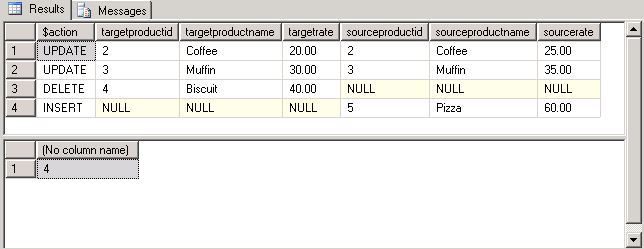
When the above is run this is the output. There were 2 updates, 1 delete and 1 insert.
If we select all records from the Products table, we can see the final results:
SELECT * FROM Products
GO
We can see the Coffee rate was updated from 20.00 to 25.00, the Muffin rate was updated from 30.00 to 35.00, Biscuit was deleted and Pizza was inserted.
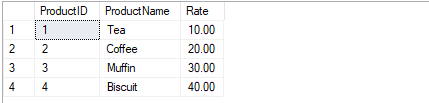
Before
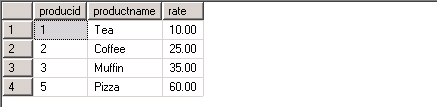
After
SQL Server Merge Command Key Points
- The MERGE SQL statement requires a semicolon (;) as a statement terminator. Otherwise, Error 10713 is raised when a MERGE statement is executed without the statement terminator.
- When used after MERGE, @@ROWCOUNT returns the total number of rows inserted, updated, and deleted to the client.
- At least one of the three MATCHED clauses must be specified when using MERGE statement; the MATCHED clauses can be specified in any order. However, a variable cannot be updated more than once in the same MATCHED clause.
- Of course, it's obvious, but just to mention, the person executing the MERGE statement should have SELECT permission on the SOURCE table and INSERT, UPDATE and DELETE permissions on the TARGET table.
- MERGE statement improves the performance as all the data is read and processed only once whereas in previous versions three different statements have to be written to process three different activities (INSERT, UPDATE or DELETE) in which case the data in both the source and target tables are evaluated and processed multiple times; at least once for each statement.
- MERGE statement takes the same kind of locks minus one Intent Shared (IS) Lock that was due to the SELECT statement in the 'IF EXISTS' as we did in previous versions of SQL Server.
- For every INSERT, UPDATE, or DELETE action specified in the MERGE statement, SQL Server fires any corresponding AFTER triggers defined on the target table, but does not guarantee which action to fire triggers first or last. Triggers defined for the same action honor the order you specify.
Next Steps
- Review MERGE (Transact-SQL) on MSDN.
- Review these resources
- Check out more SQL Server Merge tips.
- Check out the resources for SQL Server Developers.






About the author
 Arshad Ali is a SQL and BI Developer focusing on Data Warehousing projects for Microsoft.
This author pledges the content of this article is based on professional experience and not AI generated.
View all my tips
Article Last Updated: 2021-06-10
