By: Greg Robidoux | Comments (6) | Related: More > Import and Export
Problem
One of the advantages of using the Bulk-Logged recovery model is to minimally log bulk load commands, but still have other transactions fully logged. You may find that when you set your recovery model to Bulk-Logged or to Simple and you run your bulk load commands that the size of your transaction log still grows quite large. The reason for this is that there are some other settings and criteria that need to be met in order to minimally log the bulk insert commands and to minimize the amount of space needed in your transaction log.
Solution
Following is a breakdown of how transactions are logged when doing bulk inserts into your database. We will take a look at different commands as well as show how transactions are logged.
Commands
These are the bulk load commands that allow you to take advantage of having the transactions minimally logged. In addition, you can use SSIS to bulk load data which basically invokes these same techniques.
- bcp
- BULK INSERT
- INSERT INTO
Criteria
In addition to the commands above that allow you to minimally log the transaction, the following criteria must also be met.
- Table is not replicated
- Table locking is used (see how to set locks below)
There are two operations that get logged, data page updates and index page updates. The following chart shows you when and how things will be logged in the transaction log when issuing a bulk load command.
Databases in Simple and Bulk-Logged Recovery
If the database is in the SIMPLE or BULK_LOGGED recovery model, these are how things are logged.
| Table Has Existing Data | Has Clustered Index | Has Non-Clustered Index | Data Page Updates | Index Page Updates |
|---|---|---|---|---|
| No | No | No | minimally logged | n/a |
| No | No | Yes | minimally logged (see note) | minimally logged |
| No | Yes | No | minimally logged | n/a |
| No | Yes | Yes | minimally logged | minimally logged |
| Yes | No | No | minimally logged | n/a |
| Yes | No | Yes | fully logged | fully logged |
| Yes | Yes | No | fully logged | n/a |
| Yes | Yes | Yes | fully logged | fully logged |
NOTE: When doing a test using INSERT INTO .. WITH (TABLOCK) the data pages were fully logged, but for BCP and BULK INSERT they were not. This was tested with SQL Server 2017.
Databases in Full Recovery
If the database is in the FULL recovery model, these are how things are logged.
| Table Has Existing Data | Has Clustered Index | Has Non-Clustered Index | Data Page Updates | Index Page Updates |
|---|---|---|---|---|
| No | No | No | minimally logged | n/a |
| No | No | Yes | fully logged | fully logged |
| No | Yes | No | minimally logged | n/a |
| No | Yes | Yes | fully logged | fully logged |
| Yes | No | No | minimally logged | n/a |
| Yes | No | Yes | fully logged | fully logged |
| Yes | Yes | No | fully logged | n/a |
| Yes | Yes | Yes | fully logged | fully logged |
Note: the items that are highlighted are the differences between the recovery models.
How to Minimally Log Bulk Inserts
In order to allow minimally logging bulk inserts, you need to use the table lock hint as shown below for the various commands.
For INSERT INTO
You use the TABLOCK hint as shown below with the INSERT INTO command.
INSERT INTO testTable with (TABLOCK)
SELECT id, id2, name FROM testTable2
For BCP
You can specify the table lock hint with the bcp command as follows. This command is run from the Windows command line, not directly from within a SQL Server query window unless you use call the command using xp_cmdshell.
BCP test.dbo.testTable in C:\temp\test3.csv -c -h TABLOCK -T -SserverName
For BULK INSERT
Following is how this can be done for the BULK INSERT command.
BULK INSERT dbo.testTable FROM 'C:\temp\test.csv' WITH (TABLOCK, fieldterminator = ',')
Using sp_tableoption to set lock on bulk load
To issue a table level lock across the board for a table you can use the sp_tableoption stored procedure. For example let's say we want to turn on table lock on bulk load for table dbo.testTable, you would issue the following command:
sp_tableoption 'dbo.testTable', 'table lock on bulk load', 1
Once this is set on, all bulk load operations will use the table lock option by default. Note, this works with BULK INSERT and BCP, but not for INSERT INTO when testing with SQL Server 2017.
If you want to turn the setting off, issue the following command:
sp_tableoption 'dbo.testTable', 'table lock on bulk load', 0
Setting table locks from SSIS
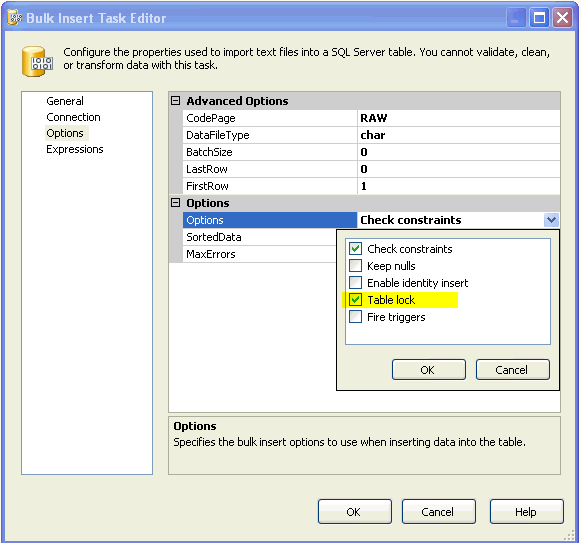
To turn this on when loading data via SSIS and the Bulk Insert Task.
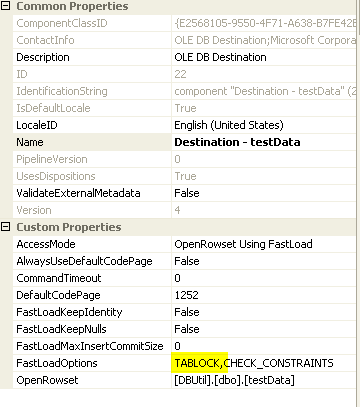
To turn this on when loading data via SSIS and the Data Flow Task. This shows you the properties of the Data Flow components.
Scripts to Recreate Tests
The following scripts can be used to test each scenario.
The database creation sets the database to BULK_LOGGED recovery, but you can change it to FULL or SIMPLE to test these configurations.
The scripts below also use INSERT INTO for each example. You can change these and try some of the other options like BCP and BULK INSERT to see how they work.
Each set of code will output the number of rows that were logged in the transaction log, so you can use these for comparison after running the tests.
Create Test Database
This creates a small empty database.
-- create a test database
USE master
GO

CREATE DATABASE [test_logging]
 CONTAINMENT = NONE ON PRIMARY
 ( NAME = N'test_logging', FILENAME = N'C:\MSSQL\test_logging.mdf' , SIZE = 8192KB , MAXSIZE = UNLIMITED, FILEGROWTH = 65536KB )
 LOG ON
 ( NAME = N'test_logging_log', FILENAME = N'C:\MSSQL\test_logging_log.ldf' , SIZE = 8192KB , MAXSIZE = 2048GB , FILEGROWTH = 65536KB )
GO

ALTER DATABASE [test_logging] SET RECOVERY BULK_LOGGED WITH NO_WAIT
GO

USE [test_logging]
GO
Use this next set of code to drop the database between each test. This way you can compare each test starting from the exact same point.
-- drop the test database
USE master
GO

-- drop database for next test
ALTER DATABASE [test_logging] SET SINGLE_USER WITH ROLLBACK IMMEDIATE
GO
DROP DATABASE [test_logging]
GO
Test with No Indexes
This will show what happens when there are no indexes.
-- test without indexes
USE [test_logging]
GO

CREATE TABLE dbo.testTable (id int, id2 int, content varchar(200) )
GO

-- insert 100K rows of random data from system tables
INSERT INTO dbo.testTable WITH (TABLOCK)
SELECT TOP 100000 a.id, a.id, a.name FROM sys.sysobjects a CROSS JOIN sys.sysobjects b CROSS JOIN sys.sysobjects c

-- get count of rows in transaction log for this object
SELECT AllocUnitName, count(*)
FROM sys.fn_dblog(NULL,NULL)
WHERE AllocUnitName LIKE 'dbo.testTable%'
GROUP BY AllocUnitName
Test with just Clustered Index
Recreate the database again and run the test with a clustered index.
-- test with clustered indexes
USE [test_logging]
GO

CREATE TABLE dbo.testTable (id int, id2 int, content varchar(200) )
GO

CREATE CLUSTERED INDEX [CLI_id] ON [dbo].[testTable] ( [id] ASC )
GO

-- insert 100K rows of random data from system tables
INSERT INTO dbo.testTable WITH (TABLOCK)
SELECT TOP 100000 a.id, a.id, a.name FROM sys.sysobjects a CROSS JOIN sys.sysobjects b CROSS JOIN sys.sysobjects c

-- get count of rows in transaction log for this object
SELECT AllocUnitName, count(*)
FROM sys.fn_dblog(NULL,NULL)
WHERE AllocUnitName LIKE 'dbo.testTable%'
GROUP BY AllocUnitName
Test with just Non-clustered Index
Recreate the database again and run test with a non-clustered index.
-- test with clustered indexes
USE [test_logging]
GO

CREATE TABLE dbo.testTable (id int, id2 int, content varchar(200) )
GO

CREATE NONCLUSTERED INDEX [NCLI_id2] ON [dbo].[testTable] ( [id2] ASC )
GO

-- insert 100K rows of random data from system tables
INSERT INTO dbo.testTable WITH (TABLOCK)
SELECT TOP 100000 a.id, a.id, a.name FROM sys.sysobjects a CROSS JOIN sys.sysobjects b CROSS JOIN sys.sysobjects c

-- get count of rows in transaction log for this object
SELECT AllocUnitName, count(*)
FROM sys.fn_dblog(NULL,NULL)
WHERE AllocUnitName LIKE 'dbo.testTable%'
GROUP BY AllocUnitName
Test with both Clustered and Non-clustered Indexes
Recreate the database again and run test with both clustered and non-clustered indexes.
-- test with clustered indexes
USE [test_logging]
GO

CREATE TABLE dbo.testTable (id int, id2 int, content varchar(200) )
GO

CREATE CLUSTERED INDEX [CLI_id] ON [dbo].[testTable] ( [id] ASC )
GO

CREATE NONCLUSTERED INDEX [NCLI_id2] ON [dbo].[testTable] ( [id2] ASC )
GO

-- insert 100K rows of random data from system tables
INSERT INTO dbo.testTable WITH (TABLOCK)
SELECT TOP 100000 a.id, a.id, a.name FROM sys.sysobjects a CROSS JOIN sys.sysobjects b CROSS JOIN sys.sysobjects c

-- get count of rows in transaction log for this object
SELECT AllocUnitName, count(*)
FROM sys.fn_dblog(NULL,NULL)
WHERE AllocUnitName LIKE 'dbo.testTable%'
GROUP BY AllocUnitName
Test Results
These are the results I got from the above tests. To test where the table already has data, I just reran the insert again and checked the number log entries. Note: the count of the log rows for the second insert includes the log rows from both the first and second insert.
| Table Has Existing Data | Has Clustered Index | Has Non-Clustered Index | Data Page Log Rows | Index Page Log Rows |
|---|---|---|---|---|
| No | No | No | 355 | n/a |
| No | No | Yes | 100,924 | 1963 |
| No | Yes | No | 977 | n/a |
| No | Yes | Yes | 2918 | 2017 |
| Yes | No | No | 701 | n/a |
| Yes | No | Yes | 201,844 | 108,046 |
| Yes | Yes | No | 107,445 | n/a |
| Yes | Yes | Yes | 109,374 | 105,943 |
More Transaction Log Details
If you want to look at the transaction log entries, you can use these queries to see what has been logged.
-- get detail listing
SELECT Operation, [Transaction ID], Context, AllocUnitName, Description
FROM sys.fn_dblog(NULL,NULL)
WHERE AllocUnitName LIKE 'dbo.testTable%'

-- group by each operation
SELECT Operation, AllocUnitName, Context, count(*)
FROM sys.fn_dblog(NULL,NULL)
WHERE AllocUnitName LIKE 'dbo.testTable%'
GROUP BY Operation, AllocUnitName, Context
Next Steps
- Next time you need to bulk load data check the criteria found above and the table lock option to take advantage of minimally logging the bulk load operation.
- Check your existing jobs to see if they are setup correctly and that they are taking advantage of this feature.






About the author
 Greg Robidoux is the President and founder of Edgewood Solutions, a technology services company delivering services and solutions for Microsoft SQL Server. He is also one of the co-founders of MSSQLTips.com. Greg has been working with SQL Server since 1999, has authored numerous database-related articles, and delivered several presentations related to SQL Server. Before SQL Server, he worked on many data platforms such as DB2, Oracle, Sybase, and Informix.
This author pledges the content of this article is based on professional experience and not AI generated.
View all my tips
