By: Chad Boyd | Comments | Related: > Install and Uninstall
Problem
You probably already know that SQL Server 2005 SP2 has been released. This is a good thing if you are in need of one of the changes that are included in this service pack. In a previous tip, SQL Server 2005 - Service Pack 2, we took a look at what was to be included in this second service pack for SQL Server 2005. The question that you often face is should I install this service pack. One thing to note before you install SP2 is that there is no way to uninstall it once it is installed.
Solution
One nice feature that you have probably become accustomed to is the ability to uninstall programs, hot fixes and service packs by using the Add/Remove Programs feature of Windows. With SQL Server 2005 there is no easy way to uninstall the service packs. For both SQL Server 2005 SP1 and SP2, in order to get back to the previous version you need to do a complete reinstall of SQL Server 2005.
Below is a short snippet from the SQL Server 2005 SP2 readme file.
| 1.3 Uninstalling SQL Server 2005 SP2
Once SQL Server 2005 SP2 has been applied, it cannot be removed without uninstalling the entire product. To remove SP2 and revert to the previous version of SQL Server 2005
|
Below is a screen shot after selecting Remove for SQL Server 2005.
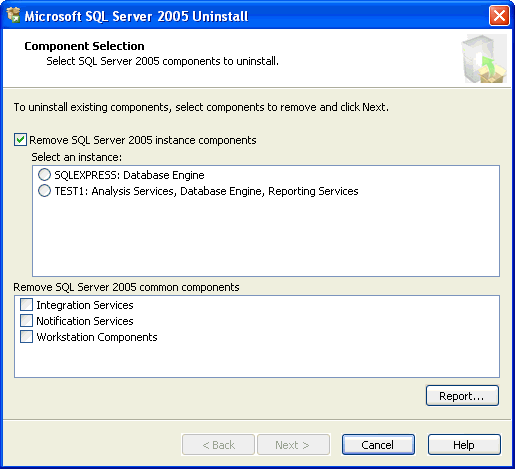
Following are links to the SQL Server 2005 services packs readme files and uninstall steps.
- SQL 2005 SP1
- SQL 2005 SP2
As you can see, a rollback from an SP2 installation requires a complete reinstall of the SQL Server 2005 instance - something to definitely take into consideration for planning your update to SP2.
Nest Steps
- Before you install SP2 find a test and development environment that you can use to do preliminary testing
- Refer to this previous tip to see if there are items in this service pack release that you really need
- Create a rollback plan in case there are issues after you install SP2
- Test, test, test before you deploy to your production servers
- Special thanks to Chad Boyd of the MSSQLTips.com community for this tip.






About the author
 Chad Boyd is an Architect, Administrator and Developer with technologies such as SQL Server, .NET, and Windows Server.
This author pledges the content of this article is based on professional experience and not AI generated.
View all my tips
